
RHM K222 wooden brown
RHM K222 Karaoke Machine User Manual
Model: K222 wooden brown
Introduction
Thank you for choosing the RHM K222 Karaoke Machine. This versatile system is designed to deliver high-quality audio and an enjoyable karaoke experience for various indoor activities, including home entertainment, parties, and meetings. This manual provides essential information for setting up, operating, and maintaining your device to ensure optimal performance and longevity.

Figure 1: RHM K222 Karaoke Machine with two wireless microphones.
Safety Information
Please read all safety instructions carefully before using the product. Keep this manual for future reference.
- This machine is designed for indoor use only. Do not expose it to rain, moisture, or extreme temperatures.
- Ensure the power adapter is connected to a compatible power outlet (110-240V, 50/60Hz).
- Do not disassemble, repair, or modify the unit yourself. Refer all servicing to qualified personnel.
- Keep the unit away from heat sources, direct sunlight, and strong magnetic fields.
- Avoid blocking ventilation openings to prevent overheating.
- Clean the unit with a soft, dry cloth. Do not use liquid cleaners or aerosols.
Package Contents
Verify that all items listed below are included in your package:
- RHM K222 Stereo Speaker Unit
- 2 x UHF Wireless Microphones
- Remote Control
- Power Adapter
- USB Charging Cable (for microphones)
- AUX Cable (3.5mm)
- Optical Cable
- User Manual (this document)
- 2 x Mic Covers

Figure 2: All items included in the RHM K222 package.
Setup
Follow these steps to set up your RHM K222 Karaoke Machine:
- Power Connection: Connect the power adapter to the DC IN port on the back of the karaoke machine and then plug it into a wall outlet. The unit will power on automatically or can be turned on using the power button on the top panel.
- Microphone Charging: Before first use, ensure the wireless microphones are fully charged using the provided USB charging cable. The microphones have a 400mAh rechargeable battery.
- Microphone Pairing: The two UHF wireless microphones are pre-paired with the main unit. Simply turn on the microphones, and they should automatically connect to the speaker.
- Connecting Audio Source: Choose your preferred audio input method:
- Bluetooth: Press the 'MODE' button on the top panel or remote until 'BLUE' appears on the display. Enable Bluetooth on your device (e.g., smartphone, tablet) and select 'RHM K222' from the list of available devices to pair.
- Optical: Connect an optical cable (included) from your TV's optical output to the OPTICAL input on the back of the karaoke machine. Select 'OPTICAL' mode on the unit.
- AUX: Use the provided 3.5mm AUX cable to connect your audio device (e.g., PC, MP3 player) to the 'LINE IN' port on the back of the machine. Select 'AUX' mode.
- USB: Insert a USB drive containing audio files into the USB port on the back of the machine. The unit will automatically switch to USB mode and begin playback.
- PC: Connect your PC to the 'PC' port on the back of the machine using a compatible cable. Select 'PC' mode.

Figure 3: Rear panel connections for various audio sources.
Operating Instructions
Main Unit Controls
- Power Button: Located on the top panel. Press to turn the unit on/off.
- MODE Button: Cycles through input modes (Bluetooth, Optical, AUX, USB, PC).
- Volume Controls (VOL+/-): Adjust the overall volume of the speaker.
- Playback Controls: Play/Pause, Next/Previous Track buttons are available on the top panel and remote.
Wireless Microphone Controls
The wireless microphones offer convenient control over your singing experience:
- Power Button: Press and hold to turn the microphone on/off.
- Microphone Volume: Use the dedicated volume buttons on the microphone to adjust your vocal volume independently.
- Echo Adjustment: Adjust the echo effect to add depth to your voice.
- Voice Mixing: Control the balance between your voice and the background music.
- Key Change: Adjust the key of the music to match your vocal range.

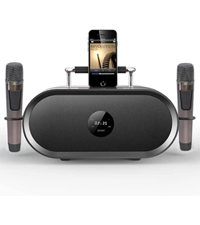
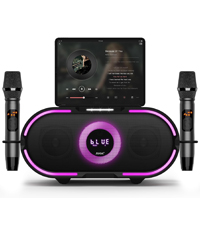
Figure 4: Microphone LED display, control panel, and charging port details.
Sound Modes
The RHM K222 offers 5 distinct sound modes to enhance your audio experience:
- Original: Standard audio playback.
- Music: Optimized for general music listening.
- KTV: Enhanced vocal presence for karaoke performances.
- Cinema: Provides a wider soundstage for movie watching.
- Classical: Balanced sound profile for classical music.

Figure 5: Explore different sound modes for various entertainment needs.
Maintenance
Proper maintenance ensures the longevity and optimal performance of your karaoke machine.
- Cleaning: Use a soft, dry, lint-free cloth to wipe down the exterior of the unit and microphones. Do not use abrasive cleaners, waxes, or solvents.
- Storage: When not in use for extended periods, store the machine in a cool, dry place, away from direct sunlight and dust.
- Microphone Care: Always place microphones back into their designated holders on the unit to prevent damage.
Troubleshooting
If you encounter issues with your RHM K222 Karaoke Machine, refer to the following common problems and solutions:
| Problem | Possible Cause | Solution |
|---|---|---|
| No power | Power adapter not connected or faulty outlet. | Ensure power adapter is securely plugged into the unit and a working wall outlet. |
| No sound from speaker | Volume too low; incorrect input mode; audio source issue. | Increase speaker volume. Check if the correct input mode is selected. Verify audio source is playing and connected properly. |
| Microphones not working | Microphones off or low battery; out of range; not paired. | Turn on microphones and ensure they are charged. Stay within 40ft range. If not paired, turn off both microphones and the unit, then restart. |
| Bluetooth connection unstable | Too far from unit; interference; device issues. | Move closer to the unit. Avoid obstacles. Disconnect and re-pair the Bluetooth device. |
| Echo/Voice mixing not working | Settings on microphone not adjusted. | Adjust echo and voice mixing settings directly on the wireless microphone. |
Specifications
Detailed technical specifications for the RHM K222 Karaoke Machine:
| Feature | Specification |
|---|---|
| Brand | RHM |
| Model Number | K222 wooden brown |
| Mounting Type | Tabletop |
| Power Source | Plug In Electric |
| Connector Types | Aux, USB, Optical |
| Item Weight | 15.97 pounds |
| Output Wattage | 70 Watts |
| Number of Channels | 1 |
| Audio Input | Bluetooth, USB, Aux In, Optical, iPhone, Android mobile phones, iPad, TV, PC |
| Product Dimensions (L x W x H) | 9.84 x 14.96 x 8.07 inches |
| Color | Wooden |
| Speaker Count | 1 |
| Connectivity Technology | Optical, Bluetooth, Line in |
Warranty and Support
RHM products are manufactured to the highest quality standards. For warranty information, technical support, or any inquiries regarding your RHM K222 Karaoke Machine, please refer to the contact information provided on the product packaging or visit the official RHM website. Keep your purchase receipt as proof of purchase for warranty claims.
Related documentsK222 wooden brown


Ask a question about this manual
Ask about setup, troubleshooting, compatibility, parts, safety, or missing instructions. Manuals+ will review the question and use this page’s manual context to help answer it.