
1. Introduction
Thank you for choosing the Dacom Athlete G05 Bluetooth Headset. This manual provides comprehensive instructions to help you set up, operate, and maintain your new wireless headphones. Please read this manual carefully before use to ensure optimal performance and longevity of your device.
2. Package Contents
Verify that all items listed below are included in your package:
- 1 x Dacom Athlete G05 Bluetooth Headset
- 1 x USB Charging Cable
- 1 x User Manual (this document)
3. Product Overview
The Dacom Athlete G05 is a wireless stereo earphone designed for sports and running, featuring a comfortable in-ear design with ear hooks for secure fit. It connects via Bluetooth V4.1.
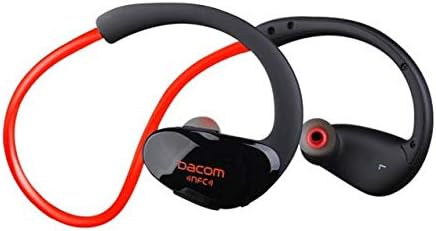
Figure 3.1: Front view of the Dacom Athlete G05 Bluetooth Headset, showing the earbud and ear hook design.
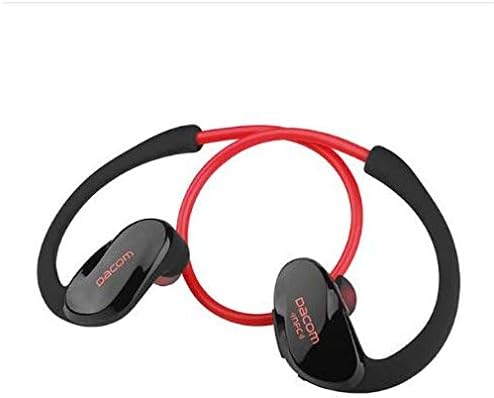
Figure 3.2: Rear view of the Dacom Athlete G05 Bluetooth Headset, illustrating the connecting cable between the two earbuds.
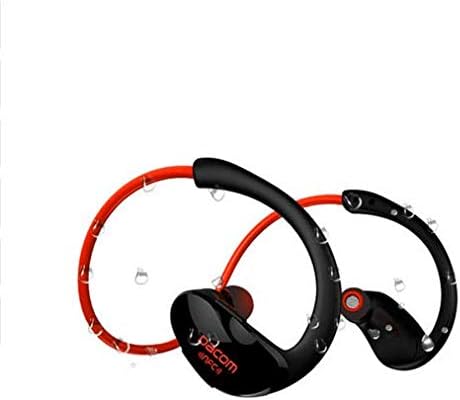
Figure 3.3: Dacom Athlete G05 Bluetooth Headset demonstrating water resistance, suitable for sports activities.
4. Setup
4.1 Charging the Headset
Before first use, fully charge your Dacom Athlete G05 headset. A full charge typically takes approximately 1.5 to 2 hours.
- Connect the provided USB charging cable to the charging port on the headset.
- Connect the other end of the USB cable to a power adapter (DC5V 150mAh output recommended) or a computer's USB port.
- The battery indicator light will illuminate during charging and change color or turn off once fully charged.
A fully charged headset provides approximately 8 hours of talk time or music playback, and up to 180 hours of standby time.
4.2 Bluetooth Pairing
To connect your headset to a Bluetooth-enabled device (e.g., smartphone, tablet):
- Ensure the headset is fully charged and turned off.
- Press and hold the multi-function button on the headset until the Bluetooth indicator light flashes red and blue alternately, indicating it is in pairing mode.
- On your device, enable Bluetooth and search for available devices.
- Select "Dacom Athlete G05" (or similar name) from the list of found devices.
- If prompted for a password, enter "0000" (four zeros).
- Once paired, the Bluetooth indicator light will flash blue slowly or turn solid blue, and you will hear a confirmation tone.
The headset supports Bluetooth V4.1 and profiles such as Headset, Handsfree, A2DP, AVRC, and APT-X.
5. Operating Instructions
5.1 Power On/Off
- Power On: Press and hold the multi-function button for approximately 3 seconds until the indicator light flashes blue and you hear a power-on tone.
- Power Off: Press and hold the multi-function button for approximately 5 seconds until the indicator light flashes red and you hear a power-off tone.
5.2 Call Management
- Answer Call: Short press the multi-function button when a call comes in.
- End Call: Short press the multi-function button during a call.
- Reject Call: Press and hold the multi-function button for 2 seconds when a call comes in.
- Redial Last Number: Double-press the multi-function button when not on a call.
5.3 Music Playback
- Play/Pause: Short press the multi-function button.
- Next Track: Long press the Volume + button.
- Previous Track: Long press the Volume - button.
- Volume Up: Short press the Volume + button.
- Volume Down: Short press the Volume - button.
Note: The headset features touch control for various functions.
6. Maintenance and Care
- Keep the headset dry. Do not expose it to extreme temperatures or humidity.
- Clean the earbuds and charging contacts regularly with a soft, dry cloth.
- Avoid dropping or subjecting the headset to strong impacts.
- Store the headset in a cool, dry place when not in use.
- Do not attempt to disassemble or modify the headset, as this will void the warranty.
7. Troubleshooting
| Problem | Possible Solution |
|---|---|
| Headset does not power on. | Ensure the headset is fully charged. Connect to a power source and try again. |
| Cannot pair with device. |
|
| No sound or low volume. |
|
| Intermittent connection. |
|
8. Specifications
| Feature | Detail |
|---|---|
| Product Name | Athlete sports Bluetooth headset |
| Model Number | G05 |
| Bluetooth Version | V4.1 |
| Bluetooth Class | Class 2 |
| Supported Profiles | Headset, Handsfree, A2DP, AVRC, APT-X |
| Charging Input | DC5V 150mAh (Power adapter output) |
| Battery Type | High-performance lithium polymer battery |
| Talk Time | Approximately 8 hours |
| Playing Time | Approximately 8 hours |
| Standby Time | Approximately 180 hours |
| Audio Frequency Range | 20Hz-20kHz |
| BT Radio Frequency | 2.400-2.481GHz |
| Output Impedance | 16Ω 3mW |
| Sensitivity | 100-105dB |
| Headphones Form Factor | In Ear |
| Connectivity Technology | Wireless |
| Control Method | Touch |
| Material | Plastic |
| Color | Red |
9. Warranty and Support
Dacom products are manufactured to the highest quality standards. For warranty information or technical support, please refer to the warranty card included with your purchase or visit the official Dacom website. Please retain your proof of purchase for warranty claims.
