1. Introduction
Welcome to the user manual for your OALE X5 Android Dual SIM Smartphone. This guide provides essential information on how to set up, operate, maintain, and troubleshoot your device. Please read this manual carefully to ensure optimal performance and longevity of your smartphone.
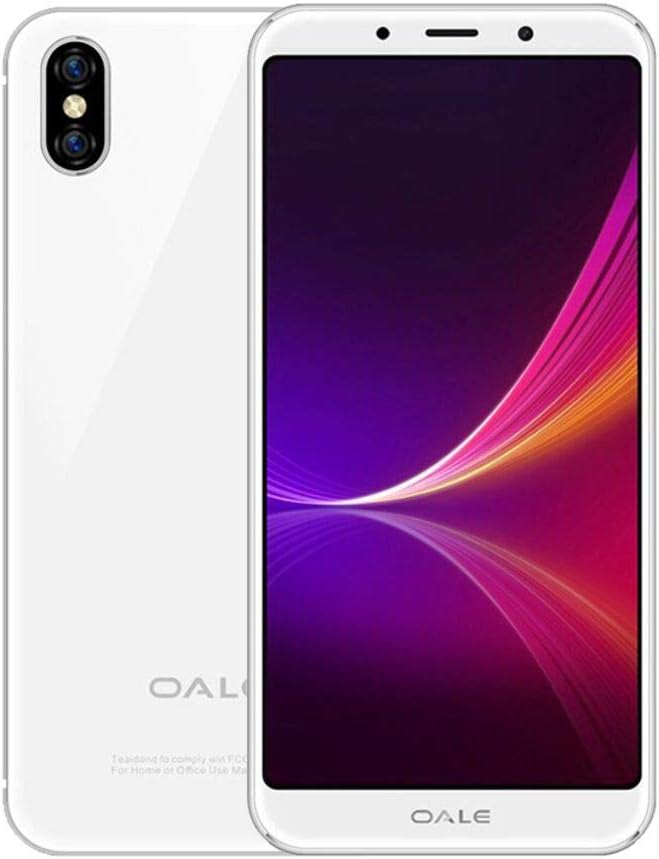
Image 1.1: Front and back view of the OALE X5 smartphone. The front features a large display with a front camera and earpiece at the top. The back shows a dual camera setup with a flash and the OALE brand logo.
2. Package Contents
Upon opening your OALE X5 smartphone package, please verify that all the following items are included:
- OALE X5 Smartphone
- Power Adapter
- Earphones
- USB Cable
3. Device Overview
The OALE X5 features a sleek design with essential components strategically placed for user convenience.
- Display: 6.0-inch HD+ screen for clear visuals.
- Front Camera: Located at the top of the display.
- Rear Camera: Dual camera setup with flash on the back panel.
- Fingerprint Sensor: Integrated on the side of the device for quick and secure access.
- Ports: USB port for charging and data transfer, 3.5mm audio jack (if applicable, typically near USB).
Image 3.1: Detailed view of the OALE X5 highlighting the 6.0-inch display, front camera, rear camera module, and the side-mounted fingerprint sensor.
4. Setup
4.1. SIM Card and Memory Card Installation
The OALE X5 supports Dual SIM functionality, allowing you to use two different phone numbers or networks simultaneously. It also supports expandable storage via a memory card (not included).
- Locate the SIM/memory card tray on the side of your device.
- Insert the SIM ejector tool (if provided) into the small hole next to the tray and push gently until the tray pops out.
- Place your Nano-SIM cards and/or memory card into the designated slots on the tray, ensuring correct orientation.
- Carefully push the tray back into the device until it clicks into place.
4.2. Initial Power On
To power on your device for the first time:
- Press and hold the Power button (located on the side) until the OALE logo appears on the screen.
- Follow the on-screen instructions to complete the initial setup, including language selection, Wi-Fi connection, and Google account setup.
4.3. Charging the Battery
Your OALE X5 is equipped with a 3000mAh battery. For optimal performance, fully charge the device before first use.
- Connect the USB cable to the power adapter.
- Plug the power adapter into a wall outlet.
- Connect the other end of the USB cable to the USB port on your phone.
- The charging indicator will appear on the screen. Disconnect the charger once the battery is full.
5. Operating Your Device
5.1. Basic Navigation
Your OALE X5 runs on the Android operating system. Navigate the interface using touch gestures:
- Tap: To select an item or open an app.
- Swipe: To scroll through screens or lists.
- Pinch: To zoom in or out on photos and web pages.
- Long Press: To access contextual menus or move icons.
5.2. Making Calls
Open the Phone app, enter the number, and tap the call icon. If using Dual SIM, you may be prompted to select which SIM to use for the call.
5.3. Sending Messages
Open the Messages app, tap the new message icon, enter the recipient's number or select from contacts, type your message, and tap send.
5.4. Camera Usage
The OALE X5 features a 13.0MP rear camera and a 5.0MP front camera.
- Open the Camera app.
- Tap the shutter button to take a photo.
- Tap the camera switch icon to toggle between front and rear cameras.
- Explore various modes and settings within the camera app for different photo effects.
5.5. Connectivity
Your device supports 4G LTE for cellular data, Wi-Fi for wireless internet, and Bluetooth for connecting to accessories.
- Wi-Fi: Go to Settings > Network & internet > Wi-Fi to connect to available networks.
- Bluetooth: Go to Settings > Connected devices > Bluetooth to pair with other Bluetooth devices.
- Mobile Data: Ensure your SIM card is active and mobile data is enabled in Settings > Network & internet > Mobile network.
5.6. Fingerprint Sensor
The side-mounted fingerprint sensor allows for quick and secure unlocking of your device.
- Go to Settings > Security & location > Fingerprint.
- Follow the on-screen instructions to register your fingerprint.
- Once registered, you can use your fingerprint to unlock the phone or authorize purchases.
6. Maintenance
6.1. Cleaning the Device
Use a soft, lint-free cloth to gently wipe the screen and body of your phone. Avoid using harsh chemicals or abrasive materials.
6.2. Software Updates
Regularly check for and install software updates to ensure your device has the latest features, security patches, and performance improvements. Go to Settings > System > System update.
6.3. Battery Care
To prolong battery life:
- Avoid extreme temperatures.
- Do not let the battery completely drain frequently.
- Use the original charger provided.
6.4. Storage Management
Your device comes with 16GB of internal storage. To manage storage effectively:
- Regularly delete unnecessary files, photos, and videos.
- Uninstall unused applications.
- Utilize cloud storage services for backups.
- Consider adding a memory card for additional storage.
7. Troubleshooting
This section addresses common issues you might encounter with your OALE X5 smartphone.
| Problem | Solution |
|---|---|
| Device does not power on | Ensure the battery is charged. Press and hold the Power button for at least 10-15 seconds to perform a forced restart. |
| Screen is unresponsive | Restart the device. If the issue persists, perform a factory reset (data will be lost). |
| Cannot connect to Wi-Fi/Mobile Data | Check Wi-Fi settings and ensure mobile data is enabled. Restart the device and your router (for Wi-Fi). Verify SIM card is properly inserted and active. |
| Battery drains quickly | Close unused apps, reduce screen brightness, disable unnecessary features like Bluetooth or GPS when not in use. Check for background app activity. |
| Apps are crashing or freezing | Clear the app's cache and data (Settings > Apps > [App Name] > Storage). Update the app or reinstall it. Ensure sufficient free storage space. |
If problems persist, please contact customer support.
8. Specifications
The following are the technical specifications for the OALE X5 smartphone:
- Model: X5
- Brand: OALE
- Operating System: Android
- Display: 6.0 inch 18:9 HD+ screen, 720*1440 px resolution
- Processor: MTK6737 1.3GHz Quad core
- Memory (RAM): 2GB
- Storage (ROM): 16GB
- Rear Camera: 13.0MP
- Front Camera: 5.0MP
- Battery: 3000mAh
- Fingerprint Sensor: Supported, side-mounted
- Cellular Network: 4G LTE (WCDMA: 850, 2100MHZ; GSM: 850, 900, 1800, 1900MHZ; FDD LTE: B1/B3/B7/B8/B20)
- Connectivity: USB
- SIM Type: Dual SIM
- Color: Silver
9. Warranty Information
Warranty terms and conditions for the OALE X5 smartphone are typically provided at the point of purchase or included with the product packaging. Please refer to these documents for detailed information regarding your warranty coverage, duration, and claims process. For further assistance, contact your retailer or the manufacturer directly.
10. Support
For additional support, frequently asked questions, or to contact customer service, please visit the official OALE website or the OALE store page.
You can visit the OALE Store here: OALE Store on Amazon


