
1. Important Safety Instructions
Please read and understand all safety warnings and instructions before using this appliance. Failure to follow the warnings and instructions may result in electric shock, fire, and/or serious injury.
- Do not pick up liquids or wet materials.
- Do not pick up flammable or combustible materials.
- Do not use without the dust bowl and filter in place.
- Do not use the appliance for any purpose other than its intended use.
- Keep hair, loose clothing, fingers, and all parts of body away from openings and moving parts.
- Store the appliance indoors.
- Use only with the charging cable provided by Black+Decker.
2. Product Overview
The Black+Decker BHHV520JF is an 18V cordless handheld vacuum cleaner designed for quick and efficient cleaning tasks around the home and car. It features cyclonic action, a transparent dustbin, and an integrated crevice tool for enhanced versatility.

Figure 1: Product Diagram with Key Features (LED indicator, 700ml dustbin, integrated nozzle, 21 min runtime)
Key Features:
- 18V Lithium-Ion Battery: Provides powerful and consistent suction.
- Cyclonic Action: Helps keep the filter clean and maintains suction power.
- Transparent Dustbin (500 ml capacity): Allows you to see when it needs emptying.
- Integrated Extendable Crevice Tool: For reaching tight spaces and corners.
- LED Charge Indicator: Displays battery status.
- Two Power Levels: For varying cleaning needs.
- Washable Filter and Dust Container: For easy maintenance.
3. Setup
3.1 Initial Charging
Before first use, fully charge the appliance. The charging time is approximately 5 hours.
- Connect the charging cable to the charging port on the vacuum.
- Plug the charging cable into a standard wall outlet.
- The LED charge indicator will illuminate to show charging status.
- Once fully charged, the indicator will change (refer to the LED indicator section in the manual for specific light patterns).

Figure 2: Charging the Handheld Vacuum
3.2 Wall Mounting (Optional)
The vacuum comes with a practical wall-mountable charging station to keep it readily accessible and charged.
- Choose a suitable location near a power outlet.
- Securely mount the charging station to the wall using appropriate fasteners (not included).
- Place the vacuum onto the charging station.
4. Operating Instructions
The BHHV520JF is designed for versatile cleaning of dry debris. Ensure the appliance is fully charged before use.
4.1 Powering On/Off and Speed Selection

Figure 3: Power Button and Battery Indicator
- To turn on the vacuum, press the power button once for the lower speed setting.
- Press the power button a second time for the higher speed setting.
- Press the power button a third time to turn off the vacuum.
4.2 Using the Integrated Crevice Tool
The integrated crevice tool can be extended to reach narrow and difficult areas.
- To extend the crevice tool, pull it forward until it locks into place.
- Use the extended tool for cleaning corners, edges, and between cushions.
- To retract, press the release button (if present) and push the tool back into its housing.

Figure 4: Cleaning Floor Debris

Figure 5: Reaching High Areas

Figure 6: Cleaning Under Furniture

Figure 7: Car Interior Cleaning
5. Maintenance
Regular maintenance ensures optimal performance and extends the life of your vacuum cleaner.
5.1 Emptying the Dustbin
The transparent dustbin allows you to monitor the dirt level. Empty it regularly to maintain suction power.
- Ensure the vacuum is turned off.
- Press the dustbin release button (usually located near the handle).
- Remove the dustbin from the main unit.
- Hold the dustbin over a waste bin and open the lid to empty the contents.
- Reattach the dustbin to the vacuum until it clicks securely into place.

Figure 8: Emptying the Dustbin
5.2 Cleaning the Filter
The 3-stage filtering system includes a filter sensor that illuminates when the filter is clogged. A clean filter is crucial for effective suction.
- With the dustbin removed, carefully pull out the filter assembly.
- Separate the outer and inner filters.
- Tap the filters gently over a waste bin to remove loose dirt.
- Rinse both filters under running water until clean. Ensure they are completely dry before reassembling.
- Reassemble the filters and place them back into the dustbin, then reattach the dustbin to the vacuum.

Figure 9: Removing the Filter
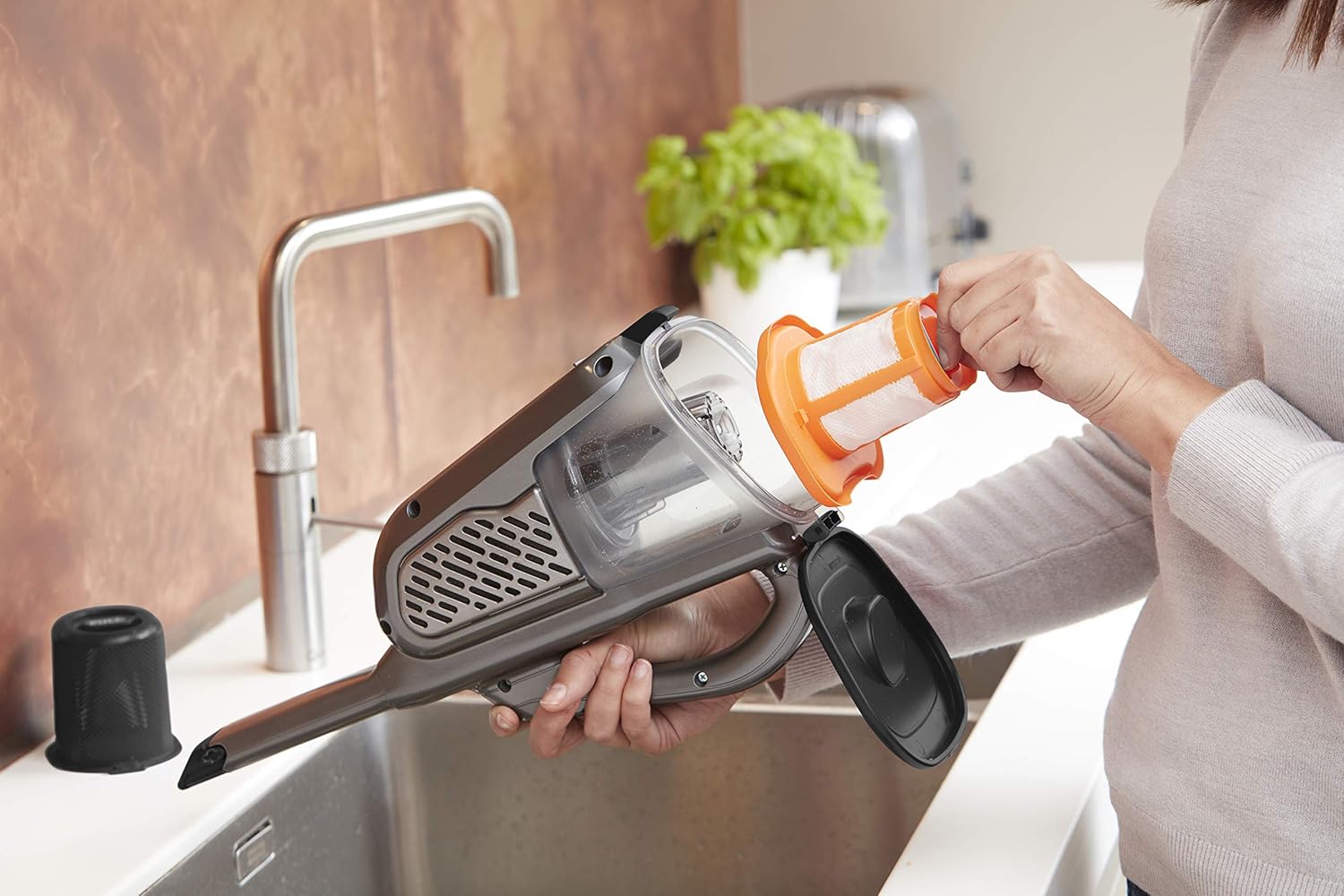
Figure 10: Washing the Filter
6. Troubleshooting
| Problem | Possible Cause | Solution |
|---|---|---|
| Vacuum does not turn on. | Battery is not charged. | Charge the battery for 5 hours. |
| Reduced suction power. | Dustbin is full or filter is clogged. | Empty the dustbin and clean the filter. |
| Filter sensor light is on. | Filter is clogged. | Clean the filter as described in Section 5.2. |
| Short operating time. | Battery not fully charged or aging battery. | Ensure full charge. If issue persists, battery may need replacement. |
7. Specifications
| Feature | Specification |
|---|---|
| Brand | Black+Decker |
| Model Number | BHHV520JF |
| Power Source | Battery Powered (Cordless) |
| Voltage | 18 Volts |
| Electric Power | 36 Watt Hours |
| Battery Type | Lithium Ion |
| Charging Time | 5 Hours |
| Battery Life (Runtime) | Up to 21 minutes |
| Dustbin Capacity | 500 ml |
| Filter Type | Cloth (3-stage filtration) |
| Noise Level | 72 Decibels |
| Number of Power Levels | 2 |
| Product Weight | 1200 Grams (1.2 kg) |
| Product Dimensions (L x W x H) | 40 x 20.3 x 16.5 cm |
| Recommended Use | Indoor, Home, Car |
8. Warranty and Support
Warranty information and customer support details are typically provided in a separate document included with your purchase or available on the manufacturer's official website. Please refer to the Black+Decker official website or contact their customer service for specific warranty terms and support options for your BHHV520JF model.
For further assistance, visit: www.blackanddecker.com


