
1. Introduction
The Zealot S11 is a portable, wireless Bluetooth speaker designed for versatile use, including outdoor activities. It features IP67 waterproofing, a multi-mode flashlight, a power bank function, and supports various audio input methods. This manual provides detailed instructions for its setup, operation, and maintenance.

Image 1: Zealot S11 Waterproof Bluetooth Speaker
2. Package Contents
Before use, please verify that all items are present in the package:
- Zealot S11 Bluetooth Speaker
- Bike/Cycle Mount
- 3.5mm Audio Cable
- USB Charging Cable
- User Manual
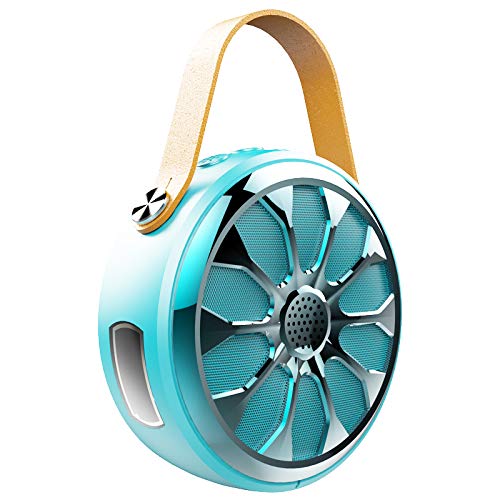
Image 2: Zealot S11 Speaker with included accessories
3. Product Layout
3.1 Ports and Connectors

Image 3: Side view of the Zealot S11 showing the AUX-in port, USB-out port (for power bank), USB-in port (for charging), Power ON/OFF switch, and TF card slot.
- IN (USB-in): Micro USB port for charging the speaker.
- OFF/ON: Power switch to turn the speaker on or off.
- TF: Slot for a TF (MicroSD) card for local music playback.
- OUT (USB-out): Standard USB port for using the speaker as a power bank.
- AUX: 3.5mm audio input jack for wired connection.
3.2 Control Buttons

Image 4: Top view of the Zealot S11 showing the control buttons for Flashlight, Mode Switch, Volume Down/Previous Track, and Volume Up/Next Track.
- Flashlight Button: Activates and cycles through flashlight modes.
- M (Mode Switch): Switches between Bluetooth, TF card, and AUX modes.
- Vol-/Pre Track: Short press for volume down, long press for previous track.
- Vol+/Next Track: Short press for volume up, long press for next track.
4. Setup
4.1 Charging the Speaker
- Connect the provided USB charging cable to the IN port on the speaker.
- Connect the other end of the USB cable to a 5V/1A USB power adapter (not included) or a computer's USB port.
- The charging indicator light will illuminate. Once fully charged, the light will change or turn off (refer to specific LED behavior in the quick start guide if available).
- A full charge provides approximately 20 hours of music playback.
4.2 Mounting on a Bike/Cycle
The Zealot S11 includes a mount for attachment to a bike or cycle handlebar.
- Locate the screw hole on the bottom of the speaker.
- Attach the provided bike mount to the speaker using the screw.
- Securely fasten the mount to your bike's handlebar. Ensure the speaker is stable before riding.
5. Operating Instructions
5.1 Power On/Off
- To power on, slide the OFF/ON switch to the 'ON' position.
- To power off, slide the OFF/ON switch to the 'OFF' position.
5.2 Bluetooth Pairing
- Ensure the speaker is powered on and in Bluetooth mode (indicated by a flashing LED, if applicable). If not, press the M button to switch to Bluetooth mode.
- On your smartphone or tablet, enable Bluetooth and search for available devices.
- Select "Zealot S11" from the list of devices.
- Once paired, the speaker will emit an audible confirmation, and the LED indicator will stop flashing.
5.3 Music Playback

Image 5: The Zealot S11 supports three major player modes: Bluetooth, TF card, and AUX input.
- Bluetooth Play: After successful pairing, play music from your connected device.
- TF Card Play: Insert a TF (MicroSD) card with music files into the TF slot. The speaker will automatically switch to TF card mode or you can press the M button to select it.
- AUX Play: Connect an audio device using the 3.5mm audio cable to the AUX port. Press the M button to switch to AUX mode.
5.4 Hands-Free Calling

Image 6: The Zealot S11 allows for hands-free phone calls when connected via Bluetooth.
When connected via Bluetooth to your smartphone, the speaker can be used for hands-free calls.
- Answer Call: Press the M button once to answer an incoming call.
- End Call: Press the M button once during a call to end it.
- Reject Call: Press and hold the M button to reject an incoming call.
5.5 Flashlight Operation
The speaker features a 3-mode flashlight.
- Press the Flashlight Button once to turn on the flashlight.
- Press again to cycle through the different modes (e.g., high, low, SOS).
- Press a third time to turn off the flashlight.
5.6 Power Bank Function
The Zealot S11 can act as a power bank to charge other devices.
- Connect your mobile phone or other USB-powered device to the OUT (USB-out) port on the speaker using a compatible USB cable.
- The speaker will begin providing 5V/1A current to charge your device.
6. Maintenance
- Waterproof Rating: The Zealot S11 is IP67 waterproof and dustproof. This means it can withstand immersion in water up to 1 meter for 30 minutes and is protected against dust ingress. Ensure all port covers are securely closed before exposure to water or dust.
- Cleaning: Wipe the speaker with a soft, damp cloth. Do not use harsh chemicals or abrasive cleaners.
- Storage: Store the speaker in a cool, dry place away from direct sunlight and extreme temperatures.
- Battery Care: To prolong battery life, fully charge the speaker before first use and at least once every three months if not used regularly. Avoid completely draining the battery frequently.
7. Troubleshooting
- Speaker not turning on: Ensure the battery is charged. Connect the speaker to a power source using the USB charging cable.
- Cannot pair via Bluetooth:
- Ensure the speaker is in Bluetooth pairing mode (flashing LED).
- Make sure your device's Bluetooth is enabled and within range (typically 10 meters).
- Forget "Zealot S11" from your device's Bluetooth list and try pairing again.
- Restart both the speaker and your Bluetooth device.
- No sound:
- Check the volume levels on both the speaker and your connected device.
- Ensure the correct playback mode (Bluetooth, TF, AUX) is selected.
- If using AUX, ensure the cable is fully inserted and functional.
- Flashlight not working: Ensure the speaker is powered on and press the flashlight button.
- Power bank not charging device: Ensure the speaker has sufficient charge. Verify the USB cable and the connected device are functional.
8. Specifications
| Feature | Specification |
|---|---|
| Model | S11 |
| Brand | Zealot |
| Connectivity Technology | Bluetooth, Auxiliary, Wireless |
| Water Resistance Level | IP67 Waterproof |
| Power Source | Battery Powered |
| Battery Capacity | 4000mAh Lithium Battery |
| Battery Average Life | 20 Hours (Music Time) |
| Control Method | Touch (Buttons) |
| Special Features | Bluetooth, Portable, Wireless, Flashlight (3 Modes), Power Bank, TF Card Support, Hands-Free Calling |
| Compatible Devices | Smartphone, Tablet |
| Audio Output Mode | Stereo |
| Item Weight | 360 Grams |
| Product Dimensions (LxWxH) | 11.5 x 11.5 x 4.5 cm |
9. Product Video Overview
This video provides a visual overview of the Zealot S11 speaker's features, including its flashlight, design, and various playback options. Please note that the video source URL is a placeholder as a direct m3u8 link was not provided in the product data.
10. Warranty and Support
For warranty information and customer support, please refer to the documentation included with your purchase or visit the official Zealot website. Keep your proof of purchase for any warranty claims.


