1. Introduction
The AODELAN SRR-PEBBLE is a versatile wireless shutter release remote control designed for select Nikon cameras. It offers both wireless and wired functionality, allowing for flexible camera operation up to 80 meters (262 feet) away. This device supports various shooting modes including single shot, time-lapse photography, continuous shooting, and Bulb function, enhancing your photographic capabilities.

Figure 1: AODELAN SRR-PEBBLE Wireless Shutter Release Remote Control (Transmitter and Receiver)
2. Package Contents
Please verify that all items listed below are included in your package:
- AODELAN Wireless Shutter Remote Receiver (x1)
- AODELAN Wireless Shutter Remote Transmitter (x1)
- Connecting Cable (x2) - Specific cable types may vary based on camera compatibility.
- CR2032 Battery (x1) - For Transmitter.
- Lanyard (x1)
- Instruction Manual (x1)
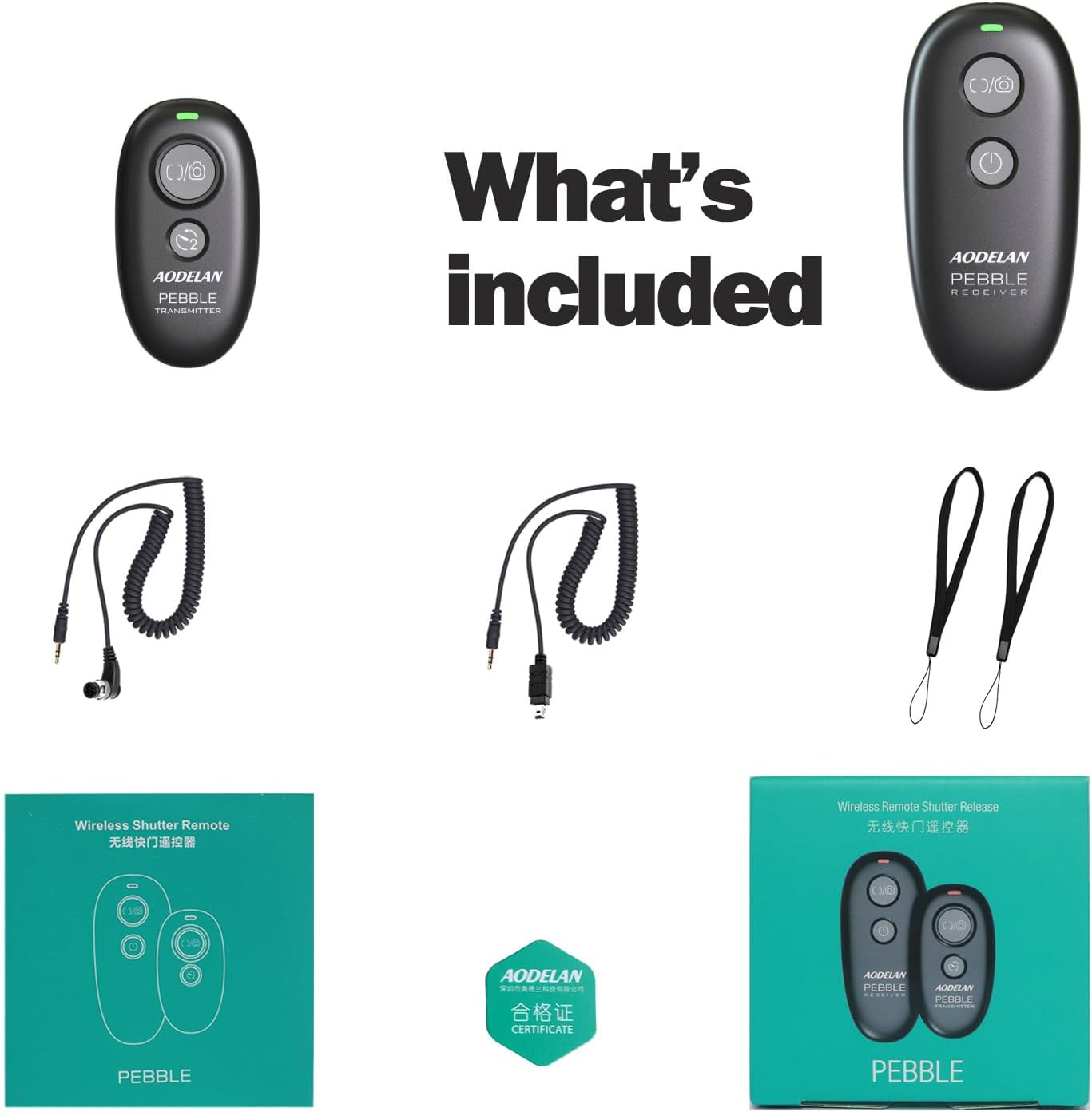
Figure 2: Included items in the AODELAN SRR-PEBBLE package
3. Product Overview
The SRR-PEBBLE system consists of two main components: the Transmitter and the Receiver.
3.1. Transmitter
The Transmitter is the handheld unit used to trigger the camera shutter. It features two buttons: a power button and a two-stage shutter button (half-press for focus, full-press for capture). It is powered by a CR2032 battery.
3.2. Receiver
The Receiver connects to your camera and receives signals from the Transmitter. It can be mounted on the camera's hot shoe or connected via a cable. The Receiver is powered by two AAA batteries.

Figure 3: Transmitter and Receiver dimensions and battery compartments
4. Battery Installation
4.1. Transmitter Battery Installation
- Locate the battery compartment on the back of the Transmitter.
- Open the battery cover.
- Insert one CR2032 battery with the positive (+) side facing up.
- Close the battery cover securely.
4.2. Receiver Battery Installation
- Locate the battery compartment on the back of the Receiver.
- Open the battery cover.
- Insert two AAA batteries (not included) according to the polarity markings inside the compartment.
- Close the battery cover securely.
5. Setup and Connection
5.1. Camera Compatibility
The AODELAN SRR-PEBBLE is compatible with a wide range of Nikon cameras, including but not limited to:
- Nikon Df, Z9, Z8, Z6, Z6 II, Z6 III, Z7, Z7 II, Z5
- Nikon D750, D780, D7500, D7200, D7100, D7000
- Nikon D5600, D5500, D5300, D5200, D5100, D5000
- Nikon D3300, D3200, D3100
- Nikon D610, D600, D90
- Nikon D3, D5, D6, D4, D4s
- Nikon D800, D850, D800E, D810, D810A, D700, D500, D300, D200
- Nikon F6, F100, F5, F90X, F90, N90s
- Nikon COOLPIX A, COOLPIX P1000, COOLPIX P7700, COOLPIX P7800, COOLPIX P950
- Nikon D1X, D2H, D3X
- Also compatible with Fujifilm S5 Pro, S3 Pro; Kodak DCS-14n.
5.2. Connecting the Receiver
The Receiver can be connected to your camera in two ways: wired or wirelessly.
5.2.1. Wired Connection
- Ensure the Receiver has batteries installed and is powered on.
- Connect one end of the provided connecting cable to the Receiver's input port.
- Connect the other end of the cable to your camera's remote control terminal. Refer to your camera's manual to locate this port.
- The Receiver can be held or mounted on the camera's hot shoe for convenience.
5.2.2. Wireless Connection
- Ensure both the Transmitter and Receiver have batteries installed and are powered on.
- Mount the Receiver onto your camera's hot shoe.
- Connect one end of the provided connecting cable to the Receiver's input port.
- Connect the other end of the cable to your camera's remote control terminal.
- The 2.4GHz digital radio technology provides automatic pairing and a stable working distance of up to 80 meters (262 feet).

Figure 4: Wired vs. Wireless connection methods

Figure 5: Common Nikon camera remote control cable connectors
6. Operating Instructions
The AODELAN SRR-PEBBLE offers multiple functions for controlling your camera's shutter.
6.1. Basic Shutter Release
- Half-Press: Lightly press the shutter button on the Transmitter to activate autofocus. The camera will focus on your subject.
- Full-Press: Press the shutter button completely down to take a photo.
6.2. Delayed Shooting
To use delayed shooting, press the shutter button on the Transmitter. The camera will capture the image after a short delay (e.g., 3 seconds), allowing you to be in the shot or avoid camera shake.

Figure 6: Delayed Shooting in action
6.3. Continuous Shooting
For continuous shooting, press and hold the shutter button on the Transmitter. The camera will continue to take photos as long as the button is held down, or until the camera's buffer is full. Release the button to stop shooting.

Figure 7: Continuous Shooting for capturing sequences
6.4. Bulb Function
The Bulb function allows for extended exposure times, useful for night photography or capturing light trails. To activate Bulb mode, press the shutter button on the Transmitter once to open the shutter, and press it again to close the shutter. The exposure duration is controlled by the time between the two presses.

Figure 8: Bulb Setting for long exposure photography
6.5. Multi-Camera Control
One Transmitter can control multiple Receivers simultaneously. This is useful for capturing the same scene from different angles or with different camera settings. Ensure all Receivers are properly connected to their respective cameras and powered on.

Figure 9: One Transmitter controlling multiple cameras
7. Specifications
| Feature | Specification |
|---|---|
| Model Number | SRR-PEBBLE |
| Product Dimensions | 3.15 x 3.15 x 1.18 inches |
| Item Weight | 1.75 ounces |
| Transmitter Battery | 1 CR2032 battery (included) |
| Receiver Battery | 2 AAA batteries (not included) |
| Transmission Technology | 2.4GHz Digital Radio |
| Working Distance | Up to 80 meters (262 feet) |
| Color | Black |
| Special Feature | Lightweight |
8. Troubleshooting
If you encounter issues with your AODELAN SRR-PEBBLE, consider the following:
- No Response: Check if both the Transmitter and Receiver have fresh batteries and are powered on. Ensure the connecting cable is securely plugged into both the Receiver and the camera.
- Interference: While designed for strong anti-interference, extreme electromagnetic environments may affect performance. Try moving to a different location.
- Range Issues: Ensure there are no major obstructions between the Transmitter and Receiver. The maximum range is 80 meters in open areas.
- Camera Settings: Verify your camera's remote control settings are correctly configured. Some cameras require specific modes (e.g., remote control mode) to be enabled.
9. Maintenance
To ensure the longevity and optimal performance of your remote control:
- Keep the device clean and dry. Avoid exposure to moisture, dust, and extreme temperatures.
- Use a soft, dry cloth for cleaning. Do not use harsh chemicals or abrasive materials.
- Remove batteries from both units if storing for extended periods to prevent leakage.
- Handle connecting cables with care to avoid damage to the connectors.
10. Warranty and Support
AODELAN products are manufactured with quality and reliability in mind. For specific warranty information, please refer to the warranty card included in your package or visit the official AODELAN website. If you require technical assistance or have questions not covered in this manual, please contact AODELAN customer support through their official channels.


