
1. Introduction
This manual provides detailed instructions for the installation, operation, and maintenance of your SANSI 18W LED Motion Sensor Outdoor Flood Light, Model C2440-GW. Please read this manual thoroughly before installation and use to ensure proper function and safety.
2. Safety Information
- Always turn off power at the circuit breaker before installing or servicing the fixture.
- Consult a qualified electrician if you are unsure about the installation process.
- Ensure all electrical connections comply with local codes and ordinances.
- Do not install on surfaces that are unstable or prone to vibration.
- This product is designed for outdoor use and is IP65 waterproof.
- Do not look directly into the LED light source when illuminated, as it may cause eye strain.
3. Package Contents
Verify that all components are present before beginning installation:
- 1x SANSI 18W LED Security Light (White)
- 1x Installation Kit (screws, wire nuts)
- 1x Instruction Manual
4. Product Features
The SANSI 18W LED Motion Sensor Outdoor Flood Light is designed for efficient and reliable outdoor illumination with advanced features:
- Energy Saving: 18 Watts, 1800 Lumens, equivalent to 200W traditional halogen lights, reducing electricity consumption by over 90%.
- Multiple Modes: AUTO (Motion Sensor), Dusk to Dawn, and On-Time modes for versatile control.
- Longer Lifespan: Utilizes SANSI's patented ceramic temperature control system for superior heat dissipation, extending product life to over 50,000 hours.
- Durable & Weatherproof: Constructed with high-quality PC material, offering good anti-ultraviolet, flame-retardant, and anti-corrosion properties. IP65 waterproof rating ensures stable operation in various weather conditions.
- Adjustable Design: Light heads and motion sensor are adjustable for optimal coverage and detection.

Image: Comparison of SANSI's ceramic heat dissipation technology with traditional designs.

Image: Overview of key features including adjustability, sensing distance, brightness, and waterproof rating.

Image: Examples of the flood light installed in different outdoor environments.
5. Installation Guide
Follow these steps for proper installation of your SANSI flood light:
- Prepare for Installation: Turn off power at the circuit breaker. Ensure the mounting surface is secure and can support the fixture.
- Fix the Mounting Plate: Secure the mounting plate onto the junction box using the provided screws.
- Connect the Wires: Connect the black (hot) wire, white (negative) wire, and green (ground) wire from the fixture to your household wiring using wire nuts. Ensure connections are tight and secure.
- Mount the Light Fixture: Attach the LED light fixture to the mounting plate.
- Choose the Working Mode: Select your desired operating mode (Auto, On-Time, D2D) using the switch on the motion sensor.
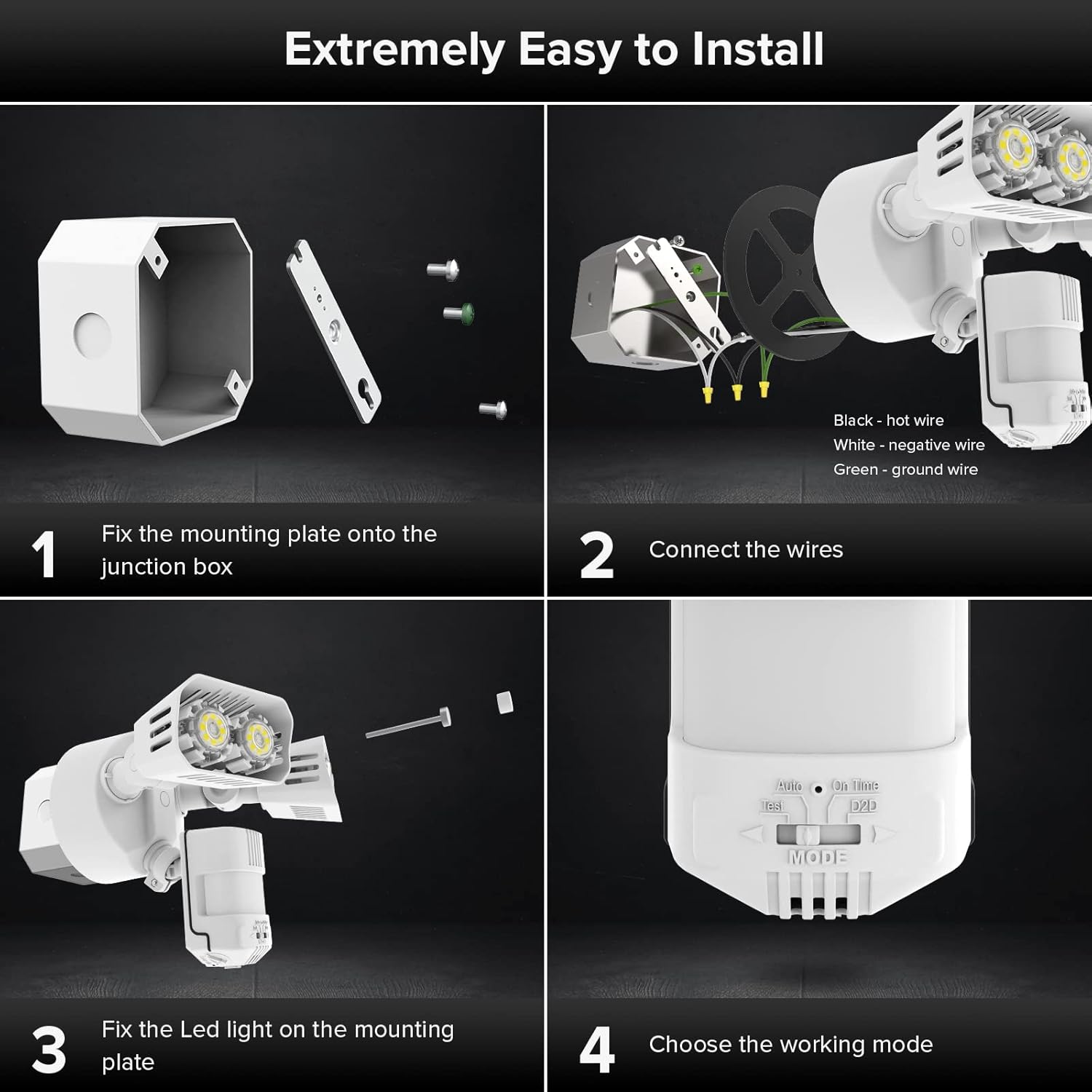
Image: Visual guide for the installation process.
6. Operating Modes
The SANSI flood light offers three primary operating modes, selectable via a switch on the motion sensor:
- AUTO (Motion Sensor Mode): The light turns on for 1-10 minutes at night when motion is detected. It stays off during the day.
- Dusk to Dawn Mode: The light automatically turns on at dusk and turns off at dawn, providing continuous illumination throughout the night.
- On-Time Mode: The light functions like a normal light, controlled manually by a wall switch. It stays on until manually turned off.
- Test Mode: For verifying proper function during installation. The light turns on for 5 seconds during daytime or night once it detects motion.

Image: Visual representation of Auto and Dusk to Dawn operating modes.
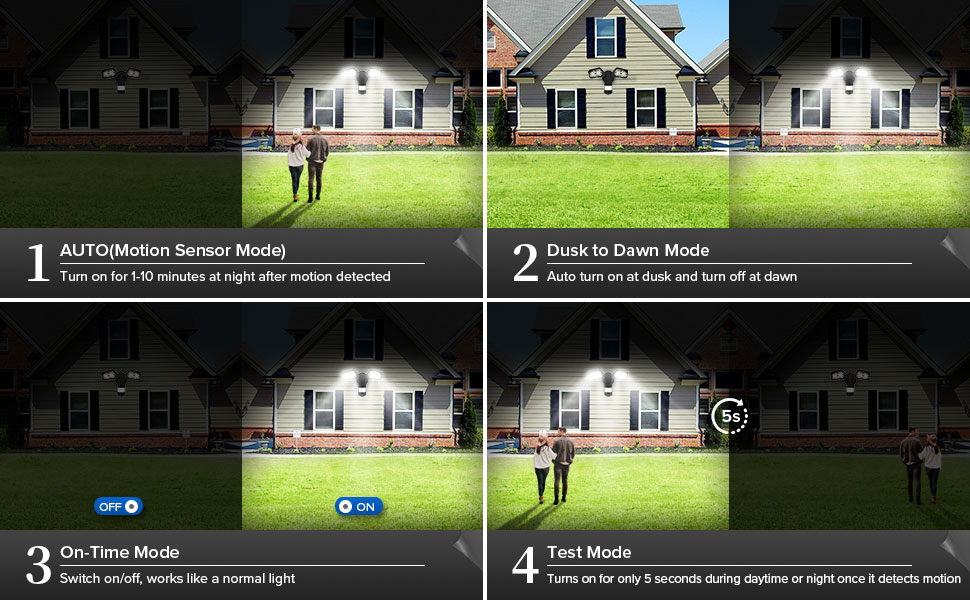
Image: Close-up of the mode selection switch.
Video: Official SANSI video demonstrating the operating modes of the 18W Motion Sensor Outdoor Light.
7. Adjustments
The motion sensor and light heads are adjustable to customize performance:
- Motion Sensor Adjustment: The sensor head can be adjusted 180° horizontally and 90° vertically to optimize detection area. Use the adjustment screws to loosen, position, and tighten.
- Light Head Adjustment: Each light head can be adjusted 180° horizontally and 90° vertically to direct illumination where needed. Loosen the screws, position the heads, and tighten securely.
- LUX (Brightness Sensitivity): Adjusts the ambient light level at which the motion sensor becomes active. Turn towards '0' for activation in darker conditions, towards 'infinity' for activation in brighter conditions. A halfway setting is often recommended.
- Time: Sets the duration the light stays on after motion is detected, typically from 1 to 10 minutes.
- Range: Adjusts the motion detection distance, up to a maximum of 72 feet.

Image: Motion sensor detection range and adjustment dials.

Image: Detailed view of the LUX, Time, and Range adjustment controls.
8. Maintenance
To ensure optimal performance and longevity of your flood light:
- Cleaning: Periodically clean the fixture with a soft, damp cloth. Do not use abrasive cleaners or solvents.
- Inspection: Regularly check for any loose connections, damaged wiring, or signs of wear. Address any issues promptly.
- Sensor Area: Keep the motion sensor lens clear of obstructions (e.g., dirt, spiderwebs) to maintain accurate detection.
9. Troubleshooting
| Problem | Possible Cause | Solution |
|---|---|---|
| Light does not turn on. | No power; incorrect wiring; sensor setting too low (LUX); bulb failure. | Check circuit breaker. Verify wiring connections. Adjust LUX setting. Contact support if LEDs are faulty. |
| Light stays on continuously. | Mode set to On-Time or D2D; continuous motion detected; sensor malfunction. | Check mode switch. Ensure no constant motion in detection area. Adjust sensitivity. |
| Light turns on for no apparent reason (false triggers). | High sensitivity; environmental factors (wind, small animals, heat sources); sensor obstructed. | Reduce Range and/or LUX sensitivity. Clear obstructions from sensor. Reposition sensor if necessary. |
| Motion detection range is too short. | Low sensitivity; sensor obstructed; incorrect sensor angle. | Increase Range sensitivity. Clear obstructions. Adjust sensor angle. |
10. Specifications
| Feature | Detail |
|---|---|
| Brand | SANSI |
| Model Number | C2440-GW |
| Wattage | 18 Watts |
| Brightness | 1800 Lumens |
| Light Color | 5000K (Daylight White) |
| Voltage | 120 Volts |
| Material | Ceramic, Plastic (Acrylonitrile Butadiene Styrene) |
| Indoor/Outdoor Usage | Outdoor |
| Water Resistance Level | IP65 Waterproof |
| Motion Sensor Detection Range | Max 72 FT |
| Motion Sensor Detection Angle | 120° |
| Lifespan | 50,000 Hours |
| Item Weight | 1.5 Pounds |
| Item Dimensions (L x W x H) | 13.7"L x 21.1"W x 29.2"H |
11. Warranty and Support
SANSI provides a 5-year warranty for this product, ensuring quality and safety. Additionally, a 30-day refund or replacement policy is available. For any issues or inquiries, please contact the professional customer service team via Amazon Message. Your satisfaction is our priority.
For further assistance, visit the SANSI Store on Amazon.


