
1. Product Overview
The Portronics iTrack 1 is a compact Bluetooth tracking device designed to help you locate misplaced items. It connects to your smartphone via Bluetooth and the TRACKFAST application, allowing you to trigger an alarm on the tracker or locate your phone. This device is suitable for tracking keys, wallets, luggage, and other personal belongings.
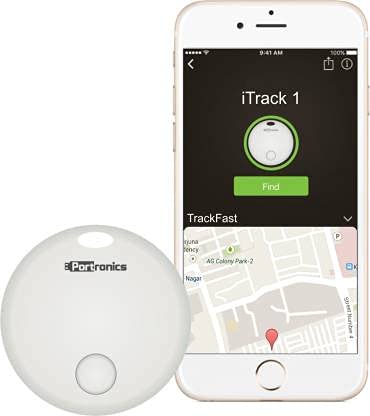
Image 1: Portronics iTrack 1 Smart Lost Item Tracker. This image displays the compact, white tracking device, highlighting its small size and simple design.
2. Setup and Installation
2.1. App Installation
- Download the TRACKFAST application from your smartphone's app store (Google Play Store for Android or Apple App Store for iOS).
- Install the application on your device.
- Ensure your smartphone's Bluetooth is enabled.
2.2. Device Pairing
- Open the TRACKFAST application on your smartphone.
- Follow the on-screen instructions within the app to add a new device.
- Press and hold the button on the iTrack 1 device until it enters pairing mode (refer to app for specific indicator).
- Select the iTrack 1 from the list of available devices in the app to complete the pairing process.
3. Operating Instructions
3.1. Finding Your iTrack 1 Device
- Open the TRACKFAST app on your paired smartphone.
- Select the iTrack 1 device you wish to locate.
- Tap the "Ring" or "Find" button within the app. The iTrack 1 will emit an audible alarm, helping you locate it.
3.2. Finding Your Smartphone
- If your smartphone is within Bluetooth range (approximately 10 meters) of the iTrack 1, simply press the button on the iTrack 1 device.
- Your smartphone will start ringing, even if it is in silent mode, allowing you to find it.
3.3. Last Location Tracking
- The TRACKFAST app records the last known location of your iTrack 1 device before it disconnected from your phone.
- Access the map feature within the app to view the last recorded location, which can assist in retracing your steps to find lost items.
3.4. Remote Camera Shutter
- The iTrack 1 can also function as a remote shutter for your smartphone camera.
- Open your smartphone's camera app and press the button on the iTrack 1 to remotely capture photos.
4. Maintenance
4.1. Battery Replacement
The iTrack 1 uses a replaceable battery. When the battery level is low, the device's performance may be affected. Replace the battery with a new one available from the market. Refer to the device's casing for instructions on how to open and replace the battery.
4.2. Water and Dust Resistance
The iTrack 1 device is designed to be dust and water resistant. However, it is not fully waterproof. Avoid submerging the device in water or exposing it to heavy rain for extended periods to prevent damage.
5. Troubleshooting
- Device Not Connecting: Ensure Bluetooth is enabled on your smartphone and the iTrack 1 is within range. Try restarting both the app and your phone. Check if the iTrack 1 battery needs replacement.
- No Sound from iTrack 1: Verify the device's battery level. If the battery is low or depleted, replace it. Ensure the volume on your smartphone is not muted if trying to find your phone.
- Inaccurate Last Location: The last location feature relies on the last known Bluetooth connection point. Environmental factors can affect accuracy. Ensure the app has location permissions enabled.
- Short Battery Life: Battery life can vary based on usage and environmental conditions. Ensure the battery is correctly installed and is a fresh replacement.
6. Specifications
| Feature | Detail |
|---|---|
| Brand | Portronics |
| Model Number | POR-130 (iTrack 1) |
| Color | White |
| Material | Plastic |
| Item Weight | 8 g |
| Dimensions (LxWxH) | 36 x 36 x 5 Millimeters |
| Battery Type | Replaceable (1 AAA batteries required, included - Note: Some models may use CR2032. Please check your device.) |
| Connectivity | Bluetooth |
| Compatibility | iOS 7 or higher (iPhone 4s and later, iPad 3rd Gen and later, iPod Touch 5 or later), Android 4.4 or higher |
| Features | Item Finder, Phone Finder, Last Location Tracking, Remote Camera Shutter, Dust & Water Resistant |
7. Warranty and Support
The Portronics POR-130 iTrack 1 comes with a 1 Year Warranty from the date of purchase.
For any product-related issues, technical assistance, or warranty claims, please contact Portronics customer care at 9555245245.
Please retain your purchase receipt for warranty validation.


