
Introduction
This manual provides detailed instructions for the installation, operation, and maintenance of the Zamp Solar ZS-3B-CAP Triple Solar Port Cable Assembly. Please read this manual thoroughly before installation and use to ensure proper function and safety.
Product Overview
The Zamp Solar ZS-3B-CAP is a triple solar port cable assembly designed to expand the connectivity of your Zamp Solar system. It allows for the connection of up to three solar panels or accessories to a single input, providing flexibility and ease of use for various solar power setups. This unit is constructed from durable stainless steel, ensuring longevity and reliable performance in outdoor environments.
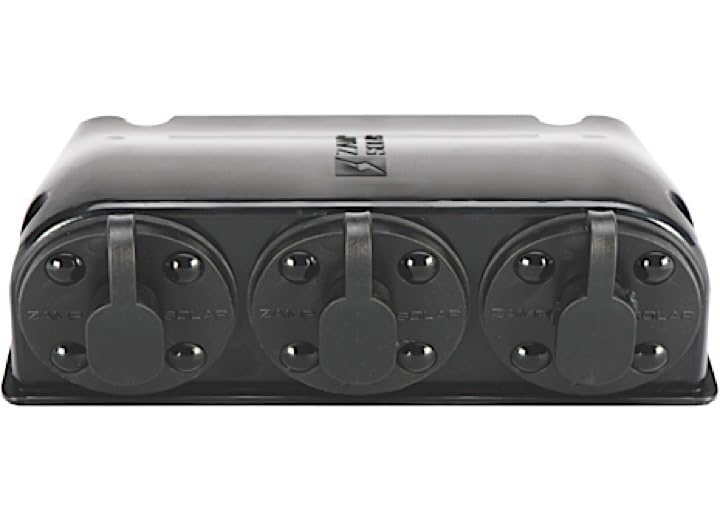
Image Description: This image displays the front view of the Zamp Solar ZS-3B-CAP, clearly showing the three covered solar ports designed for connecting multiple solar panels or accessories.

Image Description: This image shows the side and back view of the Zamp Solar ZS-3B-CAP Triple Solar Port Cable Assembly, highlighting its compact design and potential mounting points.
Setup and Installation
- Safety First: Ensure all power sources are disconnected before beginning installation. Wear appropriate safety gear.
- Mounting: Select a suitable, secure location for the ZS-3B-CAP. The unit should be protected from direct impact and excessive moisture, though it is designed for outdoor use. Use appropriate fasteners (not included) to mount the unit securely.
- Connecting Solar Panels/Accessories:
- Remove the protective caps from the desired solar ports on the ZS-3B-CAP.
- Connect the positive (+) and negative (-) leads from your solar panels or accessories to the corresponding ports. Ensure correct polarity to prevent damage to your system.
- Secure all connections firmly.
- Connecting to Main System: Connect the output cable from the ZS-3B-CAP to the designated solar input on your Zamp Solar charge controller or power system. Verify all connections are tight and secure.
- Final Check: Once all connections are made, double-check polarity and connection integrity before restoring power to your solar system.
Operating Instructions
The Zamp Solar ZS-3B-CAP operates passively as a connection hub. Once installed, it facilitates the flow of power from connected solar panels or accessories to your main solar system. No user interaction is required for its operation beyond initial setup.
- Ensure all port caps are securely in place when not in use to protect against environmental elements.
- Monitor your solar charge controller for proper power input from the connected devices.
Maintenance
Regular maintenance helps ensure the longevity and optimal performance of your ZS-3B-CAP.
- Periodic Inspection: Annually, or more frequently in harsh environments, inspect all cable connections for signs of wear, corrosion, or looseness. Tighten any loose connections.
- Cleaning: Keep the unit free from dirt, dust, and debris. Use a soft, damp cloth to wipe down the exterior. Avoid abrasive cleaners or solvents.
- Port Caps: Ensure the protective caps for unused ports are always securely fastened to prevent moisture and debris ingress.
Troubleshooting
If you experience issues with your Zamp Solar ZS-3B-CAP, consider the following troubleshooting steps:
- No Power Output:
- Verify all cable connections are secure and properly seated.
- Check the polarity of all connected solar panels and the output to the charge controller. Incorrect polarity will prevent power flow.
- Ensure the solar panels themselves are receiving adequate sunlight and are functioning correctly.
- Intermittent Power:
- Inspect cables for any damage, fraying, or kinks.
- Check for loose connections at the ports or where the unit connects to the main system.
If problems persist after performing these checks, contact Zamp Solar customer support for further assistance.
Specifications
| Model Number | ZS-3B-CAP |
| Product Type | Cable Assembly |
| Item Package Quantity | 1 |
| Product Dimensions | 6 x 4 x 2.5 inches |
| Material | Stainless Steel |
| Manufacturer | Zamp Solar |
| UPC | 856204007228 |
Warranty and Support
For specific warranty information regarding your Zamp Solar ZS-3B-CAP, please refer to the documentation included with your purchase or visit the official Zamp Solar website. For technical support, troubleshooting assistance beyond this manual, or to inquire about replacement parts, please contact Zamp Solar customer service directly.
You can typically find contact information on the Zamp Solar website or through your product retailer.