
FORGING MOUNT HY9401-B
FORGING MOUNT Long Extension TV Mount Instruction Manual
Model: HY9401-B
Introduction
This manual provides detailed instructions for the safe and proper installation, operation, and maintenance of your FORGING MOUNT Long Extension TV Mount. Please read this manual thoroughly before beginning installation to ensure correct setup and to prevent damage or injury. Keep this manual for future reference.

Image: The FORGING MOUNT Long Extension TV Mount, showcasing its dual articulating arms and wall plate.
Safety Information
WARNING: Failure to read and follow all instructions can result in personal injury, property damage, or voiding of warranty. If you do not understand these instructions, or have doubts about the safety of the installation, please contact customer service.
- Do not install this product into drywall alone. It must be mounted into wood studs, solid concrete, or brick walls.
- Ensure the wall structure can safely support the combined weight of the mount and the television.
- Do not exceed the maximum load capacity of 198 lbs (90 kg).
- Verify VESA compatibility with your television before installation.
- Use appropriate safety gear during installation, including eye protection.
- Two people are recommended for installation due to the weight and size of the mount and television.

Image: Diagram illustrating compatible wall types (wooden walls, concrete walls, brick walls) and a warning against installing on drywall alone. Also shows TV size and VESA compatibility checks.
Package Contents
Please check the package contents against the list below to ensure all components are present and undamaged. If any parts are missing or damaged, contact customer service immediately.
- TV Wall Mount Assembly (Wall Plate, Articulating Arms, TV Brackets)
- Mounting Hardware Kit (various screws, washers, spacers for TV and wall)
- 6 ft HDMI Cable
- 3-Axis Bubble Level
- Cable Ties (5 pieces)
- Instruction Manual

Image: Close-up of various mounting hardware components, including M4, M6, M8 screws, washers, and unique spacers designed for easier installation.
Setup and Installation
1. Pre-Installation Checks
- Check TV Size and Weight: This mount is designed for 50-90 inch TVs weighing up to 198 lbs (90 kg).
- Check VESA Pattern: The mount supports VESA patterns from 100x100mm to 800x400mm. Measure the horizontal and vertical distance between the mounting holes on the back of your TV.
- Check Wall Type: Identify your wall type (wood stud, solid concrete, or brick). Do not install on drywall alone.

Image: Diagram illustrating the wide compatibility of the mount, showing support for solid concrete, wood studs (16" and 12"), and brick walls, along with applicable VESA patterns (max 800x400mm, min 100x100mm) and maximum load of 198 lbs.

Image: Detailed chart of available VESA patterns supported by the mount, ranging from 100x100mm to 800x400mm.
2. Mounting the Wall Plate
- Locate the desired mounting position on your wall. Use a stud finder to locate the center of two adjacent wood studs if mounting to wood. For concrete/brick, ensure the area is solid.
- Place the wall plate against the wall at the desired height and use the included bubble level to ensure it is perfectly horizontal.
- Mark the drill holes through the wall plate.
- Drill pilot holes according to the instructions for your specific wall type (wood studs, concrete, or brick).
- Secure the wall plate to the wall using the appropriate lag bolts and washers. Ensure it is firmly attached.
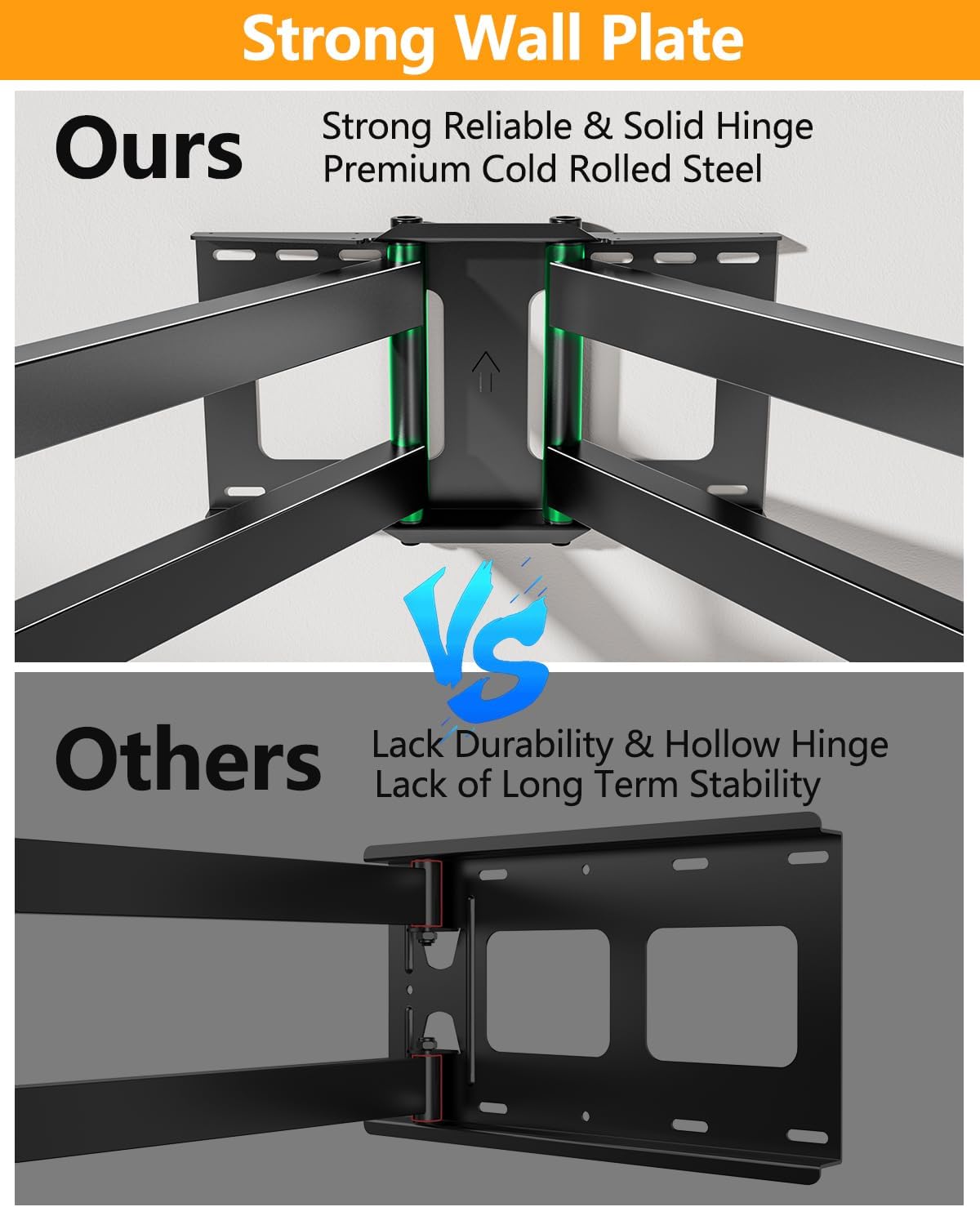
Image: Comparison showing the "Strong Wall Plate" design of the FORGING MOUNT, featuring strong, reliable, and solid hinges made of premium cold-rolled steel, contrasted with other mounts that may have hollow hinges and lack long-term stability.
3. Attaching TV Brackets to Television
- Carefully place your TV face down on a soft, clean surface to prevent scratches.
- Identify the correct size screws (M4, M6, or M8) and spacers for your TV's VESA mounting holes.
- Attach the two vertical TV brackets to the back of your television using the selected screws and spacers. Ensure the brackets are centered and securely fastened. The unique spacer design helps align threaded holes.

Image: Illustration of the unique spacer design, showing how the inner ribs prevent screws from falling down and make it easier to align with the threaded holes on the back of the TV, compared to standard spacers.
4. Mounting Television to Wall Plate
- With assistance, carefully lift the television with the attached brackets.
- Hook the TV brackets onto the wall plate. Ensure the brackets are securely seated on the mount's arms.
- Engage any safety locks or screws on the TV brackets to prevent accidental dislodgement.
Operating the Mount
Your FORGING MOUNT TV mount offers full motion capabilities for optimal viewing angles.
- Extension: The mount extends up to 43 inches from the wall, allowing for maximum versatility and maneuverability.
- Tilt: Adjust the tilt angle from +5° to -10° to reduce glare and optimize viewing. This can typically be adjusted by hand.
- Swivel: Swivel the TV up to 180° left or right, depending on TV size and wall clearance, to achieve the perfect viewing angle from various positions in a room.
- Level Adjustment: Fine-tune the level of your TV by ±3° after installation to ensure a perfectly straight display.
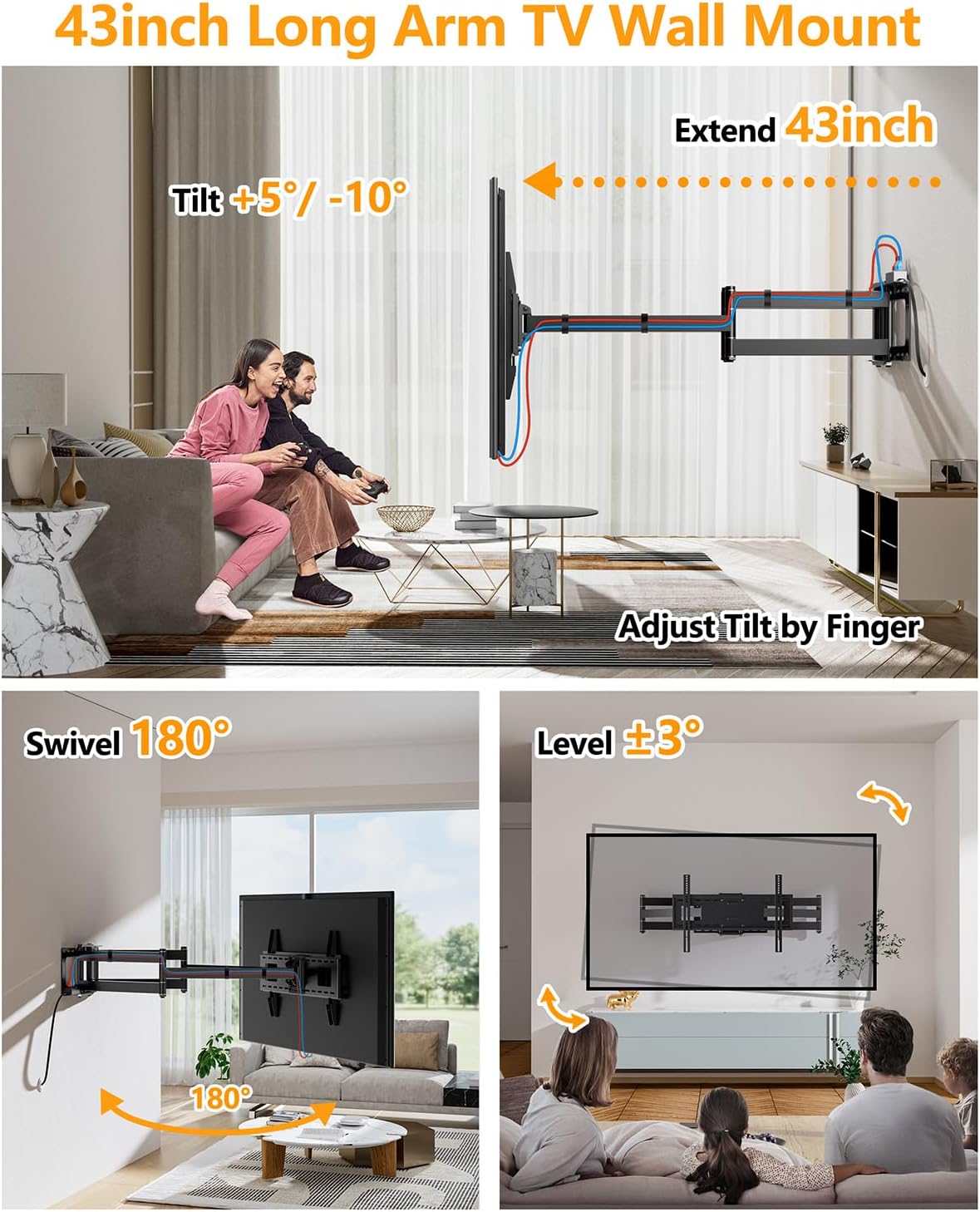
Image: Visual representation of the mount's full adjustment capabilities, including extending 43 inches from the wall, tilting +5° to -10°, swiveling 180°, and leveling ±3°.

Image: A large TV mounted on the wall, swiveling 90 degrees sideways, demonstrating the mount's ability to position the TV without hitting the wall, ideal for corner installations or viewing from different areas.

Image: Diagram highlighting the 6-arm design for full adjustment and ultra-strong overload capacity, with close-ups of double socket holes, strong bracket arms, and safety lock features.
Maintenance
Regular maintenance ensures the longevity and safe operation of your TV mount.
- Cleaning: Wipe the mount with a soft, dry cloth. Avoid abrasive cleaners or solvents that could damage the finish.
- Check Connections: Periodically check all screws and bolts to ensure they remain tight and secure. Re-tighten if necessary.
- Inspect for Wear: Inspect the articulating arms and joints for any signs of wear or damage. If any issues are found, discontinue use and contact customer support.
Troubleshooting
If you encounter any issues during or after installation, refer to the following common problems and solutions:
| Problem | Possible Cause | Solution |
|---|---|---|
| Mount feels unstable or sags. | Incorrect wall installation; Exceeded weight capacity; Loose bolts. | Ensure mount is securely fastened to studs/concrete. Verify TV weight is within limits. Tighten all mounting bolts. |
| TV is not level. | Wall plate not level; TV brackets not adjusted. | Use the built-in level adjustment feature on the mount to fine-tune the TV's horizontal position (±3°). Re-check wall plate level if necessary. |
| Cannot extend or swivel smoothly. | Joints are stiff; Cables are snagged. | Apply a small amount of silicone lubricant to the joints if they are stiff. Ensure cables are managed and not obstructing movement. |
| Missing parts. | Packaging error. | Contact FORGING MOUNT customer service with your purchase details. |
Specifications
- Brand: FORGING MOUNT
- Model Number: HY9401-B
- Material: Alloy Steel
- Color: Black
- Item Weight: 30 pounds
- Product Dimensions: 43 x 33 x 16 inches (fully extended)
- Mounting Type: Wall Mount
- Movement Type: Articulating, Tilt, Swivel, Level
- Compatible TV Sizes: 50 to 90 Inches
- Maximum Load Capacity: 198 lbs (90 kg)
- VESA Compatibility: 100x100mm to 800x400mm
- Extension from Wall: Up to 43 inches
- Maximum Tilt Angle: +5° to -10°
- Swivel Angle: Up to 180° (TV size dependent)
- Level Adjustment: ±3°
- UPC: 700961558038, 715377510860

Image: Visual representation emphasizing the robust and reliable load-bearing capacity of the mount, rated for a maximum of 198 lbs.
Warranty and Support
FORGING MOUNT provides an incredible 5-year warranty for this product. For technical support, warranty claims, or any questions regarding your TV mount, please contact FORGING MOUNT customer service.
You can typically find contact information on the FORGING MOUNT official website or through the retailer where you purchased the product.
Related documentsHY9401-B


Ask a question about this manual
Ask about setup, troubleshooting, compatibility, parts, safety, or missing instructions. Manuals+ will review the question and use this page’s manual context to help answer it.