
ResponseBridge 92pro
ResponseBridge Voice Amplifier with Dual Wireless Microphones - 25W Portable PA System
Model: 92pro
Instruction Manual
1. Introduction
Thank you for choosing the ResponseBridge 92pro Portable Voice Amplifier. This manual provides essential information for the safe and efficient operation of your device. Please read it thoroughly before use and retain it for future reference.
What's Included:
- 1 × Personal Voice Amplifier
- 1 × Wireless Headset Microphone
- 1 × Handheld Microphone
- 1 × Adjustable Waistband
- 1 × DC 9V Adapter
- 1 × DC5V Adapter
- 1 × USB Charging Cable
- 1 × User Manual

Figure 1.1: All components included in the package.
2. Product Overview
The ResponseBridge 92pro is a versatile 25W portable voice amplifier designed for clear and powerful sound projection. It features dual magnetic speakers, Bluetooth 5.0 connectivity, and supports multiple audio inputs including Micro TF card, Flash USB, and AUX. It comes with both a wireless headset microphone and a handheld microphone for flexible use.
Key Features:
- Powerful Amplification: 25W output with dual magnetic speakers, covering up to 25,000 sq.ft (2500 ㎡) with no distortion.
- Dual Wireless Microphones: Includes both a headset and a handheld microphone with UHF wireless connection for stable signal.
- Multi-Function PA System: Bluetooth 5.0 for wireless streaming (up to 114ft), Micro TF card, Flash USB, and AUX connectivity.
- Long-Lasting Battery: Built-in 5200mAh (2*2600mAh) rechargeable battery provides 10-15 hours of use.
- Compact & Portable: Measures 4.9" x 3.9" and is durable for various indoor and outdoor settings.
Components:

Figure 2.1: Main components of the ResponseBridge 92pro system.
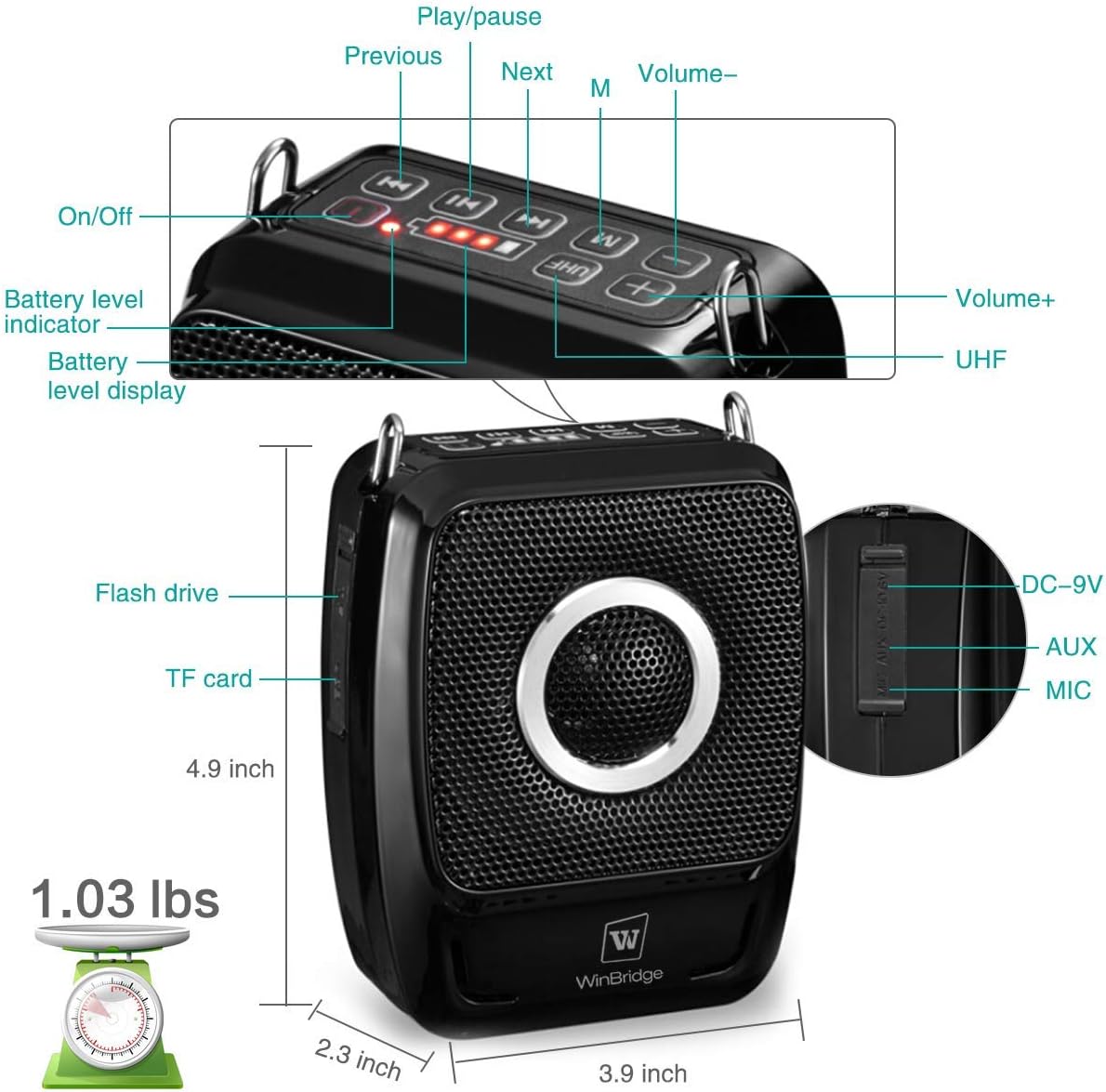
Figure 2.2: Control panel and ports overview.

Figure 2.3: Feature highlights and dimensions.
3. Setup
3.1 Initial Charging
Before first use, fully charge the voice amplifier and both wireless microphones. The megaphone speaker features a built-in 5200mAh (2*2600mAh) rechargeable battery, which can play for 10-15 hours on a full charge. The microphones also require charging. Use the provided DC 9V adapter for the main unit and DC5V adapter/USB charging cable for the microphones.
3.2 Assembling Microphones
The wireless headset microphone consists of a headset frame and a detachable transmitter. Connect the transmitter to the headset frame. The handheld microphone is a single unit.
Video 3.1: Overview of the wireless voice amplifier and dual microphones, including initial setup steps.
Video 3.2: Unboxing and demonstration of the amplifier and microphones, showing how to turn them on and connect.
4. Operation
4.1 Power On/Off
- To power on the amplifier, long press the power button (usually indicated by a red light).
- To power off, long press the power button again.
- For microphones, locate the power button on each unit and long press to turn on/off. A blue light typically indicates the microphone is on.
4.2 Bluetooth Pairing
- Turn on the voice amplifier. It will announce "Bluetooth is waiting for connection."
- On your mobile device (smartphone, tablet), go to Bluetooth settings.
- Search for available devices and select "SD-S92" to pair.
- Once connected, the amplifier will confirm with an audio prompt.
Video 4.1: Demonstration of Bluetooth pairing with a mobile device.
4.3 USB/TF Card Playback
- Insert a USB flash drive or TF (Micro SD) card into the corresponding slot on the amplifier.
- The amplifier will automatically switch to USB or TF card mode and begin playing audio.
- Use the Play/Pause, Previous, and Next buttons on the control panel to manage playback.
4.4 Microphone Usage
- Turn on both the amplifier and the desired wireless microphone (headset or handheld).
- The UHF wireless connection ensures automatic pairing.
- Adjust the volume using the controls on both the microphone and the amplifier.
- Both microphones can be used simultaneously.
Video 4.2: Detailed demonstration of the wireless PA system and two wireless microphones in use.
4.5 Volume Control
- Use the '+' and '-' buttons on the amplifier's control panel to increase or decrease the main volume.
- The wireless microphones also have their own volume controls for fine-tuning.
5. Helpful Tips
- For the best audio pickup, position the microphone about 3-5cm (1.2-2 inches) away from your mouth.
- To prevent feedback, it's advisable not to place the microphone directly in front of the voice amplifier.
- Adjust the volume to your preference using the convenient controls on both the microphone and amplifier.
- If you encounter any connection issues, re-pairing the devices often resolves the problem in the majority of cases.

Figure 5.1: The voice amplifier in a classroom setting.

Figure 5.2: Versatile usage scenarios for the amplifier.
6. Specifications
| Feature | Specification |
|---|---|
| Brand | ResponseBridge |
| Model Number | 92pro |
| Output Wattage | 25 Watts |
| Connectivity Technology | Bluetooth |
| Bluetooth Version | 5.0 |
| Audio Input | Bluetooth, Wired Microphone, Micro TF card, Flash USB, AUX |
| Battery Capacity | 5200mAh (2*2600mAh) |
| Battery Type | Lithium Polymer |
| Play Time | 10-15 hours (on full charge) |
| Item Weight | 2.33 pounds |
| Package Dimensions | 10.55 x 8.54 x 2.8 inches |
| Recommended Uses | Personal, Teachers, Outdoor, Indoor, Meetings, Parties |
7. Troubleshooting
- No Sound: Ensure the amplifier and microphone(s) are powered on and fully charged. Check volume levels on both devices. Verify correct input mode (Bluetooth, USB, TF, AUX).
- Feedback/Squealing: Keep the microphone away from the amplifier speaker. Reduce volume if necessary. Ensure the microphone is positioned correctly (3-5cm from mouth).
- Connection Issues (Wireless Microphones): Ensure microphones are powered on. If connection is lost, try re-pairing by long-pressing the UHF button on the amplifier and following the microphone's pairing instructions.
- Bluetooth Pairing Failure: Ensure the amplifier is in Bluetooth mode. Turn off and on Bluetooth on your mobile device and try searching again. Make sure no other devices are actively connected to the amplifier.
- USB/TF Card Not Playing: Ensure the media is inserted correctly. Check that the audio files are in a compatible format. Try re-inserting the media.
8. Maintenance
- Cleaning: Use a soft, dry cloth to clean the surface of the amplifier and microphones. Do not use liquid cleaners or abrasive materials.
- Storage: Store the device in a cool, dry place away from direct sunlight and extreme temperatures.
- Battery Care: To prolong battery life, avoid fully discharging the device frequently. Charge it regularly, even if not in use for extended periods.
9. Warranty and Support
This product comes with a user manual. For any support inquiries or issues not covered in this manual, please refer to the product's official support channels or contact the retailer where the product was purchased.
Related documents92pro


Ask a question about this manual
Ask about setup, troubleshooting, compatibility, parts, safety, or missing instructions. Manuals+ will review the question and use this page’s manual context to help answer it.