
EBYTE E30-170T27D
EBYTE E30-170T27D Wireless Transmitter Receiver User Manual
Model: E30-170T27D
1. Introduction
The EBYTE E30-170T27D is a high-performance wireless transmitter and receiver module designed for various IoT and industrial applications. Based on the SI4463 chip from Silicon Labs, this module operates in the 148 ~ 173.5 MHz frequency band, offering robust communication with a maximum transmission power of 500 mW (27 dBm) and a communication distance of up to 5 kilometers.
It supports transparent transmission and features TTL output with an air wake-up function (WOR) for ultra-low power consumption, making it suitable for battery-operated devices. The 170MHz frequency band provides excellent penetration and diffraction capabilities, ideal for environments like industrial plants or interiors. The module incorporates a Forward Error Correction (FEC) algorithm to enhance data reliability and transmission range by proactively correcting interfering data packets.
The E30-170T27D is designed to meet FCC, CE, and CCC standards, ensuring compliance for various export requirements.
2. Key Features
- High Performance: Features the SI4463 IC, operating at 148 ~ 173.5 MHz with 18 ~ 27 dBm output power.
- Extended Range: Achieves a communication distance of up to 5 kilometers.
- Flexible Interface: Utilizes a UART interface for data communication and offers both SMD and DIP types.
- Low Power Consumption: Includes an air wake-up function (WOR) for ultra-low power operation.
- Robust Data Transmission: Incorporates FEC (Forward Error Correction) algorithm for improved reliability and range.
- Wide Voltage Support: Supports 3.3V to 5.2V power supply, with optimal performance above 3.3V.
- Industrial Grade: Designed for industrial standard operation, supporting temperatures from -40°C to 85°C.
- SMA Interface: Equipped with an SMA interface for easy connection of coaxial cables or external antennas.
- Regulatory Compliance: Meets FCC, CE, and CCC design standards.
3. Applications
The E30-170T27D module is versatile and suitable for a wide range of applications requiring reliable wireless communication:
- Home security alarm systems and keyless remote control.
- Smart home and industrial sensor networks.
- Wireless alarm security systems.
- Building automation solutions.
- Wireless industrial remote control.
- Healthcare products and monitoring.
- Advanced Meter Reading Infrastructure (AMI).
- Smart agriculture systems (e.g., temperature/moisture sensors).
- Automotive industry applications.
4. Product Overview
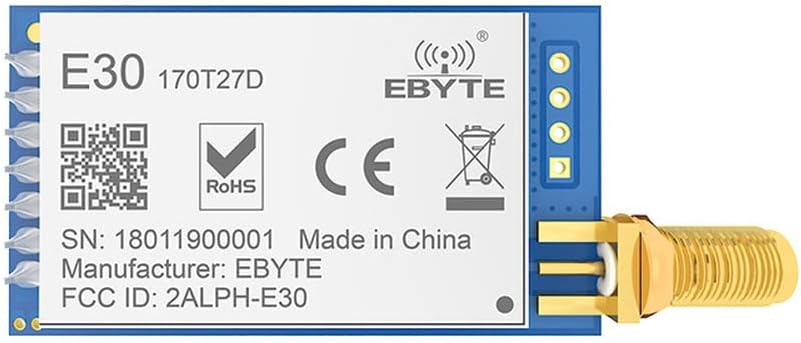
Figure 1: Top view of the E30-170T27D module, showing the EBYTE branding, model number, RoHS, CE, and FCC ID markings. The SMA antenna connector is visible on the right.

Figure 2: Angled top view of the E30-170T27D module, highlighting the pin headers on the left and the SMA connector on the right. The module's compact size is evident.

Figure 3: Close-up angled view of the E30-170T27D module, providing a clearer look at the module's surface-mounted components and the SMA connector's attachment point.

Figure 4: Bottom view of the E30-170T27D module, revealing the printed circuit board (PCB) traces and solder points for the pin headers and SMA connector.

Figure 5: A perspective view of the E30-170T27D module, showcasing its overall form factor and the integration of the wireless module with the SMA antenna connector.
5. Setup and Installation
5.1 Pin Definitions
The E30-170T27D module features standard pin headers for power, ground, and UART communication. Refer to the module's datasheet for a detailed pinout diagram. Typical connections include VCC (power), GND (ground), TXD (transmit data), and RXD (receive data).
5.2 Power Supply
Connect the module to a stable power supply within the 3.3V to 5.2V range. Ensure the power supply can provide sufficient current, especially during transmission peaks. For optimal performance, a supply voltage above 3.3V is recommended.
5.3 Antenna Connection
Attach a compatible 170MHz SMA antenna to the module's SMA connector. Ensure the connection is secure to prevent signal loss. The choice of antenna significantly impacts communication range and performance.
5.4 UART Interface Connection
Connect the module's UART pins (TXD, RXD) to your microcontroller or host system's corresponding UART pins. Ensure the baud rate, parity, and stop bits are correctly configured on both ends for proper communication.
6. Operating Instructions
6.1 Data Transmission
The E30-170T27D operates as a transparent transmission module. This means any data sent to its UART RXD pin will be wirelessly transmitted, and any data received wirelessly will be outputted via its UART TXD pin. No complex packet formatting is required for basic data transfer.
6.2 Configuration Modes
The module typically supports various configuration parameters such as operating frequency, air data rate (1kbps ~ 25kbps), transmission power, and WOR settings. These parameters are usually configured via specific AT commands or a dedicated configuration tool provided by the manufacturer. Refer to the detailed product datasheet for specific command sets and configuration procedures.
6.3 Air Wake-up (WOR) Function
The WOR function allows the module to enter a low-power sleep mode and periodically wake up to listen for incoming data. This significantly reduces power consumption, making it ideal for battery-powered applications. When a valid signal is detected, the module fully wakes up to receive data. Ensure both transmitting and receiving modules are configured for WOR if this feature is desired.
7. Specifications
| Parameter | Value |
|---|---|
| Model | E30-170T27D |
| IC | SI4463 |
| Frequency Range | 148 ~ 173.5 MHz |
| Transmission Power | 18 ~ 27 dBm (Max 500 mW) |
| Communication Distance | Up to 5.0 km (line of sight) |
| Interface | UART (TTL) |
| Air Data Rate | 1kbps ~ 25kbps |
| Supply Voltage | 3.3V ~ 5.2V |
| Operating Temperature | -40°C ~ 85°C |
| Antenna Connector | SMA |
| Compliance | FCC, CE, CCC |
8. Troubleshooting
- No Communication:
- Verify power supply voltage and current.
- Check UART connections (TXD to RXD, RXD to TXD) and ensure correct baud rate, parity, and stop bits.
- Confirm both modules are configured to the same frequency and air data rate.
- Ensure antennas are properly connected and compatible.
- Poor Range/Intermittent Connection:
- Check for obstructions between modules (walls, metal objects).
- Ensure antennas are positioned optimally and not obstructed.
- Verify transmission power settings are at an appropriate level.
- Check for sources of interference in the operating frequency band.
- Ensure the power supply is stable and not dropping voltage during transmission.
- Module Not Powering On:
- Double-check power connections (VCC and GND).
- Ensure the power supply is providing the correct voltage (3.3V-5.2V).
9. Maintenance
- Environmental Conditions: Operate the module within its specified temperature range (-40°C to 85°C) and avoid excessive humidity or direct exposure to water.
- Cleaning: If necessary, gently clean the module with a dry, soft cloth. Avoid using harsh chemicals or solvents.
- Antenna Care: Ensure the antenna is not bent or damaged, as this can degrade performance.
- Firmware Updates: Periodically check the manufacturer's website for any available firmware updates that may improve performance or add features.
10. Warranty and Support
EBYTE products are designed for reliability and performance. For detailed warranty information, technical support, or to download the latest datasheets and configuration tools, please visit the official EBYTE website:
When contacting support, please provide your product model (E30-170T27D) and any relevant details about your setup or issue.
Related documentsE30-170T27D


Ask a question about this manual
Ask about setup, troubleshooting, compatibility, parts, safety, or missing instructions. Manuals+ will review the question and use this page’s manual context to help answer it.