
Walfront HT 9600
Walfront HT9600 Air Quality Monitor User Manual
Model: HT-9600
1. Introduction
The Walfront HT9600 Air Quality Monitor is a versatile and portable device designed to accurately measure various air quality parameters, including PM2.5, PM10, dust particle counts, temperature, and humidity. Equipped with a high-definition color display, it provides clear and immediate readings, helping you assess indoor and outdoor air quality. This manual will guide you through the proper use and maintenance of your device.

Figure 1: Walfront HT9600 Air Quality Monitor
2. Product Features
- Multifunctional Measurement: Measures PM2.5, PM10, dust particles, temperature, and humidity.
- Color-Coded Pollution Levels: Displays different colors to indicate varying levels of air pollution for easy interpretation.
- High-Definition Digital Display: Features a 2.8-inch LCD screen with 320x240 pixel resolution for clear and bright readings.
- Data Storage: Capable of storing up to 999 sets of measurement data for tracking air quality trends.
- Automatic Power-off: Energy-saving feature that powers off the device after 2 minutes of inactivity.
- Pumping Type Sampling: Ensures accurate and efficient air sampling.

Figure 2: Bright Color HD Screen of the HT9600
3. Package Contents
Please check the package carefully to ensure all items are present:
- 1 x Air Quality Monitor (HT-9600)
- 1 x Storage Box/Case
- 1 x User Manual
- 1 x Plug (Power Adapter)
- 1 x Data Line (USB Cable)

Figure 3: Package Contents
4. Device Overview
Familiarize yourself with the different parts of the HT9600 Air Quality Monitor:

Figure 4: HT9600 Device Components
- Sampling Air Inlet
- Temperature and Humidity Detection Port
- Cover
- LCD Display
- Power Button
- Run Measurement Button
- Confirm Button (ENTER)
- Shift Button
- Flip Up Button (Up Arrow)
- Flip Down Button (Down Arrow)
- Return Button (BACK)
- Exhaust Port
- Battery Compartment
5. Setup
5.1. Charging the Device
Before first use, ensure the device is fully charged. Connect the provided data line (USB cable) to the device's charging port and the other end to the power adapter (plug) or a USB power source. The charging indicator on the device will show its status.
5.2. Powering On/Off
- To Power On: Press and hold the Power Button (5) until the display lights up.
- To Power Off: Press and hold the Power Button (5) until the display turns off. The device also features an automatic power-off function after 2 minutes of no operation to conserve battery life.
6. Operating Instructions
6.1. Taking Measurements
The HT9600 is designed for quick and accurate air quality assessment.
- Ensure the device is powered on.
- Place the device in the area where you wish to measure air quality. Ensure the Sampling Air Inlet (1) is unobstructed.
- Press the RUN Measurement Button (6) to start the sampling process. The device will begin drawing in air and analyzing particles.
- The display (4) will show real-time readings for PM2.5, PM10, particle counts, temperature, and humidity.
- Allow the device to run for at least 120 seconds for stable readings.
6.2. Understanding Air Quality Readings
The device uses a color-coded schematic diagram to represent different pollution levels based on PM2.5 concentration. This provides a quick visual indicator of air quality.

Figure 5: PM2.5 Air Quality Grade Schematic
- Optimal: Average PM2.5 of 24 hours is 0-35 µg/m³ (Green)
- Good: Average PM2.5 of 24 hours is 35-75 µg/m³ (Yellow)
- Light Pollution: Average PM2.5 of 24 hours is 75-115 µg/m³ (Orange)
- Moderate Pollution: Average PM2.5 of 24 hours is 115-150 µg/m³ (Purple)
- High Levels of Pollution: Average PM2.5 of 24 hours is 150-250 µg/m³ (Brown)
- Serious Pollution: Average PM2.5 in 24 hours > 250 µg/m³ (Red)
6.3. Data Storage and Retrieval
The HT9600 can store up to 999 sets of data, allowing you to track air quality trends over time.
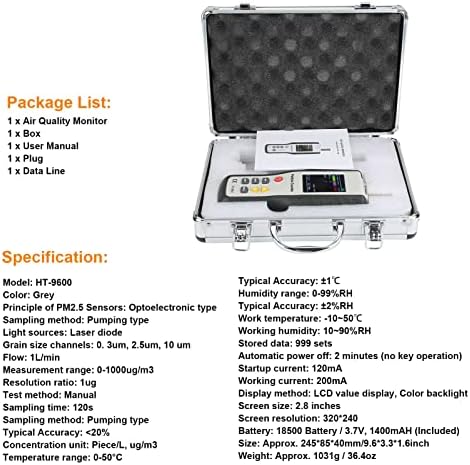
Figure 6: Data Storage Feature
- To Save Data: After a measurement is complete, the device may automatically save the data, or you may need to press the ENTER button (7) to confirm saving. Refer to the on-screen prompts.
- To View Stored Data: Use the Flip Up (9) and Flip Down (10) buttons to navigate through the menu options. Select the 'Data Record' or 'History' option and press ENTER (7) to view saved measurements.
- To Exit Data View: Press the BACK button (11).
7. Maintenance
7.1. Cleaning
- Wipe the exterior of the device with a soft, dry cloth.
- Do not use abrasive cleaners, solvents, or corrosive chemicals, as these may damage the device.
- Keep the air inlet and exhaust ports clear of dust and debris. Do not insert any objects into these openings.
7.2. Storage
- When not in use, store the device in its original carrying case to protect it from dust and physical damage.
- Store in a cool, dry place, away from direct sunlight and extreme temperatures.
7.3. Battery Information
- The device uses a 18500 Battery (3.7V, 1400mAh).
- Recharge the battery when the low battery indicator appears on the display.
- If the device will not be used for an extended period, charge it periodically to maintain battery health.
8. Troubleshooting
If you encounter issues with your HT9600 Air Quality Monitor, please refer to the table below for common problems and solutions.
| Problem | Possible Cause | Solution |
|---|---|---|
| Device does not power on. | Low battery or no charge. | Charge the device fully using the provided charger. |
| Readings are inconsistent or fluctuating. | Air inlet/exhaust blocked; device not stable; environmental interference. | Ensure air inlet/exhaust are clear. Place device on a stable surface. Avoid strong air currents or direct exposure to pollutants during measurement. Allow 120 seconds for stable readings. |
| Screen is dim or unreadable. | Low battery; display settings. | Charge the device. Check display brightness settings if available in the menu. |
| Cannot save data. | Memory full; incorrect operation. | Check if memory is full and clear old data if necessary. Follow instructions for saving data. |
| Device powers off unexpectedly. | Automatic power-off activated; low battery. | This is a normal energy-saving feature if no operation for 2 minutes. If it powers off during use, charge the battery. |
9. Specifications
| Parameter | Value |
|---|---|
| Model | HT-9600 |
| Color | Grey |
| Principle of PM2.5 Sensors | Optoelectronic type |
| Sampling Method | Pumping type |
| Light Sources | Laser diode |
| Grain Size Channels | 0.3um, 2.5um, 10um |
| Flow | 1L/min |
| Measurement Range | 0-1000ug/m3 |
| Resolution | 1ug |
| Test Method | Manual |
| Sampling Time | 120s |
| Typical Accuracy (PM) | <20% |
| Concentration Unit | Piece/L, ug/m3 |
| Temperature Range | 0-50°C |
| Typical Accuracy (Temp) | ±1°C |
| Humidity Range | 0-99%RH |
| Typical Accuracy (Humidity) | ±2%RH |
| Working Temperature | -10~50°C |
| Working Humidity | 10~90%RH |
| Stored Data | 999 sets |
| Automatic Power Off | 2 minutes (no key operation) |
| Startup Current | 120mA |
| Working Current | 200mA |
| Display Method | LCD value display, Color backlight |
| Screen Size | 2.8 inches |
| Screen Resolution | 320*240 |
| Battery | 18500 Battery / 3.7V, 1400mAh (Included) |
| Approx. Size | 245*85*40mm / 9.6*3.3*1.6inch |
| Approx. Weight | 1031g / 36.4oz (2.29 pounds) |
| Country of Origin | China |
10. Warranty and Support
Walfront products are manufactured to high quality standards. This product is covered by a standard manufacturer's warranty against defects in materials and workmanship from the date of purchase. Please retain your proof of purchase for warranty claims.
For technical support, troubleshooting assistance beyond this manual, or warranty inquiries, please contact your retailer or the Walfront customer service department. Contact information can typically be found on the product packaging or the official Walfront website.
Ask a question about this manual
Ask about setup, troubleshooting, compatibility, parts, safety, or missing instructions. Manuals+ will review the question and use this page’s manual context to help answer it.