
Graigar TM-192
TENMARS TM-192 Electromagnetic Radiation Detector User Manual
Model: TM-192 | Brand: Graigar
1. Introduction
The TENMARS TM-192 is a professional-grade electromagnetic field (EMF) meter designed to measure extremely low frequency (ELF) electromagnetic radiation. This device is ideal for assessing EMF levels from various sources in residential, commercial, and industrial environments. It features a triple-axis sensor for comprehensive measurements and offers data hold, maximum hold, and minimum hold functions for convenient analysis.
This manual provides detailed instructions on the proper use, maintenance, and troubleshooting of your TM-192 detector to ensure accurate and reliable performance.
2. Key Features
- Frequency Response: Measures electromagnetic fields from 30Hz to 2000Hz.
- Sensor Type: Equipped with a Triple Axis (X, Y, Z) sensor for accurate directional measurements.
- Measurement Ranges: Offers multiple ranges for magnetic field measurement: 20/200/2000 mG (milligauss) and 2/20/200 µT (microtesla).
- Data Hold (HOLD): Freezes the current reading on the display for easy recording.
- Maximum Hold (MAX): Captures and displays the highest measured value during a measurement session.
- Minimum Hold (MIN): Captures and displays the lowest measured value recorded.
- Display: Features a 4-digit Triple LCD display for clear readings.
- Sampling Rate: Provides a sample rate of 2.5 times per second for responsive readings.
- Auto Power Off: Designed to conserve battery life by automatically shutting down after a period of inactivity.
- USB Datalogger (TM-192D model only): The TM-192D variant includes a USB datalogger with capacity for 500 or 9999 data sets.
3. Technical Specifications
| Parameter | Value |
|---|---|
| Display | 4 digits Triple LCD display |
| Range | 20/200/2000 mG, 2/20/200 µT |
| Resolution | 0.01/0.1/1 mG or 0.001/0.01/0.1 µT |
| Frequency Response | 30Hz to 2000Hz |
| Sensor | Triple Axis (X, Y, Z) |
| Accuracy (50Hz/60Hz) | 20 mG /2µT ±(3.0%+30dgt); ±(2.5%+5dgt) |
| Accuracy (30Hz/2000Hz) | ±(5%+5dgt) |
| Overload Indication | LCD displays "OL" |
| Sample Rate | 2.5 times per second |
| Battery | 9V NEDA 1604, IEC 6F22 or JIS 006P |
| Battery Life | Approximate 100 hours |
| Operating Temperature & Humidity | 5°C to 40°C, below 80% RH |
| Storage Temperature & Humidity | -10°C to 60°C, below 70% RH |
| Weight | About 230g |
| Dimensions (L*W*H) | 173mm * 80mm * 32mm |
4. Setup and Initial Use
4.1 Unpacking and Inspection
Carefully remove the TM-192 detector and its accessories from the packaging. Inspect all components for any signs of damage during transit. If any damage is found, contact your supplier immediately.


4.2 Battery Installation
The TM-192 operates on a 9V battery (NEDA 1604, IEC 6F22, or JIS 006P). To install or replace the battery:
- Locate the battery compartment cover on the back of the device.
- Slide the cover downwards to open the compartment.
- Insert a new 9V battery, ensuring correct polarity (+/-).
- Close the battery compartment cover by sliding it back into place until it clicks securely.

5. Operating Instructions
5.1 Powering On/Off
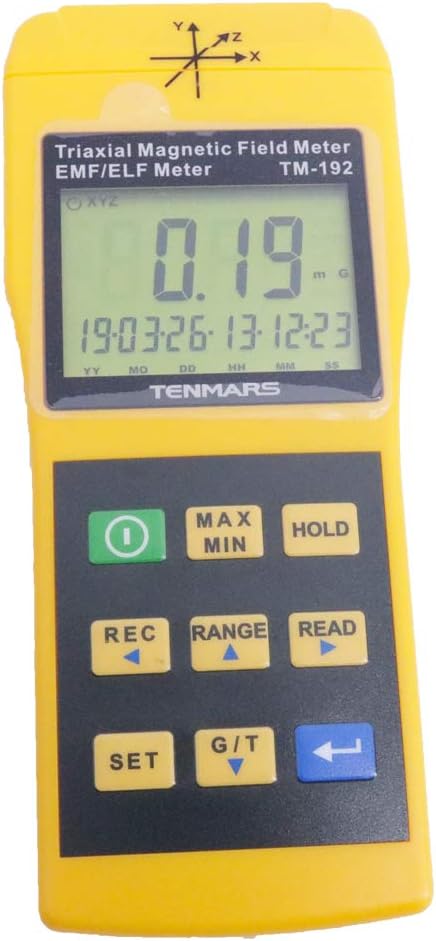
Press the Power button (green button with circle and line) to turn the device on. To turn it off, press and hold the Power button until the display shuts down.
5.2 Taking Measurements
Once powered on, the device will immediately begin measuring electromagnetic fields. Position the meter near the source you wish to measure. The triple-axis sensor allows for accurate readings regardless of the meter's orientation relative to the field source.
The display will show the current magnetic field strength in milligauss (mG) or microtesla (µT).
5.3 Using Data Hold (HOLD)
To freeze the current reading on the display, press the HOLD button. This is useful for recording stable readings. Press the HOLD button again to release the hold and resume live measurements.

5.4 Using Maximum (MAX) and Minimum (MIN) Hold
To capture the maximum or minimum magnetic field strength during a measurement period:
- Press the MAX/MIN button once to activate Maximum Hold. The display will show the highest value recorded since activation.
- Press the MAX/MIN button again to switch to Minimum Hold. The display will show the lowest value recorded.
- Press the MAX/MIN button a third time to exit MAX/MIN mode and return to live readings.
5.5 Changing Measurement Range
The TM-192 offers multiple measurement ranges. To cycle through the available ranges (20/200/2000 mG or 2/20/200 µT), press the RANGE button. Select the range that best suits the expected magnetic field strength for optimal accuracy.
5.6 Applications
The TM-192 is suitable for measuring electromagnetic field radiation intensity from various sources, including but not limited to:
- Electric transmission equipment
- Power lines
- Microwave ovens
- Air conditioners
- Refrigerators
- Computer monitors
- Video/audio devices
- Other household appliances and industrial equipment
6. Maintenance and Care
6.1 Cleaning
To clean the device, use a soft, dry cloth. Do not use abrasive cleaners, solvents, or strong detergents, as these may damage the casing or internal components.
6.2 Storage
When not in use for extended periods, remove the battery to prevent leakage and potential damage to the device. Store the TM-192 in its carrying case in a cool, dry place, away from direct sunlight and extreme temperatures. Refer to the specifications for recommended storage temperature and humidity ranges.
6.3 Calibration
The TM-192 is factory calibrated. For continued accuracy, periodic calibration by a qualified service center is recommended, especially if the device is used in demanding environments or if measurement discrepancies are suspected.
7. Troubleshooting
| Problem | Possible Cause | Solution |
|---|---|---|
| Device does not power on. | Battery is dead or incorrectly installed. | Check battery polarity. Replace with a new 9V battery. |
| Display shows "OL". | Measurement exceeds the current range. | Switch to a higher measurement range using the RANGE button. |
| Inconsistent or erratic readings. | Interference from other electronic devices; low battery. | Move away from other strong EMF sources. Replace battery if low. |
| Buttons are unresponsive. | Device frozen; low battery. | Remove and reinsert battery to reset. Replace battery if low. |
8. Included Accessories
The TENMARS TM-192 Electromagnetic Radiation Detector typically comes with the following accessories:
- User's Manual
- Carrying Case
- Calibration Certificate (may vary by region/seller)
9. Warranty Information
Specific warranty terms for the TENMARS TM-192 are provided by the manufacturer, TENMARS Electronics Co., Ltd., or the authorized seller, Graigar. Please refer to the warranty card included with your product or contact the seller directly for detailed warranty coverage, duration, and claim procedures. Keep your purchase receipt as proof of purchase for warranty claims.
10. Customer Support
For technical assistance, product inquiries, or service requests, please contact the manufacturer or your authorized distributor. Contact information can typically be found in the user manual or on the product packaging.
For support related to your purchase, you may contact Graigar USA, the seller, through the Amazon platform or their official website.
Related Documents - TM-192
 |
HGM93XX MPU(CAN) Series Genset Controller User Manual | Graigar This comprehensive user manual for the Graigar HGM93XX MPU(CAN) series genset controllers provides detailed information on operation, installation, specifications, and troubleshooting. It covers models like HGM9310MPU, HGM9320MPU, HGM9310CAN, and HGM9320CAN, essential for managing automated generator systems. |
 |
TENMARS TM-192 / TM-192D Triaxial ELF Magnetic Field Meter User Manual User manual for the TENMARS TM-192 and TM-192D Triaxial ELF Magnetic Field Meter. This document details product features, applications, measurement procedures, specifications, safety precautions, and software installation. |
 |
Mitsubishi Electric TM-RFM Series Direct Drive Motor Instruction Manual This instruction manual provides detailed information on the installation, wiring, operation, and specifications of the Mitsubishi Electric TM-RFM series direct drive AC servo motors. It covers safety precautions, environmental requirements, and technical data for optimal use. |
 |
Руководство по эксплуатации: Системы водоочистки Гейзер с клапанами Runxin Подробное руководство по установке, настройке и обслуживанию систем водоочистки Гейзер с управляющими клапанами Runxin. Включает технические характеристики, схемы работы и устранение неисправностей. |
 |
Digital Magnetic Tape Recording Fundamentals Training Manual Explore the core principles of digital magnetic tape recording with this comprehensive training manual from SDS Scientific Data Systems, featuring insights from Ampex Corporation. Covers tape technology, coding, heads, IBM formats, and binary logic. |
 |
Epson DM-D500 Klantendisplay Installatiegids Deze installatiegids biedt gedetailleerde instructies voor het veilig en effectief installeren van de Epson DM-D500 klantendisplay, inclusief aansluiting op diverse Epson TM-printers en standalone configuraties. Bevat veiligheidsmaatregelen, benodigde onderdelen, assemblageprocedures, DIP-schakelaarinstellingen en specificaties. |
Ask a question about this manual
Ask about setup, troubleshooting, compatibility, parts, safety, or missing instructions. Manuals+ will review the question and use this page’s manual context to help answer it.