
1. Introduction
The Safire SF-TESTER-ARM-5N1-4K is a versatile 4-in-1 multifunctional wrist CCTV tester designed for professional surveillance system installation and maintenance. This device supports a wide range of video formats including HDTVI, HDCVI, AHD, CVBS, and IP 4K resolutions, making it an essential tool for technicians working with various camera technologies. Its compact design, integrated features, and user-friendly interface ensure efficient and accurate testing in the field.
2. Product Features
- Multi-format Support: Compatible with HDTVI, HDCVI, AHD, Analog CVBS, and IP 4K video formats.
- High-Resolution Display: Features a 4-inch TFT-LCD touchscreen with 800x480 resolution for clear image viewing.
- PTZ Control: Supports PTZ camera control via RS485 for pan, tilt, and zoom adjustments.
- Integrated Power Output: Provides DC 12V power output and Power over Ethernet (PoE) for camera testing.
- Cable Testing: Includes an independent cable tester for RJ45 cables, along with tools for cable information and TDR testing.
- Network Connectivity: Equipped with WiFi and RJ45 10/100/1000M communication capabilities.
- Adjustable Display Settings: Allows adjustment of brightness, contrast, and saturation for optimal viewing.
- Long-lasting Battery: Built-in 7.4V 2400mAh Lithium battery for extended field use.
- Multilingual Interface: Supports multiple languages for user convenience.
3. Package Contents
Please verify that all items listed below are present in your package:
- Safire SF-TESTER-ARM-5N1-4K Multifunction Tester
- CCTV Adapter
- AC/DC 12V 3.0A Power Adapter
- Test Cables and Connectors
- Hard Protective Case
- Wrist Strap
- User Manual
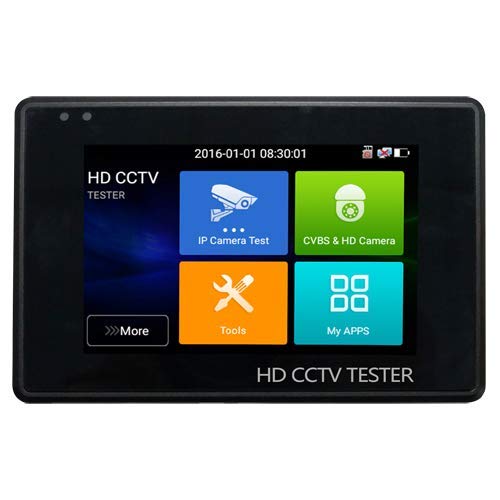
Figure 1: Safire SF-TESTER-ARM-5N1-4K Wrist CCTV Tester. This image shows the compact design of the tester, suitable for wrist-mounted operation, with its screen and control buttons visible.
4. Setup
4.1 Initial Charging
Before first use, fully charge the device. Connect the provided AC/DC 12V 3.0A power adapter to the tester's charging port and plug it into a power outlet. The charging indicator will illuminate. A full charge typically takes several hours.
4.2 Attaching the Wrist Strap
Securely attach the wrist strap to the designated points on the tester. Ensure it is fastened correctly to prevent accidental drops during use.
4.3 Powering On/Off
To power on the device, press and hold the power button until the screen illuminates. To power off, press and hold the power button again until the shutdown prompt appears, then confirm.
5. Operating Instructions
5.1 Navigating the Interface
The tester features a touchscreen interface. Use your finger to tap icons and navigate through menus. Swipe gestures may be used for scrolling in certain lists.
5.2 Video Input Selection
From the main menu, select the appropriate video input mode (HDTVI, HDCVI, AHD, CVBS, or IP) corresponding to the camera system you are testing. Connect the camera's video output to the tester's input port using the provided cables.
5.3 PTZ Control
For cameras supporting PTZ (Pan-Tilt-Zoom) functionality, select the PTZ control option. Connect the RS485 control lines from the camera to the tester. Use the on-screen controls to adjust camera direction and zoom.
5.4 Cable Testing
To test RJ45 network cables, select the 'Cable Test' function. Connect one end of the RJ45 cable to the tester and the other end to the independent cable tester accessory. The screen will display the wiring status and identify any faults.
5.5 Power Output
The tester can supply power to cameras. Select the 'Power Output' function and choose either DC 12V or PoE (if supported by the camera and tester). Connect the power output cable to the camera's power input.
6. Maintenance
6.1 Cleaning
Wipe the device with a soft, dry cloth. For stubborn dirt, a slightly damp cloth can be used. Avoid using harsh chemicals or abrasive cleaners, as they may damage the screen or casing.
6.2 Battery Care
To prolong battery life, avoid fully discharging the battery frequently. Recharge the device regularly, even if not in active use, to maintain battery health. Store the device in a cool, dry place when not in use for extended periods.
6.3 Storage
When not in use, store the tester in its protective hard case to prevent damage from impacts or dust. Keep it away from extreme temperatures and direct sunlight.
7. Troubleshooting
- Device does not power on: Ensure the battery is charged. Connect the power adapter and try again. If the issue persists, contact support.
- No video signal: Verify that the camera is powered on and functioning correctly. Check all cable connections for proper seating. Ensure the correct video input mode is selected on the tester.
- PTZ control not working: Confirm that the camera supports PTZ and that the RS485 connections are correct. Check the camera's PTZ protocol settings.
- Inaccurate cable test results: Ensure both ends of the RJ45 cable are securely connected to the tester and the accessory. Check for any visible damage to the cable.
8. Specifications
| Brand | Safire |
| Model | SF-TESTER-ARM-5N1-4K |
| Power Source | Battery |
| Screen | 4-inch TFT-LCD, 800x480 resolution |
| Supported Video Formats | HDTVI, HDCVI, AHD, Analog CVBS, IP 4K |
| Battery | 7.4V 2400mAh Lithium |
| Charger | DC 12V 3A |
| Operating Temperature | -10°C to 50°C |
| Dimensions (L x W x H) | 126 mm x 83 mm x 33 mm (4.96 x 3.27 x 1.3 inches) |
| Weight | 320 g (0.71 lbs) |
9. Warranty and Support
This Safire product is covered by a standard manufacturer's warranty. For specific warranty terms and conditions, please refer to the warranty card included in your package or contact your local Safire distributor. For technical support, troubleshooting assistance, or service inquiries, please visit the official Safire website or contact their customer service department.

