
Introduction
This manual provides instructions for the proper use and care of your Seiko STH-200B Chromatic Tuner and Metronome. This device is designed to assist musicians with accurate instrument tuning and precise rhythm practice. It features both tuning and metronome functions, along with reference tones for vocal training.
Product Overview
Familiarize yourself with the components and display of your STH-200B unit.

Figure 1: Seiko STH-200B Controls and Ports
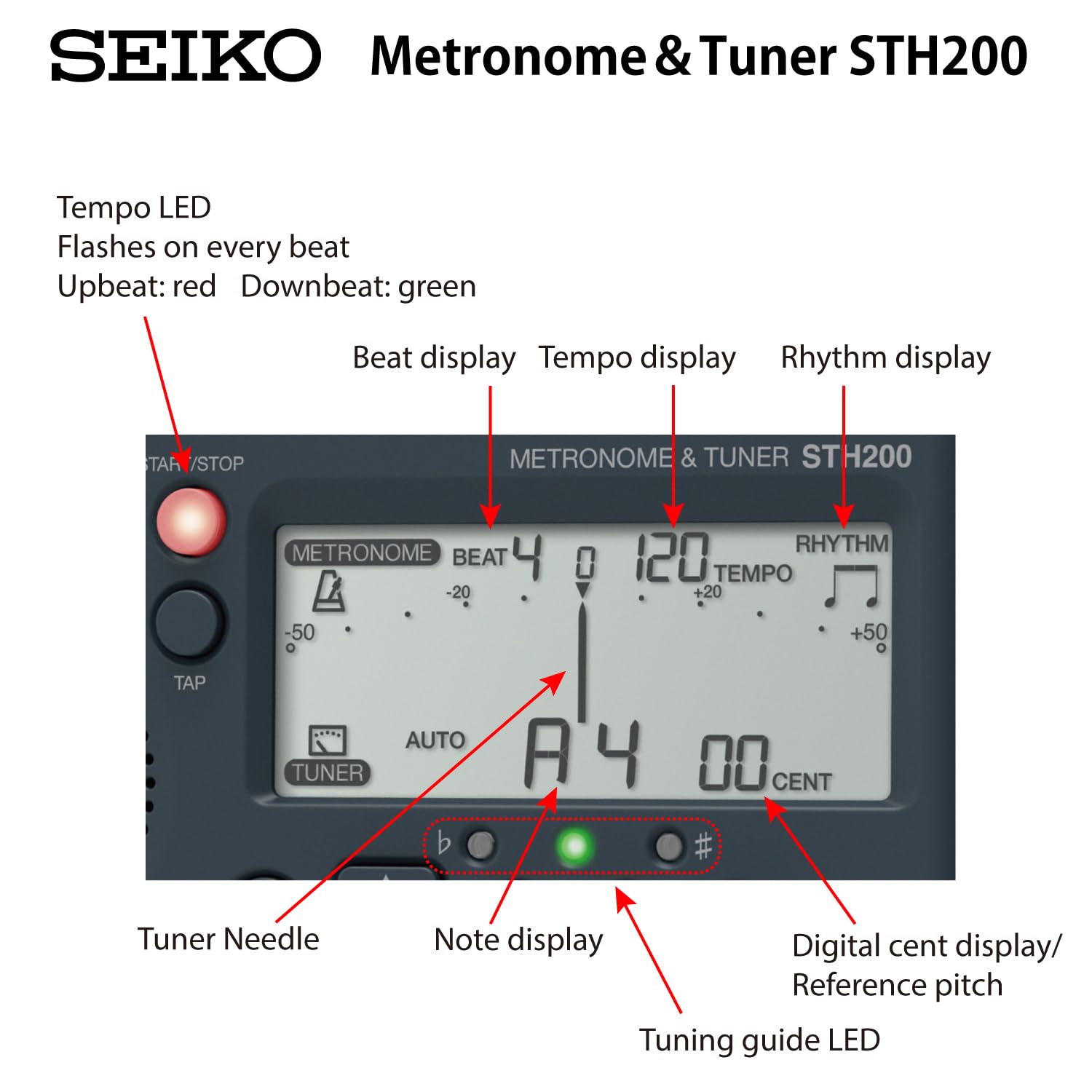
Figure 2: Seiko STH-200B LCD Display Elements
Setup
Battery Installation
The STH-200B operates on two AAA batteries (not included). To install, open the battery compartment cover located on the back of the unit. Insert the batteries according to the polarity markings (+/-) inside the compartment, then close the cover securely.

Figure 3: Rear view with battery compartment and kickstand
Using the Kickstand
For tabletop use, pull out the kickstand located on the back of the unit to prop it up at an angle.
Attaching to a Music Stand
The STH-200B features a unique slot designed to attach to the lip of most music stands. Carefully slide the unit onto the music stand lip until it is securely in place. Ensure the attachment is stable before use.

Figure 4: Music stand attachment diagram
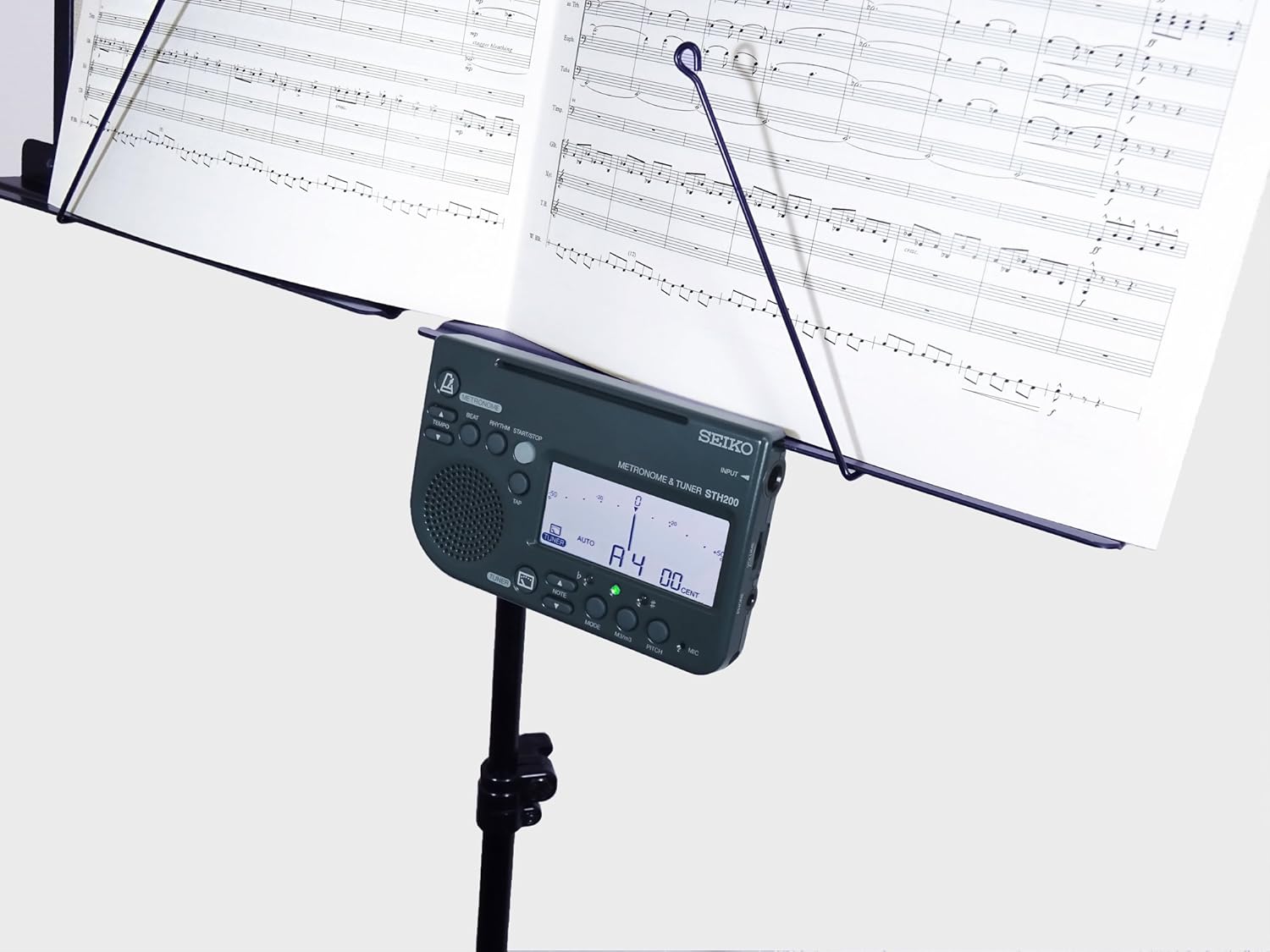
Figure 5: STH-200B attached to a music stand
Operating Instructions
Power On/Off
Press the METRONOME ON/OFF button or TUNER ON/OFF button to power on the unit. To power off, press and hold either ON/OFF button for a few seconds.
Tuner Mode
1. Press the TUNER ON/OFF button to enter Tuner Mode. The display will show tuning information.
2. Play a single note on your instrument. The STH-200B can detect notes via its built-in microphone or through the INPUT jack (for instruments with pickups).
3. The Tuner Needle on the LCD will indicate pitch deviation. The Note display will show the detected note. The Digital cent display shows the precise deviation in cents.
4. Adjust your instrument's pitch until the tuner needle is centered and the Tuning guide LED turns green. Red LEDs indicate flat or sharp.
5. The tuning range is A0 to C8.
Metronome Mode
1. Press the METRONOME ON/OFF button to enter Metronome Mode.
2. Use the Tempo UP and Tempo DOWN buttons to set the desired tempo (30-250 BPM).
3. Press the Beat button to select the number of beats per measure (e.g., 0, 1, 2, 3, 4, 5, 6, 7, 8, 9).
4. Press the Rhythm button to select the rhythm pattern (e.g., quarter notes, eighth notes, triplets).
5. Press START/STOP to begin or pause the metronome. The Tempo LED will flash with each beat (red for upbeat, green for downbeat).
6. Adjust the volume using the Volume dial.
Reference Tone Mode
1. While in Tuner Mode, press the PITCH button to cycle through reference tones. The reference tone range is C3 to C6.
2. Use the Note UP and Note DOWN buttons to select the desired reference note.
3. The unit will emit the selected tone through its speaker or connected headphones.
4. Adjust the volume using the Volume dial.
Simultaneous Use
The Seiko STH-200B allows for simultaneous use of both metronome and tuner functions, enabling comprehensive practice sessions.
Video 1: Demonstration of the Seiko STH-200B Metronome and Tuner functions in use, showing how it can be attached to a music stand and used for tuning and rhythm practice.
Maintenance
1. Cleaning: Wipe the unit with a soft, dry cloth. Do not use abrasive cleaners or solvents.
2. Battery Care: Remove batteries if the unit will not be used for an extended period to prevent leakage.
3. Storage: Store the unit in a cool, dry place away from direct sunlight and extreme temperatures.
Troubleshooting
- No Power: Check battery installation and ensure batteries are fresh.
- Inaccurate Tuning: Ensure the microphone is not obstructed or use the input jack for better signal detection. Check ambient noise levels.
- No Metronome Sound: Check volume setting and ensure headphones are not connected if you intend to use the speaker.
Specifications
| Tuning Range | A0 (27.5Hz) ~ C8 (4186Hz) |
| Reference Tone Range | C3 (130.81Hz) ~ C6 (1046.50Hz) |
| Metronome Tempo Range | 30 ~ 250 BPM |
| Display | High Contrast LCD |
| Input | Built-in microphone, Input Jack |
| Output | Speaker, Headphone Jack |
| Power Supply | 2 x AAA batteries |
| Material | Plastic |
| Attachment | Slot for music stand lip attachment, Rear kickstand |
Warranty and Support
This product is manufactured by Seiko. For warranty information or technical support, please refer to the official Seiko website or contact your local distributor. The product's warranty description is listed as 'Na.' in the provided specifications, indicating that specific warranty details should be obtained directly from the manufacturer or seller.


