
Utilitech MXL2058-LED24K8040
Utilitech Pro LED Wraparound Light
Model: MXL2058-LED24K8040
Introduction
This manual provides essential information for the safe and efficient installation, operation, and maintenance of your Utilitech Pro LED Wraparound Light. Please read this manual thoroughly before installation and retain it for future reference.
The Utilitech Pro LED Wraparound Light is a 24.17-inch LED fixture designed to provide bright, even illumination. It features a domed white acrylic diffuser and operates at 1600 lumens, 24 watts, with a 4000K color temperature at 120 volts.
Safety Information
Always follow basic safety precautions when installing or using this product to reduce the risk of fire, electric shock, or injury to persons.
- Disconnect power at the circuit breaker before installation or servicing.
- Ensure all electrical connections comply with local codes, ordinances, and the National Electric Code (NEC).
- Do not install near any heat sources such as radiators, heat registers, stoves, or other apparatus that produce heat.
- Do not use this fixture with a dimmer switch unless specifically rated for LED dimming.
- This product is intended for indoor use only.
- Do not look directly into the LED light source.
Package Contents
Verify that all components are present before beginning installation:
- Utilitech Pro LED Wraparound Light Fixture
- Mounting Hardware (screws, anchors)
- Instruction Manual (this document)
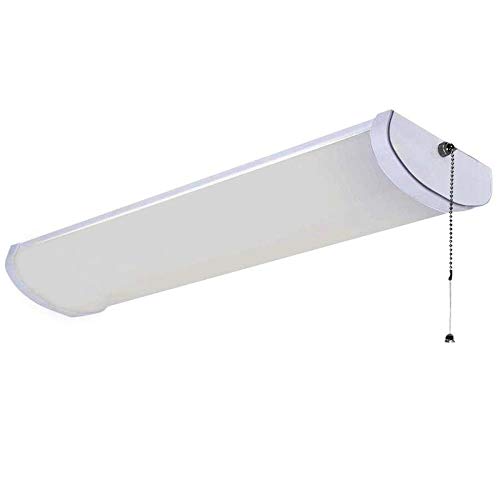
Image: The Utilitech Pro LED Wraparound Light, a long, rectangular white fixture with a domed acrylic diffuser and a pull chain switch on one end. This image shows the complete light fixture as it appears out of the box.
Setup and Installation
Follow these steps for proper installation. If you are unsure about any part of the installation, consult a qualified electrician.
- Preparation: Turn off power at the circuit breaker or fuse box to the location where the fixture will be installed. Ensure the power is off before proceeding.
- Mounting Location: Select a suitable mounting location on a ceiling or wall. Ensure the surface can support the weight of the fixture.
- Marking: Use the fixture as a template to mark the desired mounting points on the surface.
- Drilling: Drill pilot holes at the marked locations. If mounting into drywall, insert appropriate wall anchors.
- Wiring: Connect the fixture's wires to the building's electrical wires according to local electrical codes. Typically, connect the black wire from the fixture to the black (hot) wire from the supply, the white wire from the fixture to the white (neutral) wire from the supply, and the green or bare copper wire from the fixture to the green or bare copper (ground) wire from the supply. Secure connections with wire nuts.
- Securing Fixture: Carefully align the fixture with the drilled holes and secure it using the provided mounting screws. Ensure the fixture is firmly attached to the surface.
- Restore Power: Once the fixture is securely mounted and wired, restore power at the circuit breaker.
Operating Instructions
The Utilitech Pro LED Wraparound Light is designed for simple operation.
- Power On/Off: This fixture is equipped with a pull chain switch for manual operation. Pull the chain once to turn the light on, and pull it again to turn the light off.
- Remote Control (if applicable): If connected to a wall switch, the light can be controlled by the wall switch. Ensure the pull chain is in the "on" position if using a wall switch for primary control.
Maintenance
The Utilitech Pro LED Wraparound Light requires minimal maintenance.
- Cleaning: Before cleaning, ensure the power to the fixture is turned off at the circuit breaker. Wipe the fixture and diffuser with a soft, dry, or slightly damp cloth. Do not use abrasive cleaners or solvents, as they may damage the finish or acrylic diffuser.
- LED Longevity: The integrated LED light source is designed for long life and does not require bulb replacement.
Troubleshooting
If you experience issues with your LED Wraparound Light, refer to the following common problems and solutions:
| Problem | Possible Cause | Solution |
|---|---|---|
| Light does not turn on. | No power to the fixture. Pull chain in "off" position. Loose wiring connection. |
Check circuit breaker. Pull chain to "on" position. Turn off power and check wiring connections. |
| Light flickers. | Loose wiring connection. Incompatible dimmer switch. |
Turn off power and check wiring connections. Ensure dimmer is rated for LED lights or remove dimmer. |
| Light is dim. | Not applicable for this non-dimmable fixture. | Ensure fixture is receiving full 120V power. |
Specifications
| Attribute | Value |
|---|---|
| Brand | Utilitech |
| Model Number | MXL2058-LED24K8040 |
| Light Type | LED |
| Wattage | 24 watts |
| Voltage | 120 Volts |
| Brightness | 1600 Lumens |
| Color Temperature | 4000 Kelvin (Cool White) |
| Material | Acrylic (Diffuser) |
| Product Dimensions | 24.17 inches (Length) x 5.75 inches (Width) x 2.56 inches (Height) |
| Control Method | Pull Chain (Integrated) |
| Installation Type | Ceiling Mount |
Warranty Information
Utilitech products are manufactured to high-quality standards. For specific warranty details regarding your Utilitech Pro LED Wraparound Light, please refer to the warranty card included with your product packaging or visit the official Utilitech website. Keep your purchase receipt as proof of purchase for any warranty claims.
Customer Support
If you have any questions, require technical assistance, or need to report a problem with your Utilitech Pro LED Wraparound Light, please contact Utilitech customer support. Contact information can typically be found on the product packaging or the official Utilitech website.
For the most up-to-date support information, please visit: www.utilitech.com
Ask a question about this manual
Ask about setup, troubleshooting, compatibility, parts, safety, or missing instructions. Manuals+ will review the question and use this page’s manual context to help answer it.