
CELLSTAR CS-21FH
CELLSTAR CS-21FH Drive Recorder User Manual
Model: CS-21FH
1. Introduction
This manual provides comprehensive instructions for the proper installation, operation, and maintenance of your CELLSTAR CS-21FH Drive Recorder. Please read this manual thoroughly before using the product to ensure safe and optimal performance. Keep this manual for future reference.
2. Safety Information
Observe the following safety precautions to prevent accidents and ensure proper device function:
- Do not install the device in a location that obstructs the driver's view or interferes with airbag deployment.
- Ensure all cables are securely connected and do not interfere with vehicle operation.
- Avoid exposing the device to extreme temperatures, direct sunlight for prolonged periods, or excessive moisture.
- Do not attempt to disassemble or modify the device. This will void the warranty and may cause damage.
- Use only the specified power cable and accessories provided by CELLSTAR.
3. Package Contents
Verify that all items are present in the package:
- CELLSTAR CS-21FH Drive Recorder Unit
- Power Cable
- Mounting Bracket
- microSD Card (8GB)
- Instruction Manual
4. Product Overview
Familiarize yourself with the components of your CS-21FH Drive Recorder.

Figure 1: Front view of the CS-21FH Drive Recorder, showing the display screen and control buttons.

Figure 2: Top view of the CS-21FH, showing the camera lens, GPS, and VEI indicators.
Key Features:
- Full HD Recording: Captures clear and detailed video.
- HDR (High Dynamic Range): Reduces overexposure and underexposure in varying light conditions.
- microSD Maintenance-Free Function: Reduces file fragmentation, eliminating the need for regular formatting.
- Super Capacitor: Ensures video files are saved correctly even if power is suddenly lost during an impact.
- Ultra-Fast GPS: Supports 3 major satellite systems (GPS, GLONASS, Galileo) plus SBAS for highly accurate positioning and quick signal acquisition (approx. 10 seconds).
- Night Vision Correction: Improves recording visibility in low-light conditions.
- Digital Zoom: 2x and 4x digital zoom options.
- Parking Surveillance Mode: Records events when the vehicle is parked (requires optional accessory).
- Voice Assist: Provides audio guidance for recording status and settings.
5. Setup
5.1. microSD Card Preparation
The included 8GB microSD card is pre-formatted at the factory. If using a new microSD card, it must be formatted before first use. Refer to the 'Maintenance' section for formatting instructions.
5.2. Installation
- Choose a Mounting Location: Select a position on the windshield that does not obstruct the driver's view and is within the wiper's sweep area. Ensure the camera lens has a clear view of the road.
- Attach the Mounting Bracket: Clean the chosen area on the windshield. Peel off the protective film from the adhesive pad on the mounting bracket and firmly press it onto the windshield. Hold for several seconds to ensure a strong bond.
- Attach the Drive Recorder: Slide the CS-21FH unit onto the mounting bracket until it clicks into place.
- Connect Power: Connect the power cable to the drive recorder and route it discreetly along the windshield and dashboard to the vehicle's cigarette lighter socket or a dedicated power source.
- Insert microSD Card: Insert the microSD card into the designated slot on the device.

Figure 3: Example of the drive recorder mounted on the windshield, seen from outside the vehicle.

Figure 4: View of the drive recorder from the driver's seat, showing its discreet placement.
6. Operating Instructions
6.1. Basic Recording
The CS-21FH automatically starts recording when the vehicle's engine is turned ON and stops when the engine is turned OFF. Recording status is indicated on the display and via voice assist.
6.2. GPS Functionality
The device utilizes ultra-fast GPS, supporting GPS, GLONASS, Galileo, and SBAS satellites. This allows for highly accurate positioning even in urban areas with tall buildings or mountainous regions. Position information, driving speed, and trajectory are recorded along with video footage, simplifying incident review.

Figure 5: Multi-satellite GPS reception for enhanced accuracy.
6.3. Recording Features
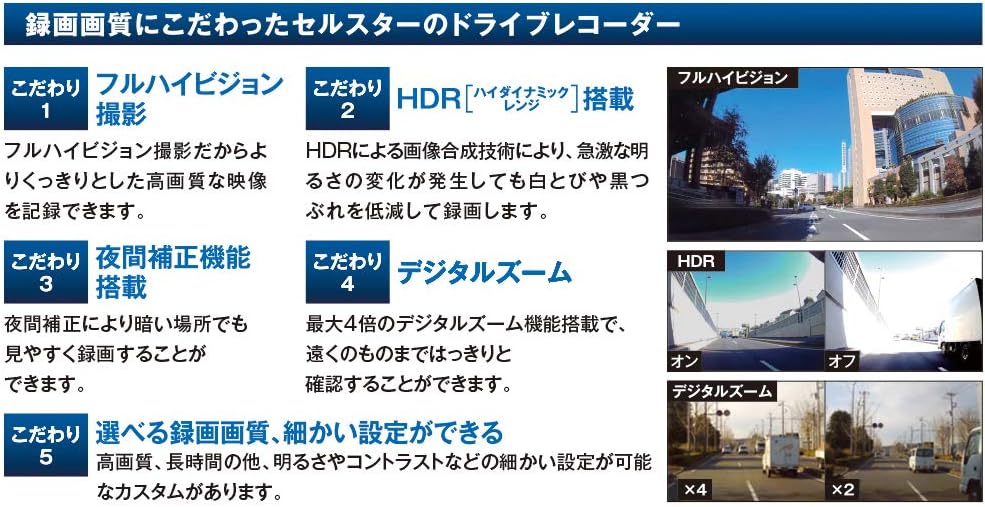
Figure 6: Visual representation of key recording features.
- Full HD Recording: Records clear, high-quality video.
- HDR (High Dynamic Range): Image composition technology that reduces whiteout and black crush even with sudden changes in brightness.
- Night Vision Correction: Enables clear recording even in dark environments.
- Digital Zoom: Offers 2x and 4x digital zoom settings.
- Manual Photo Capture: Allows you to take still photos manually during recording.
6.4. Super Capacitor
The built-in super capacitor ensures that recording continues and the video file is properly saved even if the power cable is disconnected due to an impact during an accident. This prevents loss of critical footage.
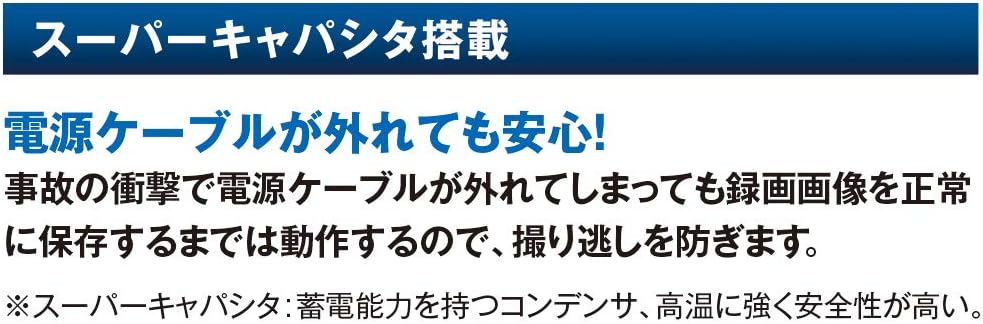
Figure 7: Super Capacitor ensures data integrity during power loss.
6.5. Parking Surveillance Mode
This mode monitors and records rough behavior or vandalism while your vehicle is parked. It records for up to 12 hours when the engine is OFF (ACC). If an event occurs while parked, you will be notified by voice when parking mode is disengaged.
Note: Parking surveillance mode requires an optional constant power cord (GDO-10 or GDO-24).

Figure 8: Parking Surveillance Mode with optional GDO-10 power cord.
7. Maintenance
7.1. microSD Card Maintenance
The CS-21FH features a unique file system that reduces file fragmentation on the microSD card, minimizing recording data errors and eliminating the need for regular formatting.

Figure 9: microSD Maintenance-Free Function.
- Note: Formatting may be required if recording quality settings are changed or depending on the microSD card's condition.
- New microSD Cards: A newly purchased microSD card must be formatted before use.
7.2. General Cleaning
Wipe the device body and lens with a soft, dry cloth. Do not use abrasive cleaners or solvents.
8. Troubleshooting
If you encounter issues with your CS-21FH Drive Recorder, please refer to the following common solutions:
- Device not powering on: Check the power cable connection to both the device and the vehicle's power outlet. Ensure the vehicle's ignition is on.
- Recording not starting: Verify that a microSD card is inserted and properly formatted. Check if the engine is on.
- Poor video quality: Ensure the camera lens is clean and free from obstructions. Check recording quality settings.
- GPS signal not acquired: Ensure the device has a clear view of the sky. Avoid areas with heavy overhead obstructions.
- Device freezing or unresponsive: Disconnect the power, wait a few seconds, and then reconnect. If the issue persists, try formatting the microSD card.
For further assistance, please contact CELLSTAR customer support.
9. Specifications
| Feature | Specification |
|---|---|
| Brand | CELLSTAR |
| Model Name | CS-21FH |
| Product Dimensions (D x W x H) | 2.45 x 8.2 x 4.35 cm |
| Product Weight | 75 g |
| Special Features | Built-in GPS, Internal Memory |
| Resolution | FullHD (1080p) |
| Mounting Size | 72(H)×82(W)×24.5(D) mm |
| Color | Black |
| Compatible Vehicle Type | Parking |
| Included Components | None (refer to package contents for accessories) |
| Mounting Type | Adhesive |
| Control Method | Touch |

Figure 10: Model comparison table (CS-21FH column is relevant).
10. Warranty and Support
The CELLSTAR CS-21FH Drive Recorder comes with a 3-year warranty. For warranty claims or technical support, please contact your retailer or CELLSTAR customer service.

Figure 11: CELLSTAR's commitment to quality and 3-year warranty.
Ask a question about this manual
Ask about setup, troubleshooting, compatibility, parts, safety, or missing instructions. Manuals+ will review the question and use this page’s manual context to help answer it.