
Retevis RT17
Retevis RT17 Walkie Talkies User Manual
Model: RT17
Introduction
This user manual provides comprehensive instructions for the operation, maintenance, and troubleshooting of your Retevis RT17 Walkie Talkies. Designed for long-range communication, these durable two-way radios are rechargeable and come with USB charger bases and earpieces, making them suitable for various applications such as schools, security, warehouses, and construction sites.

Important Safety Information
Please note that our walkie talkies FCC ID is 2ASNSRT17. Our walkie talkies meet FCC part 95 rule. Always operate the device in accordance with local regulations and guidelines. Do not attempt to disassemble or modify the radio. Keep away from extreme temperatures and direct sunlight. Ensure proper ventilation during charging.
Package Contents
Upon opening your package, please verify that all items listed below are present and in good condition:
- 6 x Retevis RT17 two-way radios
- 6 x Rechargeable batteries
- 6 x USB Charger docks
- 6 x Belt Clips
- 6 x Slings
- 6 x Earpieces

Product Overview
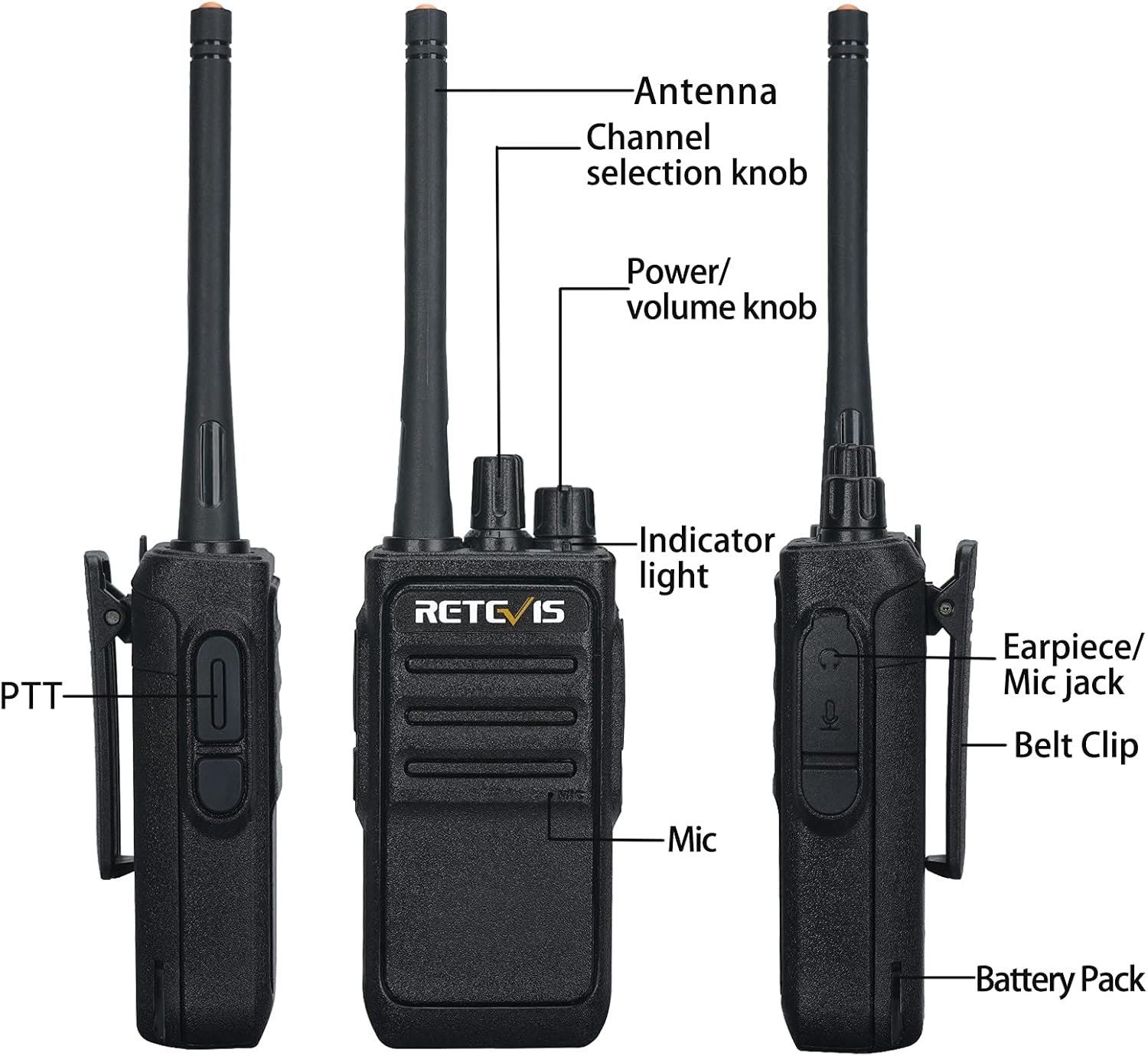
Familiarize yourself with the components of your Retevis RT17 walkie talkie:

Setup and Charging
Before first use, ensure the batteries are fully charged.
- Install Battery: Align the battery pack with the back of the radio and slide it into place until it clicks securely.
- Attach Belt Clip: If desired, attach the belt clip to the designated slot on the back of the radio.
- Charge the Radio:
- Connect the USB charger dock to a power source (e.g., power bank, laptop, car charger).
- Place the walkie talkie onto the charging station.
- The indicator light on the charger will be red while charging and turn green when the battery is fully charged.
The 1200mAh lithium batteries are designed to last through an 8-12 hour shift.

Operating Instructions
Basic Operation
- Power On/Off and Volume Control: Rotate the Power/Volume knob clockwise to turn the radio on and increase volume. Rotate counter-clockwise to decrease volume and turn off.
- Channel Selection: Rotate the Channel Selection knob to choose one of the 16 available channels. Ensure all radios intended for communication are on the same channel.
- Transmitting (PTT): Press and hold the Push-to-Talk (PTT) button on the side of the radio to transmit your voice. Speak clearly into the microphone. Release the PTT button to listen.
- Receiving: When not transmitting, the radio is in receive mode. You will hear incoming transmissions from other radios on the same channel.
- Using Earpieces: Insert the 2-pin acoustic tube earpiece into the Earpiece/Mic jack for private listening and hands-free communication. The earpieces provide clear audio, even in noisy environments.

VOX (Voice Operated Exchange) Function
The RT17 supports VOX for hands-free operation. When VOX is enabled, the radio will automatically transmit when it detects your voice, without needing to press the PTT button. Refer to the full user manual for detailed instructions on enabling and adjusting VOX sensitivity.
Key Features
- Extended Range: Equipped with a long antenna, the RT17 offers increased coverage and stable signal transmission, even through concrete walls and on construction sites.
- License-Free Operation: These 16-channel radios are compatible with most family radios (e.g., Retevis RT21, RT22, H-777, RT68, RB17) on the same channels and CTCSS, making them easy to use right out of the box without requiring a license.
- Long Battery Life: The 1200mAh rechargeable lithium batteries provide 8-12 hours of continuous use, ensuring the radios last through an entire shift.
- Clear Sound Quality: Features a built-in upgraded loudspeaker and squelch function for clear audio. The included earpieces further enhance communication in high-noise environments.
- Durable Construction: The radio has a solid, rugged feel, designed to withstand drops onto concrete or dirt from a height of 3 feet, maintaining functionality.
- USB Charging: Convenient USB charger bases allow for flexible charging from various power sources.


Maintenance
- Cleaning: Use a soft, damp cloth to clean the radio's exterior. Do not use harsh chemicals or abrasive cleaners.
- Battery Care:
- Fully charge batteries before first use.
- Avoid overcharging or completely draining the battery to prolong its lifespan.
- Store radios and batteries in a cool, dry place when not in use.
- Antenna Care: Do not bend or twist the antenna excessively, as this can damage the radio's performance.
Troubleshooting
| Problem | Possible Cause | Solution |
|---|---|---|
| No power | Battery not installed correctly or discharged. | Ensure battery is securely installed. Charge the battery fully. |
| Cannot transmit or receive | Incorrect channel, out of range, or low battery. | Verify all radios are on the same channel. Move closer to other radios. Recharge battery. |
| Poor sound quality / Static | Weak signal, interference, or volume too low. | Move to an open area. Adjust volume. Check for sources of interference. |
| Battery not holding charge | Battery lifespan reached or improper charging. | Ensure proper charging procedure. Consider replacing the battery if it's old. |
Specifications
- Model: RT17
- Item Model Number: A9145AX3-C9034AX6-C9003AX6
- Brand: Retevis
- Color: Black
- Number of Channels: 16
- Frequency Range: FRS
- Battery Type: Lithium Ion (included)
- Battery Capacity: 1200mAh
- Voltage: 3.7 Volts
- Item Weight: Approximately 4.55 pounds (for the 6-pack)
- Product Dimensions (per radio): 1.41"D x 2.08"W x 4.56"H
- Water Resistance Level: Water Repellent
- FCC ID: 2ASNSRT17
Warranty and Support
Retevis provides a 2-year warranty for the radio body and a 1-year warranty for accessories. We also offer a 30-day no-reason return policy.
Beyond the warranty period, maintenance services are still available, with buyers responsible for associated costs. For any inquiries or support, please contact Retevis customer service on Amazon. We aim to reply within 12 hours.
For more information, visit the official Retevis Store on Amazon.
Video Demonstrations
Watch the official video below to understand the range capabilities of the Retevis RT17 walkie talkies:
Video: "What's the range on RT17 walkie talkies?" This video demonstrates the effective communication range of the Retevis RT17 walkie talkies in various environments, showing their performance over different distances.
Related documentsRT17


Ask a question about this manual
Ask about setup, troubleshooting, compatibility, parts, safety, or missing instructions. Manuals+ will review the question and use this page’s manual context to help answer it.