
Road Far TM-206
TENMARS TM-206 Portable Solar Power Meter User Manual
Model: TM-206
1. Introduction
The TENMARS TM-206 Solar Power Meter is designed for precise measurement of solar radiation. This device is essential for various applications requiring accurate solar energy readings, including meteorological studies, agricultural research, and solar panel installation optimization. It measures solar radiation emitted by the sun, which is a result of nuclear fusion reactions creating electromagnetic energy.
The meter displays readings in Watts per square meter (W/m²) or British Thermal Units (BTU) per square foot per hour. Its compact design and user-friendly interface make it suitable for both professional and educational use.
2. Product Features
- Display: 3-digit LCD with a maximum reading of 2000.
- Measurement: Specifically designed for measuring solar radiation.
- Units: Supports display in W/m² (Watts per square meter) and BTU/(ft²xh) (British Thermal Units per square foot per hour).
- Functions: Includes Data Hold, Maximum (MAX), and Minimum (MIN) reading functions for comprehensive analysis.
- Accuracy: Typically within ±10W/m² or ±5% in sunlight, whichever is greater.
- Angular Accuracy: Cosine corrected for improved measurement precision.

Figure 1: Front view of the TM-206 Solar Power Meter, highlighting its LCD display and control buttons for various functions.
3. Setup and Operation
3.1. Battery Installation
The TM-206 requires one 9V battery (not included) for operation. To install the battery:
- Locate the battery compartment cover on the back of the device.
- Slide or unclip the cover to open the compartment.
- Insert a new 9V battery, ensuring correct polarity (+ and -).
- Replace the battery compartment cover securely.
3.2. Powering On/Off
Press the Power button (usually marked with an 'O' or power symbol) to turn the device on. The LCD display will illuminate. To turn off the device, press and hold the Power button until the display turns off.
3.3. Taking Measurements
Once powered on, the meter will immediately begin displaying solar radiation readings. Ensure the sensor at the top of the device is pointed directly towards the light source for accurate measurements.
- Unit Selection: Use the W/B button to toggle between Watts per square meter (W/m²) and BTU/(ft²xh) units.
- Data Hold: Press the D-H button to freeze the current reading on the display. Press it again to release the hold and resume live measurements.
- MAX/MIN Function: Press the M-H button to cycle through Maximum, Minimum, and current readings.
- Press once for Maximum reading (MAX).
- Press again for Minimum reading (MIN).
- Press a third time to return to live measurement.
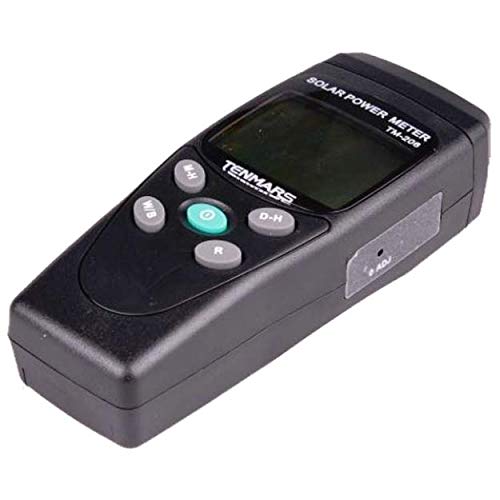
Figure 2: Side view of the TM-206, illustrating the location of the adjustment screw for calibration or fine-tuning.
4. Maintenance
- Cleaning: Use a soft, dry cloth to clean the device. Do not use abrasive cleaners or solvents. Keep the sensor lens clean for accurate readings.
- Storage: When not in use for extended periods, remove the battery to prevent leakage. Store the meter in a cool, dry place, away from direct sunlight and extreme temperatures.
- Battery Replacement: Replace the 9V battery when the low battery indicator appears on the display to ensure continuous accurate operation.
- Calibration: The device is factory calibrated. If recalibration is required, refer to a qualified service technician. The adjustment screw shown in Figure 2 may be used for fine-tuning by trained personnel.
5. Troubleshooting
| Problem | Possible Cause | Solution |
|---|---|---|
| Device does not power on. | Dead or incorrectly installed battery. | Check battery polarity; replace with a new 9V battery. |
| Display shows "OL". | Over-input; solar radiation exceeds the meter's range. | Move to an area with lower solar intensity or ensure the sensor is not directly exposed to an extremely concentrated light source. |
| Inaccurate readings. | Dirty sensor lens; incorrect sensor orientation; low battery. | Clean the sensor lens; ensure the sensor is pointed directly at the light source; replace battery. |
| Buttons are unresponsive. | Temporary software glitch; low battery. | Remove and reinsert the battery; replace battery if low. |
6. Specifications
| Parameter | Value |
|---|---|
| Display | 3 digits, 2000 readings |
| Range | 2000 W/m², 634 BTU/(ft²xh) |
| Resolution | 0.1 W/m², 0.1 BTU/(ft²xh) |
| Accuracy | Typically within ±10W/m² [±3 BTU/(ft²xh)] or ±5% (whichever is greater in sunlight). Temperature included error ±0.38 W/m² / °C [±0.12 BTU/(ft²xh)] / °C] deviation from 25 °C. |
| Angular Accuracy | Cosine corrected |
| Drift | <±2% per year |
| Over-input Indication | Display "OL" |
| Sampling Time | 0.25 second |
| Operating Temperature & Humidity | 0°C ~ 50°C (32°F ~ 122°F), below 80% RH |
| Power Supply | 9V battery x1 (Not included) |
| Dimensions (L x W x H) | 130 x 55 x 39 mm (5.12 x 2.17 x 1.54 inches) |
| Weight | Approximately 150g (5.29 ounces) |
7. Applications
The TM-206 Solar Power Meter is suitable for a wide range of applications, including but not limited to:
- Meteorology applications for weather monitoring and climate studies.
- Agriculture applications for optimizing crop growth conditions.
- Physics and optical laboratories for experimental setups.
- General solar radiation measurement.
- Solar transmission measurement through various materials.
- Solar power research and development.
- Identifying high-performance windows for energy efficiency.
- Assisting in setting up Solar PV Panels at optimum angles of incidence for maximum energy capture.
- Light intensity measurement for vehicle windows (e.g., tinting compliance).
8. Warranty and Support
Information regarding product warranty and customer support is not provided in the available product data. For warranty claims, technical assistance, or service inquiries, please contact the product manufacturer or your point of purchase directly.
Ask a question about this manual
Ask about setup, troubleshooting, compatibility, parts, safety, or missing instructions. Manuals+ will review the question and use this page’s manual context to help answer it.