1. Introduction
Welcome to the artfone CS182 Mobile Phone User Manual. This guide provides comprehensive instructions to help you set up, operate, and maintain your new mobile phone. Please read this manual carefully to ensure proper use and to maximize the device's features.
The artfone CS182 is designed for ease of use, featuring large buttons, a clear display, and essential functions for reliable communication.
2. Safety Information
Always follow basic safety precautions when using this product to reduce the risk of injury, fire, or electric shock.
- Do not expose the phone to extreme temperatures, direct sunlight, or moisture.
- Use only approved batteries, chargers, and accessories.
- Avoid dropping or subjecting the phone to severe impact.
- Keep the phone away from medical devices, as it may interfere with their operation.
- Do not attempt to disassemble or modify the phone.
3. Package Contents
Verify that all items are present in your product package:
- 1x artfone CS182 Mobile Phone
- 1x 1400mAh Battery
- 1x USB Charging Cable
- 1x Charging Base
- 1x User Manual (in French, refer to this English version for clarity)
Note: A wall charger plug is not included. You can connect the USB cable to any compatible USB power adapter for charging.

Figure 3.1: Package Contents - This image displays the artfone CS182 mobile phone, its charging base, USB cable, battery, and the user manual, all neatly arranged as they would appear in the product box.
4. Device Overview
Familiarize yourself with the physical components of your artfone CS182 mobile phone.

Figure 4.1: Front View in Charging Dock - The phone is shown upright in its charging dock, displaying its screen and large keypad. The screen shows an image of two elderly people.

Figure 4.2: Front and Back View with Features - This image presents both the front of the phone in its charging dock and the back of the phone, highlighting key features such as the 1.77-inch screen, large font (A), SOS button, FM radio, camera, music player, and calculator icons.

Figure 4.3: Large Keys Detail - A close-up view of the phone held in a hand, emphasizing the large, clearly labeled buttons designed for easy dialing and navigation.

Figure 4.4: Rear Design Detail - This image shows the textured back cover of the phone, indicating a design intended for better grip and durability.
5. Setup
5.1 Inserting SIM Card(s) and Battery
The artfone CS182 supports dual SIM cards. Ensure the phone is powered off before inserting or removing SIM cards or the battery.
- Remove the back cover by gently prying it open from the notch.
- Insert your 2G GSM SIM card(s) into the designated SIM slots (SIM1 and SIM2). Ensure the gold contacts face downwards and the card is correctly oriented.
- Insert the 1400mAh battery into its compartment, aligning the contacts.
- Replace the back cover, pressing firmly until it clicks into place.
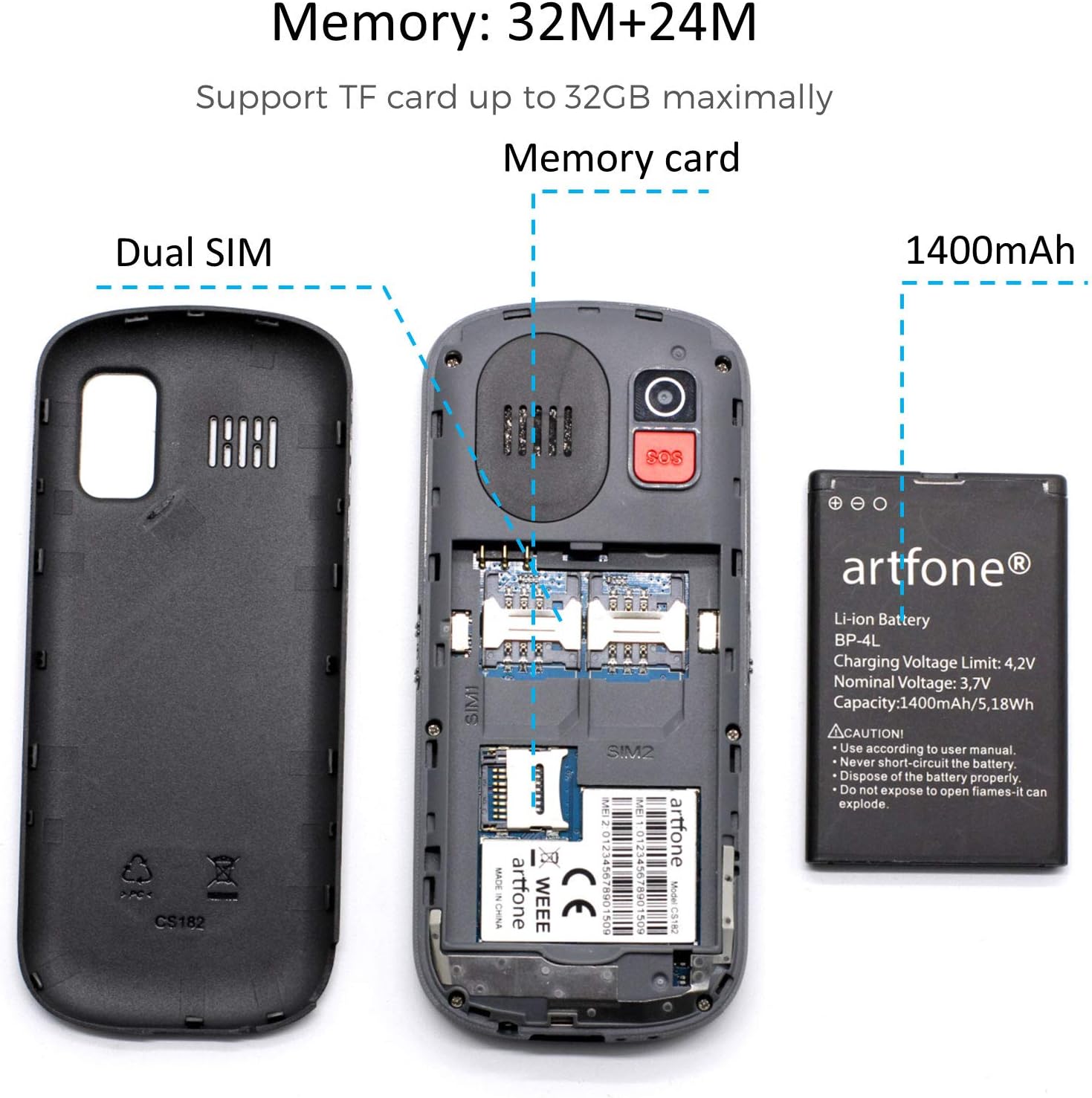
Figure 5.1: SIM and Battery Installation - An exploded view showing the phone's internal compartments for dual SIM cards and the 1400mAh battery, with the back cover removed.
5.2 Charging the Phone
Before first use, fully charge the phone battery.
- Using the Charging Base: Place the phone into the charging base, ensuring it sits securely and the charging indicator lights up.
- Using the USB Cable: Connect the USB charging cable to the phone's charging port and then to a compatible USB power adapter (not included) or a computer's USB port.
The charging indicator will show the charging status. Once fully charged, disconnect the phone from the charger.
6. Basic Operations
6.1 Power On/Off
- To Power On: Press and hold the Green Call Key until the screen lights up.
- To Power Off: Press and hold the Red End Call Key until the power off options appear, then confirm.
6.2 Making and Receiving Calls
- To Make a Call: Enter the phone number using the keypad and press the Green Call Key.
- To Receive a Call: When the phone rings, press the Green Call Key to answer.
- To End a Call: Press the Red End Call Key.
The phone features a voice broadcast function that announces the dialed numbers. This can be enabled or disabled in the settings menu.
6.3 Sending and Receiving Messages
Navigate to the "Messages" menu to compose and read SMS messages. The large font and clear interface facilitate easy text entry and reading.

Figure 6.1: User Interface Menu - This image displays various menu options on the phone's screen, including FM Radio, Call logs, Multimedia, SOS setting, Messages, Organizer, Settings, and Phonebook, demonstrating the user-friendly interface.
6.4 Adjusting Volume
Use the dedicated volume keys on the side of the phone to adjust the call volume, ringtone volume, and media volume.
6.5 Flashlight
The phone includes a built-in flashlight. Activate it using the dedicated side button for convenience in dark environments.
6.6 Camera
Access the camera function from the main menu to take basic photos. The camera resolution is VGA.
6.7 FM Radio
Tune into your favorite FM radio stations using the FM Radio application found in the menu.
6.8 Other Functions
The phone also includes a calculator, alarm clock, and calendar, accessible through the main menu for daily utility. It can store up to 200 contacts in the phonebook.
7. SOS Emergency Function
The artfone CS182 features an SOS button for emergency situations. When activated, the phone will call and send SMS messages to pre-set emergency contacts.
7.1 Setting Up SOS Contacts
- Navigate to the "SOS Setting" menu.
- Add up to 5 emergency contact numbers. These numbers will be called sequentially until one answers.
- You can also customize the emergency SMS message that will be sent.
7.2 Using the SOS Button
In an emergency, press and hold the SOS button located on the back of the phone. The phone will then initiate the emergency sequence:
- It will sound a loud alarm (if enabled).
- It will send the pre-set emergency SMS message to all 5 emergency contacts.
- It will then call the emergency contacts one by one until a connection is made.

Figure 7.1: SOS Emergency Call Feature - This image illustrates the SOS button on the back of the phone and the concept of supporting up to 5 family numbers for emergency calls.
8. Maintenance
- Cleaning: Use a soft, dry cloth to clean the phone's surface. Avoid liquid cleaners.
- Battery Care: To prolong battery life, avoid fully discharging the battery frequently. Charge the phone regularly.
- Storage: If storing the phone for an extended period, charge it to about 50% and store it in a cool, dry place.
9. Troubleshooting
| Problem | Possible Cause | Solution |
|---|---|---|
| Phone does not power on | Low battery; Battery not inserted correctly | Charge the battery; Reinsert the battery correctly |
| Cannot make calls | No SIM card; SIM card not activated; No network signal | Insert SIM card; Contact your service provider; Move to an area with better signal |
| Poor call quality | Weak network signal; Obstructions | Move to an open area; Check for network coverage |
| SOS button not working | No emergency contacts set; Incorrect numbers | Set up emergency contacts in the SOS settings menu |
10. Specifications
- Model: CS182
- Chipset: MTK6261M
- Display: 1.77-inch QVGA (120*160 resolution)
- Camera: VGA (0.08 effective fixed resolution)
- Memory: 32MB ROM + 24MB RAM (Supports TF card up to 32GB)
- Battery: 1400mAh Lithium-ion
- Speaker: Box speaker and earpiece
- Flashlight: Yes
- Notification Light: Yes
- Connectivity: 2G GSM (Supports all 2G networks in Europe), Bluetooth
- Operating System: Android 10.0 (Note: This is likely a simplified OS, not a full Android smartphone experience)
- Material: Plastic
11. Warranty and Support
The artfone CS182 mobile phone comes with a 1-year warranty from the date of purchase.
If you encounter any issues or have questions regarding your device, please do not hesitate to contact our customer service. Our support team is available to assist you.
For customer support, please refer to the contact information provided with your purchase or visit the official artfone website.


