
Hager VF312PD
Hager VF312PD Electrical Enclosure User Manual
Model: VF312PD
1. Introduction
Thank you for choosing the Hager VF312PD Electrical Enclosure. This manual provides essential information for the safe and efficient installation, operation, and maintenance of your electrical enclosure. Please read this manual thoroughly before installation and keep it for future reference. This enclosure is designed to provide protection for electrical components in various indoor applications, featuring an IP40 rating.
2. Safety Information
WARNING: Electrical work should only be performed by qualified and licensed electricians. Failure to follow these instructions can result in electric shock, fire, or serious injury.
- Always disconnect power at the main circuit breaker or fuse box before installing, servicing, or performing any work on the enclosure or its contents.
- Ensure all local and national electrical codes and regulations are strictly followed.
- Do not install this enclosure in wet or damp locations, as it is rated IP40 for protection against solid objects larger than 1mm, but not against water ingress.
- Verify that the enclosure dimensions and capacity are suitable for the intended electrical components.
- Use appropriate personal protective equipment (PPE) during installation and maintenance.
3. Setup and Installation
The Hager VF312PD Electrical Enclosure is designed for surface mounting. Follow these steps for proper installation:
- Preparation:
- Unpack the enclosure and inspect it for any shipping damage.
- Ensure all necessary mounting hardware (not included) is available.
- Choose a suitable, dry, and accessible location for installation, away from direct sunlight or heat sources.
- Mounting:
- Mark the drilling points on the wall using the enclosure's mounting holes as a template.
- Drill holes appropriate for your chosen mounting hardware.
- Securely fasten the enclosure to the wall, ensuring it is level and stable.
- Wiring:
- Carefully route all electrical cables into the enclosure through the designated knockouts or cable entries.
- Install electrical components (e.g., circuit breakers, terminals) within the enclosure according to their respective instructions and local electrical codes.
- Ensure all connections are tight and secure.
- Final Steps:
- Close and secure the enclosure door.
- Restore power to the circuit.
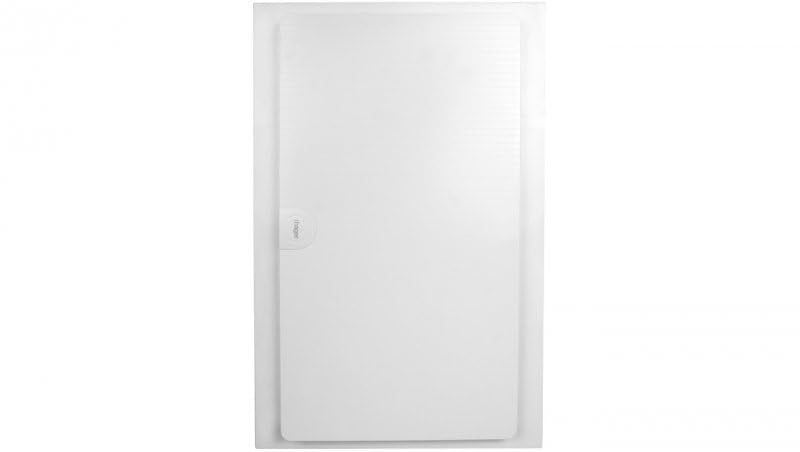
Figure 1: Front view of the Hager VF312PD Electrical Enclosure. This image shows the rectangular white enclosure with its smooth, slightly recessed door. The Hager brand logo is subtly visible on the left side of the door, indicating the manufacturer.
4. Operating the Enclosure
The Hager VF312PD is a passive electrical enclosure designed to house and protect electrical components. It does not have active operational controls. Its primary function is to provide a safe and organized environment for electrical installations.
- Access: To access the internal components, open the front door of the enclosure. Ensure power is disconnected before opening if any live components are present.
- Protection: Once closed, the enclosure provides IP40 protection, safeguarding internal components from solid objects larger than 1mm and accidental contact.
5. Maintenance
Regular maintenance ensures the longevity and continued safety of your Hager VF312PD Electrical Enclosure.
- Cleaning: Clean the exterior of the enclosure periodically with a soft, damp cloth. Do not use abrasive cleaners or solvents.
- Inspection: Annually, or more frequently in dusty environments, inspect the enclosure for:
- Signs of physical damage (cracks, dents).
- Loose mounting screws.
- Accumulation of dust or debris inside (if opened for inspection, ensure power is off).
- Integrity of cable entries and seals.
- Component Check: If the enclosure is opened for inspection, also check the internal electrical components for any signs of overheating, loose connections, or wear.
6. Troubleshooting
This section addresses common issues related to the enclosure itself. For issues with internal electrical components, refer to their respective manuals.
| Problem | Possible Cause | Solution |
|---|---|---|
| Enclosure door does not close properly. | Obstruction, damaged hinge/latch, or warped enclosure. | Check for obstructions. Inspect hinges and latch for damage. If warped, consider replacement. |
| Dust accumulation inside enclosure. | Improperly sealed cable entries, damaged enclosure, or very dusty environment. | Ensure cable entries are properly sealed. Inspect enclosure for cracks. Clean regularly. |
| Enclosure feels loose on wall. | Loose mounting screws or inadequate mounting hardware. | Tighten mounting screws. If necessary, reinforce mounting points or use stronger hardware. |
7. Specifications
| Attribute | Value |
|---|---|
| Brand | Hager |
| Model Number | VF312PD |
| Product Dimensions (L x W x H) | 13.86 x 3.84 x 21.38 inches (352 mm x 97.5 mm x 543 mm) |
| Item Weight | 12.7 ounces (0.36 Kilograms) |
| Ingress Protection (IP) Rating | IP40 (Protected against solid objects over 1mm, no protection against liquids) |
| Manufacturer | Hager |
| ASIN | B07QNF6N9P |
| Date First Available | July 23, 2020 |
8. Warranty and Support
For warranty information and technical support regarding your Hager VF312PD Electrical Enclosure, please refer to the official Hager website or contact their customer service department. Keep your purchase receipt as proof of purchase.
Hager Official Website: www.hager.com
Related documentsVF312PD


Ask a question about this manual
Ask about setup, troubleshooting, compatibility, parts, safety, or missing instructions. Manuals+ will review the question and use this page’s manual context to help answer it.