
Introduction
The Bose Surround Speakers 700 are designed to provide an immersive surround sound experience for your home entertainment system. These wireless speakers integrate seamlessly with compatible Bose soundbars, enhancing audio with precise effects and clear sound. This manual provides essential information for setting up, operating, and maintaining your speakers.
For optimal performance, these speakers are intended for use with the Bose Soundbar 700, Bose Soundbar 500, and SoundTouch 300 soundbar. They are not compatible with all Bose soundbar models; please verify compatibility with your existing system.
What's in the Box
Verify that all components are present before beginning installation:
- Two (2) OmniJewel satellite speakers
- Two (2) Unique for OmniJewel Maxwell wireless receivers
- Two (2) AC2 adapters
- Two (2) Power cords
- Two (2) Two-pin speaker cables
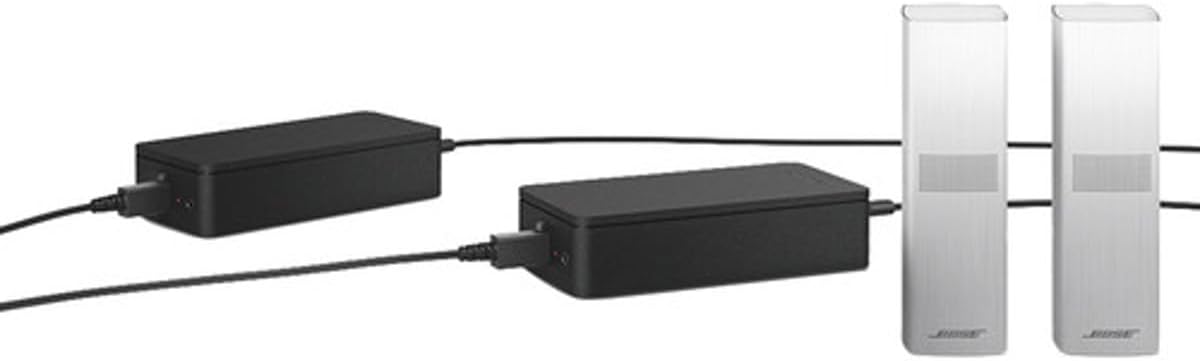
Image: Included components for the Bose Surround Speakers 700, showing the satellite speakers, wireless receivers, and cables.
Setup
- Positioning the Speakers: Place the two satellite speakers in the rear of your listening area, ideally equidistant from the main listening position and facing towards it. Ensure they are positioned to create an optimal surround sound field.
- Connecting the Speakers to Receivers: Connect each OmniJewel satellite speaker to its corresponding wireless receiver using the provided two-pin speaker cables. Ensure a secure connection.
- Powering the Receivers: Connect each AC2 adapter to a wireless receiver, then plug the power cords into the AC2 adapters and into a power outlet. The receivers will power on automatically.
- Pairing with Your Soundbar:
- Ensure your compatible Bose soundbar (Soundbar 700, Soundbar 500, or SoundTouch 300) is powered on.
- Open the Bose Music app on your mobile device. If you do not have the app, download it from your device's app store.
- Follow the in-app instructions to add the Surround Speakers 700 to your existing soundbar system. The app will guide you through the wireless pairing process.
- ADAPTiQ Audio Calibration: After pairing, use the ADAPTiQ audio calibration system (accessible via the Bose Music app) to optimize the sound performance for your specific room acoustics. Follow the on-screen prompts carefully.

Image: Bose Surround Speakers 700 integrated with a Bose soundbar, demonstrating a typical setup configuration.
Operating
Once successfully set up and paired with your soundbar, the Bose Surround Speakers 700 operate automatically. They will activate when your soundbar is in use and receive audio signals wirelessly.
- Volume Control: The volume of the surround speakers is typically controlled in conjunction with your main soundbar volume. Fine-tuning of the surround speaker level can be done through the Bose Music app settings.
- Audio Source: The speakers will reproduce surround sound channels from compatible audio sources (e.g., movies, TV shows, games with 5.1 or higher audio tracks). For stereo content, their contribution may be minimal or processed to simulate surround sound, depending on your soundbar's settings.
- Bose Music App: Use the Bose Music app for advanced settings, firmware updates, and to manage your Bose smart home system.
Maintenance
To ensure the longevity and optimal performance of your Bose Surround Speakers 700, follow these maintenance guidelines:
- Cleaning: Gently wipe the exterior surfaces of the speakers and receivers with a soft, dry cloth. Do not use liquid cleaners, solvents, or chemicals, as these may damage the finish or internal components.
- Placement: Avoid placing the speakers in direct sunlight, near heat sources, or in areas with high humidity. Ensure adequate ventilation around the wireless receivers.
- Cables: Periodically check all cable connections for security and ensure they are not pinched or damaged.
Troubleshooting
If you encounter issues with your Bose Surround Speakers 700, refer to the following common solutions:
- No Sound from Surround Speakers:
- Ensure the wireless receivers are powered on and their indicator lights are active.
- Verify that the speakers are correctly paired with your soundbar via the Bose Music app.
- Check the audio output settings on your television or source device. Ensure it is set to a surround sound format (e.g., Dolby Digital, DTS) rather than PCM stereo, which may limit surround speaker output.
- Confirm that the source content you are playing contains surround sound information. Some content, especially older or streaming-specific material, may only be stereo.
- Low Volume from Surround Speakers:
- Adjust the surround speaker level in the Bose Music app settings.
- If you used ADAPTiQ calibration, ensure the process was completed correctly. Some users report improved surround volume by temporarily covering the speakers during ADAPTiQ calibration to make the system calibrate them louder.
- Intermittent Audio or Connectivity Issues:
- Ensure the wireless receivers are within range of your soundbar and not obstructed by large metal objects.
- Try restarting your soundbar and the surround speaker receivers by unplugging them from power for 30 seconds and then plugging them back in.
- Check for any firmware updates for your soundbar and speakers through the Bose Music app.
- Compatibility: These speakers are designed for specific Bose soundbars (700, 500, SoundTouch 300). They may not function correctly or at all with other soundbar models.
For further assistance, consult the Bose Music app's help section or visit the official Bose support website.
Specifications
| Model Name | Surround Speakers 700 |
| Model Number | 834402-1200 |
| Speaker Type | Surround |
| Color | White |
| Product Dimensions (each speaker) | 1.84"D x 1.84"W x 5.77"H |
| Item Weight | 5.06 Pounds (total for pair with receivers) |
| Connectivity Technology | Wireless |
| Wireless Communication Technology | Bluetooth |
| Maximum Wireless Range | 30 Feet (9 Meters) |
| Compatible Devices | Bose Soundbar 700, Bose Soundbar 500, SoundTouch 300 soundbar |
| Included Components | 2 OmniJewel satellite speakers, 2 wireless receivers, 2 AC2 adapters, 2 power cords, 2 two-pin speaker cables |
| UPC | 017817806992 |

Image: Front view of the Bose Surround Speakers 700.
Warranty and Support
The Bose Surround Speakers 700 come with a limited warranty. For detailed information regarding warranty coverage, terms, and conditions, please refer to the warranty card included with your product or visit the official Bose website.
For technical support, product registration, or to access additional resources, please visit the Bose support website or contact Bose customer service. Keep your proof of purchase and model number (834402-1200) readily available when seeking support.


