
Introduction
The Oakton WD-35634-35 PCTSTestr 50 is a versatile, waterproof pocket tester designed for accurate measurement of pH, conductivity (Cond), Total Dissolved Solids (TDS), and salinity. This device is suitable for various applications including water quality testing, wastewater analysis, laboratory use, and industrial plant monitoring. Its robust design and advanced features ensure reliable performance in diverse environments.
Please read this manual thoroughly before operating the device to ensure proper use and to maximize its lifespan.
Product Features
- Multi-parameter Measurement: Combines pH, conductivity, TDS, and salinity testing in a single, compact unit.
- Waterproof Design: Ensures durability and reliability in wet conditions.
- Replaceable Sensor Module: Allows for cost-effective maintenance by replacing only the sensor.
- Automatic Buffer Recognition: Supports up to 3-point pH calibration with NIST or USA buffer standards.
- Auto-ranging Conductivity: Automatically adjusts range based on sample concentration.
- Adjustable Temperature Coefficient: User-adjustable for precise conductivity measurements.
- Self-adjusting TDS/Salinity Factor: Enhances accuracy for TDS and salinity readings.
- Leakproof Cap: Functions as a sample/calibration cup, hydrating cup, and stabilizing base.
- Low-Battery Indicator: Provides timely notification for battery replacement.
- Auto-shutoff: Conserves battery life.
Component Identification
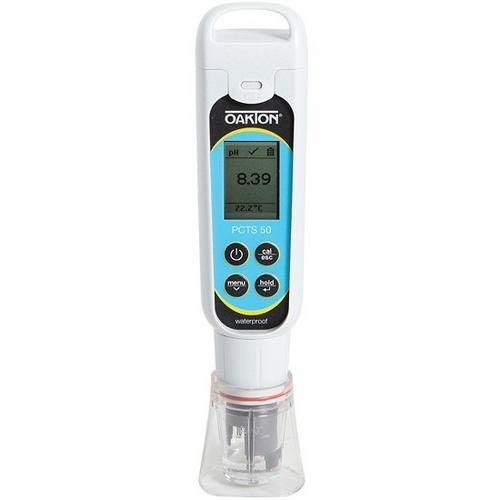
Figure 1: Oakton WD-35634-35 PCTSTestr 50 pH/TDS/Salinity Tester. The image displays the tester with a digital screen showing a pH reading of 8.39 and a temperature of 22.2°C. Below the screen are control buttons for power, calibration/escape, menu, and hold. The lower part of the device shows the sensor protected by a clear cap.
Refer to Figure 1 for a visual guide to the tester's components:
- LCD Display: Shows measurement readings, temperature, and status indicators.
- Power Button: Turns the tester on or off.
- CAL/ESC Button: Initiates calibration mode or exits a menu/setting.
- MENU Button: Accesses settings and configuration options.
- HOLD Button: Freezes the current reading on the display.
- Sensor Module: Contains the pH electrode and conductivity pins.
- Sensor Cap: Protects the sensor and can be used as a sample cup.
Setup
1. Battery Installation
- Twist off the battery compartment cover located at the top of the tester.
- Insert four 1.5V A76 batteries, ensuring correct polarity.
- Replace the battery compartment cover, ensuring it is securely tightened to maintain the waterproof seal.
2. Initial Sensor Preparation
- Remove the sensor cap.
- Rinse the sensor module with distilled or deionized water.
- Condition the pH electrode by soaking it in pH 7 buffer solution for at least 30 minutes before first use or after prolonged dry storage.
Calibration
Regular calibration ensures the accuracy of your PCTSTestr 50. Calibrate pH daily or before critical measurements. Calibrate conductivity/TDS/salinity weekly or as needed.
1. pH Calibration
- Turn on the tester.
- Press the CAL/ESC button to enter pH calibration mode. The display will show "CAL" and the current pH buffer value.
- Rinse the sensor with distilled water and immerse it in the first pH buffer solution (e.g., pH 7.00). Ensure the sensor is fully submerged.
- Wait for the reading to stabilize. The tester will automatically recognize the buffer and calibrate.
- Rinse the sensor and immerse it in the second pH buffer solution (e.g., pH 4.01 or pH 10.00).
- Wait for stabilization and automatic calibration. For 3-point calibration, repeat with a third buffer.
- Press CAL/ESC again or to exit calibration mode.
2. Conductivity/TDS/Salinity Calibration
- Turn on the tester and switch to the desired mode (Cond, TDS, or Salinity) using the MENU button.
- Press the CAL/ESC button to enter calibration mode. The display will show "CAL" and a flashing conductivity standard value.
- Rinse the sensor with distilled water and immerse it in the appropriate conductivity standard solution (e.g., 1413 µS/cm).
- Wait for the reading to stabilize. The tester will automatically calibrate.
- Press CAL/ESC again or to exit calibration mode.
Operating Instructions
1. Taking Measurements
- Press the Power button to turn on the tester.
- Remove the sensor cap.
- Rinse the sensor with distilled water and then with a small amount of the sample to be tested.
- Immerse the sensor into the sample solution, ensuring the pH bulb and conductivity pins are fully submerged. Stir gently to remove air bubbles.
- Wait for the reading to stabilize on the LCD display. The primary reading (pH, Cond, TDS, or Salinity) will be shown, along with the temperature.
- To switch between measurement modes (pH, Cond, TDS, Salinity), press the MENU button repeatedly until the desired mode is displayed.
- To hold a reading, press the HOLD button. Press again to release.
- After measurement, rinse the sensor thoroughly with distilled water.
- Press the Power button to turn off the tester.
2. Temperature Compensation
The PCTSTestr 50 features automatic temperature compensation (ATC) for pH and conductivity measurements. The temperature is displayed simultaneously with the primary reading. The temperature coefficient for conductivity can be adjusted via the menu settings if required for specific applications.
Maintenance
1. Sensor Cleaning and Storage
- After Each Use: Rinse the sensor thoroughly with distilled or deionized water to prevent sample residue buildup.
- Routine Cleaning: If readings become sluggish or inaccurate, clean the sensor with a mild detergent solution or a specialized electrode cleaning solution. Rinse thoroughly afterward.
- Long-Term Storage: Always store the pH electrode in a hydrating solution (e.g., pH 4 buffer or electrode storage solution) within the sensor cap. Never store dry. The conductivity pins can be stored dry.
2. Battery Replacement
When the low-battery indicator appears on the display, replace all four 1.5V A76 batteries as described in the "Setup" section. Ensure the battery compartment is sealed tightly after replacement.
3. Sensor Module Replacement
If the sensor module becomes damaged or its performance degrades significantly despite cleaning and calibration, it can be replaced. Refer to the manufacturer's instructions for specific replacement procedures for the WD-35634-35 model.
Troubleshooting
| Problem | Possible Cause | Solution |
|---|---|---|
| No display/Tester won't turn on | Dead batteries; Incorrect battery installation | Replace batteries; Check battery polarity. |
| Inaccurate or unstable readings | Sensor dirty; Sensor dry; Calibration needed; Expired buffer solutions | Clean sensor; Re-hydrate pH electrode; Perform calibration; Use fresh buffer solutions. |
| "Err" or "CAL" error during calibration | Incorrect buffer solution; Contaminated buffer; Damaged sensor | Ensure correct buffer for calibration point; Use fresh buffer; Clean or replace sensor module. |
| Slow response time | Sensor dirty; pH electrode dehydrated | Clean sensor; Re-hydrate pH electrode in storage solution. |
Specifications
- Model: Oakton WD-35634-35 PCTSTestr 50
- Parameters Measured: pH, Conductivity, TDS, Salinity, Temperature
- Temperature Compensation: Automatic (ATC)
- Calibration: Up to 3-point pH, 1-point Conductivity/TDS/Salinity
- Power: 4 x 1.5V A76 batteries
- Waterproof Rating: Yes
- Item Weight: 0.01 ounces
- Manufacturer: Oakton
Note: For detailed ranges and accuracy specifications, please refer to the official product datasheet or manufacturer's website.
Warranty and Support
For information regarding warranty coverage, technical support, or service, please contact Oakton customer service or visit their official website. Keep your purchase receipt as proof of purchase for warranty claims.
Manufacturer: Oakton
Website: www.oakton.com


