
JARLINK OP19537
JARLINK 30X 60X Illuminated Jewelers Loupe Magnifier Instruction Manual
Model: OP19537
Introduction
This manual provides detailed instructions for the proper use and maintenance of your JARLINK 30X 60X Illuminated Jewelers Loupe Magnifier. Designed for precision viewing, this device is ideal for examining small objects with enhanced clarity and illumination. Please read this manual thoroughly before operation to ensure optimal performance and longevity of your magnifier.

Image: The JARLINK 30X 60X Illuminated Jewelers Loupe Magnifier in both white and black variants.
Package Contents
Verify that all items are present in your package:
- 2 x JARLINK Jewelers Loupe Magnifiers (White & Black)
- 6 x LR1130 Button Batteries (pre-installed or separate)
- 2 x Battery Replacement Keys
- 2 x Fabric Storage Bags
- 1 x Product Manual

Image: A visual representation of the items included in the JARLINK loupe package.
Product Features
- Dual Lens System: Equipped with a primary 30x22mm lens and a supplementary 60x12mm lens for varied magnification needs.
- Illuminating LED Light: Integrated LED lights provide bright, clear illumination for enhanced viewing. The light automatically switches to illuminate the active lens.
- Compact and Foldable Design: Constructed from durable aluminum and plastic, the loupe folds for easy portability and storage.
- Versatile Application: Suitable for examining gems, jewelry, coins, stamps, rocks, watches, hobbies, antiques, models, and more.

Image: Examples of the JARLINK loupe's application in jewelry appraisal, stamp collection, and clock repair.
Setup
Battery Installation/Replacement
The loupe comes with LR1130 button batteries pre-installed. If the LED light dims or stops working, follow these steps to replace the batteries:
- Locate the battery cover on the side of the loupe.
- Insert the provided battery replacement key into the small slot on the battery cover.
- Gently pry open the battery cover.
- Remove the old batteries and insert three new LR1130 button batteries, ensuring correct polarity (+/-).
- Replace the battery cover, ensuring it clicks securely into place.

Image: Illustration demonstrating the battery replacement process using the provided key.
Operating Instructions
Using the Magnifier
- Unfold the Loupe: Gently unfold the loupe from its compact position. The lenses will become accessible.
- Select Magnification:
- For 30X magnification, use the larger lens (30x22mm).
- For 60X magnification, slide out the smaller lens (60x12mm).
- Activate LED Light: Locate the ON/OFF switch on the side of the loupe. Slide it to the 'ON' position to activate the LED illumination. The light will automatically direct towards the currently extended lens.
- Positioning for Clarity: For optimal clarity, hold the lens very close to the object you wish to view. The focal distance for high magnification loupes is short. If the image appears blurry, inverted, or out of focus, adjust the distance between the lens and the object until a clear image is achieved.
- Fold for Storage: When not in use, fold the loupe back into its compact form to protect the lenses and conserve battery life.

Image: Visual guide to unfolding the loupe, locating LED lights, and the battery replacement mechanism.

Image: Demonstrates the difference in detail between 30X and 60X magnification.
Maintenance
- Cleaning Lenses: Use a soft, lint-free cloth specifically designed for optical lenses to clean the magnifier lenses. Avoid abrasive materials or harsh chemicals.
- Storage: Store the loupe in its provided fabric bag when not in use to protect it from dust and scratches. Keep it in a dry place away from direct sunlight and extreme temperatures.
- Battery Care: If the loupe will not be used for an extended period, remove the batteries to prevent leakage and potential damage to the device.
Troubleshooting
| Problem | Possible Cause | Solution |
|---|---|---|
| Image is blurry or out of focus. | Incorrect distance between lens and object. | Adjust the distance until the object is in clear focus. High magnification requires very close proximity to the object. |
| LED light does not turn on. | Batteries are depleted or incorrectly installed. | Check battery polarity. Replace batteries if necessary (refer to 'Battery Installation/Replacement' section). |
| Lenses appear dirty or scratched. | Dust or debris on the lens surface; improper cleaning. | Clean lenses with a soft, lint-free optical cloth. Store in the fabric bag to prevent scratches. |
Specifications
- Brand: JARLINK
- Model Number: OP19537
- Magnification Strength: 30X (22mm lens), 60X (12mm lens)
- Lens Material: Glass
- Illumination: LED Light
- Power Source: 3 x LR1130 Button Batteries (per loupe)
- Product Dimensions: Approximately 1.6"L x 2"W (folded)
- Item Weight: 2.4 ounces (per loupe)
- UPC: 733810097495
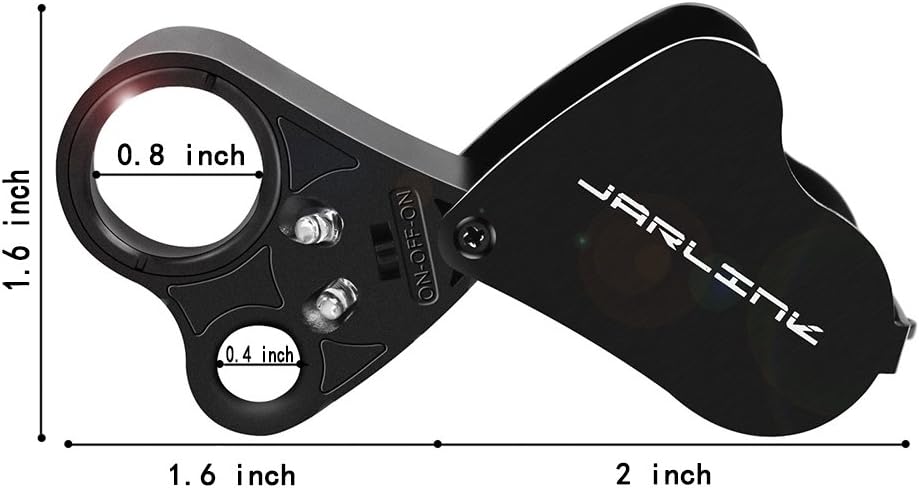
Image: Detailed dimensions of the JARLINK Jewelers Loupe Magnifier.
Warranty and Support
JARLINK is committed to providing quality products. For any questions, concerns, or support needs regarding your magnifier, please refer to the contact information provided with your purchase or visit the official JARLINK website. Please retain your proof of purchase for warranty claims.
Ask a question about this manual
Ask about setup, troubleshooting, compatibility, parts, safety, or missing instructions. Manuals+ will review the question and use this page’s manual context to help answer it.