
Introduction
This manual provides instructions for the proper installation and use of ReplacementScrews stand screws, specifically designed for the Vizio E421VA television model. These screws are intended to securely attach the original factory legs or stand to your TV.
Please read these instructions carefully before proceeding with the installation to ensure correct assembly and safe operation of your television stand.
Product Contents
The screw kit includes the following components:
- Four (4) short silver machine screws
- Four (4) long silver machine screws
- Total of eight (8) metric screws
These chrome-plated screws are designed for corrosion resistance and a sleek appearance, matching original equipment specifications.
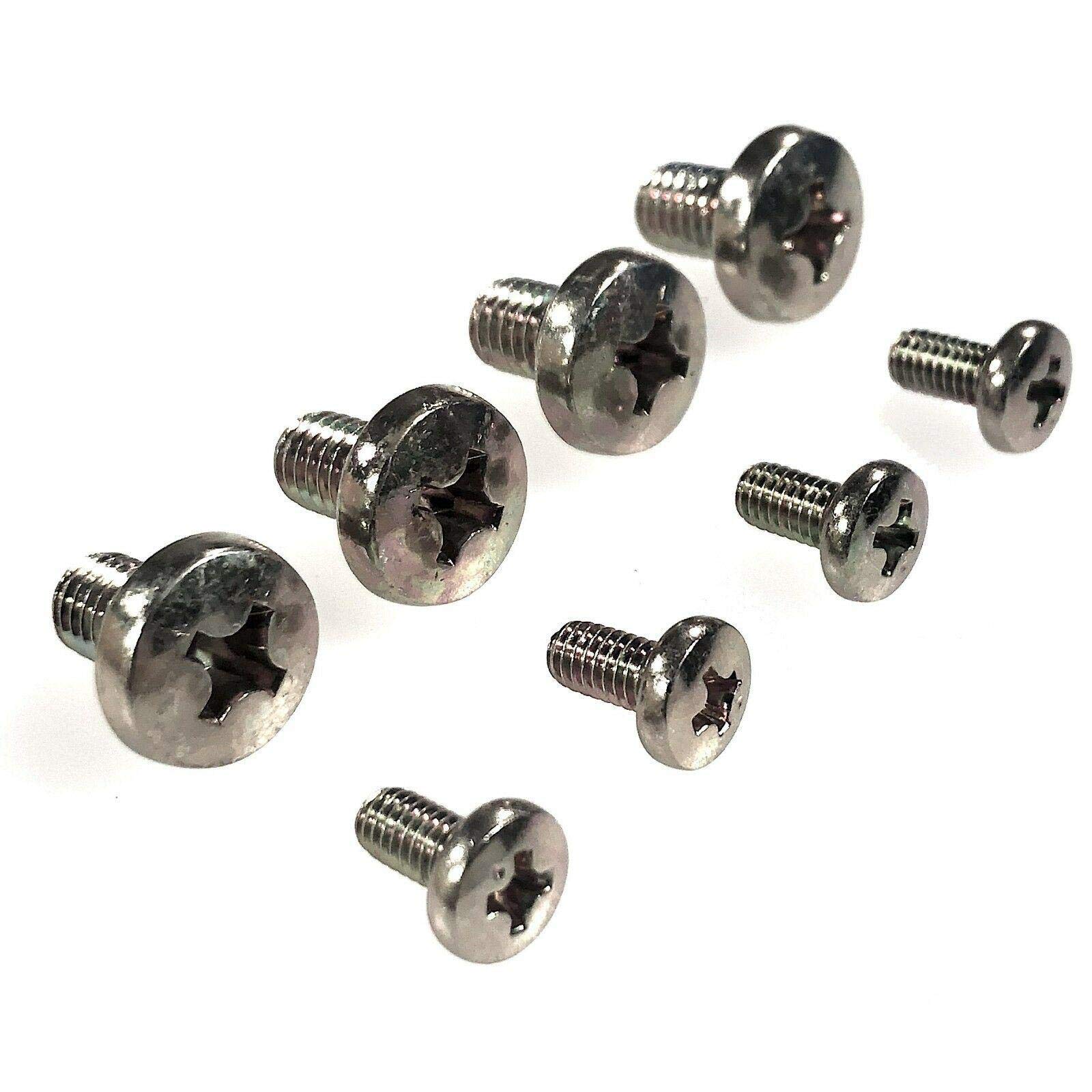
Image: The complete set of eight stand screws, including four short and four long machine screws.
Compatibility
This screw kit is specifically designed for the Vizio E421VA television model. To confirm compatibility, please verify the model number E421VA on the back label of your television.
Important Note: These screws are intended for attaching the original factory legs or stand to your Vizio E421VA TV. They are not suitable for universal stands or wall mounting applications, as those typically require different screw types and sizes.
Setup and Installation
Follow these steps to attach the stand to your Vizio E421VA television:
- Prepare the TV: Carefully place your Vizio E421VA television face down on a soft, clean, and stable surface (e.g., a blanket or foam padding) to prevent screen damage. Ensure the surface is large enough to support the TV safely.
- Identify Stand Components: Locate the original factory stand components for your Vizio E421VA. These typically include the base and any vertical support columns.
- Assemble the Stand (if necessary): If your stand requires assembly (e.g., attaching vertical columns to the base), use the appropriate screws from the kit. The kit contains both short and long machine screws. Refer to your Vizio E421VA's original stand assembly instructions to determine which screws are used for this step.
- Attach Stand to TV: Align the assembled stand with the mounting holes on the back or bottom of your Vizio E421VA television.
- Insert Screws: Insert the remaining screws from the kit into the designated holes to secure the stand to the TV. The fine-threaded machine screws are designed to fit into pre-threaded metal holes or inserts on the television.
- Tighten Screws: Using a suitable screwdriver, carefully tighten all screws until the stand is firmly attached to the television. Do not overtighten, as this can strip the threads or damage the TV. Ensure the stand is stable and does not wobble.
- Position the TV: With assistance, carefully lift the television and place it upright on a flat, stable surface.
Always ensure the television is stable before connecting power or other cables.
Operating
Once the stand is securely attached, the television is ready for use. Ensure the TV is placed on a level and stable surface to prevent accidental tipping. Do not place heavy objects on the stand or television.
Maintenance
To maintain the stability of your television stand:
- Periodically check all screws to ensure they remain tight. If any screws feel loose, gently tighten them.
- Avoid moving the television frequently by dragging it, as this can stress the stand and screws. Lift the TV when relocating it.
- Keep the screws clean and free from debris. The chrome plating helps resist corrosion, but extreme conditions should be avoided.
Troubleshooting
- Screws do not fit:
Ensure you have the correct Vizio E421VA model. These screws are specifically sized and threaded for this model's original stand. Double-check the model number on your TV's back label. Also, confirm you are using the correct screws for the specific part of the stand (short vs. long).
- Stand feels wobbly after installation:
Verify that all eight screws are fully inserted and tightened. Ensure the stand components are correctly assembled according to your TV's original instructions. If the issue persists, re-check the TV model compatibility.
- Screws are difficult to turn:
Do not force the screws. Ensure they are aligned correctly with the threaded holes. Forcing them can strip the threads. If resistance is met, remove the screw, re-align, and try again. If the problem persists, the threads in the TV or stand might be damaged, or the screws might be incorrect for your specific stand version.
Specifications
| Fastener Type | Machine Screw |
| Thread Coverage | Fully Threaded |
| Metal Type | Alloy Steel |
| Finish | Chrome Plated (Silver) |
| Total Screws | 8 (4 short, 4 long) |
| Item Weight | 0.9 ounces |
| Package Dimensions | 6.5 x 3.5 x 0.5 inches |
Important Safety Information
- Always handle the television with care and ideally with two people to prevent injury or damage.
- Ensure the TV is placed on a sturdy, level surface that can support its weight.
- Keep small parts, including screws, out of reach of children to prevent choking hazards.
- Do not modify the screws or use them for purposes other than their intended use (attaching the original Vizio E421VA TV stand).
Warranty and Support
For any questions regarding the installation or compatibility of these screws, please contact ReplacementScrews customer support. While specific warranty details are not provided, ReplacementScrews aims to provide quality products. Please refer to your purchase documentation or the seller's information for return or replacement policies.
For information regarding your Vizio E421VA television, please consult the original Vizio user manual or Vizio's official support channels.