
Important Safeguards
When using electrical appliances, basic safety precautions should always be followed to reduce the risk of fire, electric shock, and injury to persons, including the following:
- Read all instructions before operating the bread machine.
- Do not touch hot surfaces. Use handles or knobs.
- To protect against electric shock, do not immerse cord, plugs, or housing in water or other liquid.
- Close supervision is necessary when any appliance is used by or near children.
- Unplug from outlet when not in use and before cleaning. Allow to cool before putting on or taking off parts.
- Do not operate any appliance with a damaged cord or plug or after the appliance malfunctions or has been damaged in any manner.
- The use of accessory attachments not recommended by the appliance manufacturer may cause injuries.
- Do not use outdoors.
- Do not let cord hang over edge of table or counter or touch hot surfaces.
- Do not place on or near a hot gas or electric burner, or in a heated oven.
- Extreme caution must be used when moving an appliance containing hot oil or other hot liquids.
- To disconnect, turn any control to "off", then remove plug from wall outlet.
- Do not use appliance for other than intended use.
- Avoid contact with moving parts.
- This appliance has a polarized plug (one blade is wider than the other). To reduce the risk of electric shock, this plug is intended to fit into a polarized outlet only one way. If the plug does not fit fully into the outlet, reverse the plug. If it still does not fit, contact a qualified electrician. Do not attempt to modify the plug in any way.
Product Overview
The Aicok 2LB Stainless Steel Programmable Bread Machine is designed for automatic bread making. It features a durable stainless steel exterior, a nonstick ceramic pan, and an automatic fruit and nut dispenser.

Image: Key features including the control knob, viewing window, and ventilation outlets.
Key Components:
- Control Panel: Intuitive interface for program selection, time setting, and start/stop functions.
- Baking Pan: Removable nonstick ceramic pan for easy cleaning and bread removal.
- Kneading Paddle: Detachable paddle for mixing ingredients.
- Automatic Fruit & Nut Dispenser: Automatically adds ingredients at the optimal time during the baking cycle.
- Viewing Window: Allows monitoring of the baking process without opening the lid.
- Hot Air Outlet: Vents for heat dissipation during operation.
Control Panel and Display
Familiarize yourself with the control panel to operate the bread machine effectively. The display shows program number, time, loaf size, and crust color settings.
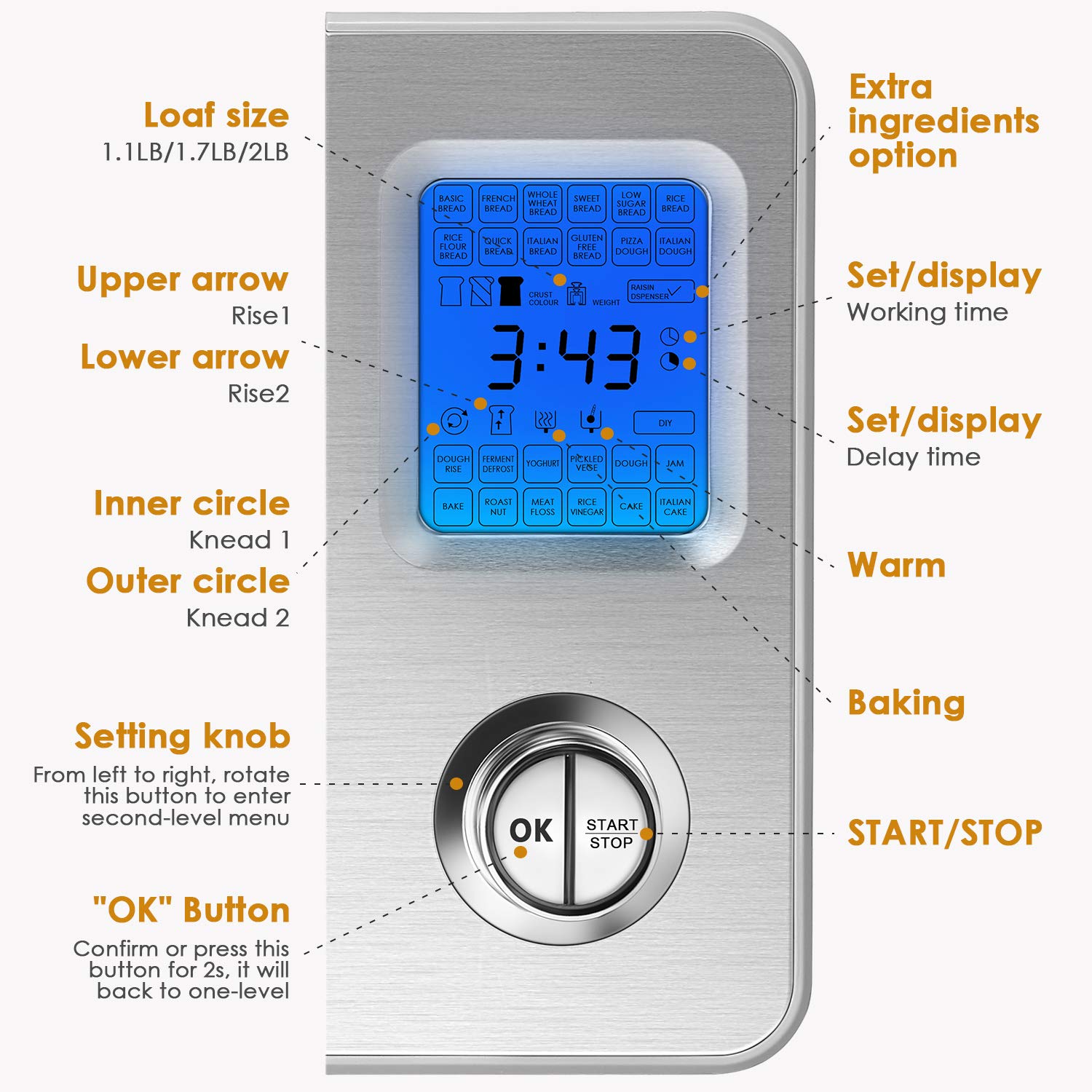
Image: Control panel layout with descriptions for each function.
- Loaf Size: Indicates selected loaf weight (1.1LB, 1.7LB, 2LB).
- Upper/Lower Arrow: Used to navigate through menu options or adjust settings.
- Inner/Outer Circle: Refers to kneading cycles (Knead 1, Knead 2).
- Setting Knob: Rotate to select programs or enter sub-menus.
- OK Button: Confirm selections or press for 2 seconds to return to the previous menu level.
- Set/Display Working Time: Shows the remaining time for the current program.
- Set/Display Delay Time: Used to set the delay start timer.
- Warm: Indicates the keep warm function is active.
- Baking: Indicates the baking phase of the program.
- START/STOP Button: Initiates or cancels a program.
Before First Use
- Unpack the bread machine and all accessories. Remove all packaging materials.
- Wipe the exterior of the bread machine with a damp cloth.
- Wash the bread pan, kneading paddle, and fruit/nut dispenser with warm, soapy water. Rinse thoroughly and dry all parts.
- Before first use, it is recommended to run the "Bake" program (Program 18) for 10 minutes without any ingredients to burn off any manufacturing residues. Ensure good ventilation during this process.
- Allow the machine to cool completely before proceeding with actual bread making.
Setup and Operation
Basic Bread Making Steps:
- Install Kneading Paddle: Place the kneading paddle onto the shaft inside the bread pan.
- Add Ingredients: Add liquid ingredients first, followed by dry ingredients. Make sure yeast is added last and does not come into direct contact with liquids or salt.
- Place Bread Pan: Insert the bread pan into the bread machine and twist it clockwise until it locks into place. Close the lid.
- Select Program: Use the setting knob to select your desired program (e.g., Basic Bread, Gluten-Free).
- Select Loaf Size and Crust Color: Use the appropriate buttons or knob to choose the loaf size (1.1LB, 1.7LB, 2LB) and crust color (Light, Medium, Dark).
- Start Program: Press the START/STOP button to begin the program. The machine will beep, and the display will show the remaining time.
- Remove Bread: Once the program is complete, the machine will beep. Unplug the machine, open the lid, and carefully remove the bread pan using oven mitts. Invert the pan to release the bread onto a wire rack to cool.
Program Modes (25-in-1)
The Aicok bread machine offers 25 pre-programmed settings for various types of bread and dough. Refer to the image below for a complete list of programs and display icons.
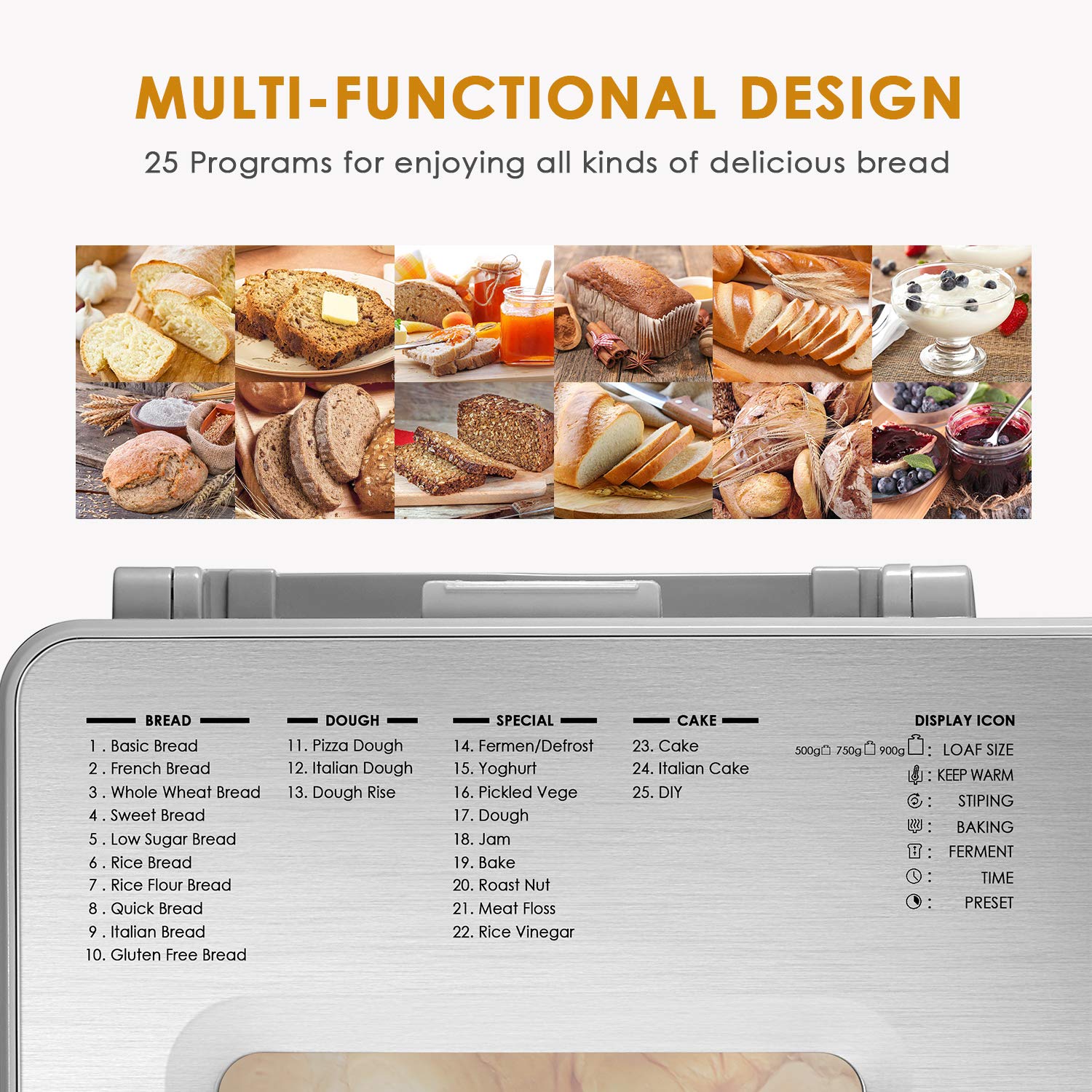
Image: Multi-functional design showcasing 25 programs and display icons.
- Bread Programs (1-10): Basic, French, Whole Wheat, Sweet, Low Sugar, Rice, Rice Flour, Quick, Italian, Gluten Free. These programs handle kneading, rising, and baking for different bread types.
- Dough Programs (11-13): Pizza Dough, Italian Dough, Dough Rise. These programs prepare dough for manual shaping and baking.
- Special Programs (14-22): Ferment/Defrost, Yoghurt, Pickled Vege, Dough, Jam, Bake, Roast Nut, Meat Floss, Rice Vinegar. These offer versatility beyond traditional bread.
- Cake Programs (23-24): Cake, Italian Cake. For baking various cakes.
- DIY Program (25): Allows custom setting of kneading, rising, and baking times.
Automatic Fruit & Nut Dispenser
The bread machine is equipped with an automatic dispenser for fruits, nuts, or other mix-ins. This dispenser releases ingredients at the optimal time during the kneading cycle, ensuring even distribution.
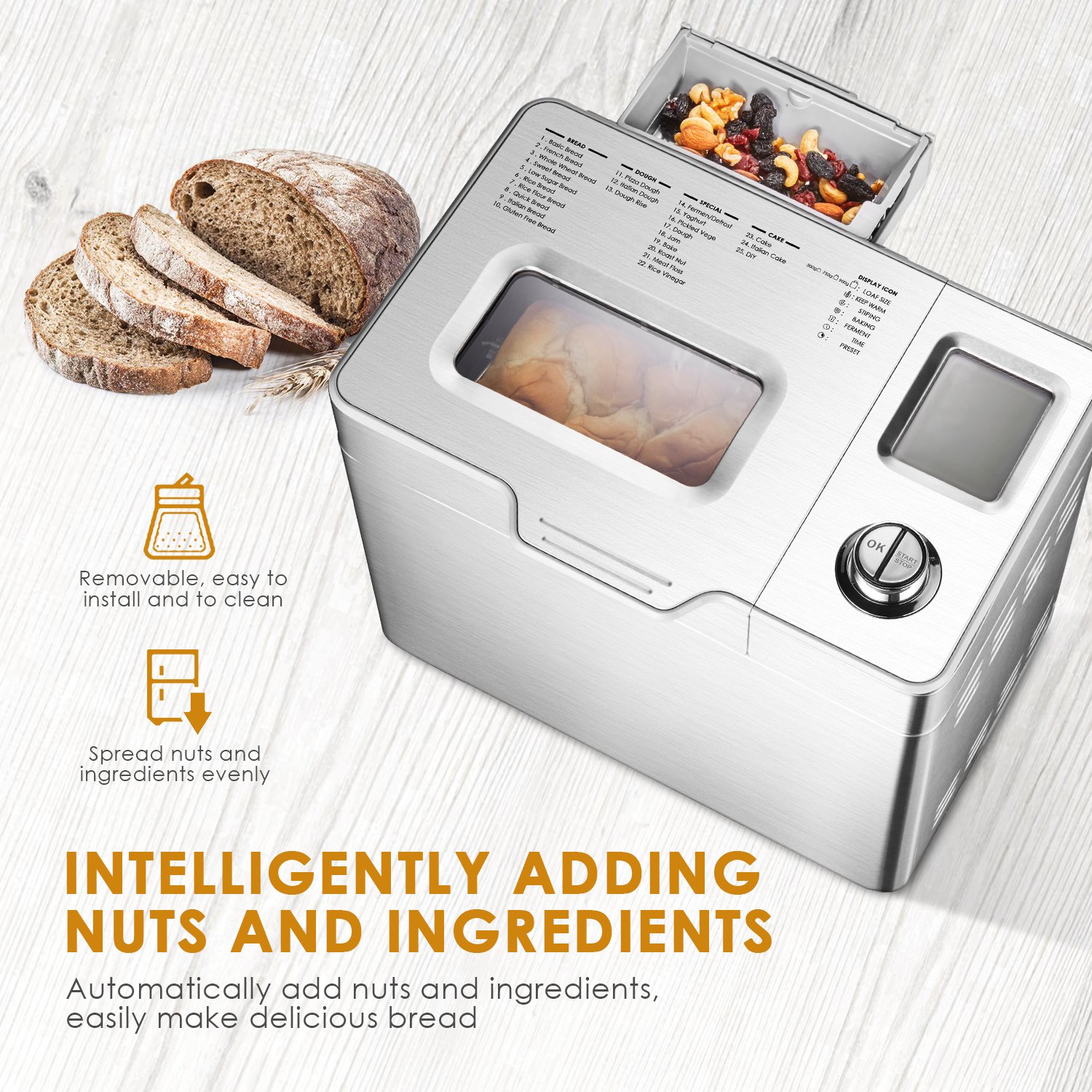
Image: Automatic fruit and nut dispenser, highlighting its ease of use and even ingredient distribution.
To use, simply open the dispenser lid and add your desired ingredients before starting the program. The machine will automatically open the dispenser and add the ingredients at the appropriate time.
Delay Timer and Keep Warm Function

Image: Features including Keep Warm, Memory Keeping, Delay Timer, and Loaf/Crust options.
- Delay Timer: Allows you to program the machine to start baking at a later time, up to 13 hours in advance. This is useful for having fresh bread ready at a specific time.
- Keep Warm: After the baking cycle is complete, the machine automatically enters a 1-hour keep warm phase to maintain the bread's temperature.
- Memory Function: The machine retains program settings for up to 10 minutes in case of a power interruption.
Maintenance and Cleaning
Proper cleaning and maintenance will ensure the longevity and optimal performance of your bread machine.
- Unplug and Cool: Always unplug the bread machine from the power outlet and allow it to cool completely before cleaning.
- Clean Bread Pan and Kneading Paddle: Remove the bread pan and kneading paddle. Wash them with warm, soapy water using a soft sponge. Do not use abrasive cleaners or metal scouring pads, as this can damage the nonstick coating. Rinse thoroughly and dry completely.
- Clean Fruit & Nut Dispenser: Detach the dispenser and wash it with warm, soapy water. Ensure no food residue remains. Dry thoroughly.
- Clean Exterior: Wipe the exterior of the bread machine with a damp cloth. Do not immerse the main unit in water or any other liquid.
- Clean Interior: Use a soft, damp cloth to wipe the interior of the baking chamber. Remove any crumbs or spills.
- Storage: Store the bread machine in a clean, dry place when not in use. Ensure all parts are dry before storage.
Troubleshooting
If you encounter issues with your bread machine, refer to the following common problems and solutions:
| Problem | Possible Cause | Solution |
|---|---|---|
| Bread does not rise or rises too much. | Incorrect yeast amount, expired yeast, water too hot/cold, incorrect flour type, too much/too little liquid. | Check yeast freshness and quantity. Use lukewarm water (105-115°F / 40-46°C). Ensure correct ingredient measurements. |
| Bread is too dense or heavy. | Too much flour, not enough liquid, old yeast, wrong program selected. | Measure ingredients precisely. Ensure yeast is active. Select appropriate program for the recipe. |
| Bread collapses during baking. | Too much liquid, too much yeast, high humidity, opening lid during rise cycle. | Reduce liquid slightly. Ensure correct yeast amount. Avoid opening the lid during rising and baking. |
| Kneading paddle stuck in bread. | Common occurrence. | Remove the paddle after the bread has cooled. A small hook tool is often provided for this purpose. |
| Machine does not start. | Not plugged in, lid not closed properly, program not selected. | Ensure power cord is securely plugged in. Close the lid firmly. Select a program and press START/STOP. |
Specifications
Refer to the following specifications for the Aicok 2LB Stainless Steel Programmable Bread Machine:

Image: Product dimensions of the bread machine and its pan.
- Model Number: 2LB
- Product Dimensions: 14.9 x 9.8 x 11.8 inches (approximately 37.8 x 24.9 x 30 cm)
- Item Weight: 17.5 pounds (approximately 7.9 kg)
- Material: Stainless Steel
- Capacity: 2 Pounds, 2.1 Pounds (various loaf sizes)
- Wattage: 650 watts
- Power: 120V~60Hz (Standard US)
- Programs: 25 pre-set programs
- Crust Colors: 3 options (Light, Medium, Dark)
- Delay Timer: Up to 13 hours
- Keep Warm Function: 1 hour automatic
Warranty and Support
For warranty information or technical support, please refer to the documentation included with your purchase or contact Aicok customer service. Keep your purchase receipt as proof of purchase for warranty claims.
Contact information for customer support can typically be found on the manufacturer's website or on the product packaging.

