
Introduction
The JISULIFE Handheld Mini Fan is a versatile 3-in-1 device designed for personal cooling, portable power, and illumination. This compact and rechargeable fan features a unique folding design, making it an ideal companion for travel, outdoor activities, or daily use. It integrates a fan, a power bank, and a flashlight into a single, convenient unit.
Safety Information
- When the fan is operating, the fan blades rotate at high speed. They will stop immediately if obstructed by foreign objects. Remove any obstructions before resuming normal operation.
- When the product is not in use, ensure the fan body is closed to prevent damage.
- When closing the storage cover, ensure the sequined fan blades are overlapped and straightened.
- This product is not waterproof. Do not rinse directly with water or use in bathrooms or highly humid environments. If water appears on the surface, wipe it off immediately before attempting to power on.
- Avoid using or storing the device in high-temperature environments (above 60℃) or confined spaces.
Package Contents
- JISULIFE Handheld Mini Fan (Model F8)
- USB Charging Cable
- Wrist Lanyard
- User Manual
Setup
Opening the Fan
The fan features a compact, foldable design. To open the fan for use, follow one of these methods:
- Method 1: Locate the small gap between the cover and the fan body. Gently pry it open to unfold the fan.
- Method 2: Press the base where the USB connectors are located. The main body on the top will expose itself, allowing you to pull it out and unfold the fan.

Figure 1: Two methods for opening the fan. Method 1 involves using a small gap, and Method 2 involves pressing the base to extend the fan body.
Initial Charging
Before first use, fully charge the fan using the provided USB charging cable. Connect the USB Type-C end to the fan's charging port and the USB-A end to a compatible power source (e.g., USB wall adapter, computer USB port, power bank).
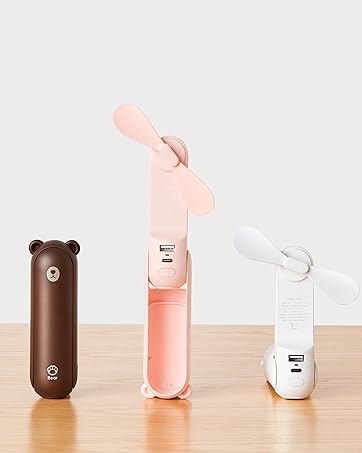
Figure 2: The fan being charged, also illustrating its capability to charge other devices.
Operating Instructions
Fan Operation
- Power On/Off & Speed Cycle: Short press the power button to turn the fan on. Each subsequent short press will cycle through the fan speeds (Speed 1, Speed 2) and then turn the fan off.
- Battery Life: The fan provides approximately 19 hours of cooling time on Speed 1 and 12 hours on Speed 2 on a full charge.

Figure 3: The fan in use, highlighting its long battery life at different speed settings.
Flashlight Operation
- Turn On/Off: Long press the power button to turn the flashlight on or off.
- Note: The fan and the flashlight functions cannot be used simultaneously.

Figure 4: The fan's integrated flashlight in operation.
Power Bank Function
The fan can serve as a backup power bank to charge your mobile devices. Connect your device to the USB-A output port on the fan using a compatible charging cable.
Key Features
- 3-in-1 Functionality: Combines a personal fan, a portable power bank, and a flashlight for multi-purpose utility.
- Long Battery Life: Offers up to 19 hours of cooling on a single charge, suitable for extended use.
- Pocket Design: Compact and lightweight (4.4 ounces, 1.46"D x 1.57"W x 4.72"H) for easy portability in a pocket or bag.
- 3-Stage Transformable Design: Can be used as a handheld fan (180° fold) or a desktop fan (270° fold) for versatile placement.
- Safety Blades: Features soft TPE material blades that automatically stop if obstructed, ensuring user safety.

Figure 5: The fan's unique folding design for handheld or desktop use.

Figure 6: The fan's compact size makes it easy to carry in a bag or pocket.

Figure 7: Demonstrating the fan's pocket size and safety features with soft blades.
Maintenance
- Cleaning: Use a soft, dry cloth to wipe the exterior of the fan. Do not use liquid cleaners or immerse the fan in water.
- Storage: Store the fan in a cool, dry place when not in use. Ensure the fan blades are properly folded and secured within the casing to prevent damage.
- Battery Care: To prolong battery life, avoid fully discharging the battery frequently. Recharge the fan regularly, even if not in constant use.
Troubleshooting
| Problem | Possible Cause | Solution |
|---|---|---|
| Fan does not turn on. | Low battery; Fan blades obstructed; Incorrect operation. | Charge the fan fully. Check for and remove any obstructions from the blades. Ensure you are short-pressing the power button. |
| Flashlight does not turn on. | Incorrect operation; Fan is currently running. | Ensure you are long-pressing the power button. Note that the fan and flashlight cannot operate simultaneously. Turn off the fan before activating the flashlight. |
| Fan does not charge or charges slowly. | Faulty charging cable; Incompatible power source; Damaged charging port. | Use the original charging cable or a high-quality USB-C cable. Ensure the power source provides sufficient output. Contact customer support if the issue persists. |
| Fan blades stop unexpectedly. | Obstruction detected. | The safety feature has activated. Remove any foreign objects from the blades and restart the fan. |
Specifications
| Feature | Detail |
|---|---|
| Brand | JISULIFE |
| Model Name | F8 |
| Color | Pink |
| Product Dimensions | 1.46"D x 1.57"W x 4.72"H |
| Item Weight | 4.4 ounces (124 Grams) |
| Power Source | Battery Powered |
| Battery Type | Rechargeable (1 AAA battery required, likely internal) |
| Working Hours (Fan) | 12-19 Hours (depending on speed) |
| Number of Fan Speeds | 2 |
| Noise Level | 60 dB |
| Wattage | 4 watts |
| Voltage | 5 Volts |
| Control Method | Touch (Button) |
| Connector Type | USB Type C (Input), USB Type A (Output for power bank) |
| Blade Material | Plastic (Soft TPE) |
| Special Features | 3 IN 1 (Fan, Flashlight, Power Bank), Foldable Design, Pocket Size |
Warranty and Support
For warranty information and customer support, please refer to the warranty card included with your product or visit the official JISULIFE website. Keep your purchase receipt as proof of purchase for any warranty claims.
You can also visit the JISULIFE Store on Amazon for more information: JISULIFE Amazon Store


