
Introduction
Thank you for choosing the XYOP RGB LED Strip Lights. This manual provides essential information for the safe and effective use of your LED strip lights. Please read it thoroughly before installation and operation, and retain it for future reference.
Safety Information
- Ensure the battery box is kept dry. While the LED strip is IP65 waterproof, the battery box is not.
- Use only 3 AA batteries (not included) of the specified type. Do not mix old and new batteries or different battery types.
- Remove batteries if the product is not used for an extended period to prevent leakage.
- Do not attempt to repair or modify the product. Refer all servicing to qualified personnel.
- Keep out of reach of children.
- Avoid direct eye exposure to the LED light for prolonged periods.
Package Contents
Please check the package contents upon opening to ensure all items are present and undamaged:
- 1 x RGB LED Strip Light (2 meters / 6.56 feet)
- 1 x 3-Key Mini Controller
- 1 x Battery Box (for 3 AA batteries)
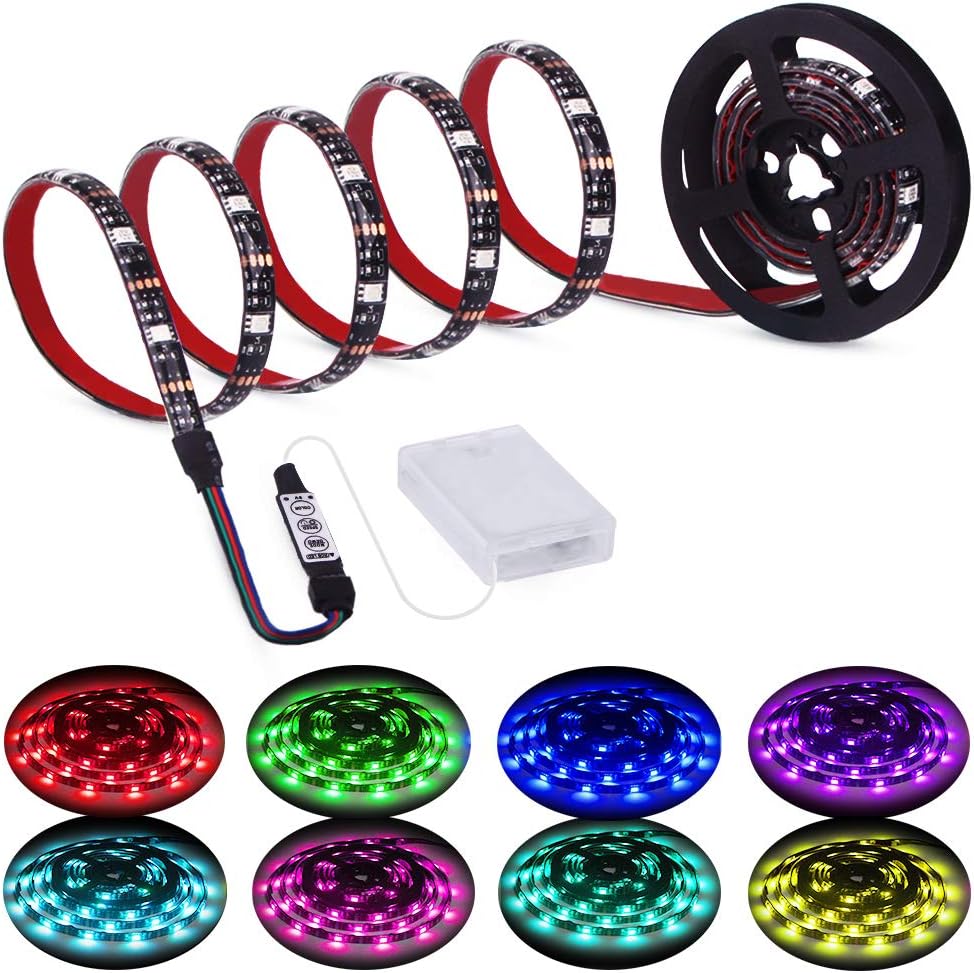
Image: Overview of the LED strip, mini controller, battery box, and various color outputs.
Product Features
- Length: 2 meters (6.56 feet)
- Power Source: Battery-powered (3 x AA batteries, not included)
- Control: Integrated 3-key mini controller
- Color Options: 20 static colors
- Dynamic Modes: 20 different dynamic lighting modes
- Adjustability: 8 levels of brightness adjustment for static colors, 8 levels of speed adjustment for dynamic modes
- Waterproof Rating: IP65 (LED strip only)
- Installation: Self-adhesive backing for easy mounting
- Customizable: Can be cut at designated marks to fit desired length
Setup
1. Battery Installation
- Open the battery compartment on the battery box.
- Insert 3 AA batteries, ensuring correct polarity (+/-).
- Close the battery compartment securely.

Image: Illustration of connecting the LED strip to the controller and battery box, highlighting the battery insertion and power switch.
2. Connecting Components
- Connect the LED strip connector to the mini controller's input. Ensure the arrows or markings on both connectors align for proper connection.
- Connect the mini controller's output to the battery box connector. Again, ensure proper alignment.
3. Mounting the LED Strip
- Clean the Surface: Before applying, ensure the surface is clean, dry, and free of dust or grease. This is crucial for strong adhesion.
- Peel and Stick: Carefully peel off the protective backing from the adhesive tape on the back of the LED strip. Press the strip firmly onto the desired surface.
- Cutting the Strip: If a shorter length is required, the LED strip can be cut at the designated cut marks (usually indicated by a copper pad and scissor icon). Only cut at these marks to avoid damaging the circuit.

Image: Demonstrates the super adhesive tape, the ability to cut the strip at marked intervals, and the IP65 waterproof rating of the strip.
Operation
The LED strip is controlled by the 3-key mini controller. Ensure the battery box switch is in the 'ON' position.

Image: Detailed view of the 3-key controller, showing the 'MODE/DEMO', 'SPEED/BRIGHTNESS/OFF', and 'COLOR' buttons and their functions.
Controller Functions:
- MODE/DEMO Button:
- Short press to cycle through 20 dynamic lighting modes.
- SPEED/BRIGHTNESS/OFF Button:
- When in a dynamic mode, short press to adjust the speed (8 levels).
- When in a static color mode, short press to adjust the brightness (8 levels).
- Long press to turn the lights OFF. Short press again to turn ON.
- COLOR Button:
- Short press to cycle through 20 static color options.
Maintenance
- Cleaning: Gently wipe the LED strip with a dry, soft cloth if it becomes dusty. Do not use harsh chemicals or abrasive cleaners.
- Battery Replacement: Replace all 3 AA batteries when the lights dim significantly or stop working. Ensure proper polarity.
- Storage: If storing for an extended period, remove the batteries from the battery box to prevent corrosion. Store the strip in a cool, dry place.
Troubleshooting
| Problem | Possible Cause | Solution |
|---|---|---|
| Lights do not turn on. | No batteries, dead batteries, incorrect battery polarity, loose connection, battery box switch OFF. | Insert fresh AA batteries with correct polarity. Check all connections are secure. Ensure the battery box switch is ON. |
| Lights are dim or flicker. | Low battery power. | Replace with fresh AA batteries. |
| Controller not responding. | Loose connection, controller malfunction. | Check connections between strip, controller, and battery box. Replace batteries. If issue persists, contact support. |
| Part of the strip is not lighting up. | Damage to the strip (e.g., cut incorrectly, bent sharply). | Inspect the strip for visible damage. If cut, ensure it was done at designated marks. Damaged sections may not be repairable. |
| Adhesive not sticking. | Surface not clean or dry, adhesive worn out. | Ensure surface is thoroughly cleaned and dry before application. For re-application, use additional double-sided adhesive tape. |
Specifications
- Model: XP-LED11-3K
- Brand: XYOP
- Light Type: LED Strip
- Light Color: RGB (Multicolor)
- Length: 2 meters (6.56 feet)
- Power Source: 3 x AA Batteries (not included)
- Voltage: 5 Volts
- Wattage: 3 Watts
- Water Resistance Level: IP65 (LED strip only)
- Included Components: Controller
- Material: Metal, Vinyl
- Item Weight: Approximately 0.634 ounces (0.02 Kilograms)
- Package Dimensions: 7.44 x 5.63 x 0.79 inches
Warranty and Support
For warranty information or technical support, please refer to the retailer's return policy or contact XYOP customer service directly. Contact details can typically be found on the product packaging or the official XYOP website.