
1. Introduction
Thank you for choosing the NGS SKYGAZER 2.1 Sound Tower. This manual provides essential information for the safe and efficient operation of your new audio system. Please read this manual thoroughly before using the device and retain it for future reference.
2. Safety Information
- Do not expose the device to rain, moisture, or extreme temperatures.
- Ensure proper ventilation around the unit. Do not block any ventilation openings.
- Do not place the device near heat sources such as radiators, heat registers, stoves, or other apparatus (including amplifiers) that produce heat.
- Use only attachments/accessories specified by the manufacturer.
- Unplug the device during lightning storms or when unused for long periods.
- Refer all servicing to qualified service personnel. Servicing is required when the apparatus has been damaged in any way.
- Keep the device away from strong magnetic fields.
3. Package Contents
Please check that the following items are included in your package:
- NGS SKYGAZER 2.1 Sound Tower
- Power Cable
- Remote Control
- 3.5mm Audio Cable (AUX-in)
- User Manual (this document)
4. Product Overview
The NGS SKYGAZER is a 2.1 channel sound tower designed for versatile audio playback and convenience. It features a CD player, USB port, AUX-in, Bluetooth connectivity, and a wireless charging pad.

Figure 1: Front view of the NGS SKYGAZER Sound Tower, showcasing its tall, sleek design and speaker arrangement.
Top Panel Controls and CD Player

Figure 2: Detailed view of the top panel, showing the CD tray, LED display, and control buttons for power, source, volume, and playback.
Speaker Components

Figure 3: Close-up of the speaker drivers, including a larger woofer and a smaller tweeter, indicating a multi-driver audio setup.
Wireless Charging Pad and Controls
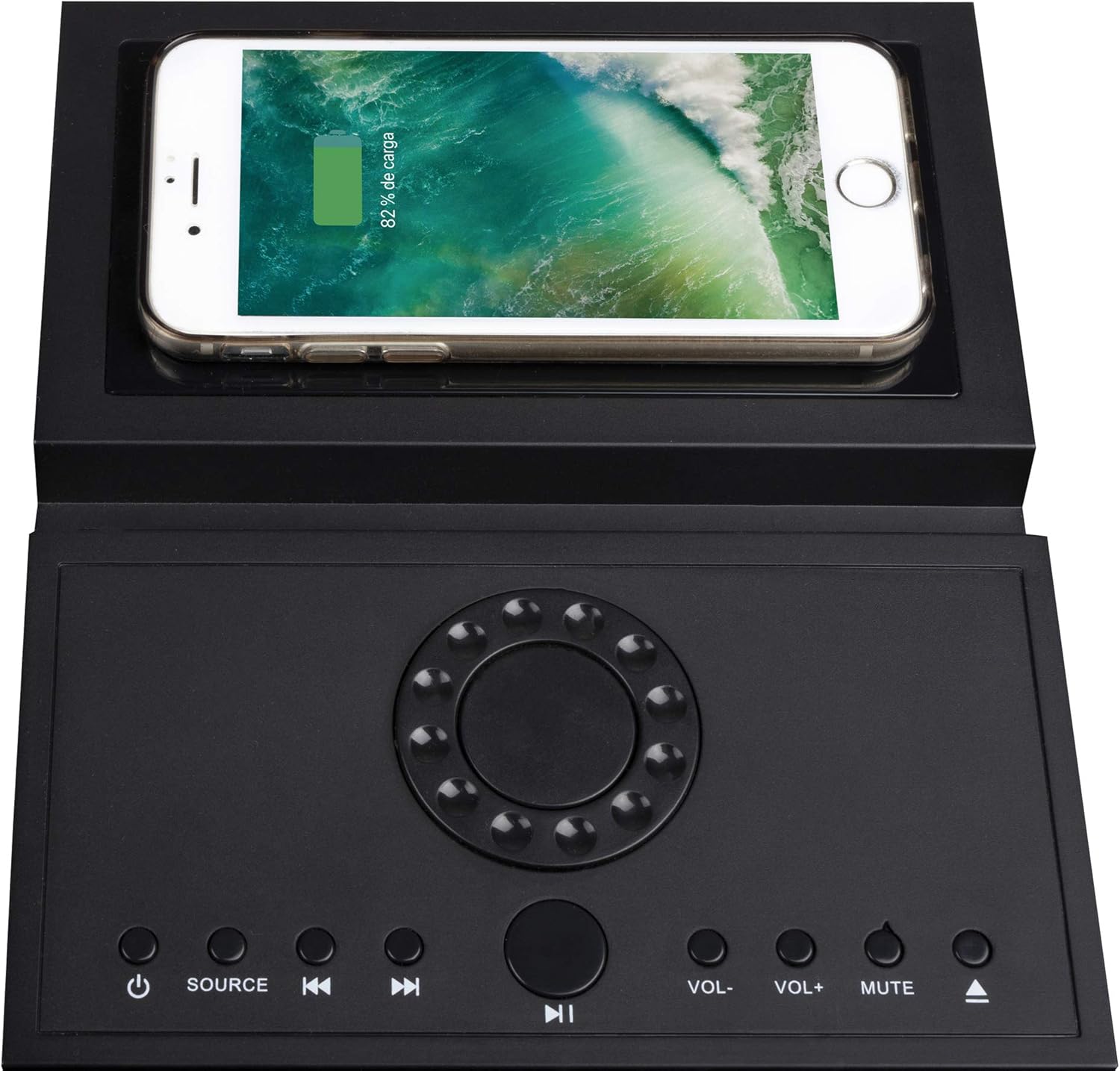
Figure 4: The top panel featuring a smartphone placed on the integrated wireless charging pad, demonstrating its functionality alongside the control buttons.
5. Setup
5.1 Unpacking and Placement
- Carefully remove the sound tower and all accessories from the packaging.
- Place the sound tower on a stable, flat surface. Ensure there is adequate space around the unit for ventilation.
- Attach the base to the bottom of the tower if it is not pre-assembled, following any specific instructions provided with the base.
5.2 Power Connection
- Connect the power cable to the AC IN port on the back of the sound tower.
- Plug the other end of the power cable into a standard wall outlet.
- The unit will enter standby mode.
6. Operating Instructions
6.1 Power On/Off
Press the POWER button ( ) on the top panel or remote control to turn the unit on or off. The LED display will illuminate when the unit is powered on.
6.2 Source Selection
Press the SOURCE button on the top panel or remote control repeatedly to cycle through available input modes: Bluetooth, CD, USB, and AUX.
6.3 Bluetooth Operation
- Turn on the sound tower and select Bluetooth mode using the SOURCE button. The LED display will show "BT" and flash, indicating pairing mode.
- Enable Bluetooth on your mobile device (smartphone, tablet, etc.).
- Search for "NGS SKYGAZER" in your device's Bluetooth settings and select it to pair.
- Once paired, the "BT" indicator on the sound tower's display will stop flashing and remain solid. You can now play audio from your device.
- Use the VOL+ / VOL- buttons on the unit or remote to adjust volume. Use the Previous/Next Track buttons to skip tracks.
6.4 CD Player Operation
- Select CD mode using the SOURCE button.
- Gently insert a CD into the motorized CD tray located on the top panel. The tray will automatically pull the CD in.
- Playback will begin automatically. If not, press the PLAY/PAUSE button.
- Use the Previous/Next Track buttons to navigate between tracks.
- To eject the CD, press the EJECT button (usually combined with the CD icon on the remote or top panel).
6.5 USB Playback
- Insert a USB flash drive containing MP3 audio files into the USB port.
- Select USB mode using the SOURCE button.
- Playback will begin automatically. If not, press the PLAY/PAUSE button.
- Use the Previous/Next Track buttons to navigate between tracks.
6.6 AUX-in Connection
- Connect one end of the 3.5mm audio cable to the AUX-in port on the sound tower.
- Connect the other end of the cable to the headphone jack or audio output of your external audio device (e.g., MP3 player, TV).
- Select AUX mode using the SOURCE button.
- Control playback and volume from your external device.
6.7 Wireless Charging
The NGS SKYGAZER features a wireless charging pad on its top surface. To use this function:
- Ensure the sound tower is powered on.
- Place your Qi-compatible smartphone directly onto the designated wireless charging area on the top panel.
- The phone should indicate that it is charging. If not, adjust its position until charging begins.
Note: Wireless charging functionality may vary depending on the smartphone model and case.
7. Maintenance
7.1 Cleaning
- Always unplug the device from the power outlet before cleaning.
- Use a soft, dry cloth to wipe the exterior surfaces of the sound tower.
- Do not use liquid cleaners, aerosols, or abrasive cleaning agents, as these may damage the finish or internal components.
7.2 Storage
If you plan to store the sound tower for an extended period, unplug it from the power source and store it in a cool, dry place, away from direct sunlight and extreme temperatures.
8. Troubleshooting
| Problem | Possible Cause | Solution |
|---|---|---|
| No power | Power cable not connected securely. | Check power cable connection to the unit and wall outlet. Ensure the outlet is functional. |
| No sound | Volume too low; incorrect source selected; audio cable not connected (AUX). | Increase volume. Select the correct input source. Ensure audio cables are properly connected. |
| Bluetooth pairing fails | Device too far; Bluetooth not enabled on source; "NGS SKYGAZER" not selected. | Ensure device is within 10 meters. Enable Bluetooth on your device. Select "NGS SKYGAZER" from the list. Try restarting both devices. |
| CD not playing or skipping | CD is dirty, scratched, or inserted incorrectly. | Clean the CD with a soft cloth. Check for deep scratches. Re-insert the CD correctly. Try a different CD. |
| Wireless charging not working | Phone not Qi-compatible; phone not positioned correctly; phone case too thick. | Ensure your phone supports Qi wireless charging. Adjust phone position on the pad. Remove thick phone cases. |
9. Specifications
- Model Name: SKYGAZER
- Output Power: 120 Watts (2.1 Channel)
- Connectivity: Bluetooth, USB, AUX-in, CD Player
- Wireless Communication: Bluetooth
- Control Method: Remote Control, Top Panel Buttons
- Power Source: AC Cable
- Special Features: Wireless Charging Pad, LED Display
- Color: Black
- Item Weight: Approximately 1 Kilogram
- Compatible Devices: Laptops, Smartphones, Tablets
10. Warranty and Support
NGS products are designed and manufactured to the highest quality standards. For detailed warranty information and technical support, please refer to the warranty card included with your product or visit the official NGS website. Please note that spare parts availability information is not provided.
For further assistance, contact NGS customer support.
