
Introduction
Thank you for purchasing the Iseebiz Automatic Pet Feeder. This device is designed to provide scheduled meals for your pet, offering convenience and peace of mind. With remote control via a smartphone application, a built-in camera, and two-way audio, you can monitor and interact with your pet from anywhere. This manual provides detailed instructions for setup, operation, and maintenance to ensure optimal performance and safety.
Safety Precautions
- Always ensure the feeder is placed on a stable, level surface to prevent tipping.
- Do not immerse the main unit in water. The main unit contains electronic components and should only be wiped with a damp cloth.
- Use only the provided AC adapter. If using batteries, ensure they are correctly installed and replaced when necessary.
- Keep the power cord away from pets to prevent chewing, which could lead to electric shock. An anti-chew tube is included for added protection.
- This feeder is designed for dry pet food only. Do not use wet food, canned food, or treats.
- Regularly inspect the feeder for any damage or blockages.
- Keep out of reach of children.
Package Contents
Verify that all items listed below are included in your package:
- Iseebiz Automatic Pet Feeder (Main Unit)
- Food Tray
- AC Power Adapter
- USB Power Cable (3 meters)
- Anti-Chew Tube for Power Cable
- User Manual (this document)

Product Overview
Familiarize yourself with the main components of your Iseebiz Automatic Pet Feeder.

- Lid: Transparent lid for easy food level monitoring.
- Food Tank: 5-liter capacity for dry pet food.
- Main Unit: Houses the motor, electronics, camera, and control panel.
- Food Tray: Detachable tray where food is dispensed.
- Camera: For remote monitoring and two-way audio communication. Features automatic night vision and a 135° wide-angle view.
- Control Panel: Buttons for manual feeding and settings.
- Infrared Sensor: Located at the food outlet to prevent overfilling and blockages.
Setup
- Power Connection:
Connect the AC adapter to the feeder and plug it into a wall outlet. For backup power during outages, install 3 D-size batteries (not included) in the battery compartment at the bottom of the unit. It is recommended to use both AC power and batteries for reliable operation.
Note: Use the provided anti-chew tube to protect the power cable from pet damage.
- Fill Food Tank:
Open the lid and pour dry pet food into the food tank. Ensure the food is suitable for automatic feeders (kibble size should be appropriate to prevent jamming).
- Place Food Tray:
Attach the food tray securely to the main unit's base.
App Installation and Connection
The Iseebiz Automatic Pet Feeder requires the "Iseefeeder" app for full functionality. The app is compatible with iOS 7 and Android 4.4 or later.
- Download the App:
Search for "Iseefeeder" in your smartphone's app store (iOS App Store or Google Play Store) and download the latest version. The app is free to download.

Figure 3: Iseefeeder App Icon. The icon shows a pet bowl with a bone and a Wi-Fi signal, indicating app control. - Connect to Wi-Fi:
Follow the in-app instructions to connect the feeder to your home Wi-Fi network. Ensure your smartphone is connected to a 2.4GHz Wi-Fi network during the setup process.
- Remote Operation:
Once connected, you can remotely control the feeder, view live camera feed, and communicate with your pet from anywhere using the app.

Figure 4: Remote Monitoring via App. A hand holds a smartphone showing the live camera feed from the feeder, with a pet visible in the background, demonstrating remote interaction.
Operating Instructions
Automatic Feeding Schedule
Set up a customized feeding schedule for your pet through the Iseefeeder app.
- You can program up to 6 meals per day.
- Each meal can be set from 1 to 20 portions. One portion is approximately 5 grams.
- The timer function ensures your pet is fed at regular intervals, helping to prevent overeating or hunger.

Manual Feeding
You can dispense food manually at any time using the app. This allows you to provide extra food or skip the next scheduled meal as needed.
Voice Recording
Record a 10-second voice message that will play automatically at each feeding time. This can help call your pet to their meal and provide comfort.

Camera Features
- Live View: Monitor your pet in real-time through the built-in camera.
- Two-Way Audio: Speak to your pet and hear their responses.
- Night Vision: Automatic night vision ensures clear monitoring even in low-light conditions.
- Wide-Angle Lens: The 135° wide-angle lens provides a broad view of the feeding area.
Infrared Sensor and Self-Protection
The feeder is equipped with an infrared sensor at the food outlet. This sensor automatically adjusts the feeding amount to prevent food from overflowing the tray. If an abnormal accumulation of food is detected in the tray, the sensor will stop dispensing to prevent blockages and ensure smooth operation.
Maintenance
Regular cleaning is essential for your pet's health and the feeder's longevity. Clean the feeder at least once a month.
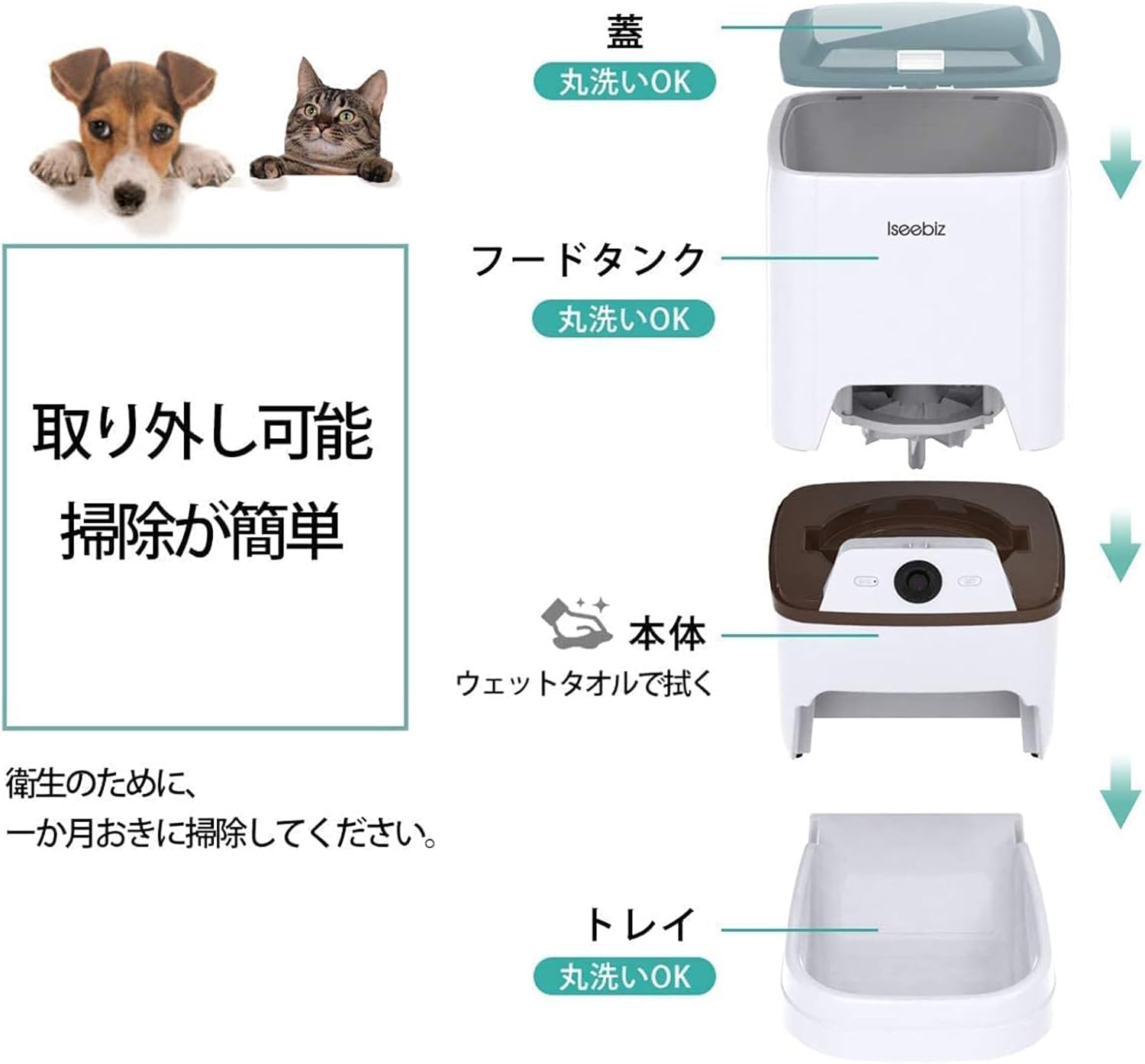
- Washable Parts: The lid, food tank, and food tray are detachable and can be washed with water and mild detergent. Ensure they are completely dry before reassembling.
- Main Unit: The main unit contains electronic components and should not be washed with water. If it gets dirty, wipe it clean with a damp cloth.
- Food Outlet: Periodically check and clean the food outlet to prevent food residue buildup.
Troubleshooting
If you encounter issues with your feeder, refer to the following common problems and solutions:
| Problem | Possible Cause | Solution |
|---|---|---|
| Feeder not dispensing food. | No power; food tank empty; food jammed; infrared sensor blocked. | Check power connection/batteries; refill food tank; clear any food blockages; clean the infrared sensor. |
| Cannot connect to Wi-Fi or app. | Incorrect Wi-Fi password; feeder too far from router; 5GHz Wi-Fi network used; app not updated. | Verify Wi-Fi password; move feeder closer to router; ensure you are connecting to a 2.4GHz network; update the "Iseefeeder" app. |
| Camera feed is unclear or unavailable. | Poor Wi-Fi signal; camera lens dirty; app issue. | Improve Wi-Fi signal strength; clean the camera lens; restart the app or feeder. |
| Voice recording quality is poor. | Microphone interference; recording environment noise. | Record in a quiet environment; ensure no obstructions near the microphone. |
If the problem persists after trying these solutions, please contact customer support.
Specifications
| Feature | Detail |
|---|---|
| Model | V6 |
| Capacity | 5 Liters |
| Material | ABS Plastic |
| Dimensions (L x W x H) | 41.5 cm x 24.5 cm x 23.5 cm |
| Weight | 2.64 kg |
| Feeding Schedule | Up to 6 meals/day |
| Portion Size | 1-20 portions (approx. 5g per portion) |
| Voice Recording | Max 10 seconds |
| Camera Features | 135° wide-angle, automatic night vision, two-way audio |
| Power Supply | AC Adapter (DC5V-1A) / 3 x D-size Batteries (backup) |
| App Compatibility | iOS 7+, Android 4.4+ |
| Target Species | Cats, Dogs (suitable for large breeds) |
Warranty and Support
For any product defects, questions, or assistance, please contact Iseebiz customer support via email. Refer to the contact information provided with your purchase or on the official Iseebiz website.
Please retain your proof of purchase for warranty claims.

