
Introduction
The DigiPower Essentials 5PC Video Blogging Kit (DPS-VLG5) is designed to enhance your video and audio recording capabilities for vlogging, live streaming, and content creation. This comprehensive kit includes a shotgun microphone, a 50 LED video light with color diffusers, an active mini tripod, a universal smartphone and action camera holder, and a mounting right-angle bracket with a built-in wireless remote.
Please read this manual carefully to ensure proper setup and operation of your kit.
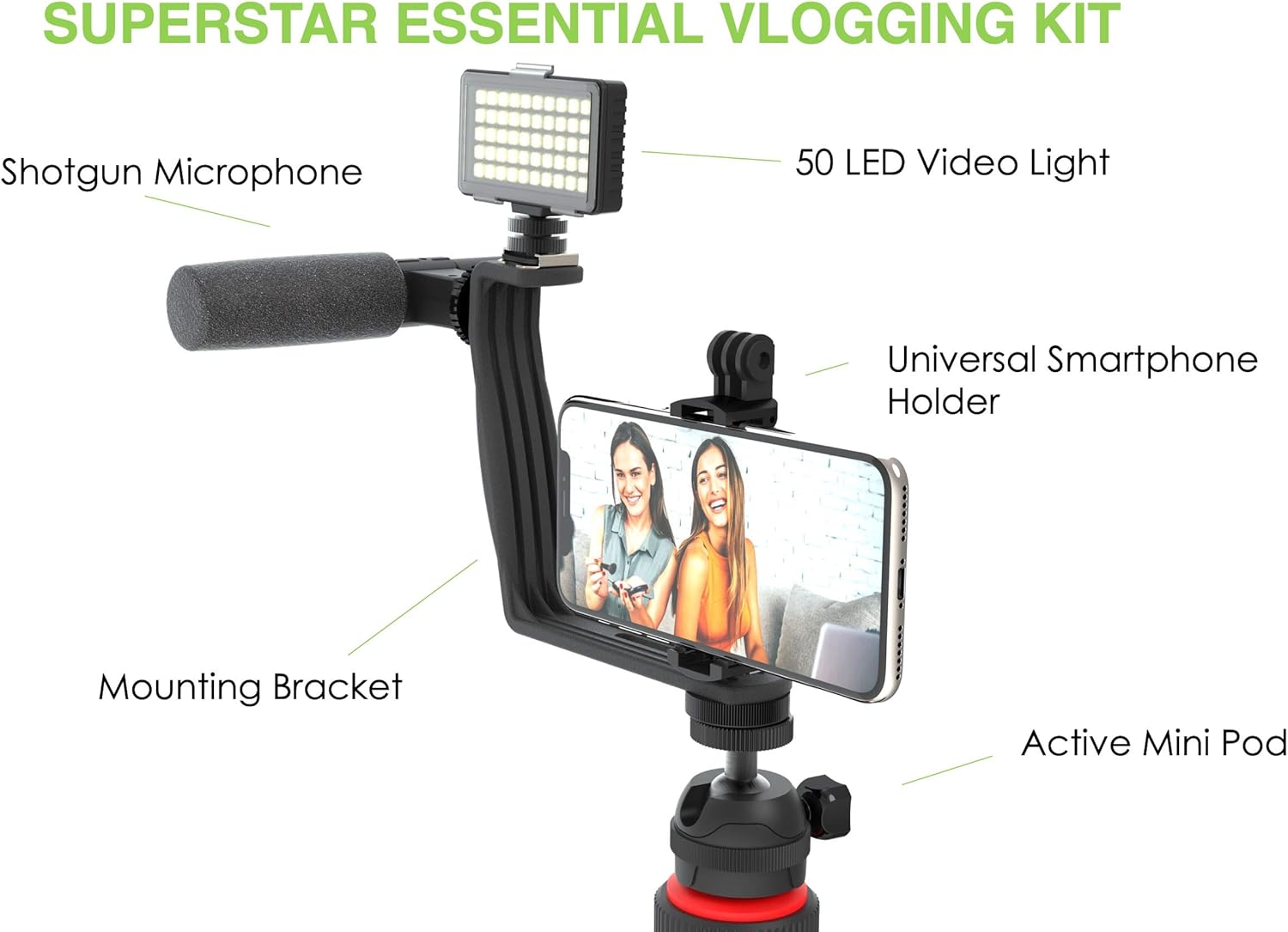
Image: Overview of the DigiPower Essentials 5PC Video Blogging Kit, showing the shotgun microphone, 50 LED video light, universal smartphone holder, mounting bracket, and active mini tripod.
Package Contents
- Shotgun Microphone
- 50 LED Video Light
- 3 Color Diffusers (Cold Blue, Warm Red, Soft White)
- Active Mini Tripod
- Universal Smartphone and Action Camera Holder
- Mounting Right-Angle Bracket
- Built-in Removable Wireless Remote
- 3 Lithium Metal batteries (for LED light)
Setup Instructions
- Attach the Tripod: Screw the active mini tripod onto the bottom of the mounting right-angle bracket. Ensure it is securely fastened.
- Install Smartphone/Action Camera Holder: The universal smartphone and action camera holder is typically found stored within the legs of the tripod. Remove it and attach it to the top of the mounting right-angle bracket.
- Mount the LED Video Light: Slide the 50 LED video light onto the cold shoe mount located on the top of the mounting bracket.
- Mount the Shotgun Microphone: Slide the shotgun microphone onto the remaining cold shoe mount on the mounting bracket.
- Connect the Microphone: Plug the microphone's TRRS connector into your smartphone or camera's audio jack. If your device requires an adapter (e.g., for newer iPhones without a 3.5mm jack), ensure it is connected.
- Insert Batteries for LED Light: The 50 LED video light requires 3 Lithium Metal batteries (included). Open the battery compartment and insert the batteries, observing polarity.

Image: Detailed view of the active mini tripod, showing the smartphone remote control and the universal smartphone and action camera adapter. Note that the smartphone holder is often stored inside the tripod legs.
Operating Instructions
Using the 50 LED Video Light
- Power On/Off: Locate the power button on the LED light and press it to turn the light on or off.
- Adjust Brightness: The LED light features brightness control. Use the designated control (usually a dial or button) to adjust the light intensity to your desired level.
- Attach Color Diffusers: To change the light's color temperature, slide one of the three included color diffusers (cold blue, warm red, or soft white) onto the front of the LED light.

Image: The 50 LED video light, illustrating its dimensions and the three attachable color filters: cold blue, warm red, and soft white.

Image: Visual demonstration of the LED light's brightness control, showing the effect of no light, low, medium, and high brightness settings on a subject.
Using the Universal Shotgun Microphone
- Select Mode: The microphone features a dual mode setting for either camera or phone. Ensure the switch on the microphone is set to the correct device (Phone or Camera) you are using.
- Positioning: For optimal audio quality, position the microphone to face the sound source.
- Windscreen: Use the removable windscreen when recording outdoors or in windy conditions to reduce unwanted noise.

Image: Detailed view of the universal shotgun microphone, highlighting its long-lasting battery, removable windscreen, dual mode switch (Phone/Camera), cold shoe adapter, and TRRS connector.
Using the Active Mini Tripod and Smartphone Holder
- Adjusting Height: Extend the tripod legs for increased stability.
- Angle Adjustment: The tripod mount allows for 360-degree rotation and a 90-degree tilt, enabling flexible camera angles. Loosen the adjustment knob, set your desired angle, and tighten to secure.
- Wireless Remote: The built-in removable wireless remote allows for hands-free recording from a distance of up to 30 feet. Pair it with your smartphone via Bluetooth (refer to your smartphone's Bluetooth pairing instructions).
Maintenance
- Cleaning: Use a soft, dry cloth to clean the surfaces of the kit components. Avoid using abrasive cleaners or solvents.
- Storage: Store the kit in a cool, dry place away from direct sunlight and extreme temperatures.
- Battery Care: If the LED light will not be used for an extended period, remove the batteries to prevent leakage.
- Cable Management: Avoid sharp bends or kinks in the microphone cable to prevent damage.
Troubleshooting
| Problem | Possible Cause | Solution |
|---|---|---|
| Missing Smartphone Holder | The smartphone holder is often stored inside the tripod legs for compact packaging. | Carefully check inside the tripod legs. It is designed to fit snugly within them. |
| Microphone produces static or no sound | Incorrect mode selected, loose connection, or device incompatibility. |
|
| LED Light not turning on | Dead batteries or incorrect battery installation. |
|
| Wireless Remote not connecting | Bluetooth not enabled, remote battery low, or pairing issue. |
|
Specifications
| Feature | Detail |
|---|---|
| Brand | DigiPower |
| Model Name | DPS-VLG5 |
| Compatible Devices | Camera, Smartphone |
| Color | Black |
| Included Components | Light, Microphone, Phone Holder, Tripod |
| Item Weight | 0.49 Kilograms |
| Item Dimensions (L x W x H) | 2.1 x 12 x 7.1 inches |
| Number of Batteries | 3 Lithium Metal batteries required (included) |
| Material | Polycarbonate |
| UPC | 758302172320 |
Warranty Information
This DigiPower Essentials 5PC Video Blogging Kit (DPS-VLG5) comes with a Limited One Year Warranty from the date of purchase. This warranty covers manufacturing defects and workmanship under normal use. It does not cover damage caused by misuse, accident, unauthorized modification, or improper handling.
Please retain your proof of purchase for warranty claims.
Support
For technical assistance, troubleshooting not covered in this manual, or warranty inquiries, please contact DigiPower customer support.
- Website: Visit the official DigiPower website for support resources and contact information.
- Email: Refer to your product packaging or the DigiPower website for customer service email.
- Phone: Refer to your product packaging or the DigiPower website for customer service phone number.
When contacting support, please have your model number (DPS-VLG5) and proof of purchase readily available.


