
Aubric B07QG7RGFW
Smart WiFi Garage Door Opener Remote Controller User Manual
Brand: Aubric | Model: B07QG7RGFW
1. Product Overview
The Aubric Smart WiFi Garage Door Opener Remote Controller is designed to upgrade your existing garage door opener, allowing for convenient control via smartphone app, voice commands through Amazon Alexa or Google Assistant, and integration with IFTTT. This device provides remote access, real-time status notifications, and enhanced security for your garage.

Image 1.1: The Aubric Smart WiFi Garage Door Opener Controller unit with its magnetic sensor, illustrating the compact design and primary components.
2. Key Features
- Smart Add-on: Integrates with your existing garage door opener for smartphone control via the free Smart Life app.
- Voice Control: Compatible with Amazon Alexa, Google Home, and iPhone Siri for hands-free operation.
- Compatibility: Designed to work with most garage door openers. A simple test with a wire or paper clip can confirm compatibility.
- Easy Installation: Requires minimal wiring (two wires for power, two for the opener motor) and straightforward Wi-Fi setup.
- User Sharing & Notifications: Supports multiple users and provides real-time notifications for garage door activity (open/close).
- Scheduling: Allows setting time schedules for automatic opening and closing of the garage door.
3. Compatibility Check
Before installation, it is crucial to verify compatibility with your existing garage door opener. There are two primary methods:
- Method 1: Application Guide (PDF)
Refer to the "Application Guide" PDF file, typically found in the Technical Specification section of the product detail page, for a comprehensive list of compatible and incompatible models. - Method 2: Manual Test
Take a wire with both ends stripped or a straightened-out paper clip. Momentarily short-circuit the two terminals on your opener motor head where the wall button wires are connected. If the garage door opens or closes, this smart controller will work with your opener.
Note:
- All yellow learn button and partial purple learn button openers are generally not compatible.
- If your opener motor button is yellow or purple, it is recommended to contact the manufacturer for a related solution based on your specific model.

Image 3.1: Visual guide for checking compatibility, showing the manual short-circuit test and highlighting incompatible learn button colors (yellow and purple).
4. Setup and Installation
The installation process for the Aubric Smart WiFi Garage Door Opener is designed to be straightforward.
4.1 Package Contents
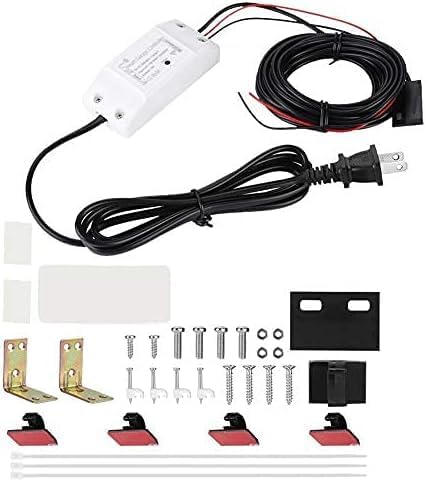
Image 4.1: Contents of the product package, including the main controller unit, power adapter, sensor, and mounting accessories.
4.2 Wiring Diagram
Connect the device to your garage door opener motor and power source as illustrated below. Ensure all connections are secure before proceeding.

Image 4.2: Detailed wiring diagram showing connections from the controller to the garage door motor and the magnetic sensor installation on the garage door track.
4.3 Step-by-Step Installation
- Power Connection: Connect the provided power adapter to the controller unit and plug it into a standard 110V AC outlet.
- Opener Connection: Connect the two control wires from the smart controller to the same terminals on your garage door opener motor where your existing wall button wires are connected. These are typically the "Wall Button" or "Common" terminals.
- Sensor Installation: Mount the magnetic sensor on your garage door and its frame. Ensure the two parts of the sensor align and are within close proximity (typically less than 1 inch) when the door is closed. This sensor detects the door's open/closed status.
- Wi-Fi Setup:
- Download the "Smart Life" app from your smartphone's app store (available for iOS and Android).
- Register or log in to your Smart Life account.
- Follow the in-app instructions to add a new device. The app will guide you through connecting the controller to your home Wi-Fi network (2.4GHz only).
- Ensure your phone is connected to the 2.4GHz Wi-Fi network during the setup process.
- Testing: After successful Wi-Fi connection, test the garage door operation using the Smart Life app. Verify that the door opens and closes correctly and that the app accurately displays the door's status (open/closed).
5. Operating Instructions
Once installed and configured, the Aubric Smart WiFi Garage Door Opener offers multiple ways to control your garage door.
5.1 Smartphone App Control
Use the Smart Life app on your smartphone to open, close, and monitor your garage door from anywhere with an internet connection.
- Open the Smart Life app.
- Select your garage door device from the device list.
- Tap the "Open" or "Close" button to operate the door.
- The app will display the current status of your garage door (Open/Closed).
- Set up schedules for automatic opening/closing at specific times.
- Receive real-time notifications when the garage door opens or closes.

Image 5.1: Screenshot of the smartphone app interface showing the garage door status and control options.
5.2 Voice Control
Integrate the controller with Amazon Alexa, Google Assistant, or iPhone Siri for convenient voice commands.
- For Amazon Alexa/Google Assistant: Link your Smart Life account within the Alexa or Google Home app. Once linked, you can use commands like:
- "Alexa, open the garage door." (May require a voice code for security)
- "Hey Google, close the garage door."
- "Alexa, is the garage door open?"
- For iPhone Siri: Set up Siri Shortcuts within the Smart Life app to create custom voice commands for opening and closing your garage door.

Image 5.2: Example of voice control setup with popular smart home assistants like Amazon Echo and Google Home.
5.3 Hands-free Control (Geofencing)
Some smart home platforms or the Smart Life app may offer geofencing features, allowing your garage door to automatically open or close when you enter or leave a predefined area around your home.

Image 5.3: Illustration of hands-free operation, where the garage door automatically opens as a vehicle approaches.
6. Maintenance
The Aubric Smart WiFi Garage Door Opener is designed for low maintenance. Regular checks include:
- Sensor Alignment: Periodically check that the magnetic sensor components on your garage door and frame remain properly aligned and securely attached.
- Cable Integrity: Inspect all connected cables for any signs of wear, damage, or loose connections.
- Software Updates: Ensure your Smart Life app is updated to the latest version to benefit from new features and security enhancements.
- Wi-Fi Connection: Verify that your home Wi-Fi network is stable and the controller maintains a strong connection.
7. Troubleshooting
If you encounter issues with your Aubric Smart WiFi Garage Door Opener, consider the following troubleshooting steps:
- Device Not Responding:
- Check if the device is powered on and its indicator light is active.
- Verify your home Wi-Fi network is operational and the controller is within range.
- Restart the controller by unplugging it for 10 seconds and plugging it back in.
- Ensure your smartphone has an active internet connection.
- Garage Door Not Opening/Closing:
- Confirm that the control wires are securely connected to the garage door opener motor terminals.
- Perform the manual compatibility test (Section 3. Method 2) to ensure your opener is compatible.
- Check if your traditional wall button for the garage door opener is functioning correctly.
- Incorrect Door Status in App:
- Ensure the magnetic sensor components are properly aligned and securely mounted on the garage door and frame.
- Verify that the sensor cable is not damaged and is securely connected to the controller.
- Voice Control Issues:
- Confirm that your Smart Life account is correctly linked to Amazon Alexa or Google Home.
- Check your voice assistant's device list to ensure the garage door controller is recognized.
- Ensure you are using the correct voice commands.
If issues persist, please refer to the official user manual PDF or contact Aubric customer support for further assistance.
8. Product Specifications
| Specification | Detail |
|---|---|
| Manufacturer | Aubric |
| Item Weight | 12 ounces |
| Product Dimensions | 3.54 x 1.57 x 0.98 inches |
| Country of Origin | China |
| Power Source | AC (no battery required) |
| Voltage | 110 Volts |
| Item Package Quantity | 1 |
| Special Features | Ergonomic |
| Color | White |
| Max Number of Supported Devices | 1 |
| Compatible Devices | Smartphone |
| Date First Available | July 19, 2018 |
9. Warranty and Support
For warranty information, technical support, or any inquiries not covered in this manual, please contact Aubric customer service directly. You may also refer to the official User Manual PDF for more detailed information.
Official User Manual (PDF): Download PDF
Related documentsB07QG7RGFW

Ask a question about this manual
Ask about setup, troubleshooting, compatibility, parts, safety, or missing instructions. Manuals+ will review the question and use this page’s manual context to help answer it.