
snode E20i
SNODE Magnetic Elliptical Trainer User Manual
Model: E20i | Brand: snode
1. Introduction
This manual provides essential information for the safe and effective operation, assembly, and maintenance of your SNODE Magnetic Elliptical Trainer. This elliptical machine is designed for home fitness cardio training, offering a full-body workout with minimal impact on joints. It features a magnetic resistance system, a programmable monitor, and Bluetooth connectivity for app tracking.
2. Important Safety Information
Before using this equipment, please read this entire manual. Failure to follow these instructions could result in injury or damage to the equipment.
- Consult your physician before beginning any exercise program.
- Keep children and pets away from the equipment during use.
- Place the elliptical trainer on a solid, level surface with at least 2 feet (0.6 meters) of clear space around it.
- Ensure all bolts and nuts are securely tightened before each use.
- The maximum user weight capacity for this machine is 265 lbs (120 kg).
- Wear appropriate exercise clothing and athletic shoes.
- Do not operate the machine if it is damaged.
- Always maintain balance while operating the elliptical.
3. Product Components
Familiarize yourself with the main components of your SNODE Elliptical Trainer:
- Main Frame: The core structure of the elliptical.
- Magnetic Control Flywheel: Provides smooth and quiet resistance.
- Programmable Monitor: Displays workout data and allows program selection.
- Dual Workout Arms: Moving handlebars for upper body engagement.
- Static Handlebars: Stationary handlebars with integrated heart rate sensors.
- Oversized Pedals: Non-slip foot platforms for secure footing.
- Transportation Wheels: Located at the front for easy movement.
- Cross Crank System: Heavy-duty system for performance and momentum.

Figure 3.1: Overview of the SNODE Magnetic Elliptical Trainer with its main features and app connectivity.
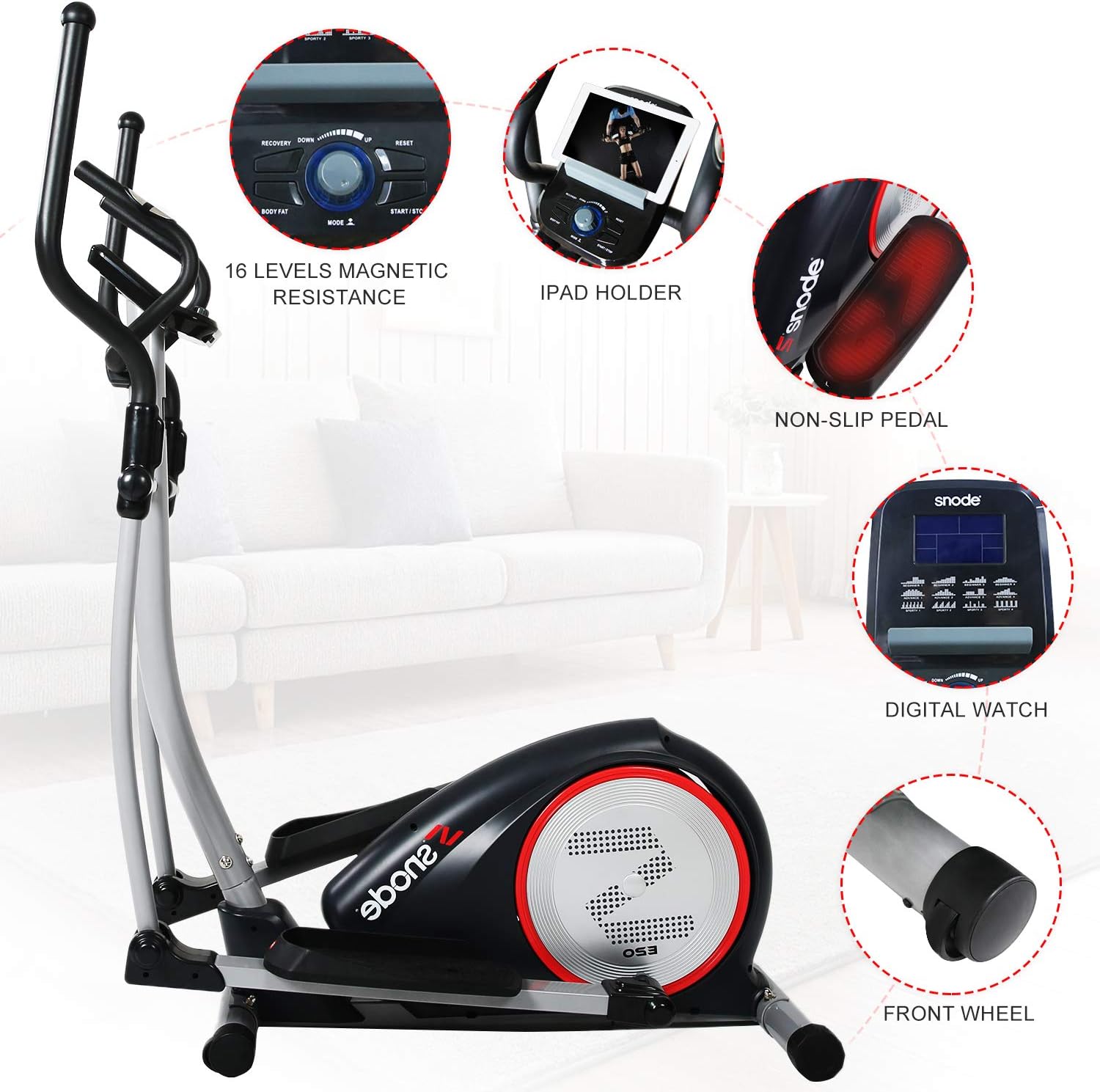
Figure 3.2: Detailed view of the control console, iPad holder, non-slip pedals, digital display, and front transportation wheels.
4. Assembly Instructions
Assembly typically requires two people and basic tools (not included, but usually a wrench and Allen key are sufficient). Follow the detailed instructions provided in the physical manual that accompanies your product. Ensure all parts are accounted for before beginning assembly.
- Unpack all components and verify against the parts list in your physical manual.
- Attach the front and rear stabilizers to the main frame.
- Secure the main upright post to the base.
- Install the pedal arms and handlebars, ensuring proper alignment and secure fastening.
- Connect the console wiring to the main frame wiring.
- Mount the console onto the upright post.
- Perform a final check to ensure all connections are tight and the machine is stable.
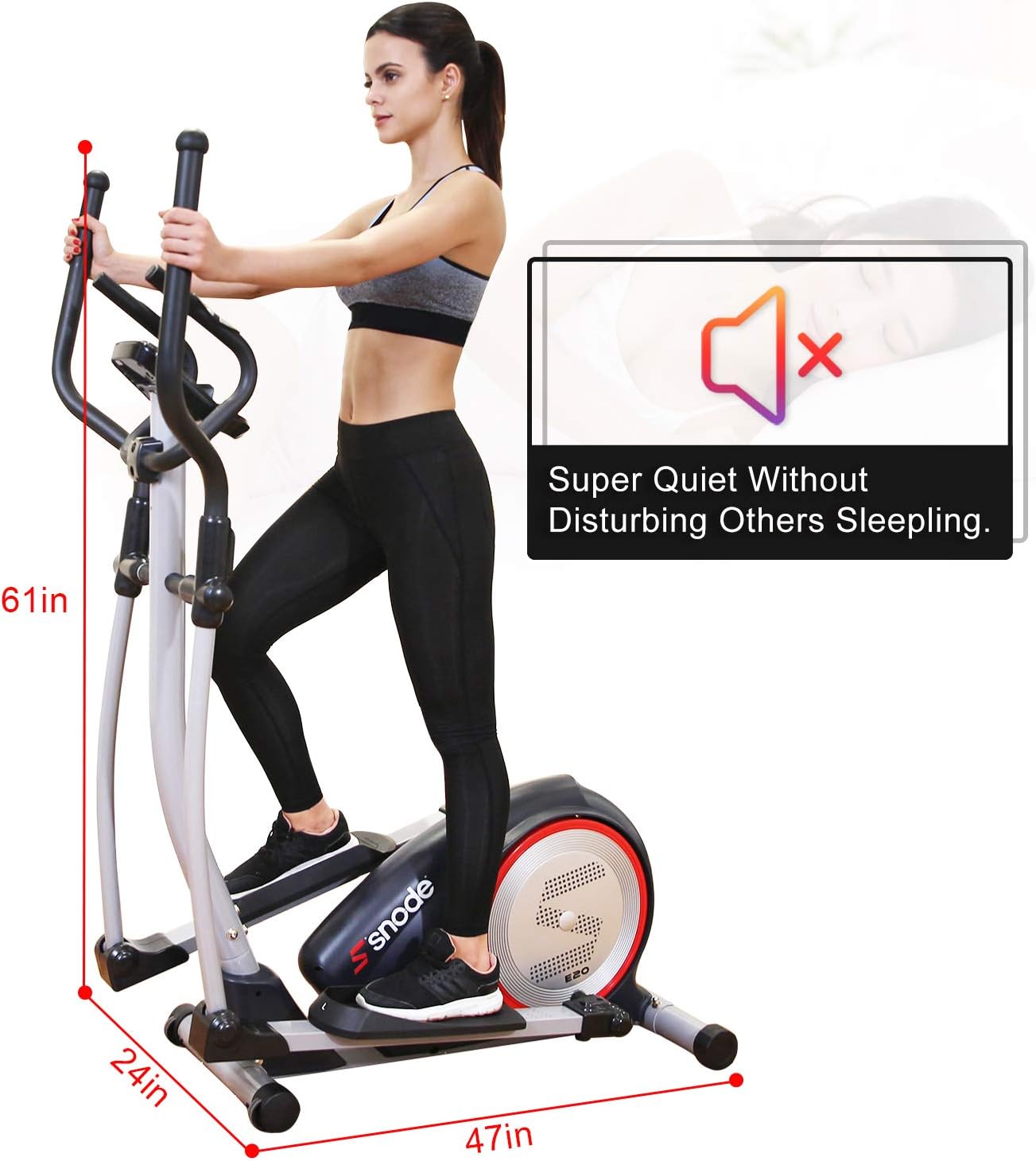
Figure 4.1: Elliptical dimensions (47in L x 24in W x 61in H) and indication of quiet operation, useful for planning placement during setup.
5. Operating Instructions
5.1. Using the Programmable Monitor
The back-lit display allows you to track various workout metrics and select programs:
- Power On: Plug in the elliptical. The monitor will activate.
- Metrics Displayed: Speed, Time, Distance, Calories Burned, Rotations Per Minute (RPM), Watt Generations, and Magnetic Resistance Load.
- Workout Programs: Select from Manual, Pre-program, Watt, Body Fat, Heart Rate, and User programs to customize your workout. Refer to the monitor's specific instructions in your physical manual for detailed navigation.
- Resistance Adjustment: Use the computer console to adjust the 16 smooth levels of magnetic resistance.
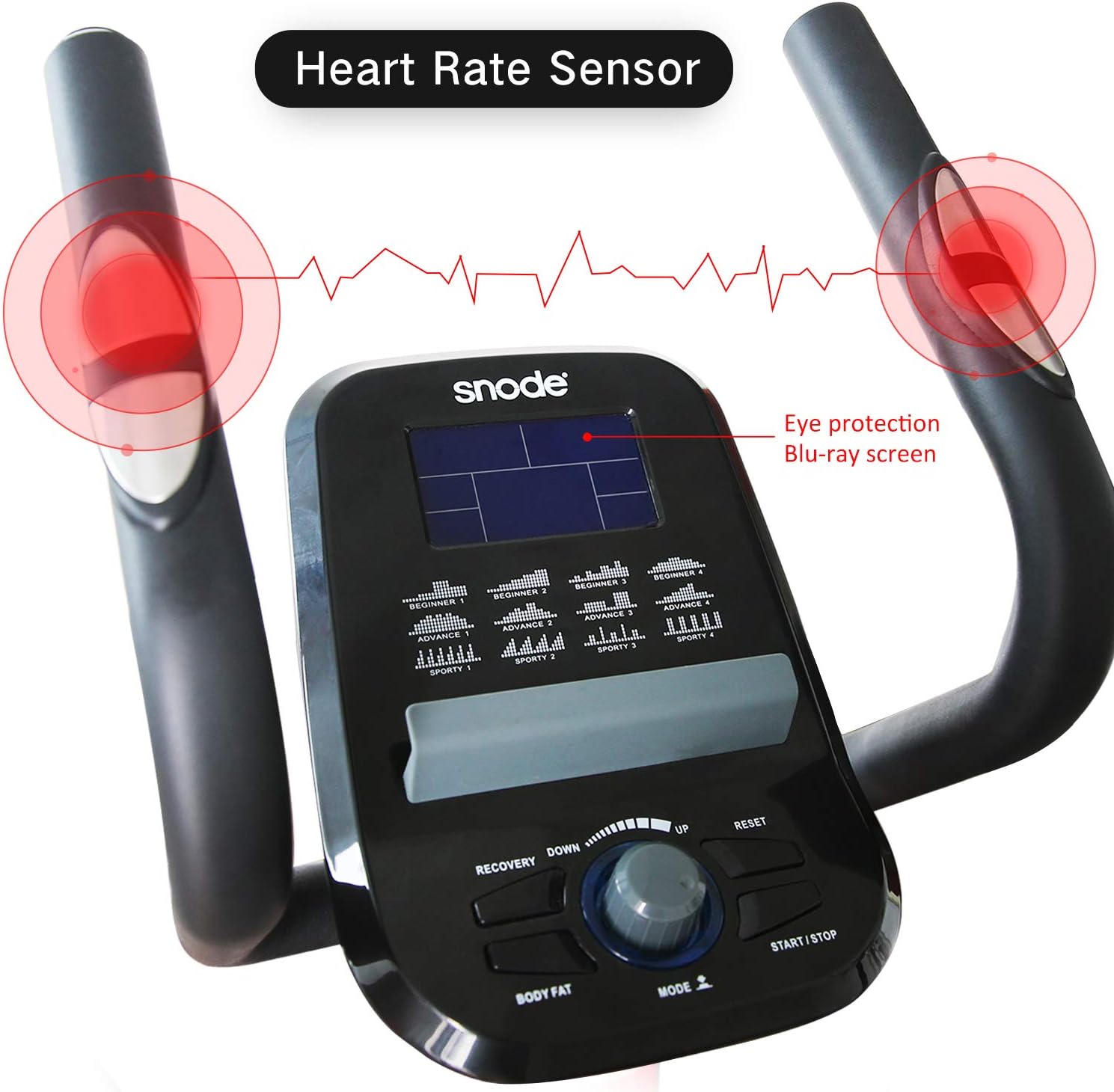
Figure 5.1: The console features heart rate sensors on the static handlebars and an eye-protection Blu-ray screen for comfortable viewing.
5.2. Bluetooth Connectivity and App Tracking
The elliptical is equipped with Bluetooth Smart technology for tracking your workouts via the free iConsole+ training app, available on Android and iOS devices.
- Download the "iConsole+ training" app from your device's app store.
- Ensure Bluetooth is enabled on your mobile device.
- Open the iConsole+ app and follow the on-screen instructions to connect to your SNODE Elliptical Trainer.
- Once connected, you can track your workout data, set goals, and utilize additional app features.
5.3. Proper Usage Technique
- Foot Placement: Place your feet securely on the oversized, non-slip pedals.
- Arm Movement: Engage the dual workout arms for an upper body workout, or hold the static handlebars for stability and heart rate monitoring.
- Stride: Maintain a smooth, continuous stride. The elliptical's design minimizes impact on knees and ankles.

Figure 5.2: Illustrates how different "slope" (resistance/effort) levels can target various muscle groups, from arms to legs, and highlights the 265 lbs weight capacity.
6. Maintenance
Regular maintenance ensures the longevity and optimal performance of your elliptical trainer.
- Cleaning: Wipe down the machine with a damp cloth after each use to remove sweat and dust. Avoid abrasive cleaners.
- Lubrication: Periodically check moving parts for friction. Apply a silicone-based lubricant to pivot points and joints as needed, following the specific instructions in your physical manual.
- Tighten Connections: Regularly inspect all bolts, nuts, and screws to ensure they are tight. Loose connections can lead to noise or instability.
- Storage: When not in use, store the elliptical in a dry, cool place away from direct sunlight and moisture. Use the transportation wheels to move it easily.
7. Troubleshooting
This section addresses common issues you might encounter with your elliptical trainer.
| Problem | Possible Cause | Solution |
|---|---|---|
| Machine is noisy during operation. | Loose bolts or connections; lack of lubrication on moving parts. | Check and tighten all bolts and screws. Apply lubricant to pivot points as per maintenance instructions. |
| Wobbling or instability. | Uneven floor; loose frame connections. | Ensure the machine is on a level surface. Adjust the leveling feet if available. Tighten all frame bolts. |
| Monitor not displaying data. | Loose console cable connection; power issue. | Check that the power adapter is securely plugged in. Verify the console cable is properly connected to the main frame. |
| Resistance not changing. | Internal mechanism issue; console malfunction. | Ensure the console is powered on and connected. If the issue persists, contact customer support. |
8. Product Specifications
| Feature | Detail |
|---|---|
| Brand | snode |
| Model | E20i |
| Material | Stainless Steel, Rubber |
| Resistance Mechanism | Magnetic |
| Number of Resistance Levels | 16 |
| Maximum Weight Recommendation | 265 Pounds |
| Maximum Stride Length | 18 Inches |
| Item Weight | 88.2 Pounds |
| Item Dimensions (LxWxH) | 47 x 24 x 61 inches |
| UPC | 735980999388 |

Figure 8.1: Illustration of the Magnetic Control Flywheel, a key component of the resistance system.
9. Warranty and Customer Support
Your SNODE Magnetic Elliptical Trainer comes with a 1-year warranty for free replacement parts. SNODE is committed to providing satisfactory solutions and customer support.
For any issues, questions, or to claim warranty service, please refer to the contact information provided in your physical user manual or reach out to SNODE customer service via their official after-service email or hotline. The customer support team aims to respond within 24 hours.
For more information, you may visit the official SNODE store on Amazon: SNODE Fitness Store
Related documentsE20i

Ask a question about this manual
Ask about setup, troubleshooting, compatibility, parts, safety, or missing instructions. Manuals+ will review the question and use this page’s manual context to help answer it.