
1. Introduction
This manual provides detailed instructions for the operation and maintenance of your Trexonic TRX-68B-AMZ 3-Speed Turntable System. Please read this manual thoroughly before using the product to ensure proper function and to prevent damage.
2. Safety Instructions
- Do not expose the unit to rain or moisture.
- Do not block any ventilation openings.
- Ensure the power cord is not pinched or walked on.
- Unplug the unit during lightning storms or when unused for long periods.
- Refer all servicing to qualified service personnel.
3. Package Contents
Verify that all items are present in the packaging:
- Trexonic TRX-68B-AMZ Main Unit
- Wired Shelf Speakers (2)
- Remote Control
- User Manual (this document)
- Power Adapter

Figure 3.1: Trexonic TRX-68B-AMZ Turntable System with included wired shelf speakers.
4. Product Overview: Controls and Features
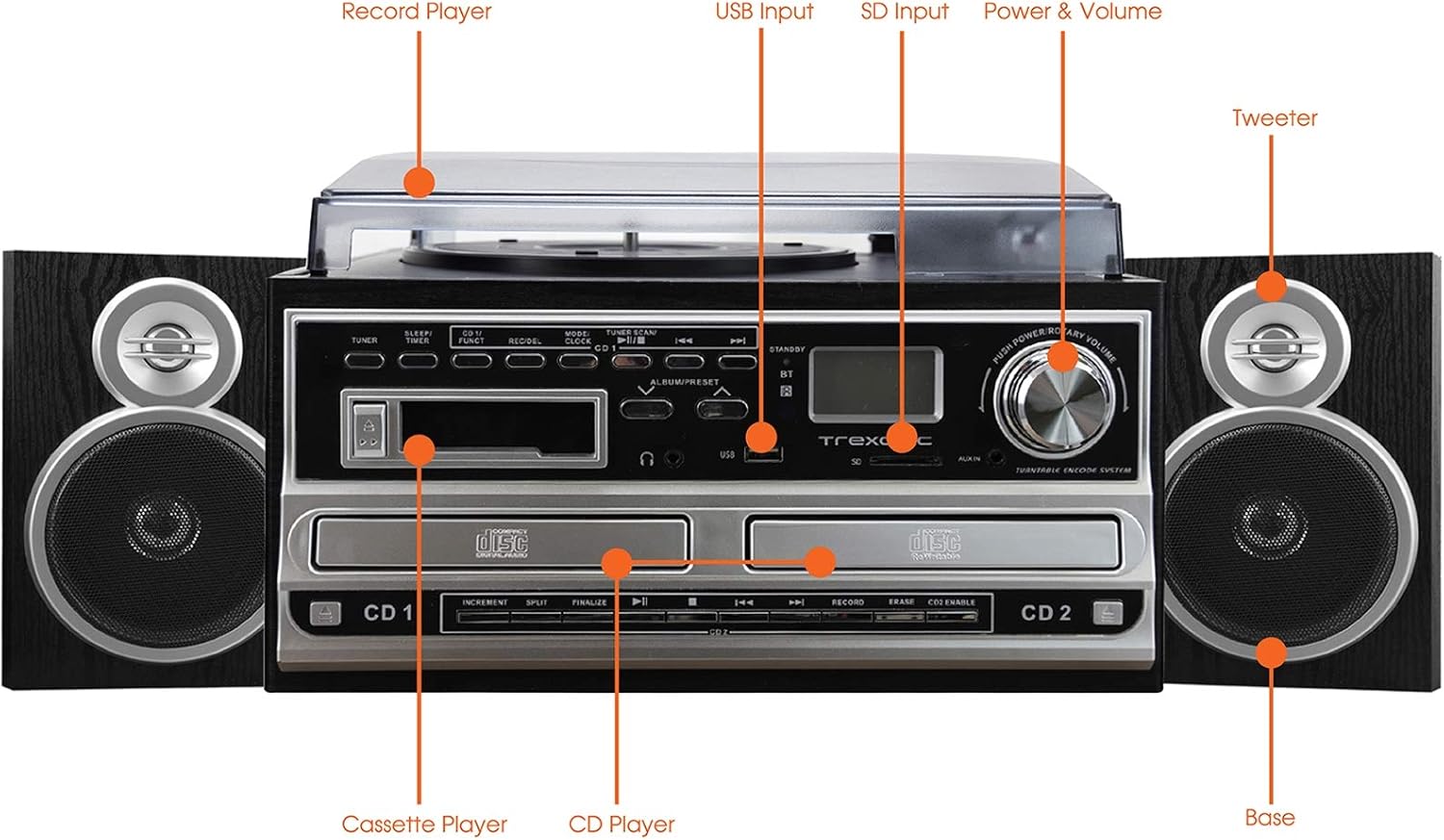
Figure 4.1: Front panel and top view of the Trexonic TRX-68B-AMZ with key components labeled.
- Record Player: For playing vinyl records.
- USB Input: Connect USB drives for playback or recording.
- SD Input: Insert SD cards for playback or recording.
- Power & Volume Knob: Controls power on/off and audio volume.
- Tweeter: High-frequency speaker component.
- Base (Woofer): Low-frequency speaker component.
- CD Player: For playing audio CDs and CD recording.
- Cassette Player: For playing and recording cassette tapes.
5. Setup
5.1 Unpacking
Carefully remove all components from the packaging. Retain the packaging materials for future transport or storage.
5.2 Speaker Connection
Connect the wired shelf speakers to the speaker output terminals on the rear of the main unit. Ensure correct polarity (positive to positive, negative to negative) for optimal sound quality.
5.3 Power Connection
Plug the power adapter into the DC IN jack on the back of the unit, then plug the other end into a standard wall outlet (AC 100-240V, 50/60Hz).
6. Operating Instructions
6.1 General Controls
- Power/Volume Knob: Rotate to turn the unit on/off and adjust volume.
- Mode/Function Button: Press to cycle through different modes (Turntable, CD, Cassette, FM, USB, SD, AUX, Bluetooth).
6.2 Turntable Operation

Figure 6.1: Close-up view of the turntable platter and tonearm.
- Lift the dust cover.
- Place a record on the platter.
- Select the appropriate speed (33, 45, or 78 RPM) using the speed selector switch.
- Move the tonearm to the desired position on the record. The platter will begin to spin automatically.
- Lower the tonearm gently onto the record.
- To stop playback, lift the tonearm and return it to its rest.
6.3 CD Player Operation
- Press the Mode/Function button to select CD mode.
- Press the OPEN/CLOSE button to open the CD tray.
- Place a CD with the label side facing up.
- Press the OPEN/CLOSE button to close the tray. The CD will begin playing automatically.
- Use the PLAY/PAUSE, STOP, SKIP FORWARD, and SKIP BACKWARD buttons for control.
6.4 Cassette Player Operation

Figure 6.2: Close-up view of the cassette player slot.
- Press the Mode/Function button to select Cassette mode.
- Insert a cassette tape into the cassette slot.
- Use the PLAY, PAUSE, FAST FORWARD, REWIND, and STOP buttons for control.
6.5 FM Radio Operation
- Press the Mode/Function button to select FM Radio mode.
- Use the TUNER knob or SEEK buttons to find radio stations.
- Press the PRESET button to save or recall favorite stations.
6.6 USB/SD Playback
- Insert a USB drive into the USB port or an SD card into the SD slot.
- Press the Mode/Function button to select USB or SD mode.
- The unit will automatically detect and play compatible audio files.
- Use the PLAY/PAUSE, STOP, SKIP FORWARD, and SKIP BACKWARD buttons for control.
6.7 Recording Functions
The Trexonic TRX-68B-AMZ allows recording from various sources to USB or SD card.
- Recording from Vinyl, CD, Cassette, or AUX to USB/SD:
- Insert a USB drive or SD card into the respective slot.
- Select the desired source mode (Turntable, CD, Cassette, or AUX).
- Begin playback of the source material.
- Press the RECORD button. The recording indicator will illuminate.
- Press the STOP button to end the recording.
7. Maintenance
7.1 Cleaning the Unit
Wipe the unit with a soft, dry cloth. Do not use abrasive cleaners or solvents. For the dust cover, use a soft cloth and a mild detergent solution if necessary, then wipe dry.
7.2 Stylus Care and Replacement
The turntable stylus (needle) is a delicate component. Clean it periodically with a soft brush, brushing from back to front. A worn stylus can damage records and degrade sound quality. Replace the stylus approximately every 300-500 hours of playback, or if you notice a decrease in sound quality or increased record wear.
8. Troubleshooting
| Problem | Possible Cause | Solution |
|---|---|---|
| No power | Power cord not connected; Power outlet faulty | Ensure power cord is securely connected; Try a different outlet. |
| No sound | Volume too low; Speakers not connected; Incorrect mode selected | Increase volume; Check speaker connections; Select correct input mode. |
| Turntable not spinning | Unit not powered on; Tonearm not moved over platter | Turn on unit; Move tonearm over the record to activate platter. |
| CD not playing | CD inserted incorrectly; CD scratched/dirty; Incorrect mode | Reinsert CD correctly; Clean or replace CD; Select CD mode. |
| Recording issues | USB/SD full or incompatible; Source not playing | Check USB/SD capacity and format; Ensure source is playing during recording. |
9. Specifications
| Feature | Specification |
|---|---|
| Brand | Trexonic |
| Model Number | TRX-68B-AMZ |
| Turntable Speeds | 33 / 45 / 78 RPM |
| Recording Formats | MP3 (to USB/SD) |
| Playback Media | Vinyl, CD, Cassette, FM Radio, USB, SD, AUX, Bluetooth |
| Included Components | Remote Control, Wired Shelf Speakers |
| Power Source | Corded Electric |
| Dimensions (Package) | 56.64 x 35.56 x 26.67 cm |
| Weight (Package) | 6.89 kg |
10. Warranty Information
Trexonic products are designed and manufactured to the highest quality standards. For specific warranty details, please refer to the warranty card included with your product or contact Trexonic customer support. Keep your purchase receipt as proof of purchase.
11. Customer Support
If you encounter any issues not covered in this manual or require further assistance, please contact Trexonic customer support. Contact information can typically be found on the manufacturer's official website or on the product packaging.