
Introduction
This user manual provides comprehensive instructions for the operation and maintenance of your HOPESTAR H40 Bluetooth Speaker. Please read this manual carefully before using the product to ensure proper functionality and to maximize your listening experience. The HOPESTAR H40 is designed to deliver quality sound with features such as surround sound, splash-proof capabilities, and FM radio functionality.
Product Overview
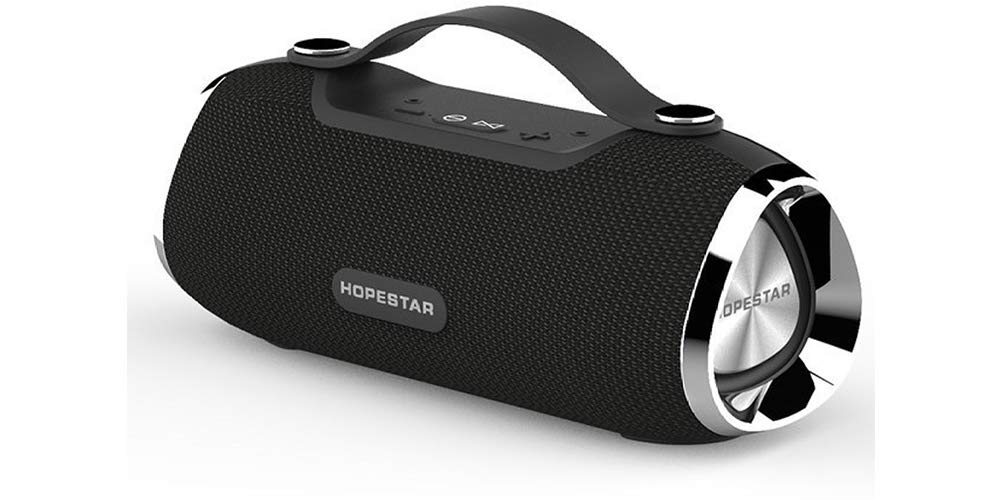
The image displays the HOPESTAR H40 Bluetooth Speaker. It is a black, cylindrical speaker with a textured fabric finish, a sturdy black carrying handle, and shiny metallic end caps. The 'HOPESTAR' logo is visible on the front grille and on one of the metallic speaker ends. Control buttons are located on the top surface.
The HOPESTAR H40 Bluetooth Speaker is a portable audio device featuring:
- Surround Sound Quality: Engineered for an immersive audio experience.
- Splash Proof IPX5: Provides protection against water splashes from any direction.
- 4 to 5 Hours Playtime: Enjoy extended music playback on a single charge.
- FM Mode: Built-in radio functionality for listening to your favorite stations.
- Battery with Dual USB Charge Out: Offers power bank functionality to charge other devices.
Setup
1. Charging the Speaker
Before initial use, fully charge the HOPESTAR H40 speaker. Connect the provided charging cable to the speaker's charging port and a compatible USB power adapter (not included). The charging indicator will illuminate during charging and turn off when the battery is full. A full charge typically provides 4 to 5 hours of playtime.
2. Powering On/Off
- To power on, press and hold the Power button until you hear an audible prompt.
- To power off, press and hold the Power button again until the speaker shuts down.
3. Bluetooth Pairing
- Ensure the speaker is powered on and in Bluetooth pairing mode (indicated by a flashing LED).
- On your smartphone or tablet, navigate to the Bluetooth settings.
- Search for available devices and select "HOPESTAR H40" from the list.
- Once paired, the speaker will emit a confirmation sound, and the LED indicator will become solid.
Operating Instructions
Bluetooth Mode
- Play/Pause: Press the Play/Pause button once to play or pause audio.
- Next Track: Press the "Next" button to skip to the next song.
- Previous Track: Press the "Previous" button to go to the beginning of the current song or the previous song.
- Volume Up: Press and hold the "Volume Up" button.
- Volume Down: Press and hold the "Volume Down" button.
FM Radio Mode
- Press the Mode button to switch to FM radio mode.
- To auto-scan and save available stations, press and hold the Play/Pause button.
- Use the "Next" and "Previous" buttons to navigate between saved FM stations.
Using as a Power Bank
The HOPESTAR H40 features a dual USB charge out port. Connect your device's charging cable to the USB output port on the speaker to use its battery to charge your smartphone or other compatible devices.
Splash Proof (IPX5) Information
The speaker is rated IPX5 splash-proof, meaning it can withstand low-pressure water jets from any direction. It is suitable for use outdoors or near water, but it should not be submerged in water. Ensure all port covers are securely closed before exposing the speaker to moisture.
Maintenance
- Cleaning: Use a soft, dry cloth to clean the speaker's exterior. Do not use abrasive cleaners or solvents.
- Storage: Store the speaker in a cool, dry place away from direct sunlight and extreme temperatures.
- Battery Care: To prolong battery life, charge the speaker regularly, even if not in frequent use. Avoid fully discharging the battery for extended periods.
- Water Exposure: Always ensure the charging port and other openings are dry before charging.
Troubleshooting
| Problem | Possible Cause | Solution |
|---|---|---|
| Speaker does not power on. | Low battery. | Charge the speaker fully. |
| No sound. | Volume too low; device not paired; incorrect mode. | Increase volume; re-pair Bluetooth device; ensure correct mode (Bluetooth/FM). |
| Bluetooth device cannot pair. | Speaker not in pairing mode; device too far; interference. | Ensure speaker is in pairing mode; move device closer; turn off other Bluetooth devices. |
| Poor FM radio reception. | Weak signal; environmental interference. | Relocate the speaker; perform auto-scan again. |
Specifications
| Model Name | H40 |
| Brand | Hopestar |
| Speaker Type | Bookshelf |
| Special Feature | Radio |
| Recommended Uses | For Smartphones or Tablets |
| Compatible Devices | Smartphone, Tablet |
| Surround Sound Channel Configuration | 2.1 |
| Waterproof Rating | IPX5 (Splash Proof) |
| Control Method | Touch |
| Wireless Technology | Bluetooth |
| Power Source | Battery Powered |
| Estimated Playtime | 4 to 5 hours |
Warranty and Support
Warranty Information
The HOPESTAR H40 Bluetooth Speaker comes with a 6-month warranty from the date of purchase. This warranty covers manufacturing defects. Please retain your proof of purchase for warranty claims.
Customer Support
For any questions, technical assistance, or warranty claims, please contact your retailer or the manufacturer's customer support. Refer to the product packaging or the official Hopestar website for contact details.


