
Introduction
Thank you for purchasing the HOPESTAR H25 Bluetooth Speaker. This manual provides important information regarding the setup, operation, maintenance, and troubleshooting of your device. Please read it thoroughly before use to ensure optimal performance and longevity.
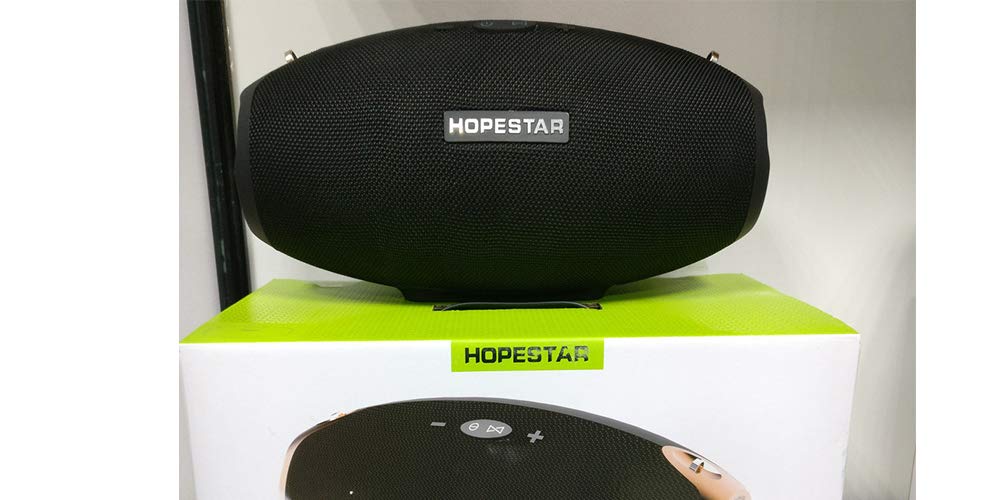
Image: Front view of the HOPESTAR H25 Bluetooth Speaker, showcasing its compact design and speaker grille.
Package Contents
Please check the package for the following items:
- HOPESTAR H25 Bluetooth Speaker
- USB Charging Cable
- Auxiliary Audio Cable (3.5mm)
- User Manual (this document)
Setup
1. Charging the Speaker
Before first use, fully charge the speaker. Connect the provided USB charging cable to the speaker's charging port and the other end to a USB power adapter (not included) or a computer's USB port. The charging indicator light will illuminate during charging and turn off when fully charged.
2. Powering On/Off
Press and hold the power button for approximately 3 seconds to turn the speaker on or off. A power-on/off tone will indicate the status.
Operating Instructions
1. Bluetooth Pairing
- Ensure the speaker is powered on and in Bluetooth pairing mode. The Bluetooth indicator light will flash rapidly.
- On your smartphone, tablet, or other Bluetooth-enabled device, enable Bluetooth and search for available devices.
- Select "HOPESTAR H25" from the list of devices.
- Once paired, the Bluetooth indicator light will stop flashing and remain solid. A confirmation tone may sound.
Note: The speaker will automatically attempt to reconnect to the last paired device when powered on.
2. FM Radio Mode
To switch to FM radio mode, press the "M" (Mode) button. The speaker will announce "FM Mode".
- Automatic Station Scan: In FM mode, press and hold the Play/Pause button to automatically scan and save available FM stations.
- Change Station: Press the "Next Track" or "Previous Track" buttons to switch between saved stations.
3. Auxiliary Input (AUX) Mode
Connect one end of the 3.5mm auxiliary audio cable to the speaker's AUX-in port and the other end to the audio output of your device. The speaker will automatically switch to AUX mode or you may need to press the "M" (Mode) button to select it.
4. Call Function (Built-in Microphone)
When connected via Bluetooth to a smartphone:
- Answer Call: Press the Play/Pause button once.
- End Call: Press the Play/Pause button once during a call.
- Reject Call: Press and hold the Play/Pause button for 2 seconds.
5. Volume Control
Press the "+" button to increase volume and the "-" button to decrease volume.
Maintenance
- Clean the speaker with a soft, dry cloth. Do not use abrasive cleaners or solvents.
- The speaker is splash-waterproof, but do not immerse it in water.
- Store the speaker in a cool, dry place when not in use for extended periods.
- Avoid exposing the speaker to extreme temperatures or direct sunlight.
Troubleshooting
| Problem | Possible Solution |
|---|---|
| Speaker does not power on. | Ensure the battery is charged. Connect to a power source and try again. |
| Cannot pair via Bluetooth. |
|
| No sound. |
|
| Poor FM radio reception. | Reposition the speaker to improve signal reception. Extend any external antenna if available. |
Specifications
| Feature | Detail |
|---|---|
| Brand | Hopestar |
| Model Name | H25 |
| Connectivity Technology | Bluetooth |
| Audio Output Mode | Surround |
| Speaker Type | Bookshelf |
| Product Features | Bluetooth, Wireless |
| Battery Average Life | 7-8 Hours |
| Waterproof Rating | Splash Water Proof |
| Control Method | Touch |
| Compatible Devices | Smartphone, Tablet |
| Power Source | Battery Powered |
| Built-in Microphone | Yes |
| FM Mode | Yes |
Warranty Information
The HOPESTAR H25 Bluetooth Speaker comes with a 6 Months Warranty. This warranty covers manufacturing faults only. Physical damage to the product is not covered under this warranty.
Customer Support
For further assistance or inquiries, please contact your retailer or the manufacturer's customer support. Please have your model number (H25) and purchase details ready.


