
erjigo ZSN PRO
erjigo KZ ZSN Pro In-Ear Earphones User Manual
Model: ZSN PRO
Introduction
The erjigo KZ ZSN Pro In-Ear Earphones are designed to deliver high-fidelity audio with a hybrid dual-driver system. This manual provides essential information for the proper setup, operation, and maintenance of your earphones to ensure optimal performance and longevity.
Package Contents
Please verify that all items listed below are included in your package:
- 1 x KZ ZSN Pro Earphones (Left and Right units)
- 1 x Detachable Earphone Cable
- 2 x Pairs of Earbud Tips (S/L sizes, in addition to the pre-installed M size)
- 1 x User Manual
- 1 x Product Warranty Card

Image: erjigo KZ ZSN Pro In-Ear Earphones (Gray Without Mic) with included accessories.
Setup
1. Connecting the Cable
The KZ ZSN Pro earphones feature a detachable 2-pin cable for easy replacement or upgrade. Ensure the cable connectors are aligned with the earphone sockets (L for left, R for right) and gently push until they click into place. Do not force the connection.

Image: Close-up view of the 2-pin connector being attached to the earphone unit, illustrating the secure connection mechanism.
2. Choosing the Right Ear Tips
Selecting the correct ear tip size is crucial for comfort, sound quality, and noise isolation. Experiment with the provided Small, Medium, and Large ear tips to find the best fit for your ears. A good seal will enhance bass response and overall audio clarity.
3. Wearing the Earphones
The KZ ZSN Pro earphones are designed to be worn with the cable looped over your ears. This provides a secure and comfortable fit, especially during movement. Insert the earphone unit into your ear canal and gently adjust the cable loop behind your ear until it feels stable.

Image: A person demonstrating the correct way to wear the earphones, with the cable routed over the ear for stability and comfort.
Video: This video provides a visual guide to unboxing and assembling the KZ ZSN Pro earphones, including connecting the detachable cable and preparing them for use.
Operating
Audio Playback
Connect the 3.5mm jack of the earphone cable to your audio source (e.g., smartphone, music player, computer). Ensure the connection is secure. Adjust the volume on your audio device to a comfortable listening level before placing the earphones in your ears.
Microphone Functionality (If Applicable)
Some variants of the KZ ZSN Pro include an in-line microphone and control button. If your model has this feature, you can use the button to play/pause music, answer/end calls, and activate voice assistants. Refer to your audio device's instructions for specific button functions.
Detachable Cable for Upgrades
The 2-pin detachable cable allows for customization. You can replace the standard cable with an adapted Bluetooth module (sold separately) to convert your wired earphones into wireless ones. This offers flexibility for different listening scenarios.
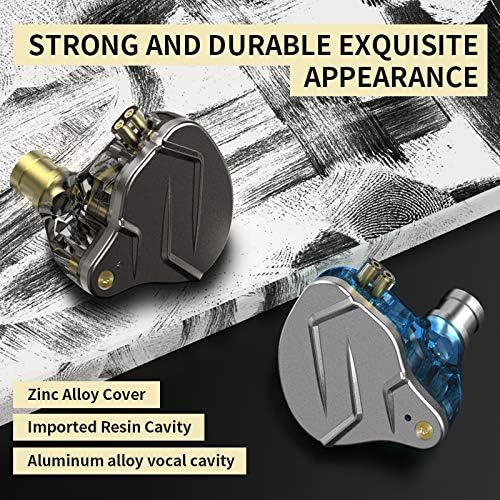
Image: Illustration of the improved 2-pin plug structure, highlighting how a Bluetooth module can be attached to upgrade the earphones to wireless functionality.
Maintenance
Cleaning Ear Tips and Nozzles
Regularly clean the ear tips with a soft, damp cloth to remove earwax and debris. For the earphone nozzles, gently wipe with a dry cotton swab. Ensure no moisture enters the earphone unit. Replace ear tips if they become worn or damaged.
Cable Care
Avoid sharp bends or excessive pulling on the cable to prevent internal damage. When storing, coil the cable loosely. The detachable design allows for easy replacement of a damaged cable.
Storage
Store your earphones in a clean, dry place away from extreme temperatures and direct sunlight. Using a small carrying case can protect them from physical damage and tangling when not in use.

Image: An exploded diagram showcasing the intricate internal components of the earphone, emphasizing the delicate nature of the drivers and the importance of careful handling during maintenance.
Troubleshooting
- No Sound:
- Check if the 3.5mm jack is fully inserted into your audio device.
- Ensure the detachable 2-pin cable is securely connected to both earphone units.
- Verify the volume on your audio device is turned up and not muted.
- Test with a different audio source or another pair of headphones to isolate the issue.
- Poor Sound Quality (Distortion, Low Bass):
- Ensure ear tips provide a proper seal in your ear canal. Try different sizes.
- Clean the earphone nozzles and ear tips to remove any obstructions.
- Check the audio source for any issues with the audio file or streaming quality.
- Loose Cable Connection:
- Gently re-seat the 2-pin connectors into the earphone units.
- If the cable consistently becomes loose, consider replacing the cable.
Specifications
| Brand | erjigo |
| Model Number | ZSN PRO |
| Driver Type | Dynamic Hybrid Dual Driver (1 Dynamic, 1 Balanced Armature) |
| Connectivity | Wired (Detachable 2-pin cable, 3.5mm Jack) |
| Impedance | 24 Ohms |
| Frequency Response | 7Hz-40000Hz |
| Sensitivity | 112dB |
| Cable Length | 3.9 feet (approximately 1.2 meters) |
| Ear Placement | In Ear |
| Material | Metal, Resin |
| Item Weight | 0.05 Pounds (approximately 22.7 grams) |
Warranty
The erjigo KZ ZSN Pro In-Ear Earphones come with a 1-year manufacturer's warranty from the date of purchase. This warranty covers defects in materials and workmanship under normal use. Please retain your proof of purchase for warranty claims. The warranty does not cover damage caused by misuse, accidents, unauthorized modifications, or normal wear and tear.
Support
For technical assistance, troubleshooting, or warranty inquiries, please contact erjigo customer support through the retailer where you purchased the product or visit the official erjigo website for contact information. Please have your product model number and proof of purchase ready when contacting support.
Ask a question about this manual
Ask about setup, troubleshooting, compatibility, parts, safety, or missing instructions. Manuals+ will review the question and use this page’s manual context to help answer it.