
1. Introduction
This manual provides essential information for the safe and efficient operation of your Boulder LED Moving Head Wash Light. This professional stage lighting fixture features 108x3W RGBW LEDs, offering versatile color mixing and dynamic movement for various event settings. Please read this manual thoroughly before installation and operation.
2. Safety Information
- Ensure the product is installed by qualified personnel.
- Always connect the product to a grounded power outlet.
- Do not operate the fixture if the power cord is damaged.
- Avoid direct eye exposure to the light source.
- Maintain adequate ventilation around the fixture to prevent overheating.
- Disconnect power before any cleaning or maintenance.
- This fixture is rated IP20 for indoor use only. Avoid exposure to moisture.
3. Package Contents
Verify that all items listed below are included in your package:
- Boulder LED Moving Head Wash Light (1 unit)
- Powercon Power Cable
- DMX Cable (3-pin)
- Omega Clamp (1/4 turn fastening)
- Safety Attachment Cable
- User Manual (this document)

Figure 3.1: Included accessories for the Boulder LED Moving Head Wash Light. This image displays an Omega clamp, a power cable, a DMX cable, and a safety attachment cable, which are essential for installation and operation.
4. Product Overview
The Boulder LED Moving Head Wash Light is designed for professional stage and event lighting, featuring robust construction and advanced control options.
4.1 Front View

Figure 4.1: Front view of the Boulder LED Moving Head Wash Light. The fixture features a circular array of 108 RGBW LEDs and a control panel with an LCD display and four buttons at its base. The brand name "Pakduk" is visible on the front.
4.2 Rear View and Connections

Figure 4.2: Rear view of the Boulder LED Moving Head Wash Light. This view highlights the cooling fan, Powercon IN/OUT connectors, 3-pin DMX IN/OUT connectors, a fuse holder, and the main power switch.
4.3 Side View

Figure 4.3: Side view of the Boulder LED Moving Head Wash Light, illustrating its compact profile and the articulation of the moving head mechanism.
4.4 Control Panel
The control panel, located at the base of the fixture, features a blue background LCD display and four control buttons: MENU, ENTER, UP, and DOWN. These buttons are used to navigate through the fixture's settings and select operating modes.
5. Setup
5.1 Mounting
The fixture can be mounted in various orientations using the included Omega clamp. Always secure the fixture with the provided safety attachment cable to a suitable support structure, ensuring it can hold at least 10 times the weight of the fixture.
- Attach the Omega clamp to the bottom of the fixture using the 1/4 turn fastening points.
- Secure the safety cable to the designated safety attachment point on the fixture and to the truss or mounting structure.
5.2 Power Connection
Connect the included Powercon power cable to the Powercon IN connector on the rear of the fixture. Ensure the power source matches the specified input voltage (AC90-260V 50/60Hz). Use the Powercon OUT connector to daisy-chain power to other compatible fixtures if needed.
5.3 DMX Connection
For DMX control, connect a 3-pin DMX cable from your DMX controller's output to the DMX IN connector on the fixture. To control multiple fixtures, connect the DMX OUT of the first fixture to the DMX IN of the next, forming a daisy chain. A DMX terminator is recommended for the last fixture in a long chain.
6. Operating Instructions
6.1 Control Modes
The Boulder LED Moving Head Wash Light supports several operating modes:
- DMX512 Mode: Allows precise control over all fixture functions via an external DMX controller. The fixture uses 14 DMX channels.
- Master-Slave Mode: Link multiple fixtures where one acts as the master, controlling the others (slaves).
- Sound Activated Mode: The fixture reacts to ambient sound, creating dynamic light shows.
- Auto Operation Mode: Pre-programmed internal shows run automatically.
6.2 LCD Display and Button Functions
Use the control panel buttons to navigate the menu and select settings:
- MENU: Access the main menu or go back to the previous menu level.
- UP/DOWN: Navigate through menu options or adjust parameter values.
- ENTER: Confirm a selection or save a setting.
6.3 Movement and Effects
- Pan/Tilt: The fixture offers 540°/630° pan and 270° tilt movement with 8/16 bit smooth and precise resolution. It includes scan position memory and auto repositioning after unexpected movement.
- Color Mixing: RGBW color mixing system allows for a wide spectrum of colors.
- LED Effects: Includes LED shutter, LED dimming, LED rainbow effect, macros effect, and strobe effect with 25 flashes per second and pulse effect.
- Dimming: General dimming and blackout for all four colors.
7. DMX Channel Map
The Boulder LED Moving Head Wash Light utilizes 14 DMX channels for comprehensive control. A detailed DMX channel chart, outlining the function of each channel and its corresponding DMX values, is typically provided in a separate DMX reference guide or can be found on the manufacturer's website. Please refer to that document for specific DMX programming.
8. Maintenance
- Cleaning: Regularly clean the lenses and exterior with a soft, lint-free cloth. Do not use abrasive cleaners.
- Inspection: Periodically check all cables, connectors, and mounting hardware for signs of wear or damage.
- Storage: When not in use, store the fixture in a dry, dust-free environment.
- Fuse Replacement: If the fixture does not power on, check and replace the fuse located near the power input if necessary. Always use a fuse of the correct type and rating.
9. Troubleshooting
| Problem | Possible Cause | Solution |
|---|---|---|
| Fixture does not power on. | No power supply; Blown fuse; Damaged power cable. | Check power connection; Replace fuse; Inspect/replace power cable. |
| No DMX control. | Incorrect DMX address; Faulty DMX cable; DMX controller issue; No DMX terminator. | Verify DMX address; Test DMX cable; Check DMX controller; Add DMX terminator. |
| Fixture movement is erratic. | Interference; Mechanical obstruction; Software glitch. | Ensure clear path for movement; Power cycle the fixture; Check DMX signal quality. |
| Lights not responding in Master-Slave mode. | Incorrect mode setting; DMX cable issue between units. | Ensure master and slave units are set correctly; Check DMX connections. |
10. Specifications
| Light Source | 108 x 3W RGBW LEDs |
| Lifespan | 50,000 hours |
| Pan Movement | 540° / 630° (8/16 bit) |
| Tilt Movement | 270° (8/16 bit) |
| DMX Channels | 14 Channels |
| Control Modes | DMX512, Master-Slave, Sound Activated, Auto Operation |
| Input Voltage | AC90-260V, 50/60Hz |
| Power Consumption | 350W |
| Ambient Temperature | -20°C ~ 45°C |
| IP Rating | IP20 (Indoor Use Only) |
| Connectors | Powercon IN/OUT, 3-Pin DMX IN/OUT |
| Dimensions (D*W*H) | 229mm * 330mm * 437mm |
| Net Weight | 8.86 kg |

Figure 10.1: Dimensional drawing of the Boulder LED Moving Head Wash Light, showing height, width, and depth measurements in millimeters.
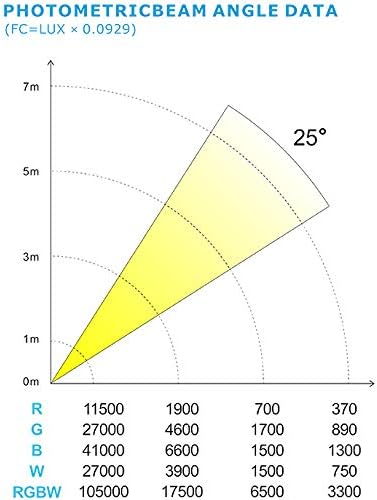
Figure 10.2: Photometric beam angle data, illustrating the light intensity (LUX) at various distances and the 25-degree beam angle of the fixture.
11. Warranty Information
This Boulder LED Moving Head Wash Light is covered by a manufacturer's warranty against defects in materials and workmanship. For specific warranty terms and conditions, please refer to the warranty card included with your product or visit the official Boulder website. Keep your purchase receipt as proof of purchase.
12. Customer Support
For technical assistance, troubleshooting, or service inquiries, please contact Boulder customer support. You can find contact information on the official Boulder website or through your retailer. When contacting support, please have your product model number (B07Q98FTK8) and purchase date ready.
Visit the Boulder Store on Amazon for more products and information.