
1. Introduction
This manual provides instructions for the Smartby EN2A27ST Universal Remote Control, designed as a direct replacement for various Sharp 4K Ultra LED Smart HDTV models. This remote offers full functionality without requiring any programming.
1.1 Product Overview
The Smartby EN2A27ST remote control is engineered to provide seamless operation for your compatible Sharp television. It features a standard layout with dedicated buttons for power, input, channel, volume, navigation, and quick access to popular streaming services.

Image 1.1: Front view of the Smartby EN2A27ST Universal Remote Control. This image displays the full button layout including number keys, navigation pad, volume and channel controls, and dedicated streaming service buttons.
1.2 Compatibility
This remote control is compatible with the following Sharp 4K Ultra LED Smart HDTV models:
- LC-32P5000U, LC-40P5000U, LC-43P5000U, LC-50P5000U, LC-55P5000U, LC-60P6000U
- LC40P5000, LC-40P5000, LC40P5000U, LC-40P5000U
- LC43P5000, LC-43P5000, LC43P5000U, LC-43P5000U
- LC50P5000, LC-50P5000, LC50P5000U, LC-50P5000U
- LC55P5000, LC-55P5000, LC55P5000U, LC-55P5000U
- LC55P6000, LC-55P6000, LC55P6000U, LC-55P6000U
- LC60P6000, LC-60P6000, LC60P6000U, LC-60P6000U
- LC60P6070, LC-60P6070, LC60P6070U, LC-60P6070U
- LC17340N5000U, LC17343N5000U, LC-17343N5000U, LC17343N6100U, LC17343N6100U, LC17343N7000U, LC-17343N7000U
- LC17350N5000U, LC-17350N5000U, LC17350N6000U, LC17350N6000U, LC17350N7000U, LC173-50N7000U
- LC17355N6000U, LC173-55N6000U, LC17355N7000U, LC-17355N7000U
- LC17360N5100U, LC17360N5100U, LC17360N6200U, LC173-60N6200U, LC17360N7000U, LC173-60N7000U
- LC17365N5200U, LC173-65N5200U, LC17365N7000U, LC-17365N7000U, LC17365N9000U, LC173-65N9000U
- LC17375N8000U, LC173-75N8000U, LC40N5000U, LC-40N50
2. Setup
2.1 Battery Installation
The remote control requires two AAA batteries (not included) for operation. No programming is required; the remote will function immediately after battery insertion.
- Locate the battery compartment on the back of the remote control.
- Slide the battery compartment cover downwards to open it.
- Insert two AAA batteries, ensuring the positive (+) and negative (-) terminals align correctly with the markings inside the compartment.
- Slide the battery compartment cover back into place until it clicks securely.
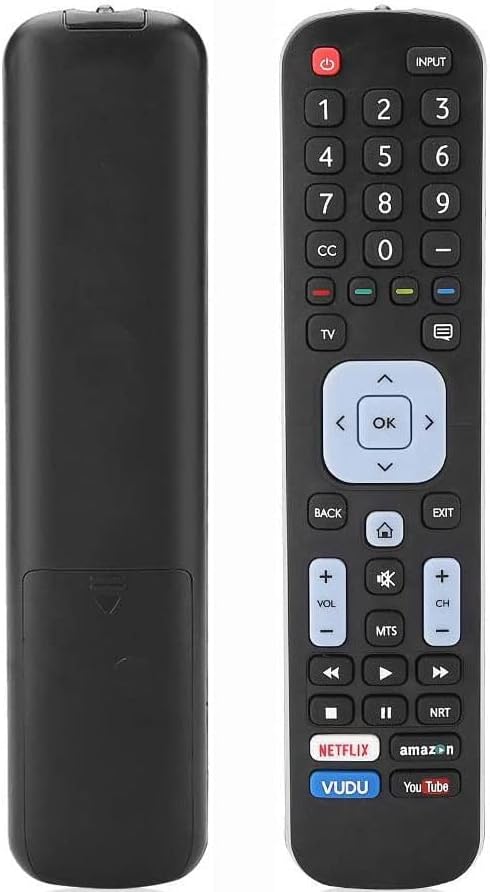
Image 2.1: Front and back view of the remote control, illustrating the location of the battery compartment on the rear.
3. Operating Instructions
The Smartby EN2A27ST remote control provides full functionality for your compatible Sharp TV. Point the remote directly at your television's infrared receiver for optimal performance.

Image 3.1: Close-up view of the Smartby EN2A27ST remote control buttons, highlighting the navigation and media controls.
3.1 Basic Functions
- Power (Red Button): Turns the television on or off.
- Input: Cycles through available input sources (HDMI, AV, etc.).
- Number Keys (0-9): Directly select channels.
- CH +/-: Changes the television channel up or down.
- VOL +/-: Adjusts the volume level up or down.
- Mute (Speaker with X): Mutes or unmutes the television audio.
- Navigation Pad (Up, Down, Left, Right, OK): Used to navigate menus and confirm selections.
- Back: Returns to the previous menu or screen.
- Exit: Exits the current menu or application.
- Home (House Icon): Accesses the TV's smart home screen or main menu.
3.2 Special Features
- Netflix: Direct access button for the Netflix streaming application.
- Amazon: Direct access button for the Amazon Prime Video streaming application.
- VUDU: Direct access button for the VUDU streaming application.
- YouTube: Direct access button for the YouTube application.
- Media Playback Controls (Play, Pause, Fast Forward, Rewind, Stop): Controls media playback within compatible applications or connected devices.
4. Maintenance
4.1 Cleaning
To maintain the remote control's appearance and functionality, clean it regularly:
- Use a soft, dry cloth to wipe the surface of the remote.
- For stubborn dirt, slightly dampen the cloth with water or a mild, non-abrasive cleaner.
- Avoid using harsh chemicals, solvents, or abrasive materials, as these can damage the remote's finish or internal components.
4.2 Battery Replacement
Replace batteries when the remote's response becomes sluggish or it stops functioning. Always replace both batteries at the same time with new AAA batteries.
- Follow the battery installation steps outlined in Section 2.1.
- Dispose of used batteries according to local regulations.
5. Troubleshooting
If you encounter issues with your Smartby EN2A27ST remote control, refer to the following common problems and solutions:
| Problem | Possible Cause | Solution |
|---|---|---|
| Remote is not responding. | Dead or incorrectly inserted batteries. | Replace batteries with new AAA batteries, ensuring correct polarity. |
| Remote has limited range or intermittent response. | Low batteries; Obstruction between remote and TV; Remote not pointed at TV's IR sensor. | Replace batteries. Remove any obstructions. Ensure the remote is pointed directly at the TV. |
| Specific buttons are not working. | Dirt or debris under the button; Internal malfunction. | Clean the remote surface. If the issue persists, consider replacing the remote. |
| TV does not respond to remote, but remote's LED flashes. | TV's IR sensor is blocked or malfunctioning; TV is not compatible. | Ensure TV's IR sensor is clear. Verify TV model is listed in the compatibility section (Section 1.2). |
6. Specifications
| Feature | Detail |
|---|---|
| Model Number | EN2A27ST |
| Brand | Smartby |
| Compatible Devices | Sharp 4K Ultra LED Smart HDTVs (specific models listed in Section 1.2) |
| Power Source | 2 x AAA Batteries (not included) |
| Special Feature | Universal (for specified Sharp models), No Programming Required |
| Color | Black |
| Product Dimensions | 8 x 1.8 x 0.6 inches |
| Item Weight | 3.2 ounces |
7. Warranty and Support
7.1 Warranty Information
This product includes a 30-day warranty return service. For details regarding returns or exchanges, please refer to your purchase documentation or contact the seller directly.
7.2 Customer Support
For further assistance or inquiries, please contact Smartby customer support through the retailer where the product was purchased. You may also visit the Smartby Store on Amazon for additional product information.