
1. Introduction
This manual provides essential information for the safe and efficient operation of your Muse M-1990 DJ Bluetooth Party Speaker. Please read these instructions thoroughly before using the device and retain them for future reference.
The Muse M-1990 DJ is a powerful party speaker designed to deliver high-quality audio with dynamic light effects. It features multiple connectivity options including Bluetooth, CD player, USB, and AUX inputs, making it versatile for various audio sources.

Image 1.1: The Muse M-1990 DJ Bluetooth Party Speaker showcasing its integrated light effects.
2. Safety Information
Observe the following safety precautions to prevent electric shock, fire, or damage to the unit:
- Do not expose the unit to rain or moisture.
- Do not open the casing. Refer all servicing to qualified personnel.
- Ensure the power supply voltage matches the rating label on the unit.
- Keep the unit away from direct sunlight, heat sources, and excessive dust.
- Ensure adequate ventilation around the unit.
- Do not place heavy objects on the unit.
- Unplug the unit during lightning storms or when unused for long periods.
3. Package Contents
Verify that all items are present in the packaging:
- Muse M-1990 DJ Party Speaker Unit
- Remote Control (requires 2 AA batteries, included)
- Wired Microphone
- AUX IN Cable (3.5mm jack)
- Power Cable (AC 100-240V, 50/60Hz)

Image 3.1: Included accessories: remote control, wired microphone, and AUX cable.
4. Product Overview
Familiarize yourself with the main components and controls of your M-1990 DJ speaker.
4.1 Top Control Panel
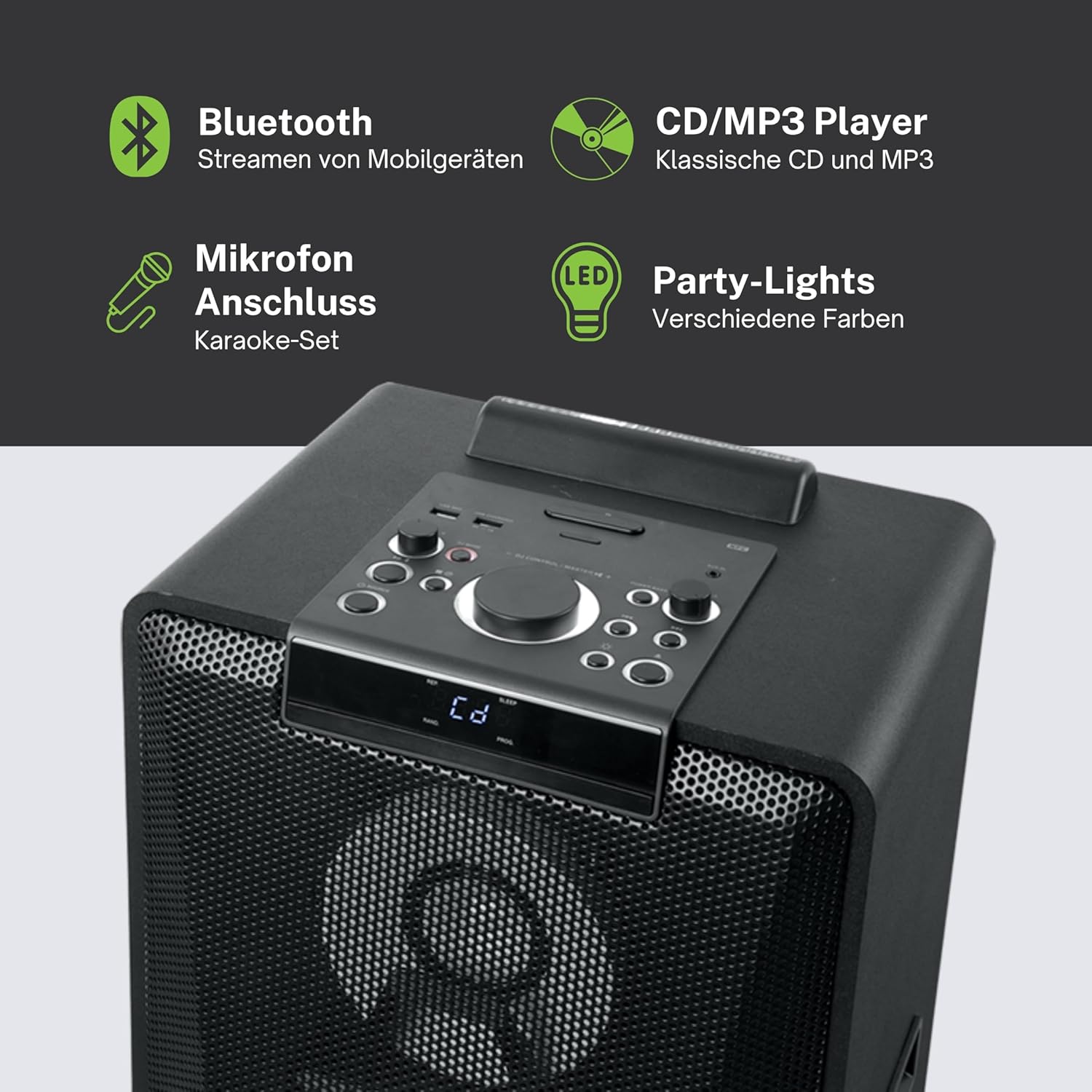
Image 4.1: Detailed view of the top control panel, showing various buttons and the LED display.
The top panel features controls for power, volume, source selection, playback, light effects, and a white LED display. It also includes a built-in cradle for a tablet or smartphone.
4.2 Rear Connectivity Ports
The rear panel provides various input and output options:
- USB 2.0 Port (for MP3 playback and charging)
- AUX IN 1 (2 x RCA jacks)
- AUX IN 2 (3.5mm jack)
- Microphone Inputs (2 jacks)
- Guitar Input (1 jack)
- AC Power Input (100-240V, 50/60Hz)
5. Setup
5.1 Placement
Place the speaker on a stable, flat surface. Ensure there is adequate space around the unit for ventilation. The unit is designed for floor mounting.
5.2 Power Connection
- Connect the supplied power cable to the AC power input on the rear of the speaker.
- Plug the other end of the power cable into a standard wall outlet (AC 100-240V, 50/60Hz).
- The unit does not contain a rechargeable battery and must be connected to a power source for operation.
6. Operating Instructions
6.1 Power On/Off
Press the Power button on the top control panel or the remote control to turn the unit on or off.
6.2 Bluetooth Pairing
- Press the Source button to select Bluetooth mode. The LED display will show 'BT' and the Bluetooth indicator will flash.
- Enable Bluetooth on your smartphone, tablet, or other compatible device.
- Search for 'M-1990 DJ' in your device's Bluetooth list and select it to pair.
- Once paired, the Bluetooth indicator will stop flashing, and you can begin streaming audio.
- For NFC-enabled devices, simply tap your device on the NFC area of the speaker for automatic pairing.
6.3 CD Playback
- Press the Source button to select CD mode.
- Open the CD tray and place a CD (CD, CD-R/RW, MP3 compatible) with the label side up.
- Close the CD tray. Playback will start automatically or can be initiated using the Play/Pause button.
6.4 USB Playback
- Insert a USB flash drive containing MP3 files into the USB 2.0 port.
- Press the Source button to select USB mode.
- Playback will start automatically or can be controlled using the playback buttons.
- The USB port also functions as a charging port for external devices.
6.5 AUX Input
- Connect your external audio device to either the AUX IN 1 (RCA jacks) or AUX IN 2 (3.5mm jack) using the appropriate cable.
- Press the Source button to select the corresponding AUX input.
- Control playback from your connected device.
6.6 Microphone and Guitar Inputs
- Plug your microphone(s) into the Microphone input jacks.
- Plug your guitar into the Guitar input jack.
- Adjust the microphone/guitar volume using the dedicated controls on the top panel.
6.7 Light Effects
The M-1990 DJ features color-changing lights and strobe effects. Use the dedicated Light Effects button on the control panel or remote to cycle through different modes or turn the lights off.
6.8 Stereo Pairing (Dual Bluetooth)
If you have two M-1990 DJ units, you can pair them wirelessly for a stereo sound experience. Refer to the specific instructions for stereo pairing in the full manual (if provided by manufacturer) or on the manufacturer's website.
7. Maintenance
7.1 Cleaning
- Always unplug the unit from the power outlet before cleaning.
- Use a soft, dry cloth to clean the exterior surfaces.
- Do not use abrasive cleaners, waxes, or solvents as they may damage the finish.
7.2 Storage
When not in use for extended periods, store the speaker in a cool, dry place, away from direct sunlight and extreme temperatures.
8. Troubleshooting
If you encounter issues with your M-1990 DJ speaker, refer to the following common problems and solutions:
| Problem | Possible Cause | Solution |
|---|---|---|
| No power | Power cable not connected; Power outlet not active | Ensure power cable is securely connected; Try a different outlet |
| No sound | Volume too low; Incorrect source selected; Audio cable not connected | Increase volume; Select correct input source; Check audio cable connections |
| Bluetooth not pairing | Speaker not in pairing mode; Device Bluetooth off; Device too far | Ensure speaker is in BT mode and flashing; Enable Bluetooth on device; Move device closer (within 10m) |
| CD not playing | CD inserted incorrectly; CD scratched/dirty; Incorrect format | Reinsert CD correctly; Clean CD; Ensure CD is audio CD or MP3 compatible |
| USB not playing | USB drive not inserted correctly; Files not MP3 format; USB drive corrupted | Reinsert USB drive; Ensure files are MP3; Try a different USB drive |
If the problem persists after attempting these solutions, please contact customer support.
9. Specifications
Detailed technical specifications for the Muse M-1990 DJ Party Speaker:
- Model Number: M-1990 DJ
- Brand: MUSE
- Output Power: 1000 Watts
- Number of Channels: 2
- Connectivity Technology: Bluetooth V4.2
- Compatible Devices: Smartphone, Tablet
- Audio Inputs: 2 x Microphone jacks, 1 x Guitar jack, 2 x RCA AUX IN, 1 x 3.5mm AUX IN
- USB Port: 1 x USB 2.0 (for MP3 playback and charging)
- CD Player: CD, CD-R/RW, MP3 compatible
- Light Effects: Color changing lights, Strobe effects, Light projection
- Power Source: AC 100-240V, 50/60Hz (Electric Cable)
- Rechargeable Battery: No
- Material: Wood (cabinet)
- Color: Black
- Item Weight: 17.9 Kilograms
- Dimensions (L x W x H): 35.6 x 34.8 x 105.7 centimeters
- Recommended Use: Party and entertainment
- Mounting Type: Floor Mount
- Included Batteries: 2 AA (for remote control)

Image 9.1: Dimensional drawing of the Muse M-1990 DJ speaker.
10. Warranty and Support
10.1 Warranty Information
Warranty terms and conditions for the Muse M-1990 DJ speaker are typically provided with the product packaging or can be found on the official Muse website. Please retain your proof of purchase for any warranty claims.
10.2 Customer Support
For further assistance, technical support, or service inquiries, please refer to the contact information provided in your product documentation or visit the official Muse customer support website.


