
1. Introduction
This manual provides detailed instructions for the installation, operation, and maintenance of your Modern Forms Hydra Smart 120-inch 8-Blade Ceiling Fan. Please read this manual thoroughly before installation and retain it for future reference. This fan is designed for both indoor and outdoor applications, featuring an integrated 2700K LED light kit and smart control capabilities.
2. Safety Information
Always follow basic safety precautions when installing and operating electrical appliances. This fan must be installed by a qualified electrician in accordance with local electrical codes. Ensure power is disconnected at the circuit breaker before installation or servicing. Do not attempt to repair or modify the fan yourself. Use only manufacturer-specified replacement parts.
- Ensure the mounting structure can support the fan's weight.
- Maintain a minimum clearance of 7 feet from the floor to the fan blades.
- Do not insert objects into the fan blades while in operation.
- This fan is wet location rated for indoor and outdoor use.
3. Package Contents
Verify that all components are present before beginning installation:
- Fan Blades (8)
- Motor Housing
- Smart Receiver
- LED Light Kit
- Mounting Hardware
- 6-inch Downrod
- Bluetooth Hardwired Wall Control (Part# F-WCBT-WT)
- Installation Instructions & Setup Manual
Note: Additional switches for 3 or 4-way setup (Part# F-WCBT-WT) and a battery-operated Bluetooth remote control with wall cradle (Part # F-RCBT-WT) are sold separately.
4. Installation
This section outlines the steps for physically installing your ceiling fan. Professional installation is recommended.
4.1 Mounting the Fan
The fan mounts to a standard ceiling fan junction box. Ensure the junction box is securely fastened to the building structure and capable of supporting the fan's weight.
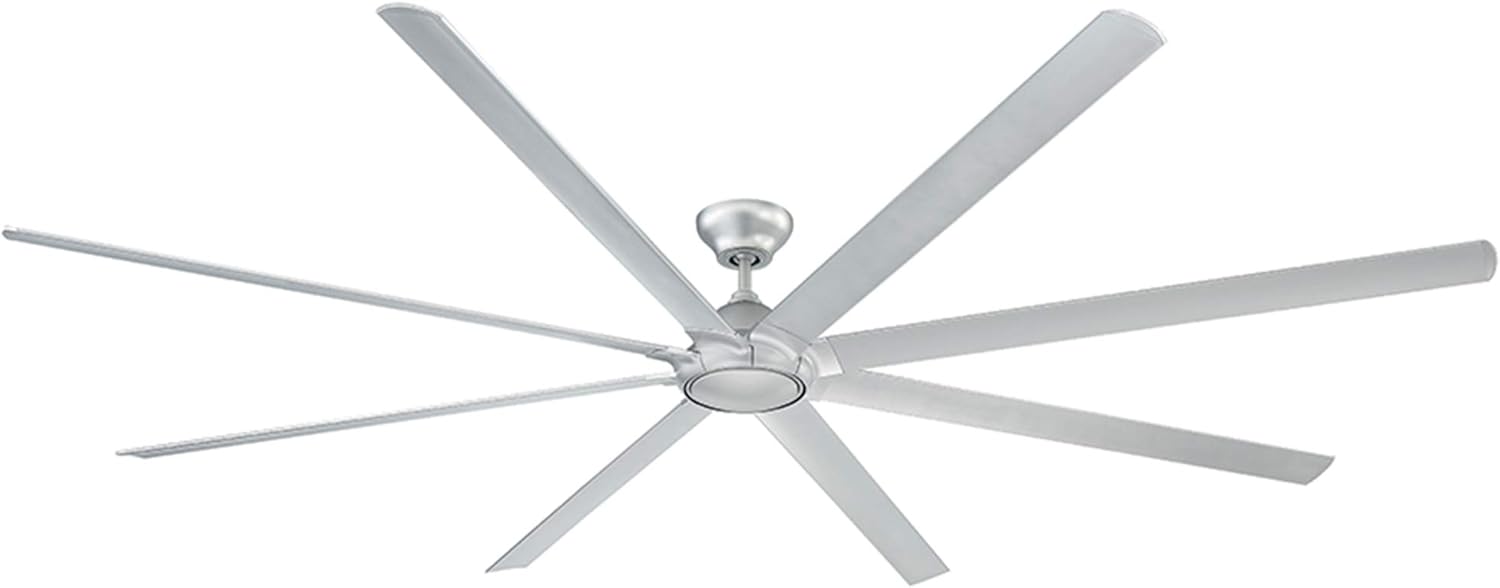
Image: The Modern Forms Hydra Smart 120-inch 8-Blade Ceiling Fan in Titanium finish, viewed from below, showing the central motor housing and eight long blades. The integrated LED light kit is visible at the center.

Image: A side profile view of the Modern Forms Hydra Smart Ceiling Fan, illustrating the downrod, motor housing, and the slight angle of the blades. The fan is shown in a titanium finish.
- Turn off power at the circuit breaker.
- Attach the mounting bracket to the ceiling junction box using the provided screws.
- Assemble the downrod to the motor housing. The fan includes a 6-inch downrod.
- Carefully lift the fan assembly and hang it from the mounting bracket.
- Connect the electrical wiring according to the wiring diagram in the separate detailed installation guide.
- Secure the canopy to the mounting bracket.
- Attach the fan blades to the motor housing.
- Install the LED light kit and its optional cover.
4.2 Downrod Selection and Ceiling Slope
The fan comes with a 6-inch downrod. Longer downrods are available separately for higher ceilings. The fan can be installed on slope ceilings up to a 32-degree slope. For slopes between 32 and 45 degrees, the XF-SCK Slope Ceiling Kit (sold separately) is required.

Image: A diagram illustrating recommended downrod lengths based on ceiling height, ranging from 8 feet to 15 feet. It shows a 6-inch downrod included with the fan, with options for 12, 18, 24, 36, 48, and 60-inch downrods. Downrod couplers are also shown.

Image: A close-up of a 12-inch ceiling fan extension downrod in matte white, showing the threaded end for secure attachment.

Image: A ceiling fan slope ceiling kit, designed to accommodate sloped ceilings up to 45 degrees, shown in matte white.
5. Setup & Connectivity
Your Hydra Smart Fan offers multiple control options for convenience.
5.1 Wall Control
The included Bluetooth hardwired wall control (Part# F-WCBT-WT) provides direct control over fan speed and light functions. Install it in a standard wall box. This control uses Bluetooth for local operation.

Image: A white Modern Forms wall control unit with buttons for fan speed, light on/off, and dimming. It is designed to fit into a standard wall switch plate.

Image: A close-up view of the Modern Forms wall control, highlighting the fan and light control buttons and a small indicator light at the bottom.
5.2 Modern Forms App
Download the free Modern Forms app from the iOS App Store or Google Play Store. The app allows you to control fan speed, light brightness, utilize smart features like breeze mode and adaptive learning, create groups, and monitor energy usage. The app connects over Wi-Fi, enabling control from anywhere with an internet connection.

Image: A smartphone displaying the Modern Forms app interface, showing controls for fan power, speed level, light brightness, and various smart features like breeze mode and scheduling.
5.3 Smart Home Integration
The Hydra Smart Fan integrates with popular smart home platforms:
- Amazon Alexa: Control your fan with voice commands.
- Google Assistant: Use voice commands to manage fan and light settings.
- Samsung SmartThings: Integrate the fan into your SmartThings ecosystem.
- Ecobee: Sync with Ecobee thermostats to optimize energy usage based on your comfort settings.

Image: Logos for Amazon Alexa, Google Assistant, Nest, and Ecobee, indicating compatibility with these smart home systems.
5.4 Official Product Video
Watch this video for an overview of Modern Forms Smart Fan features:
Video: This video from WAC Lighting provides an overview of the features and benefits of Modern Forms Smart Fans, including wet rating, LED luminaires, DC motors, and smart home integration.
6. Operating Instructions
Control your fan using the wall control, the Modern Forms app, or integrated smart home devices.
6.1 Fan Speed Control
The fan features 6 speeds. Adjust the speed using the dedicated buttons on the wall control or the slider in the Modern Forms app. Higher speeds provide greater airflow.
6.2 Light Control
The integrated 2700K LED light kit offers smooth and continuous brightness control, dimmable to 1%. Use the light buttons on the wall control or the app to turn the light on/off and adjust brightness. An optional cover is included to conceal the luminaire if desired.
6.3 Smart Features
- Breeze Mode: Simulates a natural breeze by varying fan speed. Activate via the Modern Forms app.
- Adaptive Learning: The fan learns your preferences and adjusts settings automatically over time.
- Scheduling: Set schedules for fan and light operation through the app.
- Summer/Winter Mode: Reverse the fan direction to optimize air circulation for cooling in summer or distributing warm air in winter. This feature is typically controlled via the app.
7. Maintenance
Regular maintenance ensures optimal performance and longevity of your fan.
- Cleaning: Wipe the fan blades and motor housing with a soft, damp cloth. Do not use abrasive cleaners or solvents.
- LED Luminaire: The LED luminaire is replaceable. Refer to the detailed installation guide for replacement instructions if needed.
- Motor: The DC motor is designed for long-term, maintenance-free operation. No lubrication is required.
8. Troubleshooting
If you experience issues with your fan, consult the following common problems and solutions:
| Problem | Possible Cause | Solution |
|---|---|---|
| Fan does not operate | No power, loose wiring, incorrect wall control pairing. | Check circuit breaker. Verify all wiring connections. Re-pair wall control with fan (refer to pairing instructions in detailed manual). |
| Light does not work | Loose wiring, faulty LED module. | Check light kit wiring. If LED module is faulty, contact support for replacement. |
| Fan wobbles | Loose blades, unbalanced blades, loose mounting. | Ensure all blade screws are tight. Use a balancing kit (not included) if necessary. Verify mounting bracket is secure. |
| App connectivity issues | Wi-Fi signal weak, incorrect network settings, app not updated. | Ensure strong Wi-Fi signal. Verify fan is connected to the correct 2.4GHz Wi-Fi network. Update the Modern Forms app to the latest version. |
For further assistance, refer to the comprehensive troubleshooting section within the Modern Forms app or contact customer support.
9. Specifications
Key technical details for the Modern Forms Hydra Smart 120-inch 8-Blade Ceiling Fan:
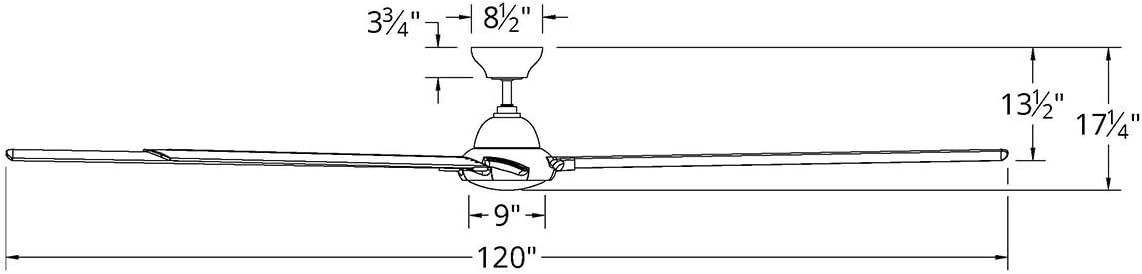
Image: A technical drawing showing the dimensions of the Modern Forms Hydra Smart Ceiling Fan, including a 120-inch blade span, 17.25-inch height, and other measurements for the motor housing and canopy.
| Feature | Detail |
|---|---|
| Model Number | FR-W1805-120L27-TT |
| Blade Span | 120 inches |
| Number of Blades | 8 |
| Color | Titanium |
| Light Kit | 2700K Warm LED, Dimmable |
| Motor Type | 6-Speed Brushless DC Motor |
| Power Source | AC/DC, 120 Volts |
| Wattage | 67.5 watts |
| Air Flow Capacity | 13300 Cubic Feet Per Minute |
| Noise Level | 15 Decibels |
| Material | Aluminum (body), Alloy Steel (blades) |
| Indoor/Outdoor Usage | Wet Location Rated |
| Certifications | ETL, cETL, UL, cUL, CSA CAN Wet Location Listed, Energy Star, FCC |
| UPC | 790576696843 |

Image: The Energy Star Most Efficient 2020 logo, indicating the fan's high energy efficiency.
10. Warranty
Modern Forms provides the following warranty for the Hydra Smart Ceiling Fan:
- LED Module: 5 years
- Motor: Lifetime
- All Other Parts: 1 year
Please retain your proof of purchase for warranty claims. For detailed warranty terms and conditions, refer to the official Modern Forms website or contact customer support.
11. Customer Support
For technical support, troubleshooting assistance, or warranty inquiries, please utilize the Modern Forms app or visit the Modern Forms website. The app provides a dedicated support section with FAQs and contact options.


