
sofirn SP70KIT
Sofirn SP70 Tactical Flashlight User Manual
Model: SP70KIT
1. Introduction
The Sofirn SP70 is a high-performance tactical flashlight designed for demanding outdoor, military, and emergency applications. It features a powerful LED, delivering an impressive output of up to 5500 lumens and a long-reaching beam distance of up to 750 yards. The SP70 incorporates two distinct light groups for versatile operation, allowing users to choose between fixed brightness levels or a smooth ramping function. Constructed from durable, aircraft-grade aluminum with an IPX8 water resistance rating, this flashlight is built to withstand extreme conditions.
2. Package Contents
Please verify that all items listed below are included in your package:
- 1 x Sofirn SP70 Tactical Flashlight
- 2 x 26650 Lithium Polymer Batteries
- 1 x Dual Bay Battery Charger
- 1 x Micro USB Cable
- 2 x Spare O-rings
- 1 x Shoulder Strap
- 1 x User Manual

Image: Sofirn SP70 flashlight and its accessories.
3. Specifications
- Light Source: LED
- Brightness: 2 to 5500 Lumens
- Beam Distance: Up to 750 Yards
- Material: Aircraft-grade Aluminum
- Water Resistance: IPX8 (Water Resistant)
- Power Source: Battery Powered
- Battery Type: 2 x 26650 Lithium Polymer (included)
- Dimensions: 9.8"D x 3.5"W x 3.5"H
- Weight: 1.38 Pounds
- Special Feature: Durable

Image: Sofirn SP70 flashlight construction details.
4. Setup
4.1 Battery Installation
- Unscrew the tail cap of the flashlight by turning it counter-clockwise.
- Insert the two 26650 Lithium Polymer batteries with the positive (+) end facing towards the head of the flashlight.
- Carefully screw the tail cap back on clockwise until it is securely tightened. Ensure the O-rings are properly seated to maintain water resistance.

Image: Sofirn SP70 with batteries.
4.2 Initial Charging
Before first use, it is recommended to fully charge the included 26650 batteries using the provided dual bay charger and Micro USB cable. The charger's indicator lights will show charging status (typically red for charging, green for fully charged).
5. Operating Instructions
5.1 Power On/Off
- To Turn On: Fully press the tail switch.
- To Turn Off: Fully press the tail switch again.
- Momentary On: Half-press and hold the tail switch. Release to turn off.
- Standby Mode: When the light is on, fully press the tail switch to enter standby mode. The side switch indicator will remain lit.
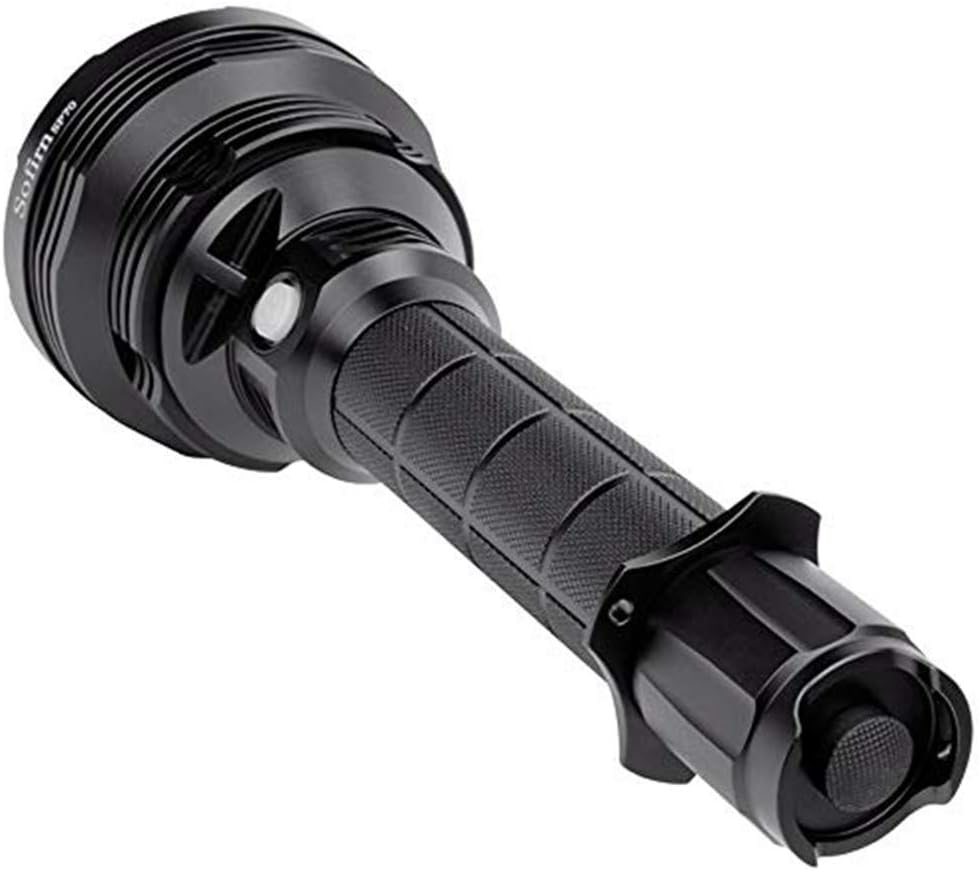
Image: Tail switch for power control.
5.2 Mode Switching (Side Switch)
The SP70 features two light groups controlled by the side switch:
- Group 1 (6 Brightness Levels):
- From ON, hold the side switch to cycle through Eco (60LM) → Low (400LM) → Mid (1200LM) → High (4000LM). Release to select.
- Double-tap the side switch for Turbo (5500LM). Double-tap again to return to the previous mode.
- Triple-tap the side switch for Beacon (1000LM).
- From OFF, hold the side switch for Moon (2LM).
- Group 2 (Ramping):
- From ON, hold the side switch to smoothly ramp brightness up or down (2LM to 5500LM). Release to select.
- Double-tap the side switch for Turbo (5500LM).
- Triple-tap the side switch for Beacon (1000LM).
- Switching Between Groups: From ON, four quick clicks of the side switch will toggle between Group 1 and Group 2.
5.3 Power Indicator
The side switch features a built-in power indicator to show battery status:
- Green: Battery is good.
- Red: Battery is low.
- Flashing Red: Battery is critically low and needs charging.
5.4 Advanced Temperature Regulation (ATR)
The SP70 is equipped with ATR technology. When the driver temperature reaches 60°C (140°F), the brightness level will automatically adjust downwards to prevent overheating and prolong the flashlight's lifespan. The brightness will increase again once the temperature drops.
Video: Demonstration of the Sofirn SP70's user interface and beam performance. This video shows how to operate the tail switch for power, the side switch for mode cycling, and the impressive brightness levels, including Turbo mode and beam distance at night.
6. Maintenance
- Cleaning: Clean the flashlight body with a soft, damp cloth. For the lens, use a lens cleaning cloth and solution.
- O-rings: Periodically lubricate the O-rings with silicone grease to maintain water resistance. Replace worn O-rings with the included spares.
- Threads: Keep the threads clean and lightly lubricated to ensure smooth operation of the tail cap.
- Battery Care: Remove batteries if the flashlight will not be used for an extended period. Store batteries in a cool, dry place.

Image: Internal components of the flashlight head, relevant for maintenance.
7. Troubleshooting
| Problem | Possible Cause | Solution |
|---|---|---|
| Flashlight does not turn on. |
|
|
| Light is dim or flickers. |
|
|
| Water ingress. |
|
|
8. Safety Information
- Do not look directly into the light beam, especially on high or turbo modes, as it can cause temporary vision impairment or permanent eye damage.
- Keep the flashlight out of reach of children.
- Use only recommended batteries. Improper battery types or installation can cause damage or pose a safety risk.
- Do not disassemble the flashlight head or modify the internal components, as this may void the warranty and cause damage.
- Avoid exposing the flashlight to extreme temperatures or direct sunlight for prolonged periods.
9. Warranty and Support
For warranty information, technical support, or any inquiries regarding your Sofirn SP70 Tactical Flashlight, please contact Sofirn customer service directly through their official website or the retailer from whom you purchased the product. Please retain your proof of purchase for warranty claims.
You can visit the official Sofirn store on Amazon for more information: Sofirn Store
Ask a question about this manual
Ask about setup, troubleshooting, compatibility, parts, safety, or missing instructions. Manuals+ will review the question and use this page’s manual context to help answer it.