
1. Product Overview
This manual provides instructions for the APIELE 19mm Momentary Push Button Switch. This switch is designed for applications requiring a momentary contact, meaning it activates when pressed and deactivates when released. It features a 12V LED indicator and is constructed from stainless steel.
Key Features:
- Momentary operation: Push and hold for ON, release for OFF.
- Integrated 12V LED indicator.
- Required mounting hole size: 19mm (3/4 inch).
- Durable stainless steel construction.
- Includes wire socket plug for convenient wiring.
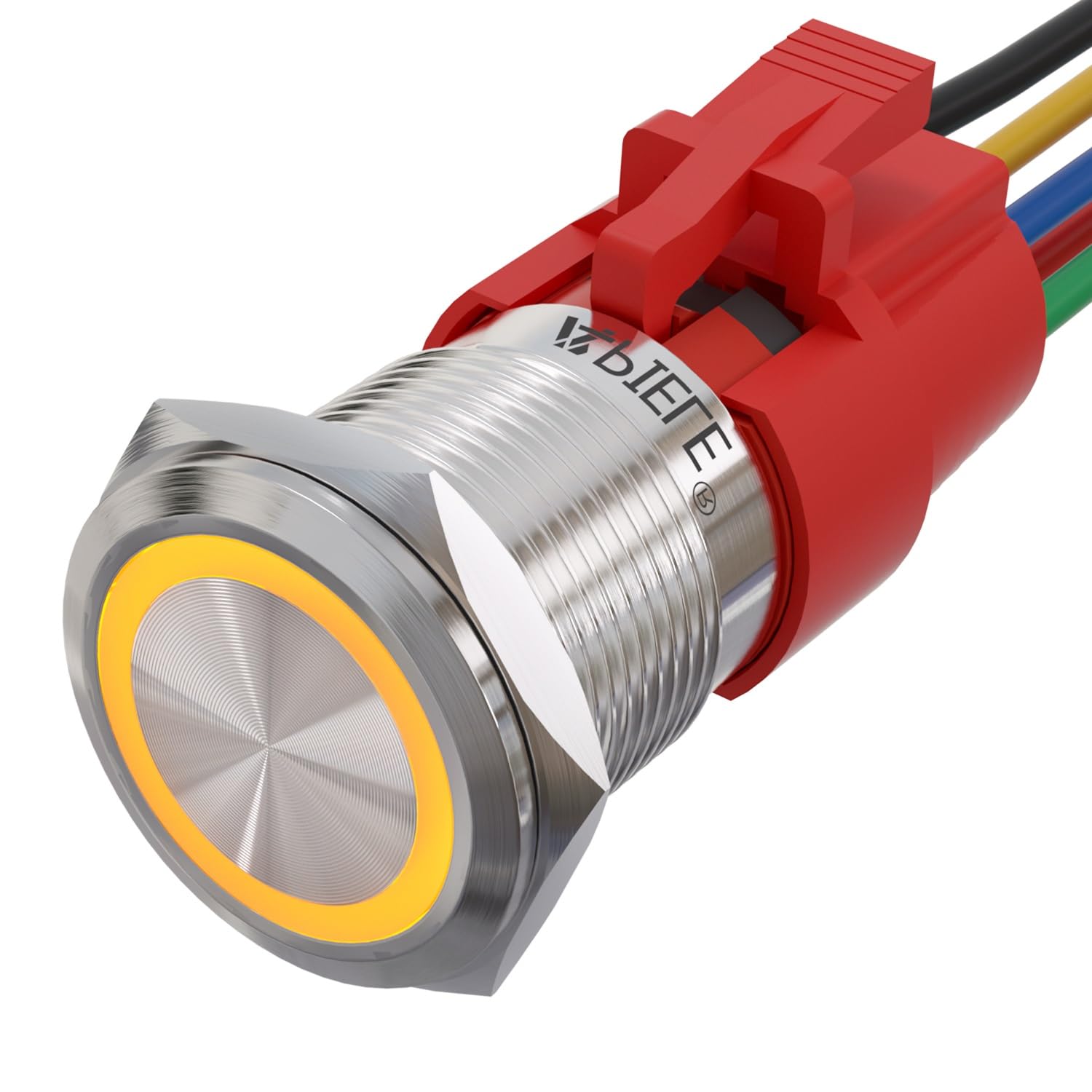
Figure 1: APIELE 19mm Momentary Push Button Switch (Yellow LED variant shown).
2. Specifications
| Specification | Value |
|---|---|
| Operation Mode | Momentary (ON-NONE-OFF) |
| Mounting Hole Size | 19mm (3/4 inch) |
| Structure | 1NO 1NC (1 Normally Open, 1 Normally Closed) |
| Protection Degree | IP65 (Dust tight and protected against water jets) |
| Rated Current | 5A |
| Shell Material | Stainless Steel |
| LED Voltage | 12V |
| Connector Type | Plug In |
| Item Dimensions (L x W x H) | 40 x 30 x 10 mm |

Figure 2: Detailed dimensions and key specifications of the switch.
3. Setup and Installation
The switch requires a 19mm (3/4 inch) mounting hole. Ensure the mounting surface is clean and free of obstructions. Secure the switch using the provided nut on the threaded body.
3.1 Wiring Instructions
The switch comes with a wire socket plug for easy connection. Refer to the wire color codes and wiring diagrams below for proper installation.
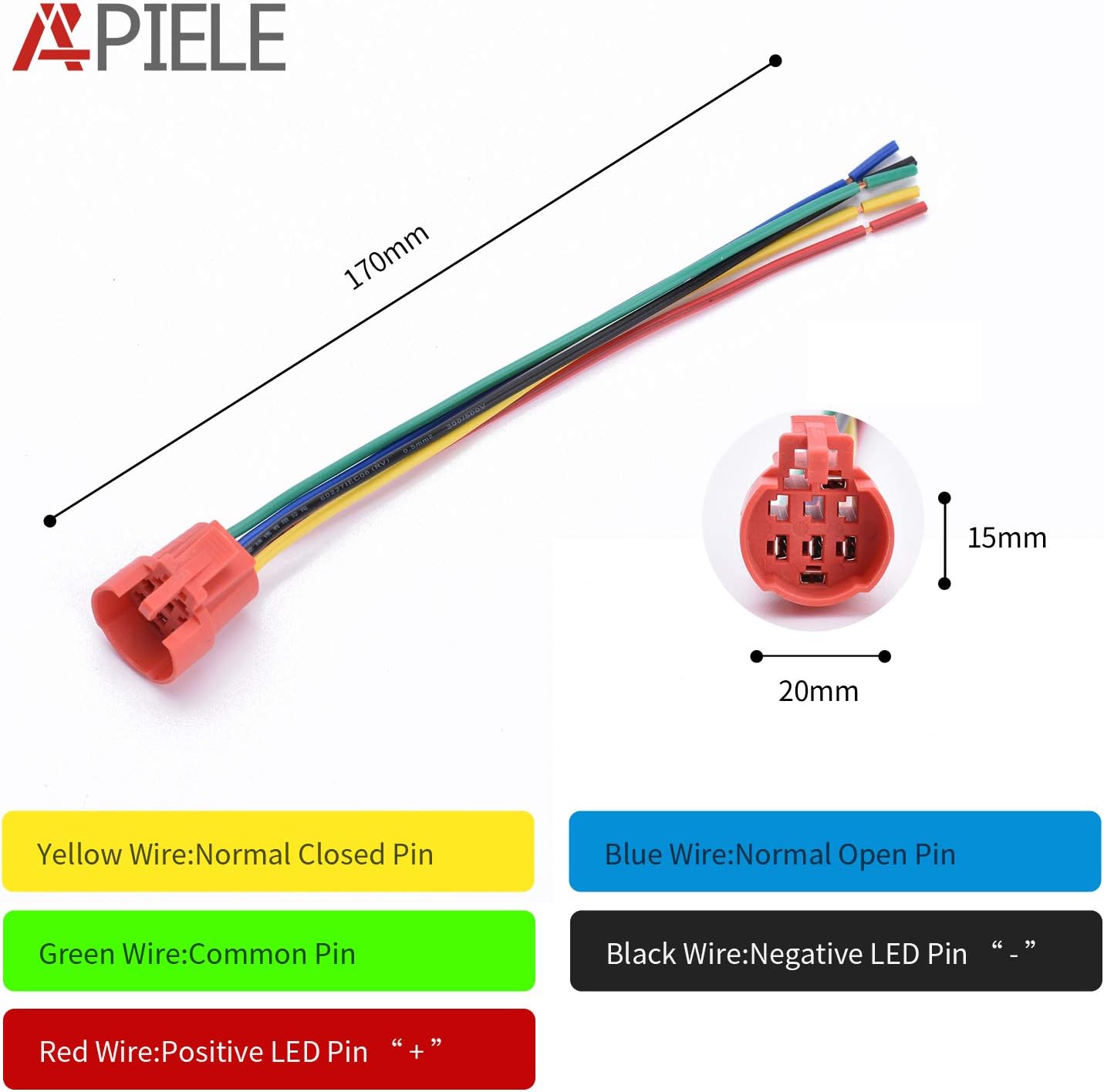
Figure 3: Wire socket plug and color code definitions.
- Yellow Wire: Normal Closed Pin (NC)
- Blue Wire: Normal Open Pin (NO)
- Green Wire: Common Pin (C)
- Black Wire: Negative LED Pin ("-")
- Red Wire: Positive LED Pin ("+")
Wiring Diagrams:

Figure 4: Three common wiring configurations for the switch and LED.
- Configuration 1 (LED ON with Device ON):
Connect the LED positive (+) and negative (-) pins to the power source. Connect the Common (C) and Normally Open (NO) pins to control the device. When the button is pressed, the device turns ON and the LED lights up. When released, the device turns OFF and the LED turns OFF. - Configuration 2 (LED Always ON, Device ON with Button Press):
Connect the LED positive (+) and negative (-) pins directly to the 12V power source for continuous illumination. Connect the Common (C) and Normally Open (NO) pins to control the device. The device will turn ON only when the button is pressed, while the LED remains lit. - Configuration 3 (LED ON when Device OFF, Device ON with Button Press):
Connect the LED positive (+) and negative (-) pins to illuminate when the device is OFF. This typically involves wiring the LED across the Normally Closed (NC) and Common (C) contacts, or using external logic. When the button is pressed, the device turns ON and the LED turns OFF. When released, the device turns OFF and the LED turns ON.
Note: The LED has a built-in resistor for 12V operation. For other voltages, an external resistor may be required to prevent damage or adjust brightness. The LED and switch contacts are independent, allowing for flexible control schemes.
4. Operation
This is a momentary switch. To activate the connected device, press and hold the button. The device will remain active as long as the button is held down. Upon releasing the button, the switch returns to its original state, and the device deactivates.
The integrated LED provides visual feedback. Its behavior (always on, on with switch, or inverse) depends on the chosen wiring configuration as detailed in Section 3.1.

Figure 5: Switch durability rated for 200,000 press cycles and 40,000 hours lamp life.
5. Maintenance
The APIELE 19mm Momentary Push Button Switch is designed for durability and minimal maintenance. It has an IP65 protection rating, meaning it is dust-tight and protected against water jets. This makes it suitable for various environments, including those with exposure to moisture.
- Cleaning: Use a soft, damp cloth to clean the switch surface. Avoid abrasive cleaners or solvents that could damage the stainless steel finish or internal components.
- Inspection: Periodically check the wiring connections to ensure they are secure.
- Environmental Conditions: While rated IP65, prolonged submersion or exposure to high-pressure water jets is not recommended.

Figure 6: The switch features an IP65 efficient waterproof design.
6. Troubleshooting
- Switch Not Responding:
- Verify all wiring connections are secure and correct according to the diagrams in Section 3.1.
- Ensure the power source is providing the correct voltage (e.g., 12V for the LED).
- Check for any physical obstructions preventing the button from fully depressing. - LED Not Lighting Up:
- Confirm the LED is receiving 12V power. Check the polarity of the LED connections (Red wire for positive, Black wire for negative). While the LED may function with reversed polarity due to internal design, correct polarity is recommended.
- Inspect the LED wires for breaks or loose connections.
- If using a different voltage, ensure an appropriate external resistor is used. - Intermittent Operation:
- Loose wiring connections are a common cause. Re-check all terminals.
- Ensure the mounting nut is tightened sufficiently to prevent movement.
7. Warranty and Support
APIELE offers a 3-year warranty for this product. If the product fails due to manufacturing defects within 3 years of purchase, a replacement will be provided free of charge. This warranty does not cover damage caused by misuse, improper installation, or non-man-made breakage.
For technical support or warranty claims, please contact APIELE customer service through your point of purchase or the official APIELE website.