
Product Overview
The ProMaster Tripod Weight Hook (Model 3713) is an accessory designed to enhance the stability of compatible ProMaster tripods. This hook allows users to attach additional weight to the tripod's center column, which helps to lower the center of gravity, reduce vibrations, and prevent tipping, especially in challenging conditions or when using heavy camera equipment.
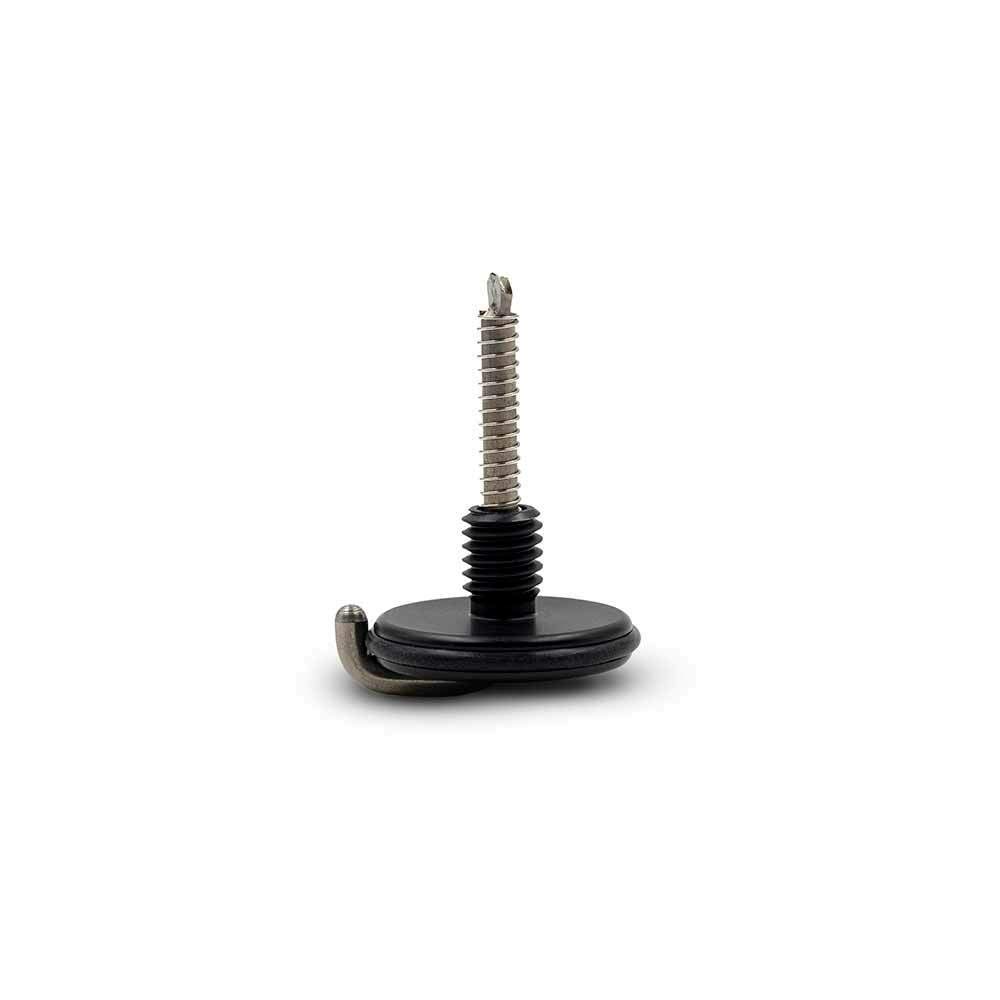
Image: The ProMaster Tripod Weight Hook (Model 3713), showing its threaded shaft and hook design.
Key Features
- Enhanced Stability: Provides a secure point to attach counterweights, significantly improving tripod stability.
- Broad Compatibility: Specifically designed for ProMaster XC525, XC-M 525, XC-M 528, and Specialist series tripods.
- Simple Installation: Attaches quickly and easily to the tripod's center column.
- Portable Design: Lightweight and compact for convenient transport and use on location.
Compatibility
This weight hook is compatible with the following ProMaster tripod models:
- ProMaster XC525 Tripods
- ProMaster XC-M 525 Tripods
- ProMaster XC-M 528 Tripods
- ProMaster Specialist Tripods

Image: An XC-M series tripod, one of the compatible models.

Image: A Specialist series tripod, another compatible model.
Installation Instructions
Follow these steps to properly install the ProMaster Tripod Weight Hook:
- Identify the Attachment Point: Locate the threaded attachment point at the bottom of your compatible ProMaster tripod's center column. This is typically a female thread designed for accessories.
- Align the Hook: Take the ProMaster Tripod Weight Hook (Model 3713) and align its threaded shaft with the attachment point on the center column.
- Screw into Place: Gently rotate the weight hook clockwise. Continue turning until it is firmly screwed into place. Ensure it is secure but do not overtighten, as this could damage the threads.
- Verify Security: Once installed, gently tug on the hook to confirm it is securely attached to the tripod.
Operation
After installing the weight hook, you can use it to add stability to your tripod setup:
- Attach Weights: Hang a suitable counterweight from the hook. Common items include a camera bag, a sandbag, or a dedicated weight pouch. The amount of weight needed will depend on your camera setup, tripod height, and environmental conditions (e.g., wind).
- Observe Stability: Monitor the tripod's stability after adding weight. The goal is to lower the tripod's center of gravity, making it less prone to movement or tipping.
- Adjust as Needed: If the tripod still feels unstable, consider adding more weight or adjusting the tripod's leg spread for a wider, more stable base.
Maintenance
To ensure the longevity and proper function of your ProMaster Tripod Weight Hook, follow these simple maintenance guidelines:
- Cleaning: Keep the weight hook clean from dirt, dust, and debris. A soft, dry cloth is usually sufficient. Avoid harsh chemicals.
- Inspection: Periodically inspect the threaded shaft and the hook itself for any signs of wear, bending, or damage. If damage is observed, discontinue use and consider replacement.
- Storage: When not in use, store the weight hook in a dry, clean environment, preferably with your tripod accessories, to prevent loss or damage.
Troubleshooting
If you encounter issues with your ProMaster Tripod Weight Hook, refer to the following common problems and solutions:
- Problem: The weight hook does not screw into the tripod's center column.
- Solution:
- Ensure your tripod is one of the compatible models (XC525, XC-M 525, XC-M 528, or Specialist).
- Check for any obstructions or cross-threading. Re-align the hook and try screwing it in carefully.
- Inspect the threads on both the hook and the tripod for damage. If threads are stripped, the component may need replacement.
- Problem: The tripod still feels unstable after attaching weight to the hook.
- Solution:
- Verify that sufficient weight has been added to the hook. For very heavy camera setups or strong winds, more weight may be necessary.
- Ensure the tripod legs are fully extended and locked, and that the leg angles are appropriate for the terrain, providing a wide and stable base.
- Check that all tripod adjustments (leg locks, center column lock, head lock) are securely tightened.
Specifications
| Brand | ProMaster |
| Model Number | 3713 |
| Compatible Devices | ProMaster XC525, XC-M 525, XC-M 528, & Specialist Tripods (Camera) |
| Item Weight | Approximately 16 ounces (0.45 kg) |
| Color | Black |
| UPC | 029144037130 |
Warranty and Support
ProMaster products are designed for reliability and performance. For specific warranty details, product registration, or technical support, please visit the official ProMaster website or contact your authorized ProMaster dealer. Keep your purchase receipt as proof of purchase for any warranty claims.
ProMaster Official Website: www.promaster.com
