
1. Introduction
This manual provides detailed instructions for the Pyle PWMA335BT.5 Portable Bluetooth Karaoke PA Speaker System. This versatile system features Bluetooth wireless audio streaming, an 8-inch subwoofer, DJ lights, a built-in rechargeable battery, FM radio, USB/Micro SD card readers, and microphone inputs. Please read this manual thoroughly before operating the device to ensure proper use and to maximize its performance.

Image 1.1: The Pyle PWMA335BT.5 speaker system shown with its various accessories, including microphones, remote control, and power adapter.
2. Package Contents
Verify that all items listed below are included in your package:
- Portable PA Speaker
- Wired Handheld Microphone
- Headset Microphone
- Lavalier Microphone
- Audio (Aux) Connection Cable
- Power Adaptor
- Remote Control
3. Key Features
- Karaoke & Music Streaming Speaker System
- Compact, Portable & Powerful Design with convenient carry handle and rolling wheels
- Bluetooth Wireless Audio Streaming (Version 2.0, Range: 65'+ Ft.)
- Built-in Rechargeable Battery (Lead Acid, 3500mAh 11.1V)
- Flashing DJ Party Lights / Multi-color Flashing Disco LED Lights
- FM Radio with Digital LCD Display
- USB Flash & Micro SD Memory Card Readers (Max support: 32GB)
- MP3 Digital Audio File Compatibility
- Includes Handheld Wireless Microphone
- Audio File Recording Function (Records vocals via microphone to USB/Micro SD as .MP3)
- Headphone Jack & Aux (3.5mm) Input
- Microphone Input
- Full Range Stereo Sound Reproduction with Impressive Bass Response (8'' Subwoofer)

Image 3.1: Illustration of the 8-inch subwoofer providing strong stereo audio and bass amplification.
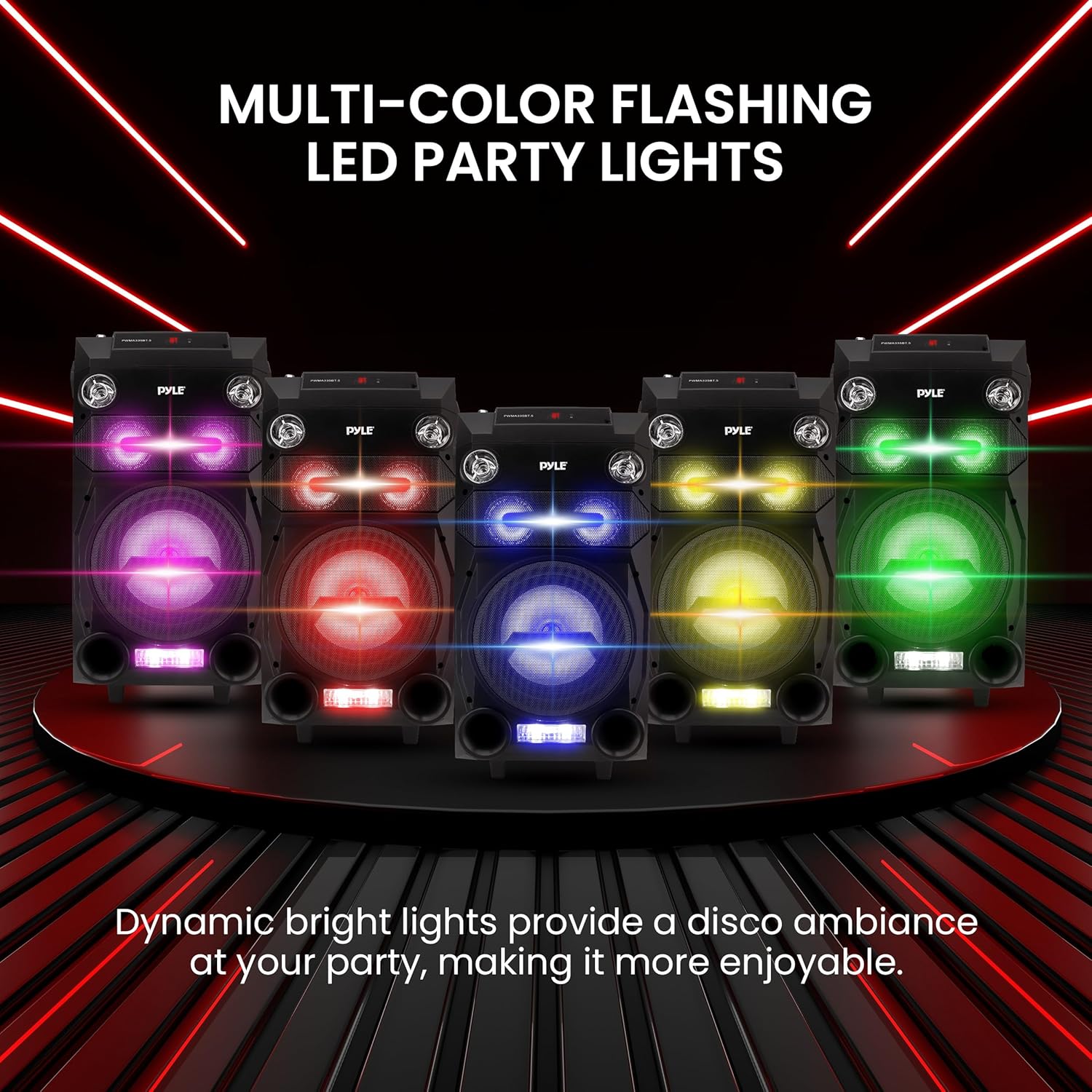
Image 3.2: The speaker features dynamic multi-color flashing LED lights for visual effects.

Image 3.3: The unit includes a built-in rechargeable battery, offering 3-6 hours of playing time.

Image 3.4: The speaker is designed for portability with a convenient retractable handle and rolling wheels.
Video 3.1: An overview of the Pyle Portable Wireless Bluetooth Karaoke PA Speaker System, highlighting its features and portability.
4. Setup Guide
4.1 Charging the Battery
- Connect the power adaptor to the speaker's DC 12V input.
- Plug the power adaptor into a standard wall outlet (100/240V).
- The charging indicator light will illuminate. Allow sufficient time for a full charge before first use.
4.2 Connecting the Microphone
- For the wired handheld microphone, insert its cable into the 'MIC IN' jack on the speaker.
- For wireless microphones (headset or lavalier with belt-pack transmitter), ensure the transmitter is powered on and paired according to its specific instructions.
- Adjust the microphone volume using the dedicated 'MIC VOL' knob on the control panel.
4.3 Bluetooth Pairing
- Power on the speaker.
- Press the 'MODE' button to select Bluetooth mode. The LCD display will show 'BT'.
- On your device (smartphone, tablet, laptop), enable Bluetooth and search for available devices.
- Select 'PyleUSA' from the list. If prompted for a password, enter '0000'.
- Once paired, the speaker will emit a confirmation tone, and you can stream audio wirelessly.
4.4 USB/Micro SD Playback
- Insert a USB flash drive or Micro SD card (up to 32GB) containing MP3 audio files into the respective slot.
- The speaker will automatically switch to USB/SD mode and begin playing audio.
- Use the playback controls (Play/Pause, Next, Previous) on the speaker or remote control.
4.5 FM Radio Operation
- Press the 'MODE' button to select FM radio mode.
- Press and hold the 'Play/Pause' button to automatically scan and save available FM stations.
- Use the 'Next' and 'Previous' buttons to navigate through the saved stations.
4.6 Audio Recording Function
- Ensure a USB flash drive or Micro SD card is inserted.
- Connect a microphone.
- Press the 'REC' button to start recording. The system will record audio from the microphone and any music playing through the speaker.
- Press 'REC' again to stop recording. Recorded files are saved as .MP3 on the inserted storage device.
5. Operating Instructions
5.1 Control Panel Overview
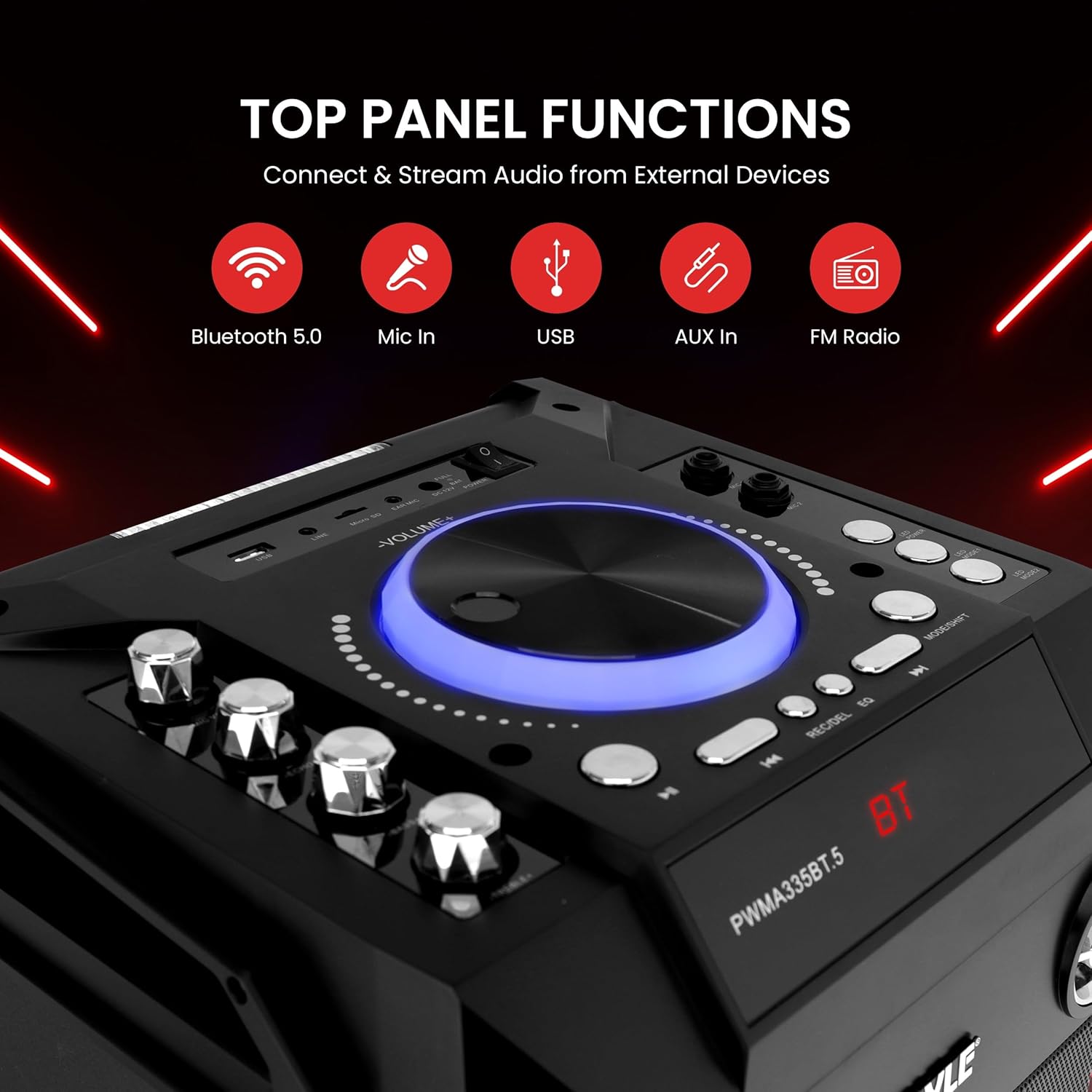
Image 5.1: The top panel features controls for volume, mode selection, playback, and microphone adjustments.
- Power Switch: Turns the unit ON/OFF.
- Volume Knob: Adjusts the master volume of the speaker.
- Mode Button: Cycles through input modes (Bluetooth, FM, USB, SD, AUX).
- Play/Pause Button: Plays or pauses audio playback.
- Previous/Next Buttons: Skips to the previous or next track/station.
- REC Button: Initiates or stops audio recording.
- MIC VOL Knob: Adjusts the microphone volume.
- ECHO Knob: Adjusts the echo effect for the microphone.
- LED Switch: Turns the DJ party lights ON/OFF.
5.2 DJ Lights
The speaker is equipped with multi-color flashing DJ lights. Use the dedicated LED switch on the control panel to activate or deactivate these lights. The lights will synchronize with the music, enhancing the audio experience.
5.3 Using External Devices (AUX-in)
To play audio from an external device without Bluetooth, use the provided Audio (Aux) Connection Cable. Connect one end to your device's headphone jack and the other end to the speaker's 'AUX IN' port. Select 'AUX' mode using the 'MODE' button.
6. Care and Maintenance
- Cleaning: Use a soft, dry cloth to clean the speaker's exterior. Avoid using harsh chemicals or abrasive cleaners.
- Storage: Store the speaker in a cool, dry place away from direct sunlight and extreme temperatures.
- Battery Care: To prolong battery life, fully charge the speaker before first use and recharge it regularly, even if not in use. Turn off the power with the ON/OFF switch when not in use to prevent battery damage from standby mode.
- Water Exposure: This device is not waterproof. Avoid exposure to water or excessive moisture.
7. Troubleshooting
| Problem | Possible Solution |
|---|---|
| No power | Ensure the power adaptor is securely connected and plugged into a working outlet. Check if the battery is charged. |
| No sound | Check the master volume and source device volume. Ensure the correct input mode is selected. Verify audio cables are properly connected. |
| Bluetooth not connecting | Ensure the speaker is in Bluetooth mode. Turn off and on Bluetooth on your device. Make sure the speaker is not already paired with another device. Try re-pairing. |
| Microphone not working | Check microphone connection and ensure it is switched ON. Adjust the 'MIC VOL' knob. For wireless microphones, check battery and pairing. |
| Poor FM reception | Try repositioning the speaker or extending its antenna (if applicable) to improve signal. |
8. Technical Specifications
| Feature | Specification |
|---|---|
| Power Output | 550 Watt MAX |
| Sound System | 8'' Subwoofer |
| Bluetooth Version | 2.0 |
| Bluetooth Wireless Range | 65'+ Ft. |
| Battery Type | Lead Acid, 3500mAh 11.1V |
| Impedance | 4 Ohm |
| S/N Ratio | ≥85dB |
| Max USB/SD Memory Card Support | 32GB |
| Power Supply | 100/240V (DC 12V Power Adapter) |
| Wired Microphone Cable Length | 16.5 ft. |
| Product Dimensions (L x W x H) | 22.84 x 12.8 x 12.6 inches |
| Item Weight | 5 pounds |
| Model Number | PWMA335BT.5 |
| UPC | 842893118048 |
9. Warranty and Support
Pyle products are designed and manufactured to the highest quality standards. For warranty information, technical support, or service inquiries, please refer to the warranty card included with your product or visit the official Pyle website. Keep your purchase receipt as proof of purchase.


