
1. Product Overview
Thank you for choosing the RADIANT Men's Digital Quartz Watch RA505203. This watch features a black square dial with a stainless steel back cover and bracelet. It offers multiple functions including a chronograph, countdown timer, day, month, week display, backlight, alarm, dual time, and 12/24 hour mode. Please read this manual carefully to understand its operation and ensure proper use.
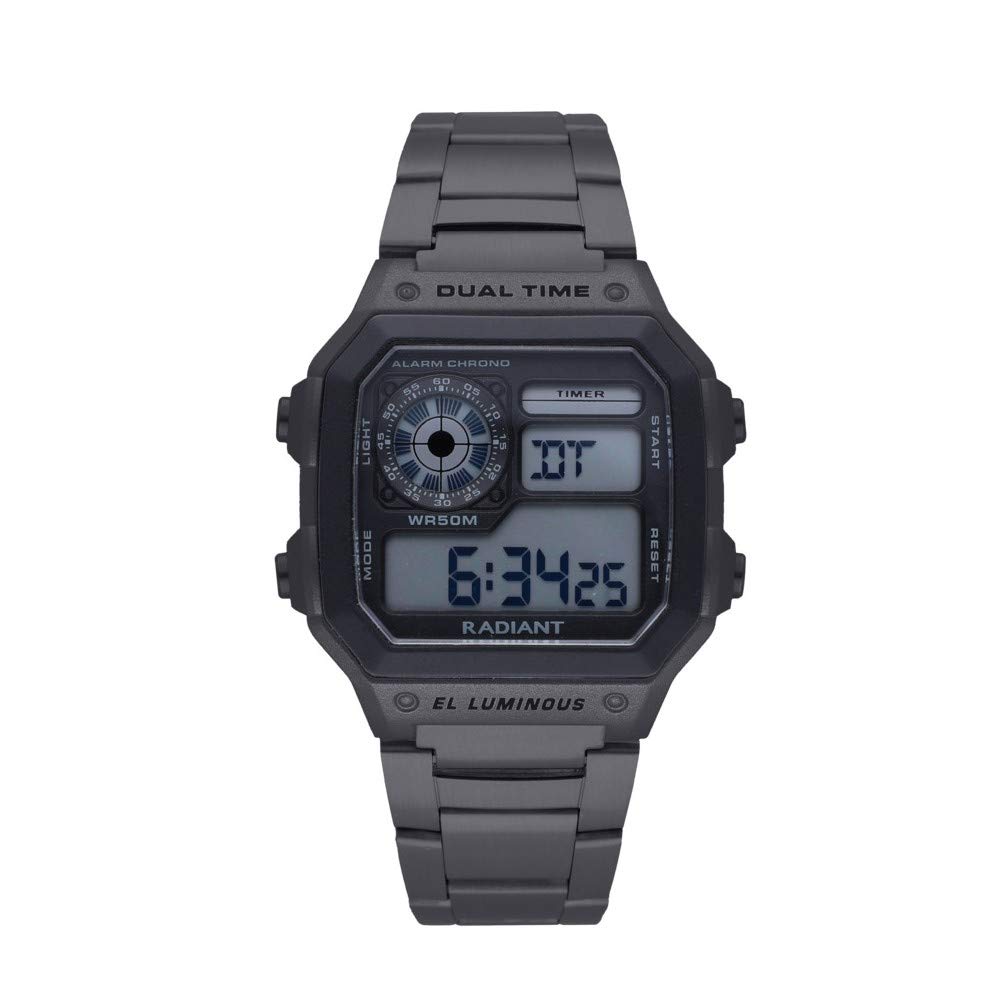
Image 1.1: The RADIANT Men's Digital Quartz Watch RA505203, showcasing its black square dial and stainless steel bracelet.
2. Initial Setup
Upon receiving your watch, it may be in a power-saving mode or require initial time setting. The watch comes with one alkaline button battery installed.

Image 2.1: The packaging box for the RADIANT Men's Digital Quartz Watch RA505203.
2.1. Button Functions
Identify the buttons on your watch. Typically, digital watches have 2-4 buttons for mode selection, setting, and light. Refer to the diagram below for common button layouts (exact layout may vary slightly).
- MODE Button: Cycles through different modes (Time, Chronograph, Alarm, Dual Time, Countdown).
- SET/ADJUST Button: Used to enter setting mode and confirm selections.
- START/STOP Button: Used to start/stop functions like chronograph or countdown, and to increment values during setting.
- LIGHT Button: Activates the backlight.
2.2. Setting Time and Date
- Press the MODE button repeatedly until the time display flashes or you enter the time setting mode.
- Use the SET/ADJUST button to select the hour, minute, second, year, month, or day. The selected segment will flash.
- Use the START/STOP button to adjust the flashing value.
- Continue pressing SET/ADJUST and START/STOP until all desired values (time, date, day of week) are set.
- Press the MODE button to exit the setting mode.
2.3. 12/24 Hour Mode Selection
While in time setting mode, you can usually toggle between 12-hour and 24-hour display formats by pressing the START/STOP button when the hour is flashing.
3. Operating Instructions
3.1. Chronograph (Stopwatch)
- Press the MODE button until 'CHRONO' or 'STW' appears on the display.
- Press the START/STOP button to start the stopwatch.
- Press the START/STOP button again to pause the stopwatch.
- To resume, press START/STOP. To reset to zero, press the SET/ADJUST button while the stopwatch is paused.
3.2. Countdown Timer
The watch features a countdown timer up to 24 hours.
- Press the MODE button until 'TIMER' or 'TMR' appears.
- Press the SET/ADJUST button to enter setting mode. The hour digits will flash.
- Use the START/STOP button to set the desired hour. Press SET/ADJUST to move to minutes, then seconds, and adjust with START/STOP.
- Press SET/ADJUST to exit setting mode.
- Press START/STOP to begin the countdown.
- Press START/STOP again to pause. Press SET/ADJUST to reset to the set time.
3.3. Alarm Setting
- Press the MODE button until 'ALARM' or 'ALM' appears.
- Press the SET/ADJUST button to enter alarm setting mode. The hour digits will flash.
- Use the START/STOP button to set the desired alarm hour. Press SET/ADJUST to move to minutes, then adjust with START/STOP.
- Press SET/ADJUST to exit setting mode.
- To activate/deactivate the alarm, press the START/STOP button while in the alarm display mode (not setting mode). An alarm icon will appear/disappear.
3.4. Dual Time
This feature allows you to track a second time zone.
- Press the MODE button until 'DUAL TIME' or 'DT' appears.
- Press the SET/ADJUST button to enter setting mode. The hour digits will flash.
- Use the START/STOP button to set the desired hour for the second time zone. Press SET/ADJUST to move to minutes, then adjust with START/STOP.
- Press SET/ADJUST to exit setting mode.
3.5. Backlight
To illuminate the display in low-light conditions, press the LIGHT button. The backlight will typically stay on for a few seconds.
4. Maintenance
4.1. Battery Replacement
The watch is powered by one alkaline button battery. When the display becomes dim or functions become erratic, it is time to replace the battery. It is recommended to have battery replacement performed by a qualified watch technician to ensure proper sealing and water resistance.
4.2. Water Resistance
This watch has a water resistance rating of 30 meters (3 ATM). This means it is suitable for daily use and can withstand splashes or brief immersion in water. It is not suitable for swimming, diving, or showering with hot water, as steam and pressure changes can compromise the seals.
4.3. Cleaning
Clean the watch case and bracelet regularly with a soft, dry cloth. For stubborn dirt, a slightly damp cloth can be used, followed by immediate drying. Avoid using chemical cleaners or abrasive materials.
5. Troubleshooting
- Display is blank or dim: The battery may be low or depleted. Replace the battery.
- Buttons are unresponsive: Ensure the watch is not in a locked mode (if applicable). If the issue persists, a battery replacement might be needed, or the watch may require servicing.
- Time is inaccurate: Re-set the time according to Section 2.2. If the inaccuracy continues, the battery may be low, or the quartz movement may require inspection.
- Water condensation inside the crystal: This indicates a breach in the water resistance. Avoid further contact with water and seek professional service immediately.
6. Specifications
| Feature | Specification |
|---|---|
| Brand | RADIANT |
| Model Number | RA505203 |
| Display Type | Digital |
| Movement | Quartz |
| Case Shape | Square |
| Case Diameter | 40 millimeters |
| Case Thickness | 14 millimeters |
| Band Material | Stainless Steel |
| Band Width | 24 millimeters |
| Band Color | Black |
| Dial Color | Black |
| Windshield Material | Plastic |
| Clasp Type | Three-fold push-type clasp |
| Water Resistance | 30 meters (3 ATM) |
| Battery | 1 Alkaline button battery (included) |
| Weight | 260 g |
7. Warranty and Support
7.1. Warranty Information
This RADIANT watch comes with a 2-year warranty from the date of purchase. The warranty covers manufacturing defects under normal use. It does not cover damage resulting from improper handling, accidents, unauthorized repairs, or normal wear and tear (e.g., battery, strap, crystal scratches).
7.2. Customer Support
For any questions, technical assistance, or warranty claims, please contact your retailer or the official RADIANT customer support channel. Please have your model number (RA505203) and proof of purchase ready when contacting support.