
Introduction
This manual provides detailed instructions for the setup, operation, and maintenance of your Silva Schneider SMV 600 USB Stereo System. This compact audio system features a CD player, FM radio, USB playback, and Bluetooth connectivity, offering versatile audio entertainment. Please read this manual thoroughly before using the device to ensure proper operation and to maximize your listening experience.
Package Contents
Upon unpacking, please ensure all items are present and in good condition.
- One (1) Silva Schneider SMV 600 USB Stereo System unit
- Power Cable
- Remote Control (typically included)
- Instruction Manual (this document)
Product Overview
Familiarize yourself with the main components and features of your stereo system.

Figure 1: Front View of the SMV 600 Stereo System. This image displays the front of the Silva Schneider SMV 600, featuring a central control panel with a digital clock display and two integrated speakers on either side. The unit is shown mounted on a wall.
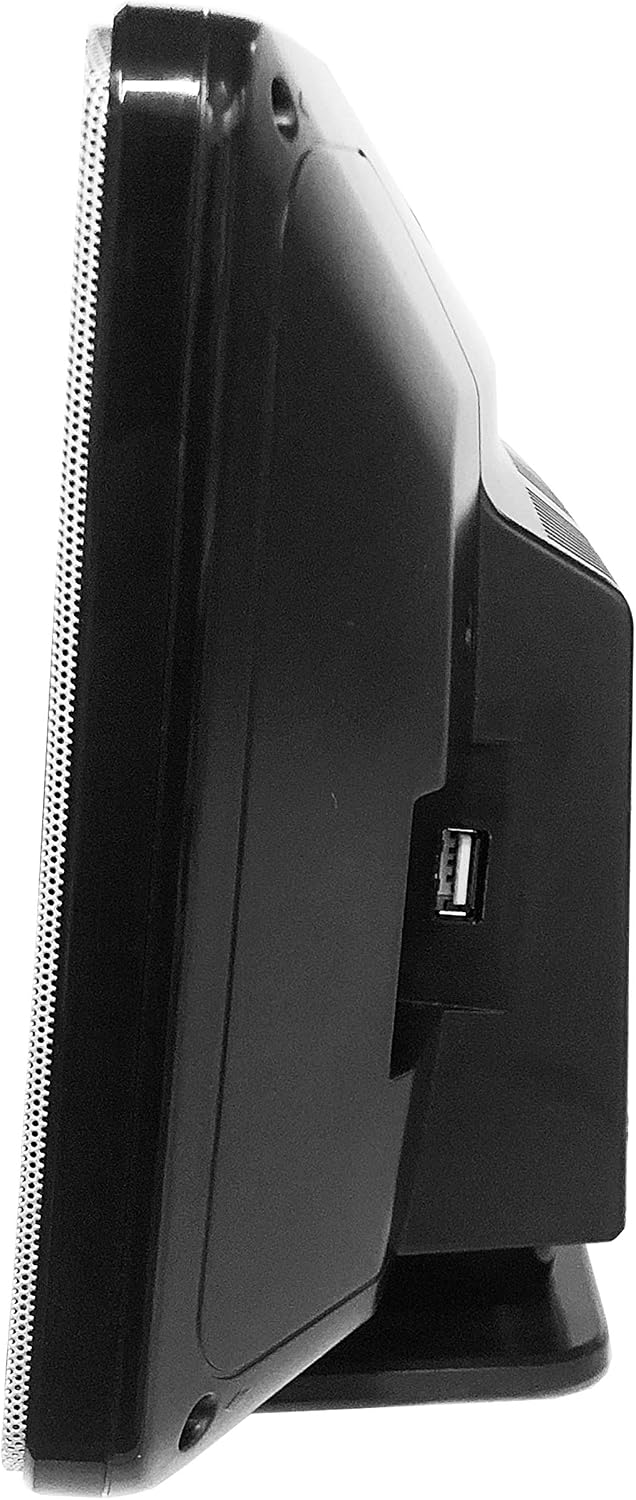
Figure 2: Side View with USB Port. This image shows a side profile of the SMV 600, clearly indicating the location of the USB port on the right side of the unit.
- Central Unit: Houses the CD player, digital display, and control buttons.
- Speakers: Integrated stereo speakers on both sides of the central unit.
- USB Port: Located on the side for connecting USB storage devices.
- FM Antenna Input: For connecting the FM antenna (usually on the rear).
- Power Input: For connecting the AC power cable.
Setup
- Placement: Place the stereo system on a stable, flat surface or mount it securely on a wall. Ensure adequate ventilation around the unit to prevent overheating. Avoid placing it near heat sources or in direct sunlight.
- Connect FM Antenna: Connect the supplied FM antenna (if applicable) to the FM antenna input on the rear of the unit. Extend the antenna for optimal reception.
- Connect Power: Plug the power cable into the AC power input on the unit, then plug the other end into a standard wall outlet (AC 230V, 50Hz).
- Initial Power On: Press the Power button on the unit or remote control to turn on the system. The display should illuminate.
Operating Instructions
Power On/Off and Mode Selection
- Power: Press the POWER button to turn the unit on or off.
- Mode: Press the MODE button repeatedly to switch between CD, FM, USB, and Bluetooth modes.
CD Playback
- Switch to CD mode.
- Open the CD compartment (if applicable, or insert disc into slot).
- Place a CD with the label side facing up. Close the compartment.
- The system will automatically begin playing the CD. If not, press the PLAY/PAUSE button.
- Use the SKIP buttons (<< / >>) to navigate between tracks.
- Press STOP to halt playback.
FM Radio Operation
- Switch to FM mode.
- Auto Scan: Press and hold the SCAN button (or similar, refer to remote/unit buttons) to automatically scan and save available FM stations.
- Manual Tuning: Use the TUNE +/- buttons to manually adjust the frequency.
- Preset Stations: Use the PRESET buttons to select saved stations.
USB Playback
- Insert a USB flash drive into the USB port (refer to Figure 2 for location).
- Switch to USB mode.
- The system will automatically detect and begin playing compatible audio files (e.g., MP3).
- Use the PLAY/PAUSE and SKIP buttons to control playback.
Bluetooth Connectivity
- Switch to Bluetooth mode. The display will show "BT" or "PAIR" and the unit will enter pairing mode.
- On your Bluetooth-enabled device (smartphone, tablet, etc.), enable Bluetooth and search for available devices.
- Select "SMV 600" or a similar name from the list of devices.
- Once paired, you can play audio from your device through the stereo system.
Maintenance
- Cleaning: Disconnect the power before cleaning. Use a soft, dry cloth to wipe the exterior of the unit. Do not use liquid cleaners or abrasive materials.
- CD Player: Use a specialized CD lens cleaner disc periodically to maintain optimal playback quality.
- Storage: If storing the unit for an extended period, disconnect it from power and store it in a cool, dry place away from direct sunlight and dust.
Troubleshooting
If you encounter any issues with your SMV 600, please refer to the following common problems and solutions before seeking professional service.
| Problem | Possible Cause | Solution |
|---|---|---|
| No power | Power cable not connected; Power outlet faulty | Ensure power cable is securely plugged in. Try a different power outlet. |
| No sound | Volume too low; Incorrect mode selected; Mute activated | Increase volume. Select the correct input mode (CD, FM, USB, BT). Deactivate mute function. |
| CD not playing | CD inserted incorrectly; CD is dirty or scratched; Incorrect mode | Reinsert CD with label side up. Clean CD with a soft cloth. Try a different CD. Ensure CD mode is selected. |
| USB not recognized | USB drive not formatted correctly; Incompatible file types; USB drive faulty | Ensure USB drive is FAT32 formatted. Use compatible audio files (e.g., MP3). Try a different USB drive. |
| Bluetooth pairing fails | Device too far; Bluetooth not enabled on source device; Unit not in pairing mode | Ensure devices are within range (approx. 10 meters). Enable Bluetooth on your device. Ensure the stereo is in Bluetooth pairing mode. |
Specifications
| Model Number | 200005 |
| Brand | Silva Schneider |
| Dimensions (L x W x H) | 10 x 39 x 22 cm |
| Weight | 9.07 g (Note: This value appears to be a typo in the source data. Actual product weight is likely significantly higher.) |
| Audio Output Mode | Stereo |
| Number of Speakers | 2 |
| Power Output | 2 x 5 W (RMS) |
| Electrical Power (Wattage) | 80 watts |
| Power Source | AC Power (Mains) |
| Connectivity Technology | USB, Bluetooth |
| Supported Media | CD, FM Radio, USB |
| Bluetooth Compatible | Yes |
Warranty and Support
Your Silva Schneider SMV 600 USB Stereo System is covered by a standard manufacturer's warranty. Please refer to the warranty card included with your purchase for specific terms and conditions, including the warranty period and coverage details.
For technical support, service, or inquiries regarding your product, please contact your local Silva Schneider authorized dealer or visit the official Silva Schneider website for contact information. Keep your proof of purchase for warranty claims.