
1. Introduction
This manual provides detailed instructions for the installation, operation, and maintenance of your Moen 87604 Chrome 1-Handle Touch Control Kitchen Faucet. Please read this manual thoroughly before beginning installation or use to ensure proper function and longevity of the product.
2. Safety Information
Observe all local plumbing and building codes. Ensure the water supply is turned off before installation. Wear appropriate personal protective equipment, such as safety glasses, during installation. If you are unsure about any part of the installation process, consult a qualified professional plumber.
3. Package Contents
The Moen 87604 Chrome 1-Handle Touch Control Kitchen Faucet package includes the following components:
- Moen 87604 Chrome 1-Handle Touch Control Kitchen Faucet
- Side Sprayer
- Mounting hardware
- Installation instructions

Image 1: Moen 87604 Faucet and Side Sprayer. This image displays the main faucet unit with its single handle and curved spout, alongside a separate side sprayer, both in a chrome finish.
4. Setup and Installation
Carefully review all instructions and diagrams before beginning installation. It is recommended to take your time during the installation process.
4.1 Pre-Installation Steps
- Turn off the main water supply to the kitchen area.
- Clear the area under the sink for easy access.
- Ensure all package contents are present.
4.2 Faucet Mounting
This faucet is designed for a single-hole deck mount installation and requires a 4-hole configuration on your sink or countertop. The maximum compatible deck thickness is 1.13 inches. The connection size for water lines is 3/8 inch.
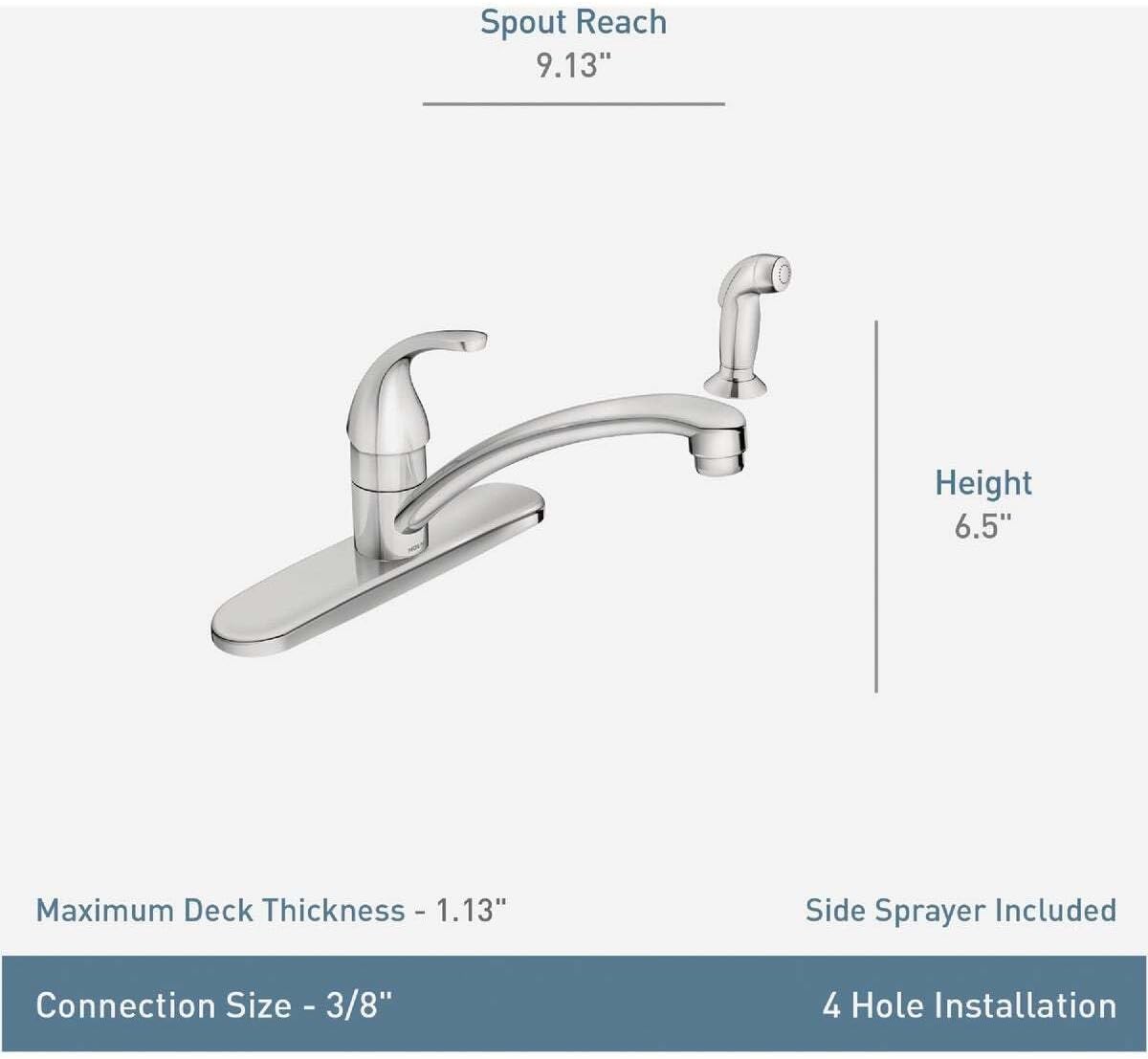
Image 2: Faucet Dimensions and Installation Overview. This diagram illustrates key measurements such as spout reach (9.13"), height (6.5"), maximum deck thickness (1.13"), connection size (3/8"), and confirms 4-hole installation with a side sprayer included.
4.3 Water Line Connection
Connect the hot and cold water supply lines to the corresponding inlets on the faucet. Ensure all connections are secure to prevent leaks. Use appropriate tools and avoid over-tightening.

Image 3: Installed Moen 87604 Faucet. This image shows the Moen 87604 faucet and its side sprayer installed on a kitchen countertop next to a sink, demonstrating its appearance in a typical kitchen setting.
5. Operating Instructions
The Moen 87604 faucet features a single handle for water flow and temperature control, along with a touch control function.
5.1 Handle Operation
- Water Flow: Lift the handle to increase water flow. Push down to decrease or stop flow.
- Temperature Control: Move the handle left for hot water and right for cold water.
5.2 Touch Control Function
The touch control feature allows for convenient on/off operation. Refer to the specific touch control instructions provided with your faucet for detailed activation and usage. Typically, a light touch to the faucet body will activate or deactivate water flow.
5.3 Side Sprayer Use
The included side sprayer provides additional functionality for rinsing and cleaning. Press the lever on the sprayer handle to activate water flow through the sprayer. Release the lever to return water flow to the main spout.
The maximum flow rate for this faucet is 1.5 Gallons Per Minute (GPM).
6. Maintenance
Regular maintenance will help preserve the finish and functionality of your Moen faucet.
6.1 Cleaning the Finish
To clean the chrome finish, use a soft, damp cloth and mild soap. Avoid abrasive cleaners, harsh chemicals, or scouring pads, as these can damage the finish. Rinse thoroughly with clean water and dry with a soft cloth.
6.2 Aerator Maintenance
Periodically unscrew the aerator from the end of the spout and clean any debris or mineral deposits. This helps maintain optimal water flow.
6.3 Handle and Material Care
The handle is made of ceramic. Ensure it is not subjected to excessive force. The faucet body contains plastic components; avoid exposing them to extreme heat or harsh solvents.
7. Troubleshooting
This section addresses common issues you might encounter with your faucet.
- Low Water Flow:
Check if the aerator is clogged with debris. Clean or replace if necessary. Ensure water supply valves are fully open.
- Leaks from Spout or Handle:
Verify that all connections are tight. If leaks persist, internal components may require inspection or replacement. Consult a professional plumber if needed.
- Touch Control Not Responding:
Ensure the power source for the touch control (if battery-operated) is functional. Refer to the specific touch control guide for diagnostic steps.
- No Hot or Cold Water:
Check the hot and cold water supply lines under the sink to ensure they are fully open and not kinked. Verify that the water heater is functioning correctly.
8. Specifications
| Feature | Detail |
|---|---|
| Brand | Moen |
| Model Name | MOEN 87604 Chrome 1-Handle Touch Control Kitchen Faucet |
| Part Number | 87604 |
| Finish Type | Chrome |
| Material | Plastic (body), Ceramic (handle) |
| Number of Handles | 1 |
| Mounting Type | Tabletop, Single Hole Deck Mount |
| Hole Count | 4 |
| Connection Size | 3/8 inch |
| Maximum Deck Thickness | 1.13 inches |
| Special Features | Lead Free, Touch Control |
| Maximum Flow Rate | 1.5 Gallons Per Minute |
| Product Dimensions | 15.2"D x 2.8"W x 12"H |
| Item Weight | 3.26 pounds |
| UPC | 026508289358 |
9. Warranty Information
This Moen product comes with a limited warranty. For specific details regarding warranty coverage, terms, and conditions, please refer to the warranty documentation included with your purchase or visit the official Moen website.
10. Support and Contact
For further assistance, technical support, or to inquire about replacement parts, please contact Moen customer service. You can find contact information on the official Moen website or through the Moen Store on Amazon.


