
Product Overview
The MARATHON Slim Jumbo Atomic Wall Clock is designed for clear visibility and precise timekeeping. It features an atomic synchronization function, ensuring accurate time by receiving radio frequencies from the NIST Colorado Atomic Clock. This clock also displays indoor temperature, humidity, and date, offering comprehensive environmental information.

Image: Front view of the MARATHON Slim Jumbo Atomic Wall Clock, displaying 12:34 AM, 73.4°F temperature, 12/11 Sunday date, and 60% humidity.
Key Features:
- Self-Setting & Self-Adjusting: Automatically synchronizes with the NIST Colorado Atomic Clock for precise time.
- Large, Easy-to-Read Display: 15-inch display with large digits for clear visibility from a distance.
- Multiple Display Modes: Choose between AM/PM or 24-hour time, month/weekday/date, and indoor temperature (Celsius/Fahrenheit) with humidity.
- Alarm with Snooze: Includes an easy-to-set alarm with a convenient five-minute snooze function.
- Adjustable Time Zones: Allows selection of various time zones and Daylight Saving Time preference.
- Language Options: Display language can be set to English, French, or Spanish.
Setup
1. Battery Installation
The clock requires two (2) AA batteries for operation. These batteries are typically included with your purchase. Locate the battery compartment on the back of the clock. Insert the batteries, ensuring correct polarity (+ and -) as indicated inside the compartment.

Image: The clock mounted on a wall in a modern living space, emphasizing its ease of setup and use, and mentioning included batteries.
2. Initial Synchronization (Atomic Time)
Upon battery insertion, the clock will automatically begin searching for the NIST Colorado Atomic Clock signal. This process allows the clock to self-set to the correct time, date, and adjust for Daylight Saving Time (DST) automatically. Please allow up to 24-48 hours for the clock to acquire the signal and fully synchronize. During this period, ensure the clock is placed in an area with minimal electronic interference and away from large metal objects.
3. Time Zone and DST Preference
After initial synchronization, you may need to select your specific time zone. Refer to the buttons on the back of the clock, typically labeled "TIME ZONE" or similar. Press the button repeatedly to cycle through available time zones until yours is displayed. You can also manually toggle the Daylight Saving Time (DST) preference ON or OFF if the automatic adjustment is not desired or if you are in a region that does not observe DST.
Operating Instructions
Display Modes
The clock offers various display modes to show different information. Use the "MODE" button, usually located on the back or side of the clock, to cycle through the following displays:
- Time Display: Shows the current time in either AM/PM or 24-hour format.
- Date Display: Shows the month, weekday, and date.
- Temperature & Humidity Display: Shows the indoor temperature in Celsius (°C) or Fahrenheit (°F), along with the indoor humidity percentage.
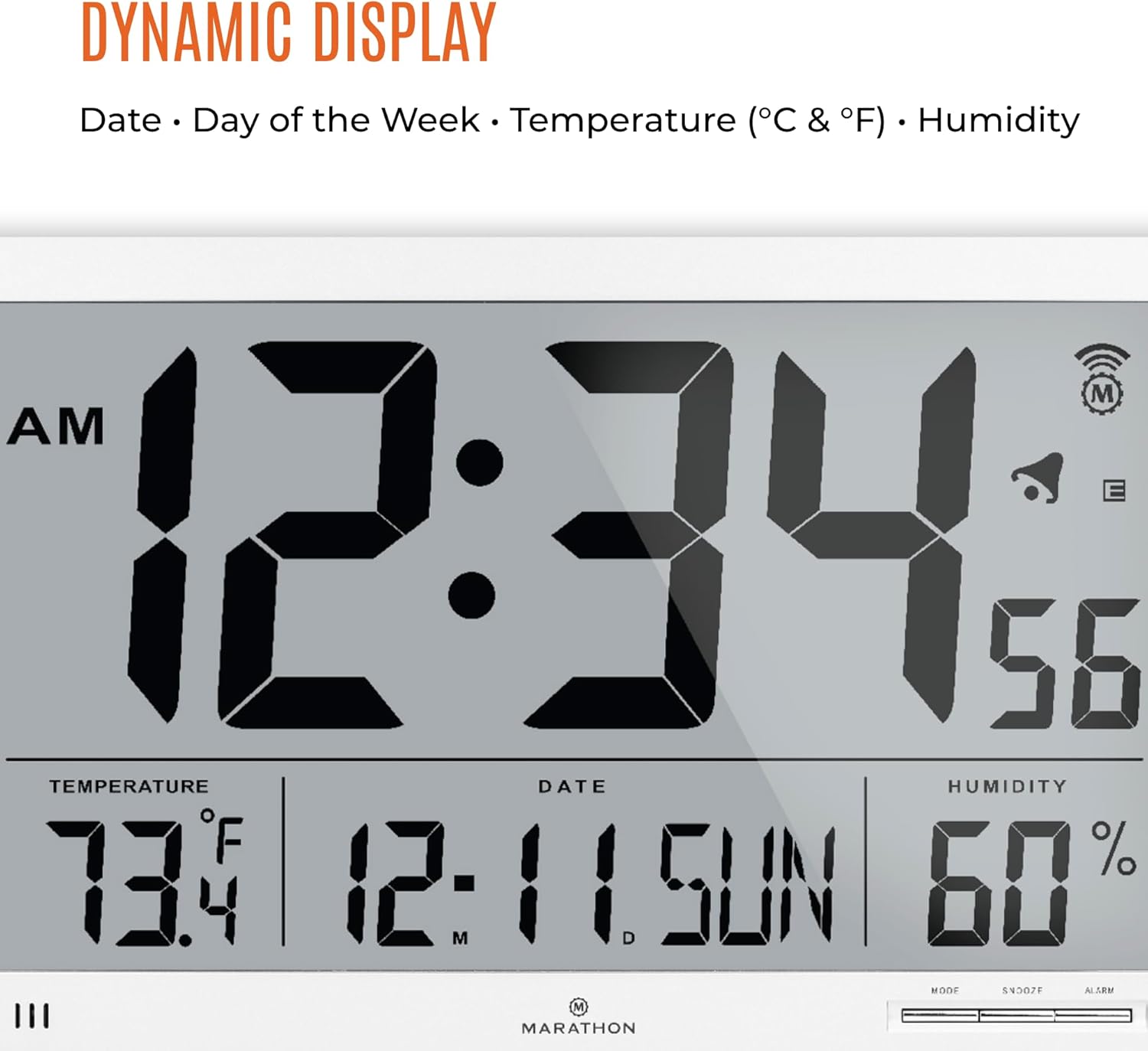
Image: A detailed view of the clock's dynamic display, illustrating the time, temperature, date, and humidity readings.
Language Selection
The display language can be set to English, French, or Spanish. Consult your clock's specific buttons (often labeled "LANGUAGE" or integrated into the "MODE" settings) to change the language preference.
Alarm Function
To set the alarm:
- Press the "ALARM" button to enter alarm setting mode.
- Use the "+" or "-" buttons to adjust the alarm time.
- Press "ALARM" again to confirm the setting.
When the alarm sounds, press the "SNOOZE" button to activate the snooze function, which will silence the alarm for approximately five minutes before sounding again. To turn off the alarm completely, press any other button or allow it to sound for its full duration.
Maintenance
Battery Replacement
It is recommended to replace the two (2) AA batteries annually to ensure optimal performance and prevent battery leakage. When replacing, ensure the clock is powered off (if applicable) and insert new batteries with correct polarity.
Cleaning
To clean the clock, gently wipe the display and casing with a soft, dry, or slightly damp cloth. Avoid using abrasive cleaners, solvents, or spray cleaners directly on the clock, as these can damage the display or finish.
Troubleshooting
| Problem | Possible Cause | Solution |
|---|---|---|
| Clock does not set time automatically. | Weak or no atomic signal reception; initial synchronization period not complete; interference. |
|
| Time is incorrect after Daylight Saving Time (DST) change. | Automatic DST adjustment failed or DST preference is set incorrectly. |
|
| Display is dim or blank. | Low batteries. | Replace both AA batteries with new ones. |
| Temperature/Humidity readings seem inaccurate. | Clock recently moved; external factors affecting sensors. | Allow the clock to acclimate to its new environment for at least 30 minutes. Ensure it is not placed near heat sources, direct sunlight, or vents. |
Specifications
| Specification | Detail |
|---|---|
| Brand | MARATHON |
| Model Number | CL030062WH |
| Color | White |
| Display Type | Digital |
| Product Dimensions | 10.9"W x 16.2"H |
| Item Weight | 2.13 pounds (34.08 Ounces) |
| Power Source | Battery Powered (2 AA batteries included) |
| Mounting Type | Wall Mount |
| Operation Mode | Atomic |
| Alarm Clock | Yes |
| Indoor/Outdoor Usage | Indoor |
| UPC | 063442321867 |

Image: A diagram illustrating the physical measurements of the clock, including overall dimensions and digit height.
Warranty and Support
MARATHON has a long-standing tradition of producing high-quality timing instruments. For any questions regarding product operation, troubleshooting, or potential warranty claims, please contact MARATHON customer support directly. Refer to the official MARATHON website or product packaging for the most current contact information.
You can visit the official MARATHON store on Amazon for more information: MARATHON Store